 PluginStats
eslint-plugin-lodash weekly downloads statistics
By idok · npm · ESLint plugins
Lodash specific linting rules for ESLint
eslint-plugin-lodash has 381,009 recorded weekly downloads on npm, a decrease of 47.1% over the past 30 days.
It ranks #277 of 2,251 tracked npm listings by weekly downloads.
Over 90 days, weekly downloads changed by -57.9%.
PluginStats has 121 daily observations since Jun 19, 2026; the latest is from Oct 17, 2026.
About eslint-plugin-lodash
ESLint-Plugin-Lodash ===================
[![Maintenance Status][status-image]][status-url] [![NPM version][npm-image]][npm-url] [![Yarn CI][build-image]][build-url]
Lodash-specific linting rules for ESLint.
News
• Version 2.0.0 was released, and now supports importing single methods! For a list of changes, you can check the changelog. For a detailed rundown of breaking changes and additions, you can check the release notes.
Installation
Install ESLint either locally or globally.
$ npm install eslint --save-dev
If you installed ESLint globally, you have to install the Lodash plugin globally too. Otherwise, install it locally.
$ npm install eslint-plugin-lodash --save-dev
Configuration
Add a plugins section and specify ESLint-Plugin-Lodash as a plugin. You can additionally add settings for the plugin.
Shared Rule Settings
These are settings that can be shared by all of the rules. All settings are under the lodash inside the general settings object. For more info about shared settings, read the ESLint Configuration Guide.
• pragma: specifies the name you use for the Lodash variable in your code. If none is specified, the plugin checks what was imported in ES6 modules or required in commonjs. • version: specifies the major Lodash Version you are using (default is 4). If you wish to use this plugin with Lodash v3, this value should be 3. (on by default in the config v3)
Finally, enable all of the rules that you would like to use.
Recommended configuration
This plugin exports a recommended configuration that enforces all the rules. You can configure the plugin as follows:
Configuration for use with the full Lodash object
If you work with the full Lodash object with the same variable name every time, you should use the canonical configuration. This allows rules to run without explicitly importing Lodash in your code, and allows for faster execution for some of the rules:
Configuration for Using with Lodash v3
Out of the box, this plugin supports the use of Lodash v4. To use with Lodash v3, the config needs to specify the version in the settings, and can't use some rules. The plugin also exports a v3 config for ease of use.
List of provided rules
Rules are divided into categories for your convenience. All rules are off by default, unless you use one of the plugin's configurations which turn all relevant rules on.
Possible Errors
The following rules point out areas where you might have made mistakes.
• callback-binding: Use or avoid thisArg for Lodash method callbacks, depending on major version. • collection-method-value: Use value returned from collection methods properly. • collection-return: Always return a value in iteratees of Lodash collection methods that aren't forEach. • no-double-unwrap: Do not use .value() on chains that have already ended (e.g. with max() or reduce()) (fixable) • no-extra-args: Do not use superfluous arguments on Lodash methods with a specified arity. • no-unbound-this: Do not use this inside callbacks without binding them. • unwrap: Prevent chaining without evaluation via value() or non-chainable methods like max().,
Stylistic Issues
These rules are purely matters of style and are quite subjective. • chain-style: Enforce a specific chain style: explicit, implicit, or explicit only when necessary. • chaining: Prefer a either a Lodash chain or nested Lodash calls • collection-ordering: Enforce a specific collection sorting method: sortBy or orderBy • consistent-compose: Enforce a specific function composition direction: flow or flowRight. • identity-shorthand: Prefer identity shorthand syntax • import-scope: Prefer a specific import scope (e.g. lodash/map vs lodash) • matches-prop-shorthand: Prefer matches property shorthand syntax • matches-shorthand: Prefer matches shorthand syntax • no-commit: Do not use .commit() on chains that should end with .value() • path-style: Enforce a specific path style for methods like get and property: array, string, or arrays only for paths with variables. (fixable) • prefer-compact: Prefer _.compact over _.filter for only truthy values. • prefer-filter: Prefer _.filter over _.forEach with an if statement inside. • prefer-find: Prefer _.find over _.filter followed by selecting the first result. • prefer-flat-map: Prefer _.flatMap over consecutive map and flatten. • prefer-immutable-method: Prefer using methods that do not mutate the source parameters, e.g. _.without instead of _.pull. • prefer-invoke-map: Prefer using _.invoke over _.map with a method call inside. • prefer-map: Prefer _.map over _.forEach with a push inside. • prefer-reject: Prefer _.reject over filter with !(expression) or x.prop1 !== value • prefer-thru: Prefer using _.prototype.thru in the chain and not call functions in the initial value, e.g. _(x).thru(f).map(g)... • prefer-wrapper-method: Prefer using array and string methods in the chain and not the initial value, e.g. _(str).split(' ')... • preferred-alias: Prefer using main method names instead of aliases. (fixable) • prop-shorthand: Use/forbid property shorthand syntax.
Preference over native…
Description from the npm listing.
- eslint
- eslint-plugin
- eslintplugin
- lodash
Where eslint-plugin-lodash sits in the listing
Each band is one page of 20. Weekly downloads on a log scale. Placement is projected from weekly downloads, so it can differ from the marketplace's own sort order. Hover a dot to see the listing.


Charts
Images: 30d · 1y · all time · 1600×900 dark
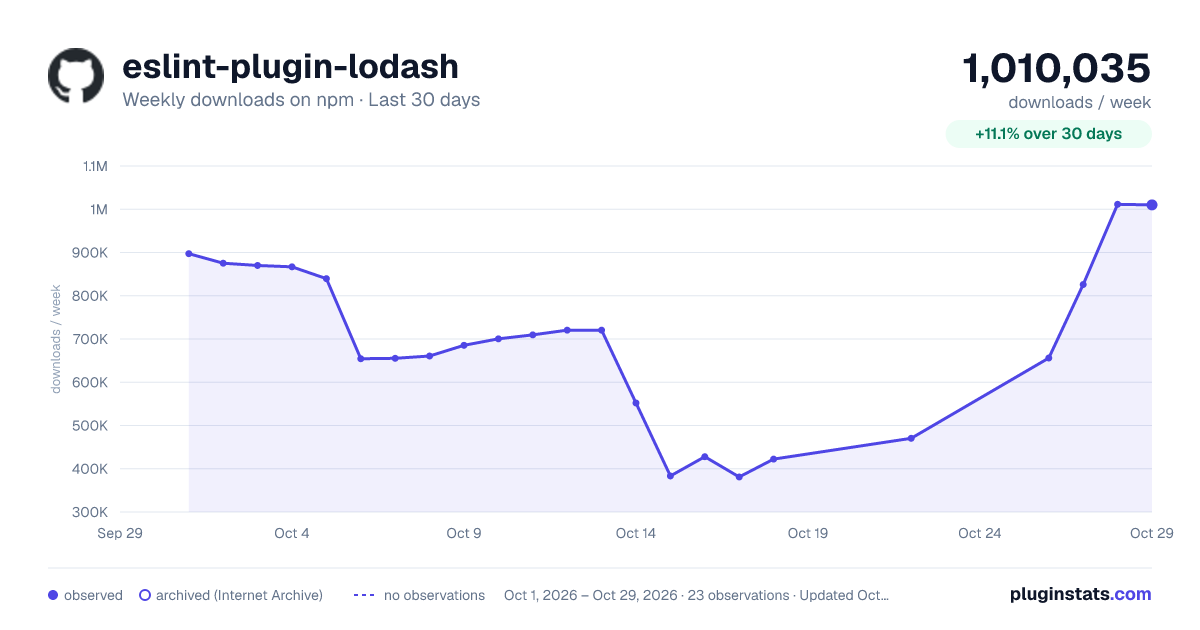
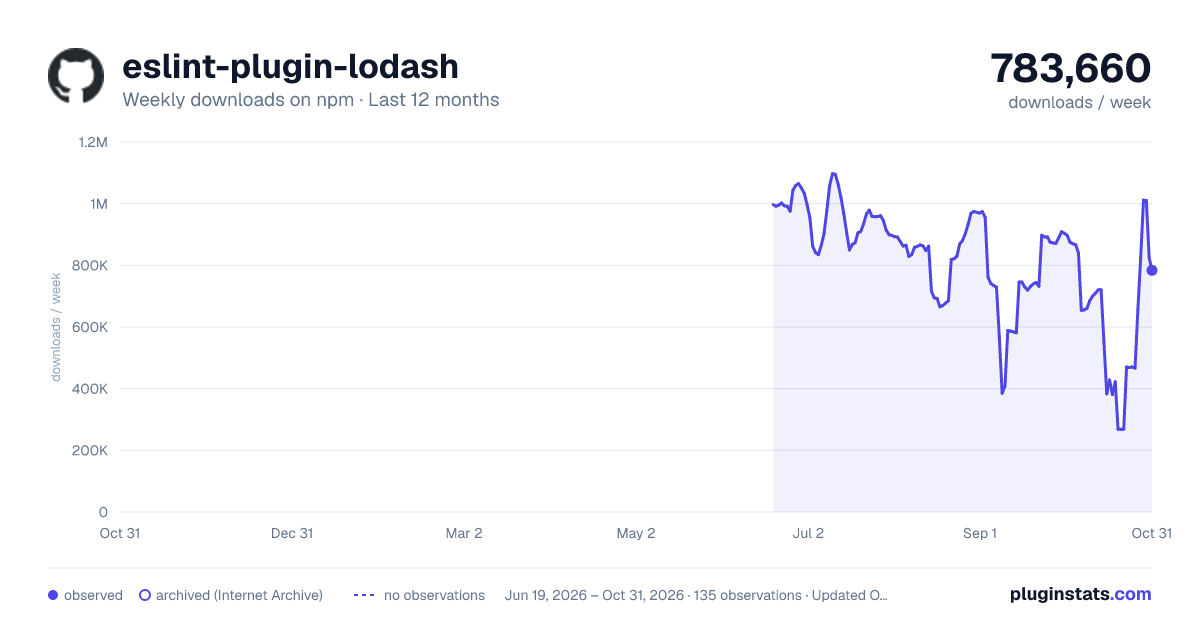
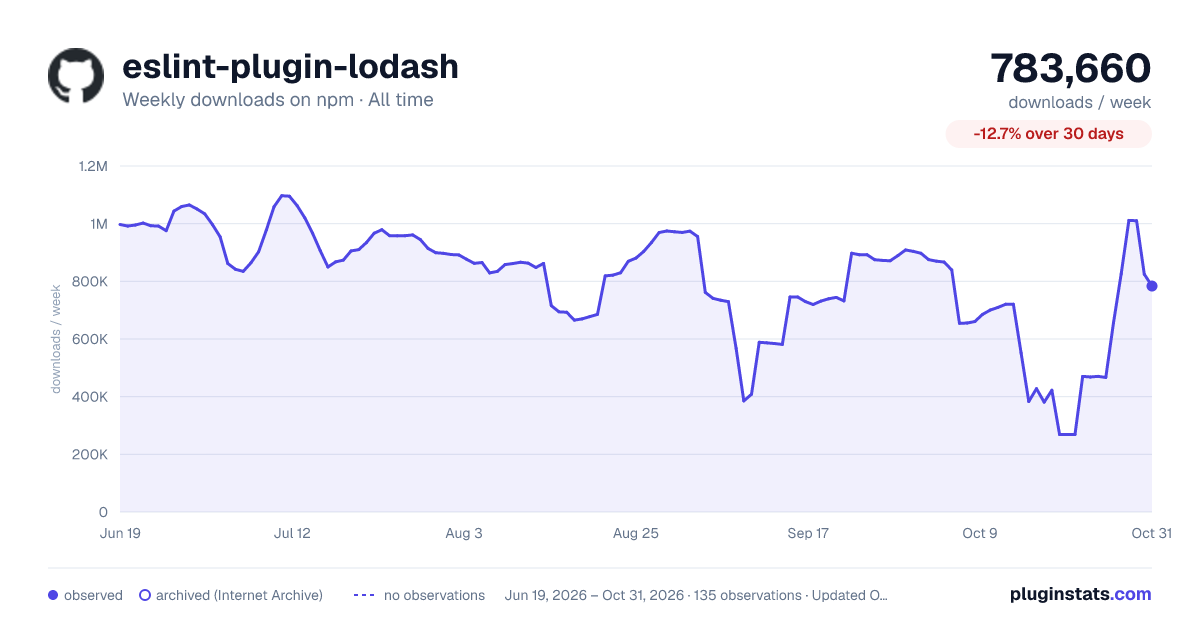

Adoption over time


7/30/90-day growth


Filled points are observed values; hollow points come from Internet Archive snapshots of the listing page. Dashed segments span periods with no observations — values between points are not interpolated.
Recent observations
Full history (121)Similar npm ESLint plugins plugins
Data source
Weekly downloads (trailing 7 complete days) come from the official npm downloads API. Downloads include CI and mirrors and are not equivalent to installs or users. npm publishes no ratings.
Listing: https://www.npmjs.com/package/eslint-plugin-lodash. First seen Oct 16, 2026; last successful collection Oct 18, 2026. See the methodology.