 PluginStats
boneyard-js weekly downloads statistics
By 0xGF · npm · Vite plugins
Pixel-perfect skeleton loading screens. Wrap your component in <Skeleton> and boneyard snapshots the real DOM layout — no manual descriptors, no configuration.
boneyard-js has 65,206 recorded weekly downloads on npm, a decrease of 5.1% over the past 30 days, ranking #536 of 2,322 tracked listings.
About boneyard-js
boneyard
Pixel-perfect skeleton loading screens, extracted from your real DOM.
Wrap your component in <Skeleton>, run the CLI, and get positioned bone rectangles that match your actual layout. No manual sizing, no guesswork.
Quick start
npm install boneyard-js
import { Skeleton } from 'boneyard-js/react'

function BlogPage() {
  const { data, isLoading } = useFetch('/api/post')

  return (
    <Skeleton name="blog-card" loading={isLoading}>
      <BlogCard data={data} />
    </Skeleton>
  )
}
npx boneyard-js build http://localhost:3000
// app/layout.tsx — import once, all skeletons auto-resolve
import './bones/registry'
Frameworks
// React
import { Skeleton } from 'boneyard-js/react'

// Preact
import { Skeleton } from 'boneyard-js/preact'

// React Native
import { Skeleton } from 'boneyard-js/native'
<!-- Svelte -->
<script lang="ts">
  import Skeleton from 'boneyard-js/svelte'
</script>

<Skeleton name="profile-card" loading={isLoading}>
  <ProfileCard />
</Skeleton>
<!-- Vue -->
<script setup>
import Skeleton from 'boneyard-js/vue'
</script>

<Skeleton name="profile-card" :loading="isLoading">
  <ProfileCard />
</Skeleton>
// Angular
import { SkeletonComponent } from 'boneyard-js/angular'
Config
Create boneyard.config.json in your project root. Controls both the CLI and runtime defaults.
{
  "breakpoints": [375, 768, 1280],
  "out": "./src/bones",

  "color": "#e5e5e5",
  "darkColor": "#2a2a2a",
  "animate": "shimmer",
  "shimmerColor": "#ebebeb",
  "darkShimmerColor": "#333333",
  "speed": "2s",
  "shimmerAngle": 110
}
All color values accept any valid CSS color (hex, rgba, hsl, etc.).
| Key | Default | Description |
|---|---|---|
breakpoints | auto | Viewport widths for capture (auto-detects Tailwind) |
out | ./src/bones | Output directory for .bones.json and registry.js |
wait | 800 | ms to wait after page load before capturing |
color | #f0f0f0 | Bone fill color (light mode) |
darkColor | #222222 | Bone fill color (dark mode) |
animate | pulse | pulse, shimmer, or solid |
shimmerColor | #f7f7f7 | Shimmer highlight (light mode) |
darkShimmerColor | #2c2c2c | Shimmer highlight (dark mode) |
speed | 2s / 1.8s | Animation duration (shimmer / pulse) |
shimmerAngle | 110 | Shimmer gradient angle in degrees |
stagger | false | Delay between bones in ms (true = 80ms) |
transition | false | Fade out when loading ends in ms (true = 300ms) |
select | container | Width used to pick the responsive breakpoint: container (measured width) or viewport (window.innerWidth). Use viewport for app-shell layouts where the container is narrower than the window |
url | dev server | Capture origin for the Vite plugin, e.g. https://myapp.dev — use when the dev server sits behind a reverse proxy (portless, custom HTTPS origins) so auth cookies scoped to the real origin apply. Defaults to the server's own localhost:<port>. Also available as a boneyardPlugin({ url }) option |
Per-component props override config. Config overrides package defaults.
Fixtures
When your component needs API data or auth to render, provide a fixture for the CLI to snapshot instead:
<Skeleton
  name="dashboard"
  loading={isLoading}
  fixture={<DashboardFixture />}
  snapshotConfig={{ leafTags: ["section"] }}
>
  <Dashboard data={data} />
</Skeleton>
Use leafTags to treat elements as atomic bones — prevents the extractor from recursing into children and creating unwanted internal shapes. A leaf tag is atomic only while everything it holds is inline: <p>Hello <strong>world</strong></p> is one bone, but an li (or any listed tag) wrapping block-level content — a card inside a list item, say — is walked into like a container, so lists of cards keep their inner structure.
Dark mode
Detected via the .dark class on <html> or any ancestor (standard Tailwind convention). Does not use prefers-color-scheme — gives you explicit control.
When .dark is present, darkColor and darkShimmerColor are used automatically.
CLI
The build command (and the Vite plugin) drive a headless Chromium via Playwright to snapshot your rendered UI. Playwright ships as a dependency of boneyard-js, so it's already in node_modules — but its browser binary is downloaded separately. Install it once before your first build:
npx playwright install chromium
Skipping this step is the most common first-run error. If Playwright reports a missing browser, run the command above. (Note:
playwright installonly works because Playwright is a dependency here — if you hitCommand "playwright" not foundin a strict pnpm/monorepo setup, usenpx playwright install chromium.)
Prefer not to download a browser — e.g. in CI, or to reuse your logged-in session? See Reusing an existing browser.
npx boneyard-js build                              # auto-detect dev server
npx boneyard-js build http://localhost:3000         # explicit URL
npx boneyard-js build --out src/bones              # custom output
npx boneyard-js build --force                      # regenerate all
npx boneyard-js build --breakpoints 375,768,1280   # custom breakpoints
npx boneyard-js build --cookie "session=abc123"    # auth cookies
npx boneyard-js build --native --out ./bones       # React Native
Reusing an existing browser
Instead of launching (and downloading) Playwright's Chromium, boneyard can attach to a Chrome you're already running over the DevTools Protocol. This reuses your cookies and auth state, and skips the browser download — useful in CI or behind a login.
Chrome exposes two remote-debugging modes, and boneyard supports both:…
Description from the npm listing.
- skeleton
- skeleton-screen
- loading
- placeholder
- react
- react-native
- vue
- preact
- angular
- vite
- vite-plugin
- zero-layout-shift
README badge
Show your rank in a README or on your website. The badge updates automatically.
Charts
Images: 30d · 1y · all time · 1600×900 dark
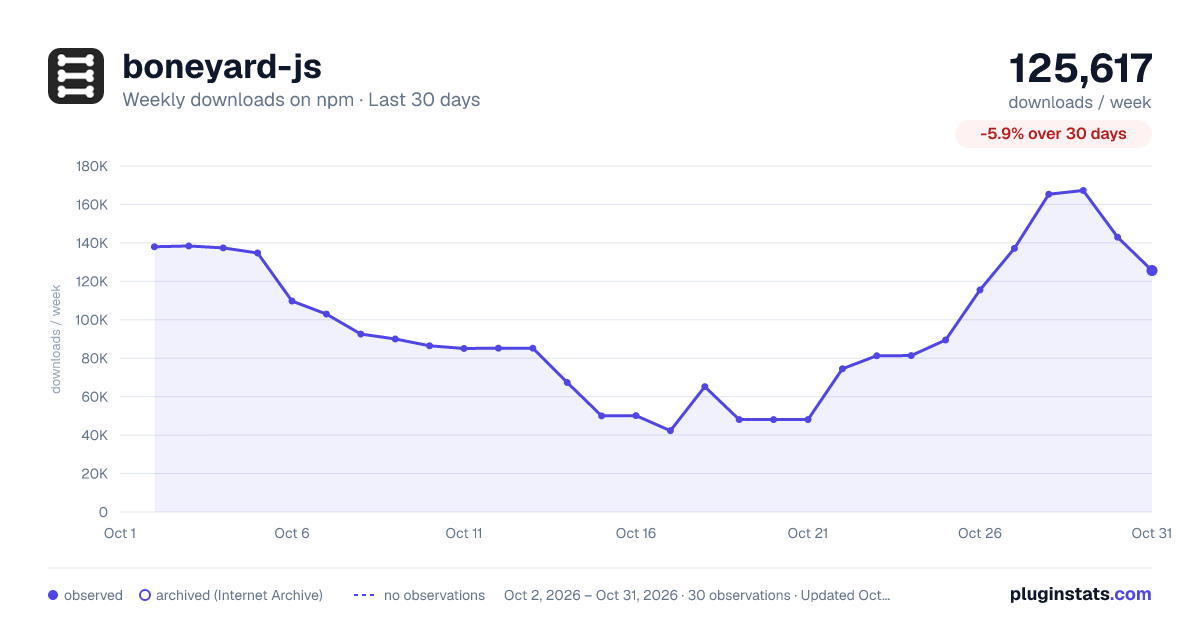
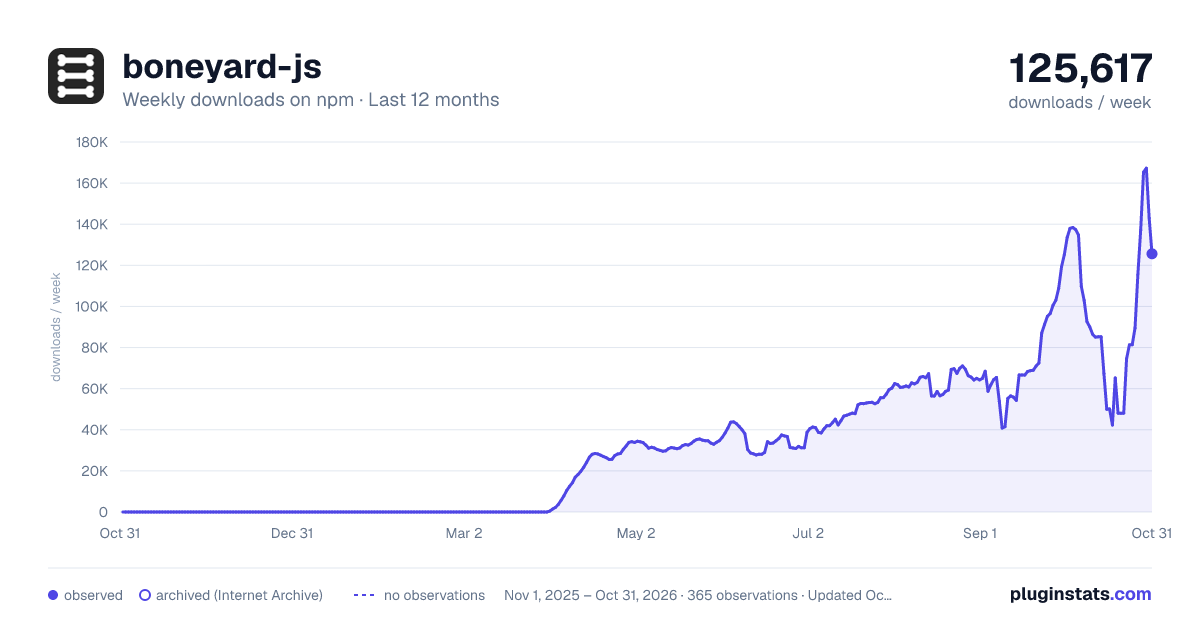
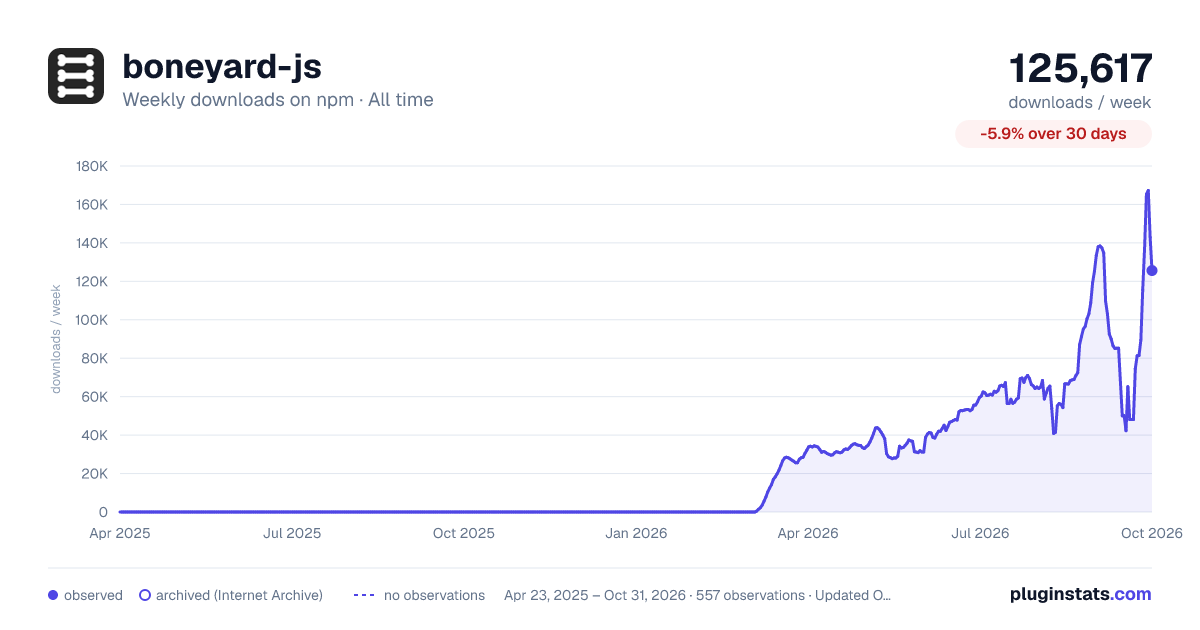

Adoption over time
7/30/90-day growth
Ranking history
Listing placement
Listing placement
Filled points are observed values; hollow points come from Internet Archive snapshots of the listing page. Dashed segments span periods with no observations — values between points are not interpolated.
Each band is one page of 20. Weekly downloads on a linear scale. Placement is projected from weekly downloads, so it can differ from the marketplace's own sort order. Hover a dot to see the listing.
Recent observations
Full history (544)Similar npm Vite plugins plugins
All 20 boneyard-js alternativesData source
Weekly downloads (trailing 7 complete days) come from the official npm downloads API. Downloads include CI and mirrors and are not equivalent to installs or users. npm publishes no ratings.
Listing: https://www.npmjs.com/package/boneyard-js. First seen Oct 16, 2026; last successful collection Oct 20, 2026. See the methodology.