 PluginStats
vite-plugin-biome weekly downloads statistics
By skrulling · npm · Vite plugins
Run Biome in the Vite dev loop for fast linting, formatting, and checks.
vite-plugin-biome has 2,584 recorded weekly downloads on npm, a decrease of 49.1% over the past 30 days.
It ranks #1228 of 2,251 tracked npm listings by weekly downloads.
Over 90 days, weekly downloads changed by -69.3%.
PluginStats has 121 daily observations since Jun 19, 2026; the latest is from Oct 17, 2026.
About vite-plugin-biome
Vite Plugin Biome
Run Biome inside your Vite dev loop.
vite-plugin-biome lets you lint, format, or check files with the Biome version already installed in your project. It runs on Vite startup and reacts to hot updates, so feedback shows up while you build instead of in a separate step.
By default, each hot update reruns Biome for the configured files scope. If you want faster feedback during development, you can opt into rerunning only the edited files.
Why Use It
• Keep Biome output inside the normal Vite workflow. • Run lint, format, or check without wiring extra scripts into your day-to-day loop. • Apply fixes automatically when you want them. • Fail the build on Biome errors when you need stricter enforcement. • Pass through extra Biome CLI args such as --changed or --config-path=....
AI-Assisted Development
This plugin is not AI-specific, but it fits well into AI-assisted workflows with tools like Cursor, Claude Code, Codex, and Windsurf. When generated edits touch many files quickly, keeping Biome in the Vite loop helps surface feedback immediately without changing your existing setup.
Compatibility
This plugin is compatible with:
• Biome: 1.8.0 and higher, including 2.x • Vite: 4.x and higher • Node.js: 16.x and higher
By default, the plugin resolves and runs the @biomejs/biome binary installed in your project. If you need to use a different command, override biomeCommandBase.
Installation
Usage
Add the plugin to your vite.config.js or vite.config.ts file.
Common Setups
Fast Local Guardrails
Run Biome in lint mode during development.
Auto-Fix During Development
Run Biome in check mode and write fixes back to disk.
Recheck Only Edited Files During HMR
Keep the initial startup run broad, but limit hot updates to the files you just edited.
Strict Build Feedback
Fail the build when Biome reports errors.
Pass Extra Biome Arguments
Forward additional CLI args to Biome.
Options
| Option | Description | Values | Default |
| mode | The Biome command to run | lint, format, check | lint | | files | File or glob pattern to process | e.g. 'src/**/*.js' | '.' | | hotUpdateMode | How Vite hot updates trigger Biome. full reruns the configured scope on every change. changed reruns only edited files when possible, with a full fallback for Biome config changes. Startup still runs against the configured scope. | full, changed | full | | applyFixes | Apply Biome fixes automatically | true, false | false | | unsafe | Allow unsafe fixes, requires applyFixes | true, false | false | | failOnError | Fail the build when Biome returns errors | true, false | false | | forceColor | Force color output by adding --colors=force | true, false | true | | diagnosticLevel | Minimum diagnostic level to show | info, warn, error | info | | logKind | Output style for Biome logs | pretty, compact, check | pretty | | biomeCommandBase | Override the command used to invoke Biome | e.g. 'npx @biomejs/biome' | Auto-resolved | | biomeAdditionalArgs | Additional CLI arguments passed to Biome | e.g. '--changed --config-path=...' | — |
License
MIT LICENSE
If this plugin saves you time, consider starring the repo: GitHub
Description from the npm listing.
- biome
- biomejs
- vite
- vite-plugin
- linter
- linting
- formatter
- formatting
- code-quality
- ai-assisted-development
Where vite-plugin-biome sits in the listing
Each band is one page of 20. Weekly downloads on a log scale. Placement is projected from weekly downloads, so it can differ from the marketplace's own sort order. Hover a dot to see the listing.


Charts
Images: 30d · 1y · all time · 1600×900 dark
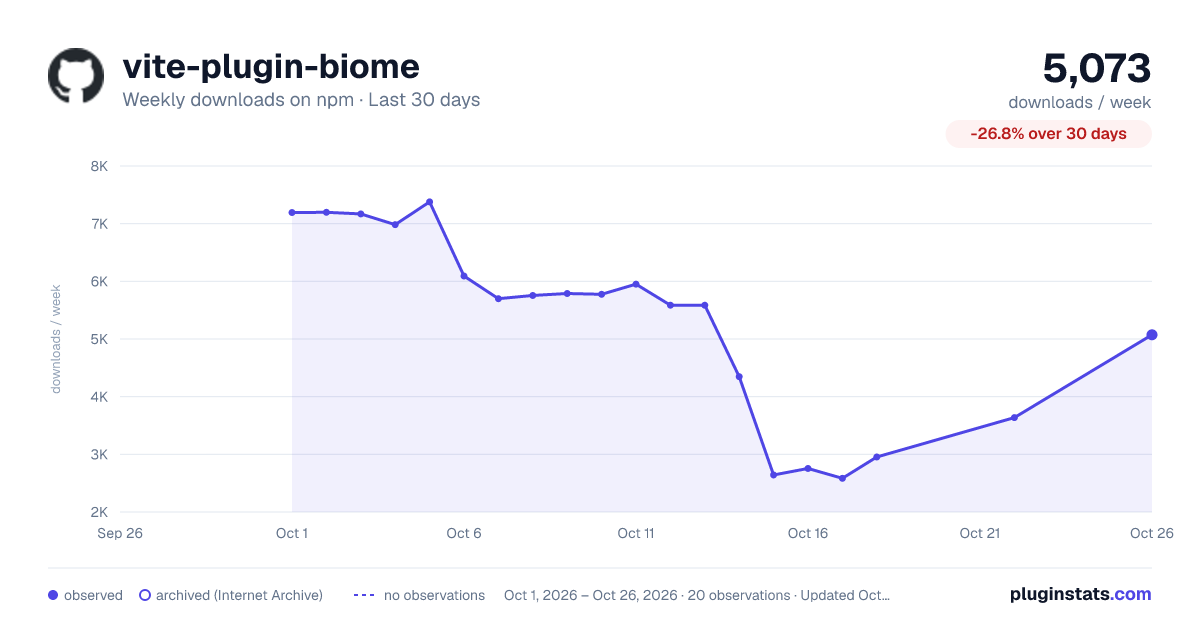
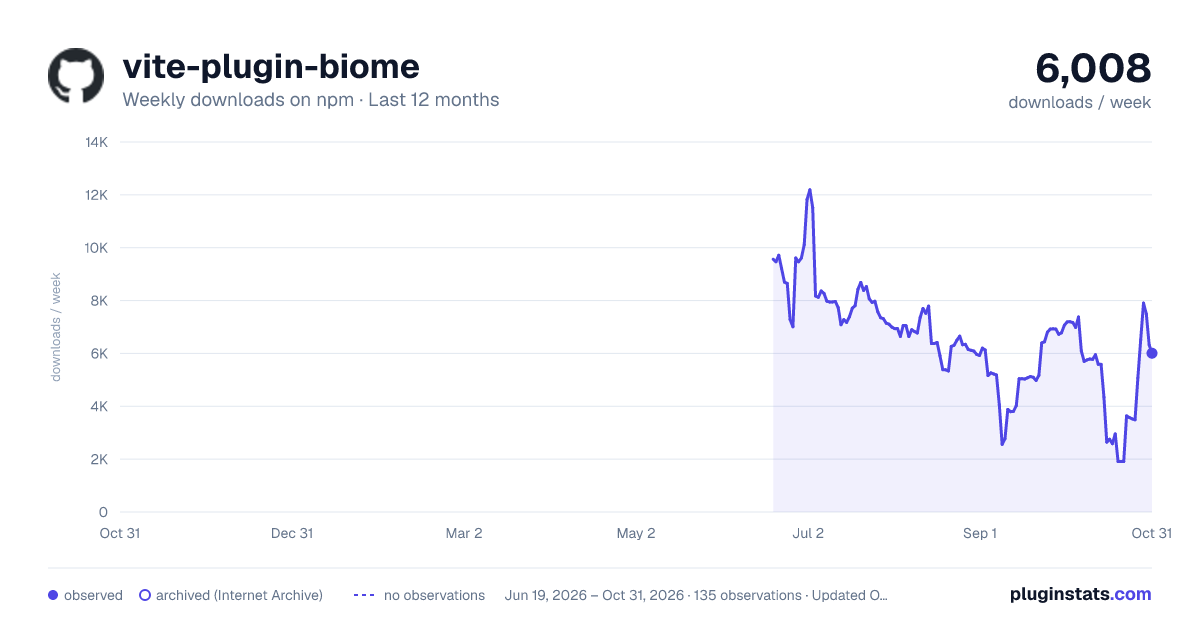
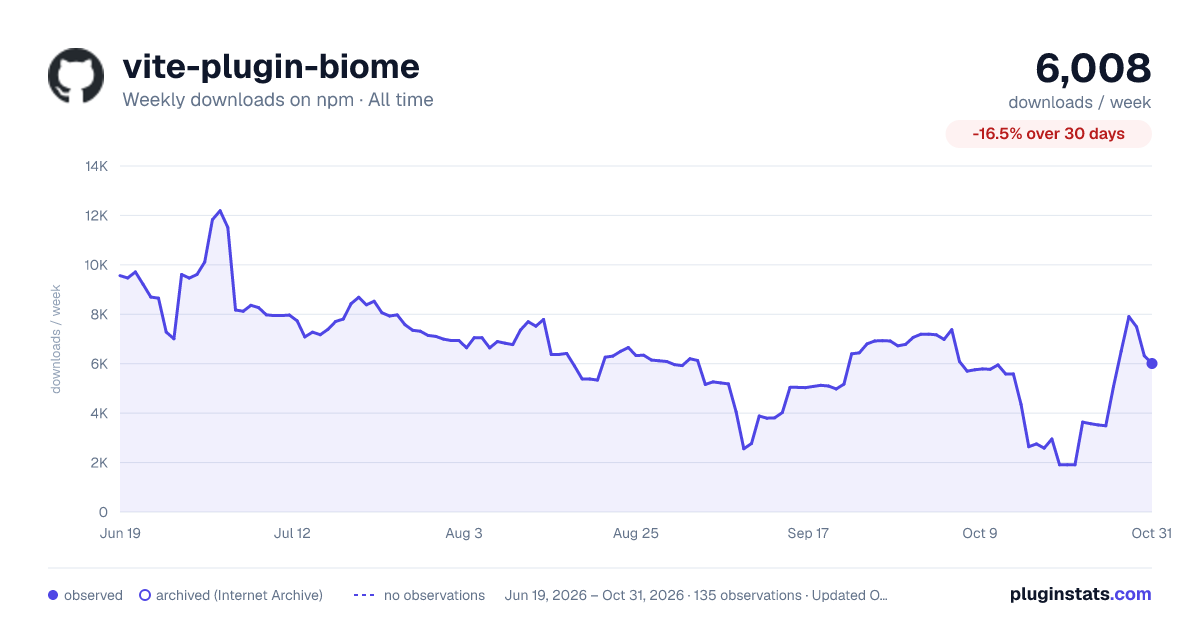

Adoption over time


7/30/90-day growth


Filled points are observed values; hollow points come from Internet Archive snapshots of the listing page. Dashed segments span periods with no observations — values between points are not interpolated.
Recent observations
Full history (121)Similar npm Vite plugins plugins
Data source
Weekly downloads (trailing 7 complete days) come from the official npm downloads API. Downloads include CI and mirrors and are not equivalent to installs or users. npm publishes no ratings.
Listing: https://www.npmjs.com/package/vite-plugin-biome. First seen Oct 16, 2026; last successful collection Oct 18, 2026. See the methodology.