 PluginStats
vite-plugin-banner weekly downloads statistics
By chengpeiquan · npm · Vite plugins
A banner plugin for Vite. Adds a banner to the top of each generated chunk.
vite-plugin-banner has 15,212 recorded weekly downloads on npm, a decrease of 19.3% over the past 30 days, ranking #820 of 2,256 tracked listings.
About vite-plugin-banner
English | 简体中文
Features
Adds a banner to the top of each generated chunk.
Installation
Install the package from npm (or yarn, or pnpm).
Options
| Plugin Options Type | Description | Example |
| string | The banner content | Basic usage | | ContentCallback | See the type declarations below | Add different banners | | BannerPluginOptions | See the type declarations below | Optional parameter format |
· Type Declarations:
ts • content: (fileName: string) => { • // Or use switch statement • return fileName.endsWith('.js') • ? 'This message will inject into js files.' • : 'This message will inject into other files.' • } • `
Usage
In most cases, just use the string format as a plugin option.
Basic usage
Add it to vite.config.ts
When you run npm run build on your project, In the dist folder(Or the build.outDir in vite.config.ts you configured), Except for vendor files, all js and css files will add a banner to the top.
e.g. in app.b3a7772e.js:
Advanced usage
Of course, the most ideal banner is related to your package information.
First, You need to update your package.json like this, For example, it contains such field content:
Then, import the package.json into vite.config.ts, update the banner like this:
Run npm run build, you can see the banner become more detailed.
e.g. in app.6936be52.js:
Fun usage
If you want to make some banners that show your personality, you can make some interesting content from some online generators.
Such as:
• http://www.network-science.de/ascii/ • https://www.bootschool.net/ascii
Run npm run build, e.g. in app.d9a287b8.js:
Add different banners
Since 0.6.0, it supports incoming function callback to set the content of Banner. When using ContentCallback type, this plugin will judge what content should be added according to the internal logic of the function.
- When a valid string is returned, it will become the banner content 2. Returning a Falsy value will skip processing(e.g. '', null, undefined)
e.g.
Optional parameter format
Sometimes plugins can't get outDir successfully (for example, in VitePress, the plugin get through viteConfig.build.outDir is always a .temp temporary directory, not the final output directory), so you need to manually specify the output directory to inform the plugin.
Take VitePress as an example:
In addition to outDir, you can also use debug, verify and other options, see the above Options description for details.
License
MIT License © 2021 chengpeiquan
Description from the npm listing.
- vite-plugin
- vite plugin
- vite banner
README badge
Show your rank in a README or on your website. The badge updates automatically.
Charts
Images: 30d · 1y · all time · 1600×900 dark
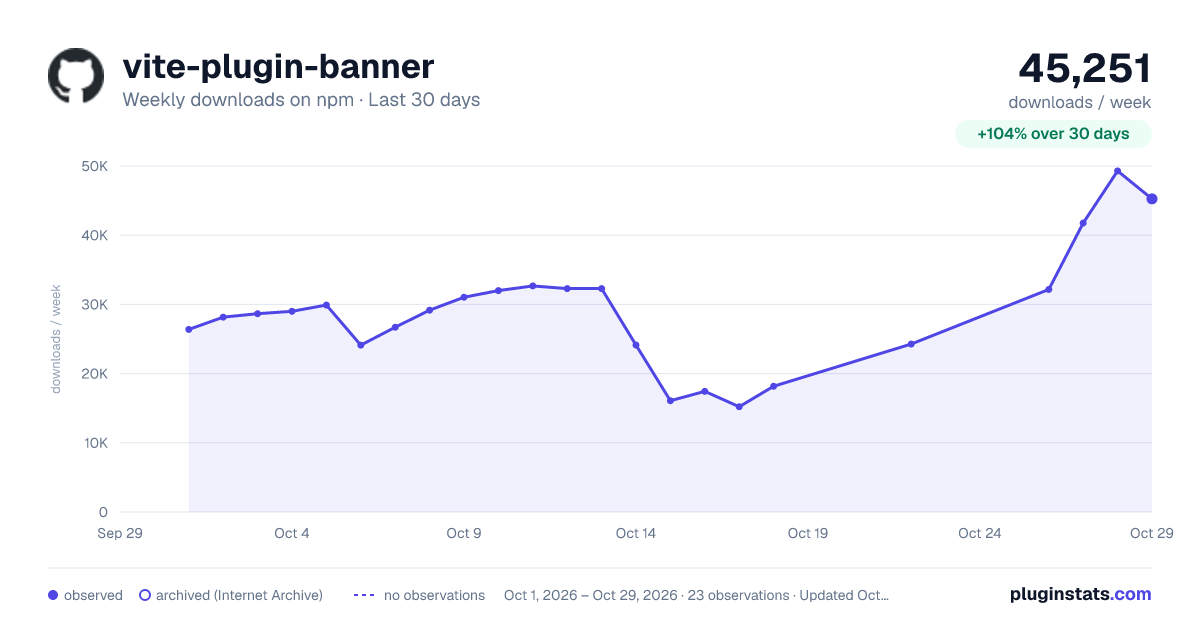
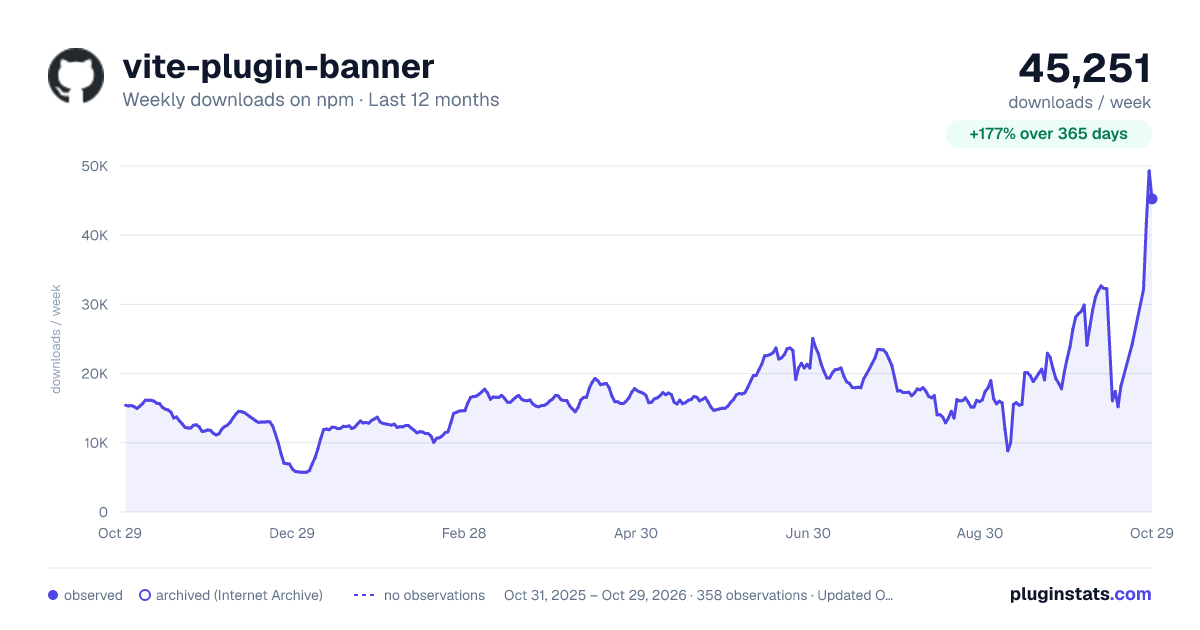
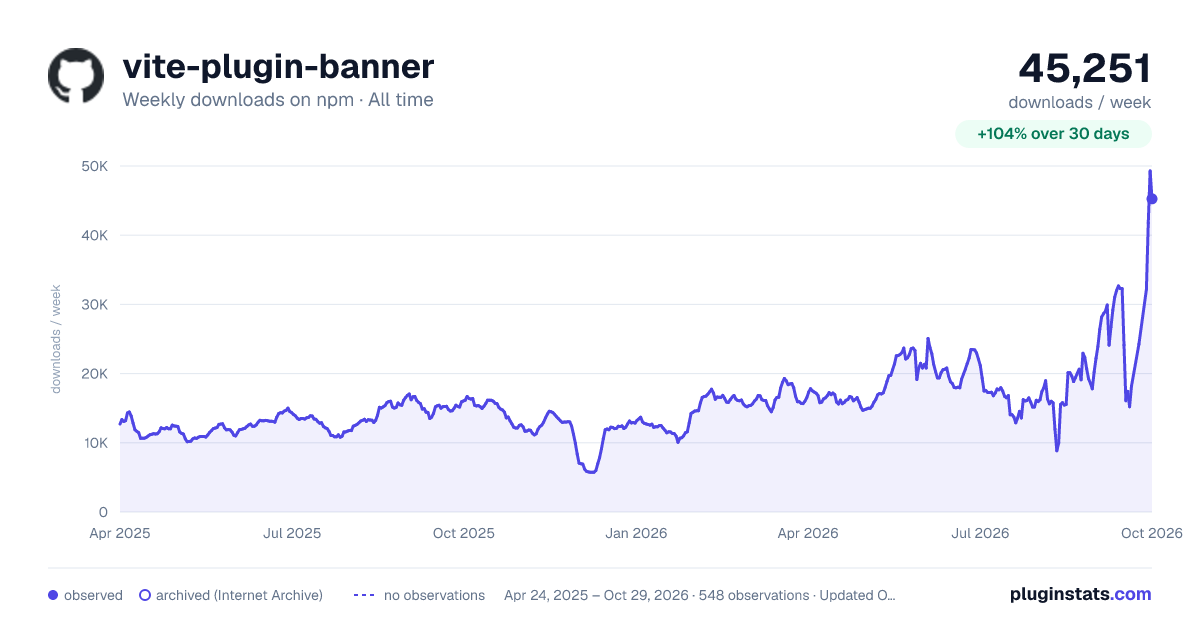

Adoption over time
7/30/90-day growth
Ranking history
Listing placement
Listing placement
Filled points are observed values; hollow points come from Internet Archive snapshots of the listing page. Dashed segments span periods with no observations — values between points are not interpolated.
Each band is one page of 20. Weekly downloads on a linear scale. Placement is projected from weekly downloads, so it can differ from the marketplace's own sort order. Hover a dot to see the listing.
Recent observations
Full history (542)Similar npm Vite plugins plugins
All 20 vite-plugin-banner alternativesData source
Weekly downloads (trailing 7 complete days) come from the official npm downloads API. Downloads include CI and mirrors and are not equivalent to installs or users. npm publishes no ratings.
Listing: https://www.npmjs.com/package/vite-plugin-banner. First seen Oct 16, 2026; last successful collection Oct 19, 2026. See the methodology.