 PluginStats
vite-plugin-md weekly downloads statistics
By antfu (14 listings) · npm · Vite plugins
Markdown for Vite
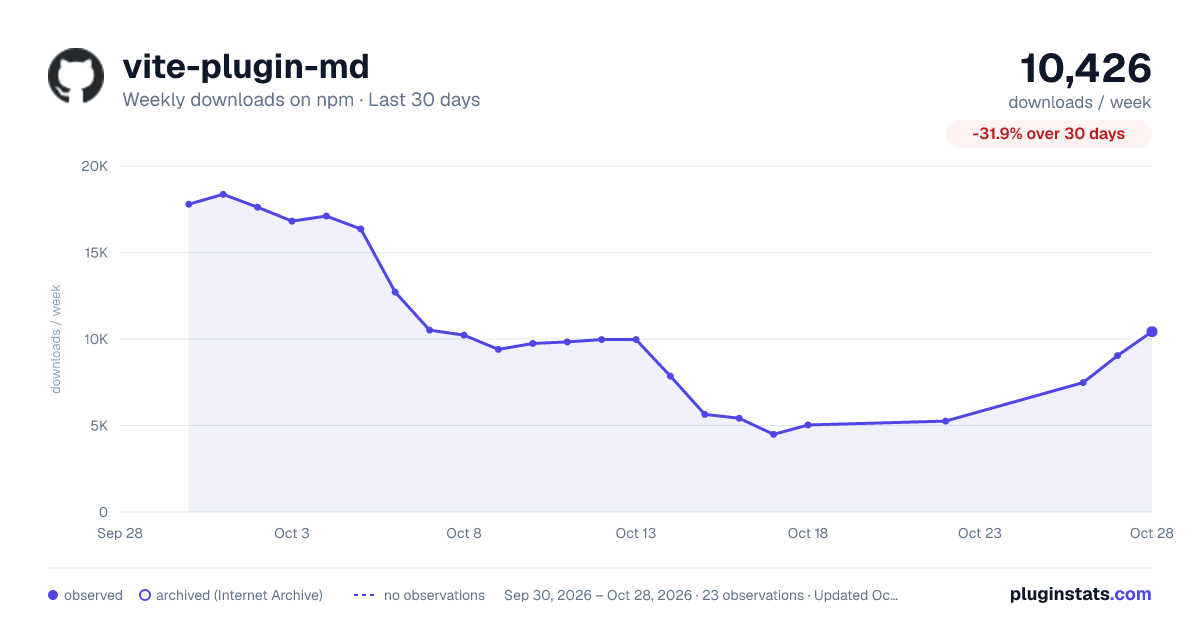
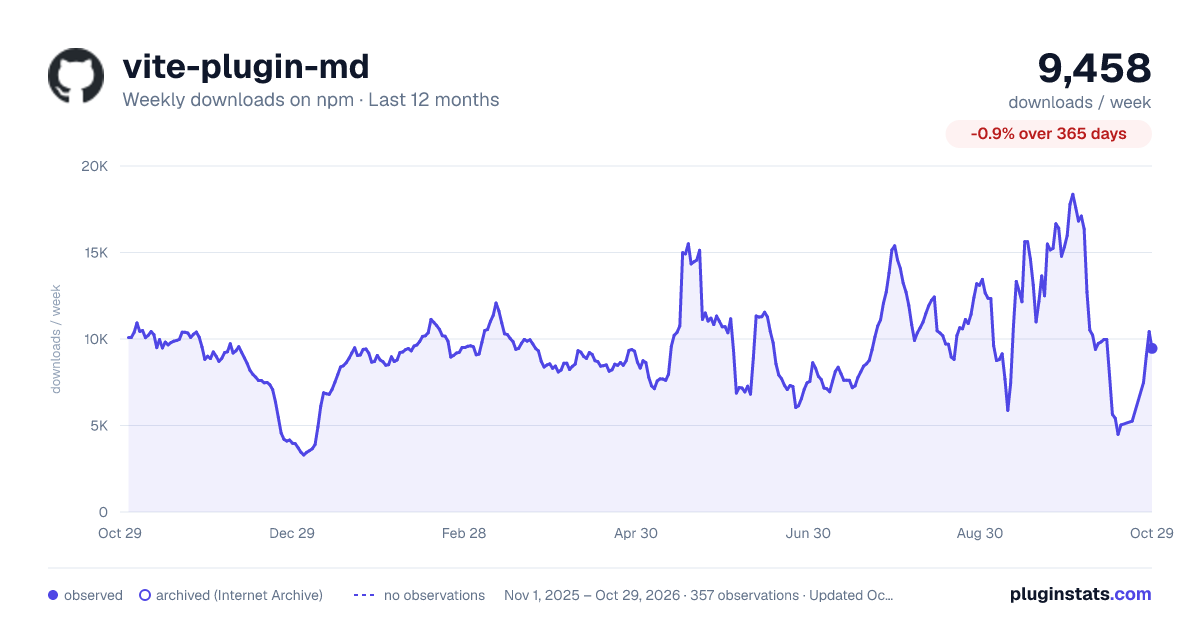
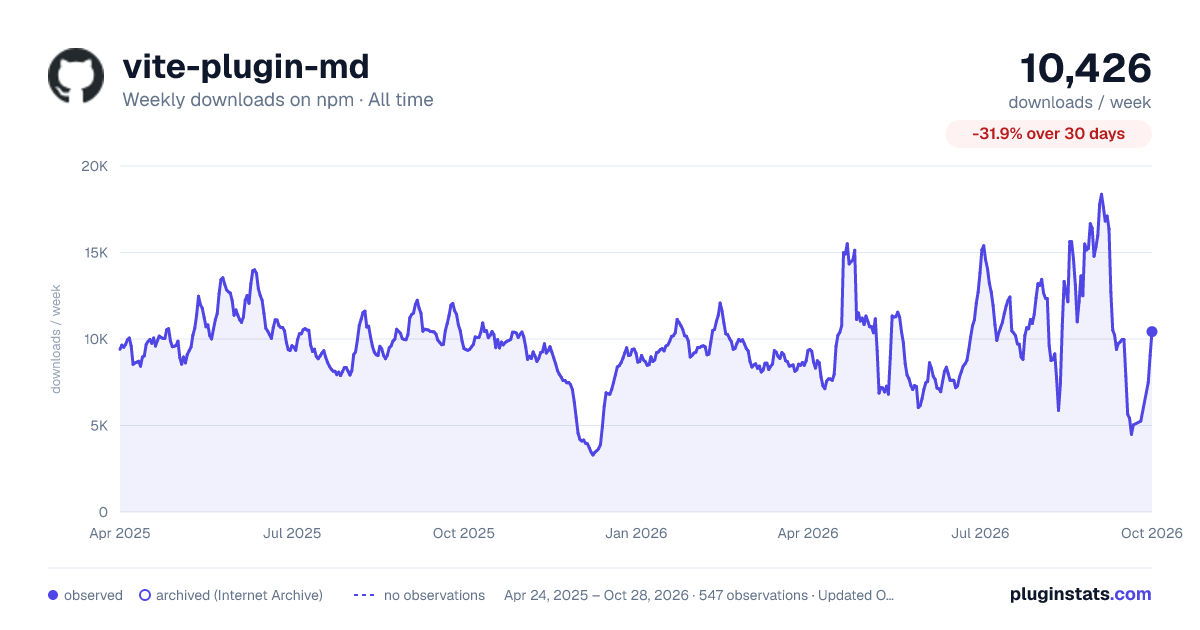
vite-plugin-md has 4,489 recorded weekly downloads on npm, a decrease of 65.8% over the past 30 days.
It ranks #1120 of 2,256 tracked npm listings by weekly downloads.
Over 90 days, weekly downloads changed by -46.8%.
PluginStats has 542 daily observations since Apr 24, 2025; the latest is from Oct 17, 2026.
About vite-plugin-md
vite-plugin-md
Markdown for Vite
• Use Markdown as Vue components • Use Vue components in Markdown • Extend functionality with Builder API
From v0.13, we introduced a pipeline and builder engine (#54, #77) to provide full customizability. If you still prefer the simple Markdown-to-Vue transformation prior to v0.13, it has been moved to vite-plugin-vue-markdown.
Installing this Plugin
Installation can be done in a few simple steps. From the root of your repo do the following:
1. NPM Install
Please note that this plugin _does_ have some peer dependencies; this is by design is intended to provide better control to end users but as NPM has fairly recently changed how they handle peer dependencies these will no longer be automatically be installed for you. You can either add auto-install-peers=true to your .npmrc file to go back to the old process or install peer deps when told about them.
2. Vite Configuration
Add the following to your vite.config.js / vite.config.ts file:
This adds the VueJS along with _this_ repo as "plugins" to Vite. With VueJS you'll also want to make sure to include both vue and md files.
3. Typescript Config (optional)
If you're using Typescript than you'll want take the additional step of adding a "shim file" to help Typescript to understand how to think of Vue SFC files and Markdown files structurally. For VueJS developers, you've probably already done this for your VueJS files but you can wrap this up with a single file -- shims.d.ts -- in the root of your repo:
4. Builder Installs (optional)
Modern versions of this plugin provide a powerful pipeline system for extending the functionality of this plugin. You can use provided/recommended plugins but you can create these yourself. More on this below but for now be aware that the three _builders_ which had been originally included as internal builders are now "external" to both demonstrate how you can do this and to keep this repo more focused on core pipelining.
The three "built-in" builders were code(), link(), and meta(). Instead of importing them directly as symbols from this repo you can now just import them directly from their repos:
• code - pnpm add -D @yankeeinlondon/code-builder npm install -D @yankeeinlondon/code-builder
yarn add -D @yankeeinlondon/code-builder • meta - pnpm add --save-dev @yankeeinlondon/meta-builder • link - pnpm add --save-dev @yankeeinlondon/link-builder
At this point the process is exactly the same as before, you simply add these builders into the configuration for this repo like so:
Note: code, meta, and link can all be imported from md-powerpack -- npm install -D md-powerpack -- which is an aggregation repo for builder API's. Either approach is equally valid.
Using this Plugin
Refer to the _example_ app in this repo for a working example but the really short answer is ... just write markdown files in the same places where you might have written VueJS SFC components and they will both be treated as Vue components in every way.
That means you can:
1. Import Markdown as Vue components
2. Use Vue Components inside your Markdown
In this example we use a custom Vue component called Counter (actually found in the demo app) and intermix it with our Markdown content. In this example we leveraged the ability to automatically import components with the powerful Vite plugin unplugin-vue-components but if you prefer not to you can just manually import some components globally or you can also add the following block to your Markdown:
In most cases, however, use of the unplugin-vue-components just makes life simpler. :)
3. Frontmatter
Frontmatter is a meta-data standard used with most of the static content frameworks and allows you to put name/value pairs at the top of your Markdown files and then use this content within the page. For example:
Will be rendered as:
Leveraging Meta Properties
It is often useful to have certain "meta properties" associated with your pages and you can do this easily in one of two ways:
1. If you use @vueuse/head then you can enable the headEnabled configuration option 2. If you want to go further you can add the meta() builder mentioned above
With both options you can start to add frontmatter like this:
This will then intelligently be incorporated into tags in the resulting output. For more information look at the corresponding docs:
• Docs for @vueuse/head • Docs for @yankeeinlondon/meta-builder
4. Import Frontmatter from Markdown
Not only can you import Markdown files as VueJS components (using the _default_ import) but you can also import a Markdown file's frontmatter via a named export:
Configuration / Options
1. Options Hash
The configuration for this plugin is a fully typed dictionary of options and therefore is largely self-documenting.
See the ts-doc for more advanced options
2. Markdown-It plugins (and options)
Under the hood this plugin leverages markdown-it for converting Markdown content to HTML. This parser is very mature and has a rich set of plugins that you use quite easily. If you don't find what you want you can also build your own plugin relatively easily [docs ].
Whether you're _using_ or _building_ a plugin, you will incorporate it into this plugin using the markdownItSetup property. Alternatively you can also set configuration options of markdown-it with markdownItOptions:
3. Builder APIs
Builder API's are mini-configurators for a particular feature area. The idea behind them is to allow extending functionality quickly with _sensible defaults_ but also providing their own configurations to allow users to grow into and configure that feature area. The Builder API and Builder pipeline are the _preferred_ way of extending the functionality of this plugin where possible but due to the vast array of MarkdownIt plugins you may still need to rely on that ecosystem in some cases.
To empower developers the docs and a createBuilder utility can be found here:
• Builder API…
Description from the npm listing.
- vite
- vite-plugin
- markdown-it
Where vite-plugin-md sits in the listing
Each band is one page of 20. Weekly downloads on a log scale. Placement is projected from weekly downloads, so it can differ from the marketplace's own sort order. Hover a dot to see the listing.


Charts
Images: 30d · 1y · all time · 1600×900 dark

Adoption over time


7/30/90-day growth


Filled points are observed values; hollow points come from Internet Archive snapshots of the listing page. Dashed segments span periods with no observations — values between points are not interpolated.
Recent observations
Full history (542)Similar npm Vite plugins plugins
Data source
Weekly downloads (trailing 7 complete days) come from the official npm downloads API. Downloads include CI and mirrors and are not equivalent to installs or users. npm publishes no ratings.
Listing: https://www.npmjs.com/package/vite-plugin-md. First seen Oct 16, 2026; last successful collection Oct 19, 2026. See the methodology.