 PluginStats
react-display-name-plugin weekly downloads statistics
By mockingjay-io · npm · Webpack plugins
Build plugin that preserves React component names in production bundles for DevTools. Supports Webpack and Vite.
react-display-name-plugin has 1,257 recorded weekly downloads on npm, a decrease of 27.3% over the past 30 days.
It ranks #1352 of 2,251 tracked npm listings by weekly downloads.
Over 90 days, weekly downloads changed by -52.2%.
PluginStats has 543 daily observations since Apr 23, 2025; the latest is from Oct 17, 2026.
About react-display-name-plugin
React displayName Plugin
react-display-name-plugin is a build plugin for both Webpack and Vite that makes your custom React components visible within React Dev Tools and other tools that rely on the displayName parameter.
_Note: This package supports Webpack 5 and Vite 2+. For older versions (Webpack 4), see the legacy package @mockingjay-io/webpack-react-component-name._
Normally React component names are minified during compilation. This plugin makes these component names available in production bundles by hooking into your build tool's compilation process, traversing the AST looking for React component definitions, and updating the emitted source code to populate the displayName property. This is the property that, when populated, is used by the React Dev Tools extension to determine the name of a component.
Since we emit a displayName property value for each React component definition (critically, not every React component _instance_), using this plugin will result in a small size increase to your production bundles.
Installation
1. Install via your preferred package manager:
For Webpack
2. Import and add the plugin to your Webpack configuration:
Next.js users have to add this within next.config.js/next.config.mjs/next.config.ts. Examples available here.
For Vite
2. Import and add the plugin to your Vite configuration:
Note: The Vite plugin should be placed after the React plugin in your plugins array, as it needs to run after JSX transformation.
Core Utilities (Advanced)
For building custom plugins for other bundlers, you can import the core utilities directly:
Available Utilities: • detectReactComponents(ast, callback) - Walks an AST and detects React components • generateDisplayNameCode(componentName) - Generates displayName injection code • argumentCreatesElement(argument) - Checks if AST node is React.createElement • argumentJsx(argument) - Checks if AST node is JSX transform output (_jsx, _jsxs) • shouldAddDisplayName(node) - Checks if a node should have displayName added
Options
parseDependencies
Type: boolean Default: false
If set true, the plugin will name the components exported from node_modules.
include
Type: (string | RegExp | (path: string) => boolean)[] Default: []
If the path matches any of the elements in this array, it will be included if it isn't explicitly excluded.
If the item is a string, it will use standard glob syntax. If the item is a Regular Expression, the path will be tested against it. If the item is a function, the path will be passed into it for testing.
exclude
Type: (string | RegExp | (path: string) => boolean)[] Default: []
If the path matches any of the elements in this array, it will be excluded.
If the item is a string, it will use standard glob syntax. If the item is a Regular Expression, the path will be tested against it. If the item is a function, the path will be passed into it for testing.
A truthy result will be excluded.
Troubleshooting
As you probably know, there is more than one way to define a React component. This plugin attempts to detect every possible way of defining a component, but there may be some we've missed. See the /examples directory and the unit tests for examples of the different permutations of React component definitions that we currently support.
If we are not detecting one of your components, please either file an Issue containing example source for a component which is not detected, or feel free to open a PR with the fix.
Note for Next.js users
In Next.js the plugin may cause warnings like [webpack.cache.PackFileCacheStrategy] Skipped not serializable cache item to be generated. These warnings are safe to ignore without any further action. But if you'd like to supress these warnings, as an interim solution, the following snippet can be added to your webpack config.
License
This project is licensed under the terms of the MIT license. See LICENSE.md for more info.
Description from the npm listing.
- webpack
- vite
- plugin
- react
- displayname
- react-devtools
- component-names
- production
- minified
- vite-plugin
- webpack-plugin
- typescript
- types
Where react-display-name-plugin sits in the listing
Each band is one page of 20. Weekly downloads on a log scale. Placement is projected from weekly downloads, so it can differ from the marketplace's own sort order. Hover a dot to see the listing.


Charts
Images: 30d · 1y · all time · 1600×900 dark
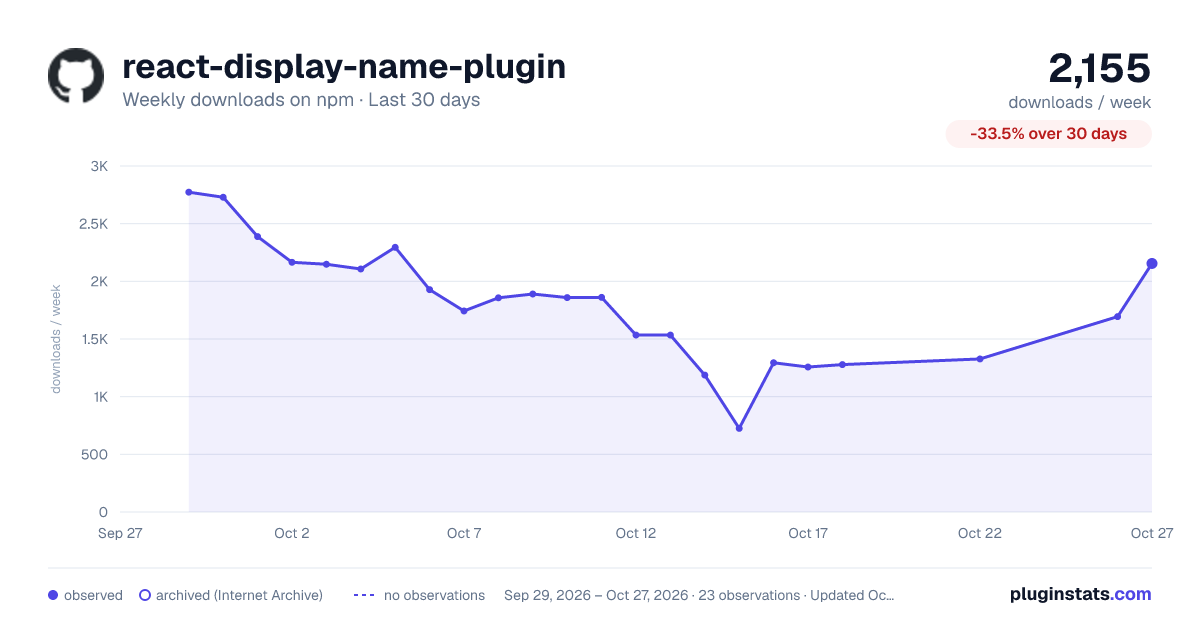
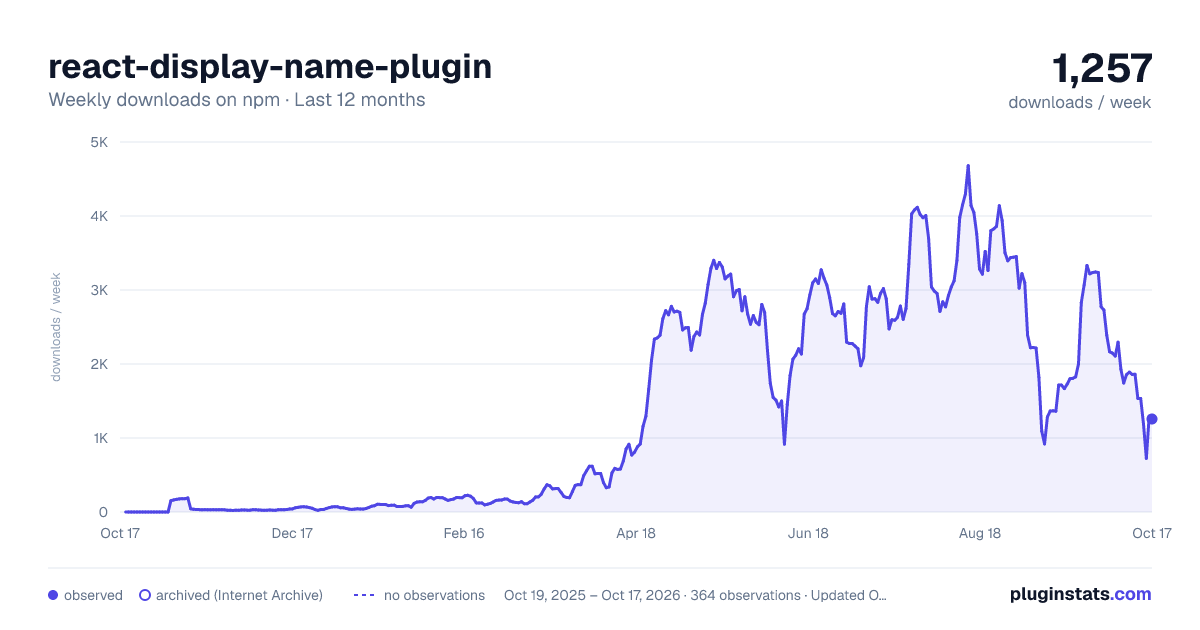
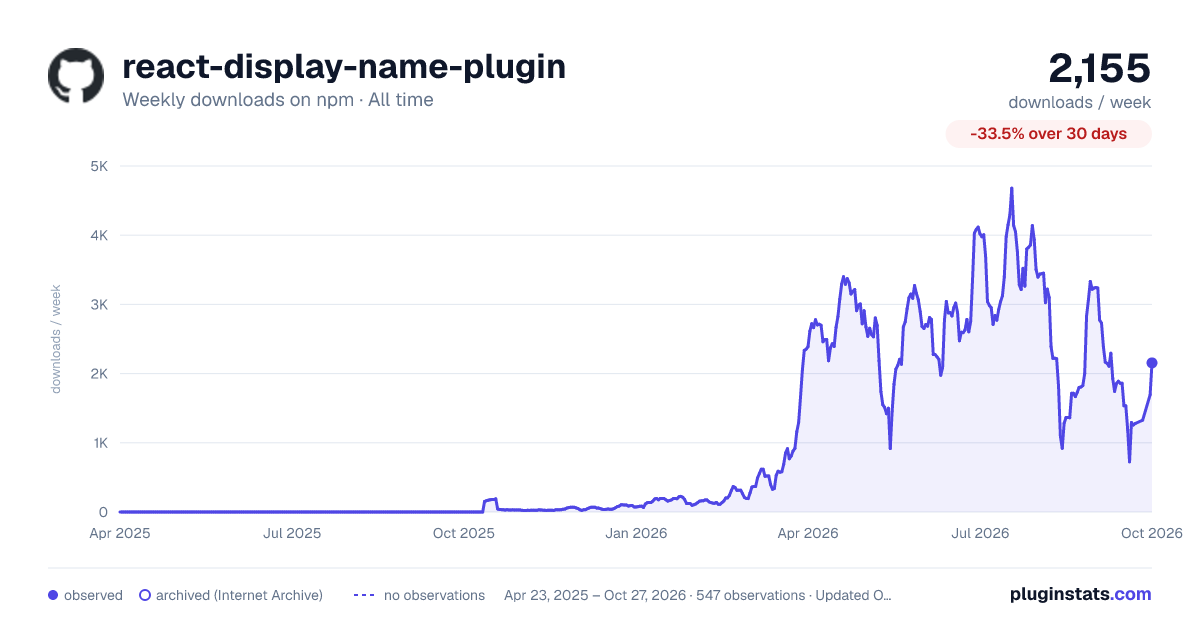

Adoption over time


7/30/90-day growth


Filled points are observed values; hollow points come from Internet Archive snapshots of the listing page. Dashed segments span periods with no observations — values between points are not interpolated.
Recent observations
Full history (543)Similar npm Webpack plugins plugins
Data source
Weekly downloads (trailing 7 complete days) come from the official npm downloads API. Downloads include CI and mirrors and are not equivalent to installs or users. npm publishes no ratings.
Listing: https://www.npmjs.com/package/react-display-name-plugin. First seen Oct 16, 2026; last successful collection Oct 18, 2026. See the methodology.