 PluginStats
css-minimizer-webpack-plugin weekly downloads statistics
By webpack (4 listings) · npm · Webpack plugins
CSS minimizer (minifier) plugin for Webpack
css-minimizer-webpack-plugin has 3,904,676 recorded weekly downloads on npm, a decrease of 49.9% over the past 30 days.
It ranks #136 of 2,251 tracked npm listings by weekly downloads.
Over 90 days, weekly downloads changed by -57.1%.
PluginStats has 121 daily observations since Jun 19, 2026; the latest is from Oct 17, 2026.
About css-minimizer-webpack-plugin
[![npm][npm]][npm-url] [![node][node]][node-url] [![tests][tests]][tests-url] [![cover][cover]][cover-url] [![discussion][discussion]][discussion-url] [![size][size]][size-url]
css-minimizer-webpack-plugin
This plugin uses cssnano to optimize and minify your CSS.
It serves as a more accurate alternative to optimize-css-assets-webpack-plugin, with better support for source maps, assets with query strings, caching, and parallel processing.
Getting Started
To begin, you'll need to install css-minimizer-webpack-plugin:
or
or
Then add the plugin to your webpack configuration. For example:
webpack.config.js
[!NOTE]
This enables CSS optimization only in production mode by default.
To enable it in development mode as well, set the optimization.minimize option to true:
webpack.config.js
Finally, run Webpack using your preferred method.
Note about source maps
This plugin works only with source-map, inline-source-map, hidden-source-map and nosources-source-map values for the devtool option.
Why? Because CSS support only these source map types.
The plugin respects the devtool setting and uses the SourceMapDevToolPlugin internally.
Using a supported devtool value enables source map generation.
Enabling the columns option in SourceMapDevToolPlugin also allows source map generation.
Use source maps to map error message locations to their original modules (note that this may slow down compilation).
If you use your own minify function please refer to the minify section for correct handling of source maps.
Options
| Name | Type | Default | Description |
| test | String\|RegExp\|Array | /\.css(\?.*)?$/i | Test to match files against. | | include | String\|RegExp\|Array | undefined | Files to include. | | exclude | String\|RegExp\|Array | undefined | Files to exclude. | | parallel | Boolean\|Number | true | Enable or disable multi-process parallel running. | | minify | Function\|Array | CssMinimizerPlugin.cssnanoMinify | Allows to override default minify function. | | minimizerOptions | Object\|Array | { preset: 'default' } | Cssnano optimisations options. | | warningsFilter | Function Boolean> | () => true | Allows filtering of css-minimizer warnings. |
test
• Type: String|RegExp|Array • Default: /\.css(\?.*)?$/i
Test to match files against.
include
• Type: String|RegExp|Array • Default: undefined
Files to include.
webpack.config.js
exclude
• Type: String|RegExp|Array • Default: undefined
Files to exclude.
webpack.config.js
parallel
• Type: Boolean|Number • Default: true
Use multi-process parallel running to improve the build speed.
The default number of concurrent runs: os.cpus().length - 1 or os.availableParallelism() - 1 (if this function is supported).
ℹ️ Parallelization can speed up your build significantly and is therefore highly recommended. If a parallelization is enabled, the packages in minimizerOptions must be required via strings (packageName or require.resolve(packageName)). Read more in minimizerOptions
Boolean
Enable or disable multi-process parallel running.
webpack.config.js
Number
Enable multi-process parallel running and specify the number of concurrent runs.
webpack.config.js
minify
• Type: Function|Array • Default: CssMinimizerPlugin.cssnanoMinify
Overrides the default minify function.
By default, plugin uses cssnano package.
This is useful when using or testing unpublished versions or forks.
Possible options:
• CssMinimizerPlugin.cssnanoMinify • CssMinimizerPlugin.cssoMinify • CssMinimizerPlugin.cleanCssMinify • CssMinimizerPlugin.esbuildMinify • CssMinimizerPlugin.lightningCssMinify (previouslyCssMinimizerPlugin.parcelCssMinify, the package was renamed, but we keep it for backward compatibility) • async (data, inputMap, minimizerOptions) => {return {code: "a{color: red}", map: "...", warnings: [], errors: []}}
[!WARNING]
Always use require inside minify function when parallel option is enabled.
Function
webpack.config.js
Array
If an array of functions is passed to the minify option, the minimizerOptions must also be an array.
The function index in the minify array corresponds to the options object with the same index in the minimizerOptions array.
webpack.config.js
minimizerOptions
• Type: Object|Array • Default: { preset: 'default' }
Cssnano optimisations options.
Object
Array
The function index in the minify array corresponds to the options object with the same index in the minimizerOptions array.
If you use minimizerOptions like object, all minify function accept it.
If parallelization is enabled, the packages in minimizerOptions must be referenced via strings (packageName or require.resolve(packageName)). In this case, we shouldn't use require/import.
processorOptions (⚠ only cssnano)
• Type: Object • Default: { from: assetName }
Allows filtering options processoptions for the cssnano.
The parser, stringifier and syntax can be either a function or a string indicating the module that will be imported.
[!WARNING]
If any of these options are passed as a function, the parallel option must be disabled..
warningsFilter
• Type: Function Boolean> • Default: () => true
Filter css-minimizer warnings (By default cssnano).
Return true to keep the warning, or a falsy value (false/null/undefined) to suppress it.
[!WARNING]
The source parameter will be undefined unless source maps are enabled.
webpack.config.js
Examples
Use sourcemaps
Don't forget to enable sourceMap options for all loaders.
Remove all comments
Remove all comments, including those starting with /*!.
Using custom minifier csso
webpack.config.js
Using custom minifier clean-css
webpack.config.js
Using custom minifier esbuild
webpack.config.js
Using custom minifier lightningcss, previously @parcel/css
webpack.config.js
Using custom minifier swc
webpack.config.js
Contributing
We welcome all contributions!
If you're new here, please take a moment to review our contributing guidelines.
CONTRIBUTING
License
MIT
Description from the npm listing.
- cssnano
- css
- csso
- clean-css
- swc
- esbuild
- webpack
- webpack-plugin
- minimize
- minimizer
- minify
- minifier
- optimize
- optimizer
Where css-minimizer-webpack-plugin sits in the listing
Each band is one page of 20. Weekly downloads on a log scale. Placement is projected from weekly downloads, so it can differ from the marketplace's own sort order. Hover a dot to see the listing.


Charts
Images: 30d · 1y · all time · 1600×900 dark
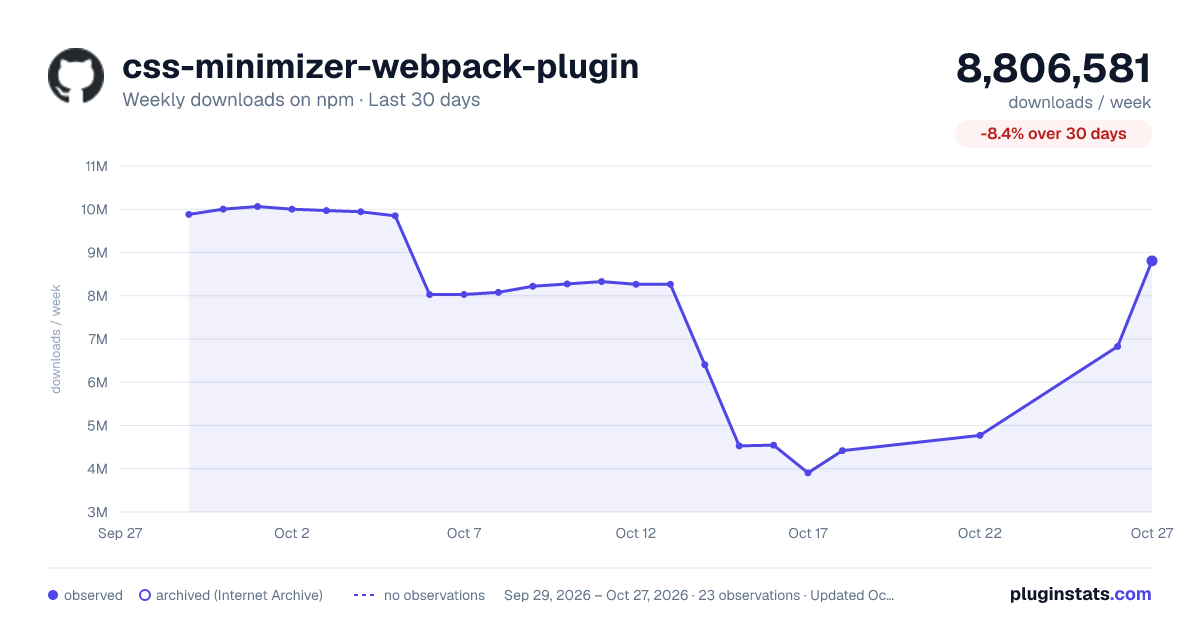
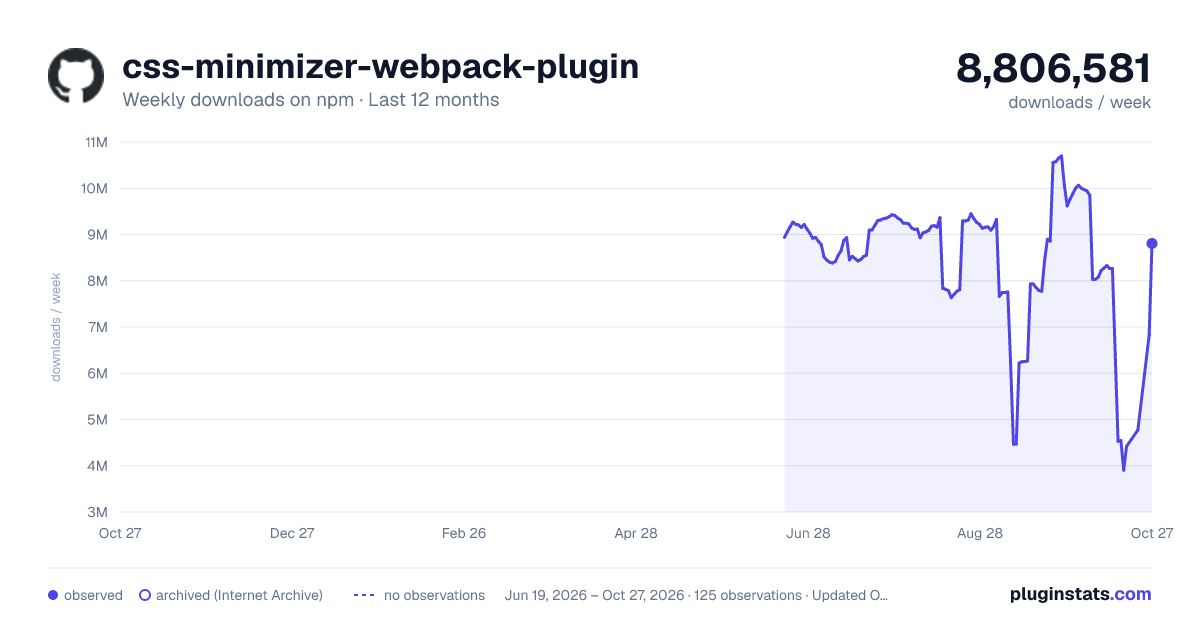
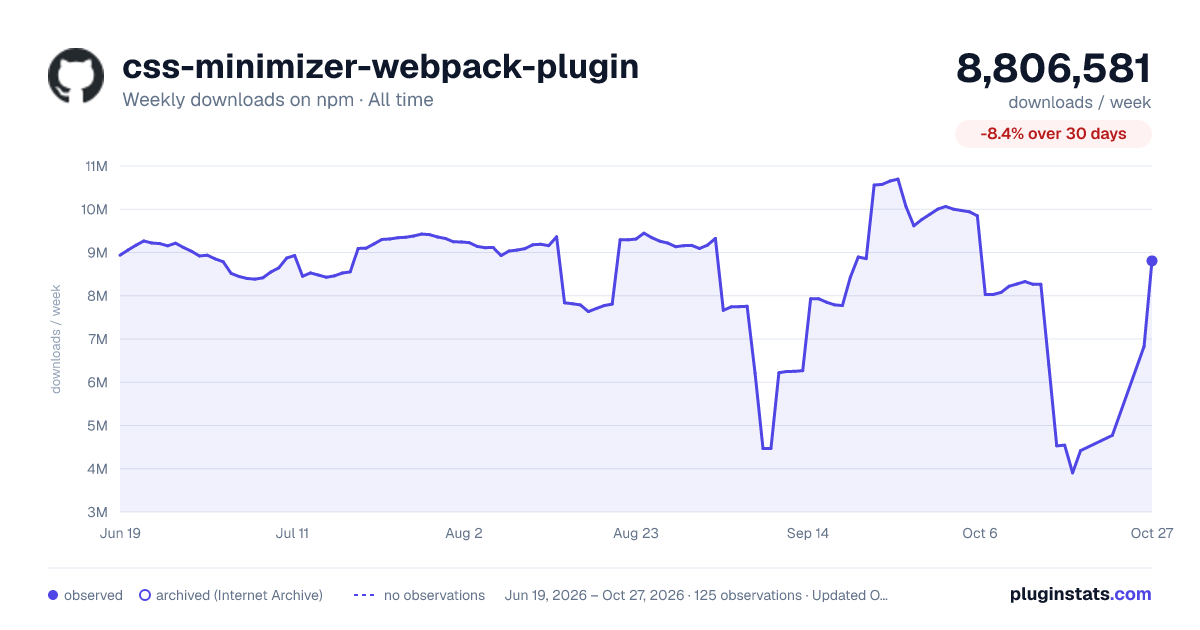

Adoption over time


7/30/90-day growth


Filled points are observed values; hollow points come from Internet Archive snapshots of the listing page. Dashed segments span periods with no observations — values between points are not interpolated.
Recent observations
Full history (121)Similar npm Webpack plugins plugins
Data source
Weekly downloads (trailing 7 complete days) come from the official npm downloads API. Downloads include CI and mirrors and are not equivalent to installs or users. npm publishes no ratings.
Listing: https://www.npmjs.com/package/css-minimizer-webpack-plugin. First seen Oct 16, 2026; last successful collection Oct 18, 2026. See the methodology.