 PluginStats
@pandacss/eslint-plugin weekly downloads statistics
By pandacss · npm · ESLint plugins
ESLint rules for Panda CSS
@pandacss/eslint-plugin has 21,137 recorded weekly downloads on npm, a decrease of 4.5% over the past 30 days.
It ranks #740 of 2,251 tracked npm listings by weekly downloads.
Over 90 days, weekly downloads changed by +13.3%.
PluginStats has 121 daily observations since Jun 19, 2026; the latest is from Oct 17, 2026.
About @pandacss/eslint-plugin
@pandacss/eslint-plugin
ESLint rules for Panda CSS that read your actual config. They know your tokens, recipes, patterns, and utilities — so they catch a typo'd token, a deprecated recipe, or a hardcoded color that should be a token. 🐼
There's no JSON to generate first. The plugin loads your panda.config.ts once and lints against it.
Beta. ESLint v9 flat config only. Most rules are report-only; a few add fixes/suggestions (noted below).
Install
You need ESLint 9 or later.
Setup
Add the recommended config to eslint.config.mjs. Loading your Panda config is async, and ESLint supports a flat config that resolves to a Promise, so await it (top-level await works in flat config):
That's it. The rules now run against your project's tokens, recipes, and utilities.
Top-level await works in eslint.config.mjs (or .js with "type": "module") and in eslint.config.ts (jiti ≥2 / Node ≥22.13 / Deno / Bun). In a CommonJS eslint.config.cjs, export a Promise instead — ESLint resolves it:
The recommended config scopes itself to JS/TS/JSX files and does not set a parser — use your project's existing parser. Most TS setups already have one via typescript-eslint, and framework projects via their ESLint preset (eslint-plugin-vue, astro-eslint-parser, etc.). Panda's rules read source text directly, so any parser that produces a Program works.
To lint framework files (.vue, .svelte, .astro), opt them in via files once their parser is configured:
Enabling opt-in rules / changing severities
recommended binds every rule under the @pandacss plugin, so add opt-in rules (or tweak severities) in your own rules block after it:
Monorepos
Call recommended once per Panda config and scope each to its package via files:
The Panda config is loaded once and cached; a long-running editor session won't pick up panda.config edits until ESLint restarts.
oxlint
The same rules run under oxlint via its ESLint-compatible JS plugins (alpha — needs oxlint + @oxlint/plugins). Point jsPlugins at the @pandacss/eslint-plugin/oxlint entry and enable the rules in .oxlintrc.json:
The entry auto-discovers panda.config.* from the working directory; set PANDA_CONFIG_PATH to point at a config in a non-standard location.
Single config per run. Unlike the ESLint flat config (where you compose several recommended({ configPath }) entries), oxlint loads a JS plugin once and binds one Panda project. For a custom path or a monorepo with several configs, write a tiny local plugin instead of using the entry, hardcoding the configPath:
oxlint.config.ts (via defineConfig from oxlint, Node ≥22.18) works the same way — plugins are still referenced by path, so the setup is identical.
Rules
These rules are on in recommended:
• no-invalid-token-paths (error) — a token reference that doesn't exist, e.g. token('colors.ghost'). • no-invalid-nesting (error) — a nested selector missing & (':hover' instead of '&:hover'), which Panda silently ignores. Suggests prefixing &. • file-not-included (error) — a file uses Panda but sits outside your config include, so its styles never get generated. • no-deprecated (warn) — use of a deprecated token, utility, recipe, or pattern. If you set deprecated: 'use X instead' in config, that message shows up in the lint error. • prefer-token (warn) — a raw value where a token exists, with the token to use. In recommended it's scoped to colors (the old no-hardcoded-color); widen it with categories (see below). • no-debug (warn) — a leftover debug: true. • extraction-diagnostics (warn) — parse or extraction problems Panda hit in the file.
The rest are off by default. Turn them on per project:
• no-important — !important in styles. • no-margin-properties — margin props; nudges you toward gap and layout patterns. • no-physical-properties — physical props that have logical equivalents (left → insetInlineStart). • no-shorthand-longhand-mix — a shorthand and one of its longhands in the same block (margin + marginLeft); the longhand wins regardless of source order. Takes ignore (groups to allow). • consistent-property-style — enforce one property style: Panda shorthand aliases (ml) or longhand canonical names (marginLeft). Autofixable. Takes style: 'shorthand' | 'longhand' (default longhand) and ignore. • prefer-text-style — a style object setting two or more typography properties that should be one textStyle token. • no-primitive-token — a primitive/core token where a semantic token exists for that category. Takes categories and allow.
Enable an opt-in rule like any other:
Options
no-deprecated takes a kinds option to narrow what it checks:
Valid kinds: tokens, utilities, recipes, patterns. All are checked by default.
prefer-token takes categories (which token categories to enforce; defaults to all) and allow (raw values to permit):
It lists the tokens that carry the value and offers each as an editor quick-fix, so you pick — semantic and primitive both shown (semantic first), themed tokens marked (themed). It matches equivalent forms (#FFF == #ffffff, 16px == 1rem):
Quick-fixes apply to each offending leaf — flat literals (color: '#f00'), values nested in conditions (color: { base: '#f00' }), and responsive-array elements (color: ['#f00', ...]). Coverage spans css(), style props, and recipe styles in cva() / sva() / styled('div', { ... }) (base, variants, compoundVariants).
no-primitive-token takes categories (which token categories to enforce; defaults to categories with semantic tokens) and allow (primitive token paths to permit):
This complements prefer-token: prefer-token maps hardcoded CSS values to tokens; no-primitive-token maps primitive tokens to semantic tokens. Categories without semantic tokens are skipped, so spacing primitives are allowed unless you define semantic spacing tokens.
Migrating from no-hardcoded-color
no-hardcoded-color is now prefer-token scoped to colors. Replace it with:
recommended already does this, so if you use configs.recommended there's nothing to change.
Settings…
Description from the npm listing.
- eslint
- eslintplugin
- eslint-plugin
- panda
- pandacss
- css-in-js
Where @pandacss/eslint-plugin sits in the listing
Each band is one page of 20. Weekly downloads on a log scale. Placement is projected from weekly downloads, so it can differ from the marketplace's own sort order. Hover a dot to see the listing.


Charts
Images: 30d · 1y · all time · 1600×900 dark
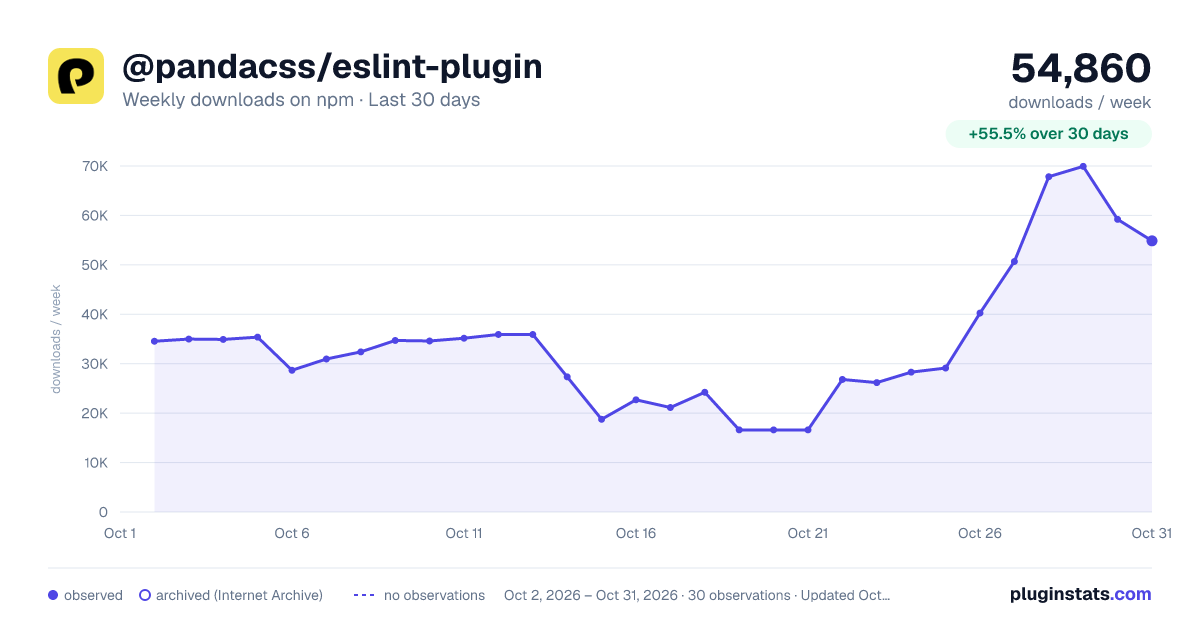
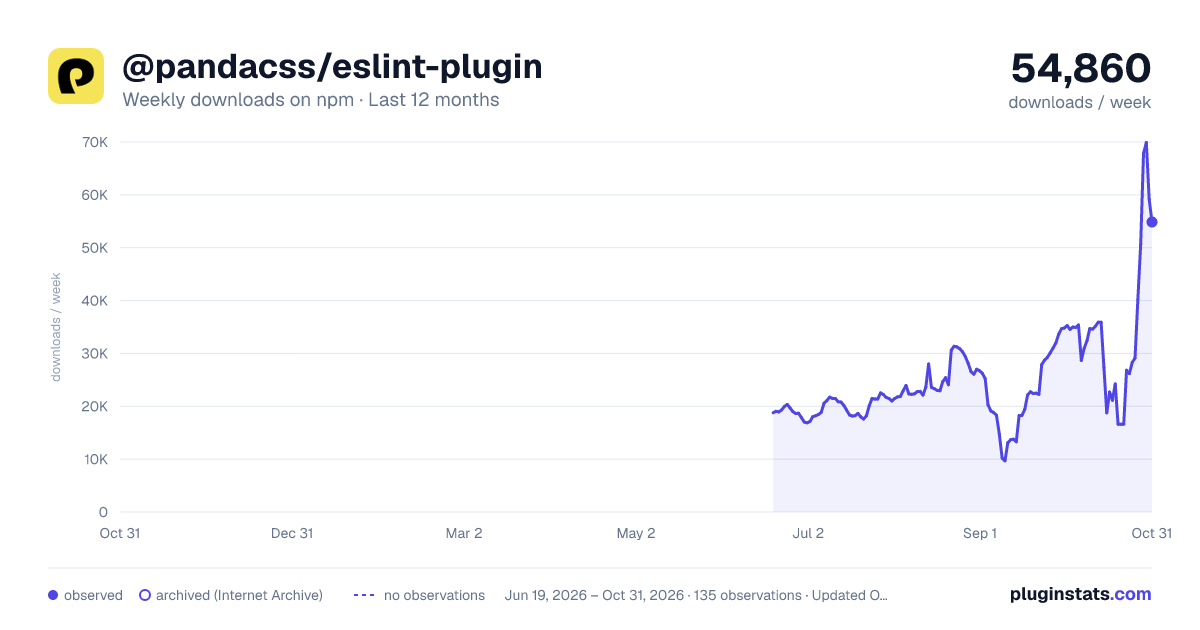
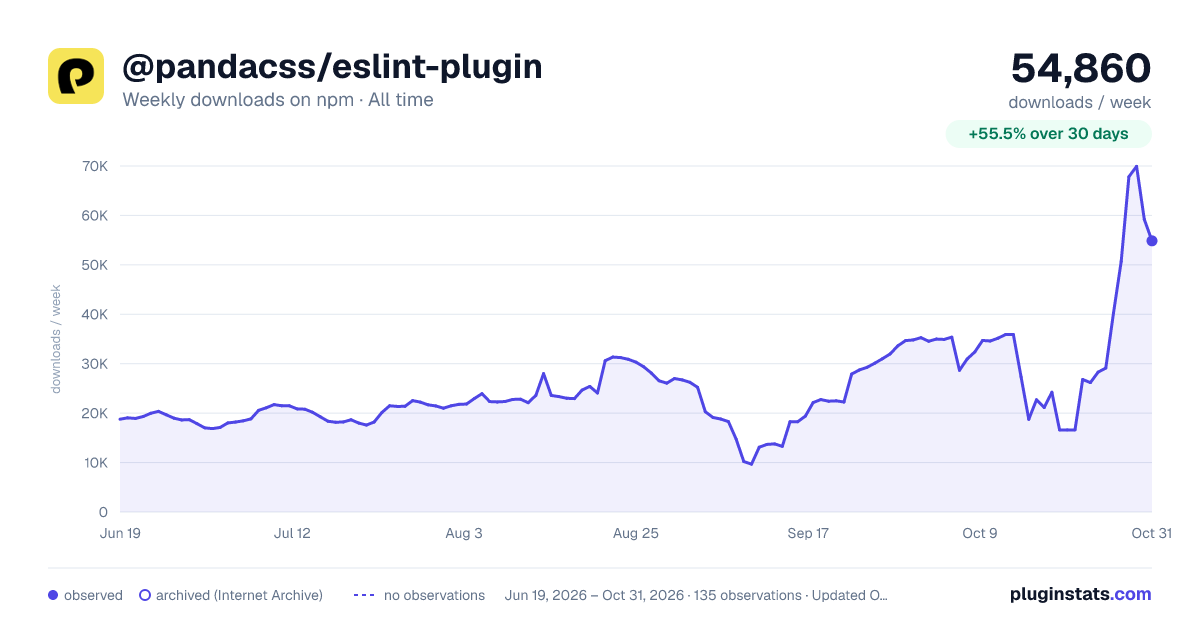

Adoption over time


7/30/90-day growth


Filled points are observed values; hollow points come from Internet Archive snapshots of the listing page. Dashed segments span periods with no observations — values between points are not interpolated.
Recent observations
Full history (121)Similar npm ESLint plugins plugins
Data source
Weekly downloads (trailing 7 complete days) come from the official npm downloads API. Downloads include CI and mirrors and are not equivalent to installs or users. npm publishes no ratings.
Listing: https://www.npmjs.com/package/@pandacss/eslint-plugin. First seen Oct 16, 2026; last successful collection Oct 18, 2026. See the methodology.