 PluginStats
eslint-plugin-md weekly downloads statistics
By leo-buneev (2 listings) · npm · ESLint plugins
An ESLint plugin that allows you to lint markdown code in your *.md files.
eslint-plugin-md has 8,863 recorded weekly downloads on npm, a decrease of 67.1% over the past 30 days.
It ranks #940 of 2,251 tracked npm listings by weekly downloads.
Over 90 days, weekly downloads changed by -71.6%.
PluginStats has 121 daily observations since Jun 19, 2026; the latest is from Oct 17, 2026.
About eslint-plugin-md
eslint-plugin-md
An ESLint plugin to lint and fix markdown files. It uses amazing remark-lint under the hood. Also enables using prettier to automatically format your markdown files right from eslint!
Motivation
ESLint is a tool for linting Javascript. There is another plugin called eslint-plugin-markdown, however it is still only linting Javascript parts inside *.md files, and leaves Markdown itself untouched.
Wouldn't it be cool, if we could use ESLint to enforce style of Markdown itself? That is what this plugin is for!
Installation
You'll first need to install ESLint:
Next, install eslint-plugin-md:
Note: If you installed ESLint globally (using the npm -g or yarn global) then you must also install eslint-plugin-md globally.
Usage
Add plugin:md/recommended config to extends section of your your .eslintrc configuration file
And this is it! By default it will apply all rules from Markdown style guide.
Note: By default ESLint won't lint \*.md files. So:
• If you use ESLint from CLI, use --ext parameter (e.g. eslint . --ext js,md) • If you use VSCode with ESLint plugin, add "eslint.validate": ["markdown"] in your VSCode preferences
Usage with eslint-plugin-prettier
Prettier is an amazing code formatter that supports many languages, including markdown. It is common to use prettier as a rule in ESLint via amazing eslint-plugin-prettier.
This plugin can play nicely together with eslint-plugin-prettier (meaning that first code will be formatted via prettier, and then remark rules will be applied). Typical eslint configuration will look like this:
Modifying eslint setup for js code inside \*.md files
By default, code inside fenced code block marked as js language (` js // .eslintrc.js module.exports = { extends: ['plugin:md/recommended'], overrides: [ { files: ['*.md'], parser: 'markdown-eslint-parser', }, { files: ['*.md.js'], // Will match js code inside *.md files rules: { // Example - disable 2 core eslint rules 'no-unused-vars' and 'no-undef' 'no-unused-vars': 'off', 'no-undef': 'off', }, }, ], } js // .eslintrc.js module.exports = { extends: ['plugin:md/recommended'], rules: { 'md/remark': [ 'error', { // This object corresponds to object you would export in .remarkrc file plugins: ['preset-lint-markdown-style-guide', 'frontmatter', ['lint-maximum-line-length', false]], }, ], }, overrides: [ { files: ['*.md'], parser: 'markdown-eslint-parser', }, ], } bash yarn add -D remark-lint-alphabetize-lists js // .eslintrc.js module.exports = { extends: ['plugin:md/recommended'], rules: { 'md/remark': [ 'error', { // This object corresponds to object you would export in .remarkrc file plugins: ['preset-lint-markdown-style-guide', 'frontmatter', 'remark-lint-alphabetize-lists'], }, ], }, overrides: [ { files: ['*.md'], parser: 'markdown-eslint-parser', }, ], } ```
Description from the npm listing.
- markdown
- md
- eslint-markdown
- eslint
- eslintplugin
- eslint-plugin
Where eslint-plugin-md sits in the listing
Each band is one page of 20. Weekly downloads on a log scale. Placement is projected from weekly downloads, so it can differ from the marketplace's own sort order. Hover a dot to see the listing.


Charts
Images: 30d · 1y · all time · 1600×900 dark
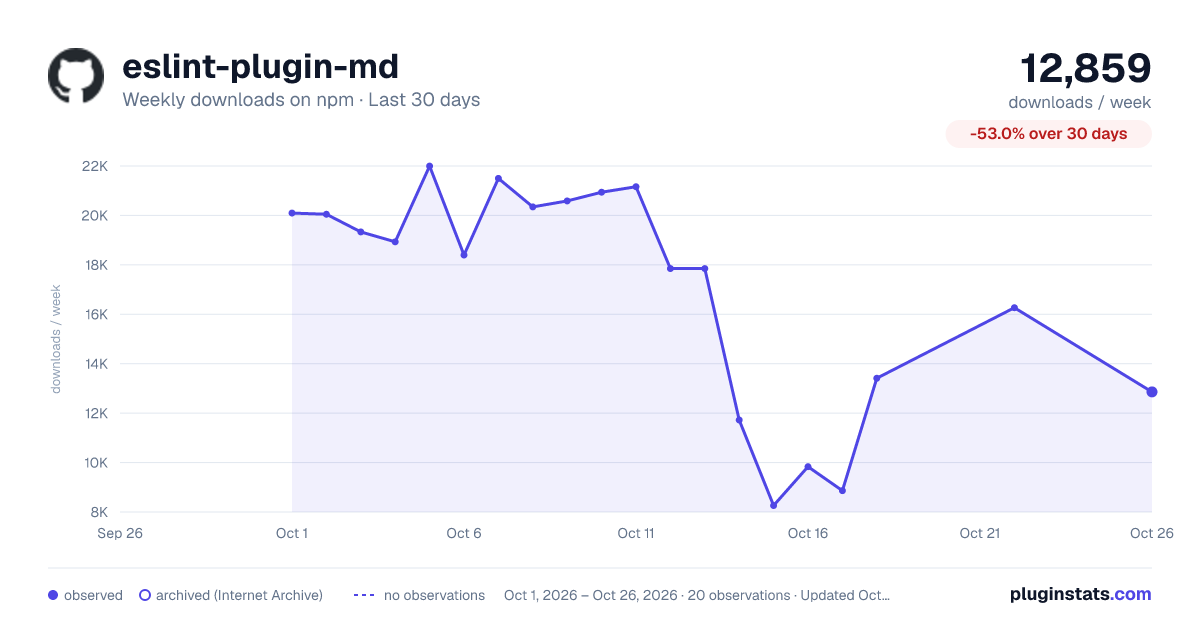
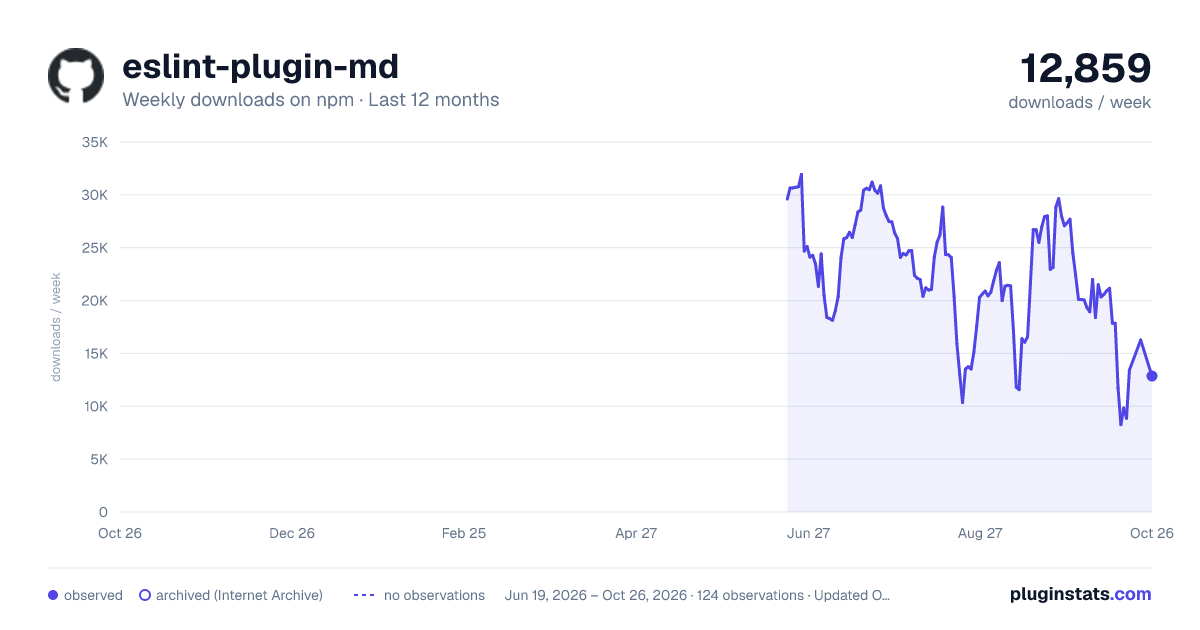
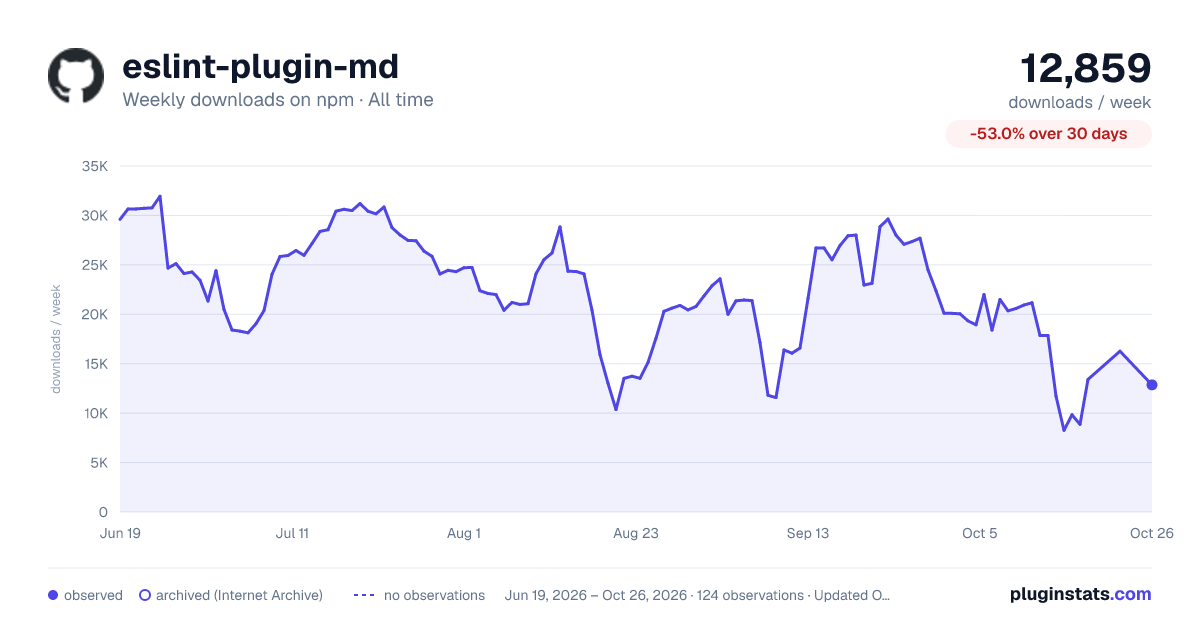

Adoption over time


7/30/90-day growth


Filled points are observed values; hollow points come from Internet Archive snapshots of the listing page. Dashed segments span periods with no observations — values between points are not interpolated.
Recent observations
Full history (121)Similar npm ESLint plugins plugins
Data source
Weekly downloads (trailing 7 complete days) come from the official npm downloads API. Downloads include CI and mirrors and are not equivalent to installs or users. npm publishes no ratings.
Listing: https://www.npmjs.com/package/eslint-plugin-md. First seen Oct 16, 2026; last successful collection Oct 18, 2026. See the methodology.