 PluginStats
eslint-plugin-drizzle weekly downloads statistics
By drizzle-team · npm · ESLint plugins
Eslint plugin for drizzle users to avoid common pitfalls
eslint-plugin-drizzle has 144,810 recorded weekly downloads on npm, a decrease of 34.1% over the past 30 days.
It ranks #414 of 2,251 tracked npm listings by weekly downloads.
Over 90 days, weekly downloads changed by -21.6%.
PluginStats has 121 daily observations since Jun 19, 2026; the latest is from Oct 17, 2026.
About eslint-plugin-drizzle
eslint-plugin-drizzle
For cases where it's impossible to perform type checks for specific scenarios, or where it's possible but error messages would be challenging to understand, we've decided to create an ESLint package with recommended rules. This package aims to assist developers in handling crucial scenarios during development
Big thanks to @Angelelz for initiating the development of this package and transferring it to the Drizzle Team's npm
Install
You can install those packages for typescript support in your IDE
Usage
Create a .eslintrc.yml file, add drizzle to the plugins, and specify the rules you want to use. You can find a list of all existing rules below
All config
This plugin exports an all config that makes use of all rules (except for deprecated ones).
At the moment, all is equivalent to recommended
Rules
enforce-delete-with-where: Enforce using delete with the.where() clause in the .delete() statement. Most of the time, you don't need to delete all rows in the table and require some kind of WHERE statements.
Optionally, you can define a drizzleObjectName in the plugin options that accept a string or string[]. This is useful when you have objects or classes with a delete method that's not from Drizzle. Such a delete method will trigger the ESLint rule. To avoid that, you can define the name of the Drizzle object that you use in your codebase (like db) so that the rule would only trigger if the delete method comes from this object:
Example, config 1:
Example, config 2:
enforce-update-with-where: Enforce using update with the.where() clause in the .update() statement. Most of the time, you don't need to update all rows in the table and require some kind of WHERE statements.
Optionally, you can define a drizzleObjectName in the plugin options that accept a string or string[]. This is useful when you have objects or classes with a delete method that's not from Drizzle. Such as update method will trigger the ESLint rule. To avoid that, you can define the name of the Drizzle object that you use in your codebase (like db) so that the rule would only trigger if the delete method comes from this object:
Example, config 1:
Example, config 2:
Description from the npm listing.
- eslint
- eslintplugin
- eslint-plugin
- drizzle
Where eslint-plugin-drizzle sits in the listing
Each band is one page of 20. Weekly downloads on a log scale. Placement is projected from weekly downloads, so it can differ from the marketplace's own sort order. Hover a dot to see the listing.


Charts
Images: 30d · 1y · all time · 1600×900 dark
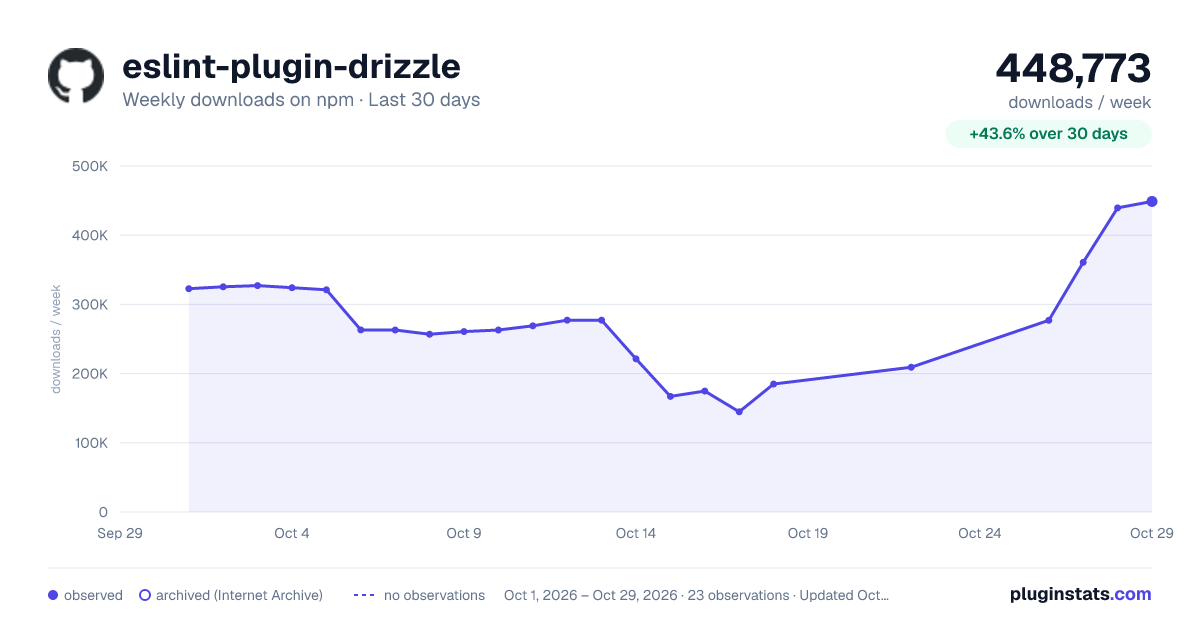
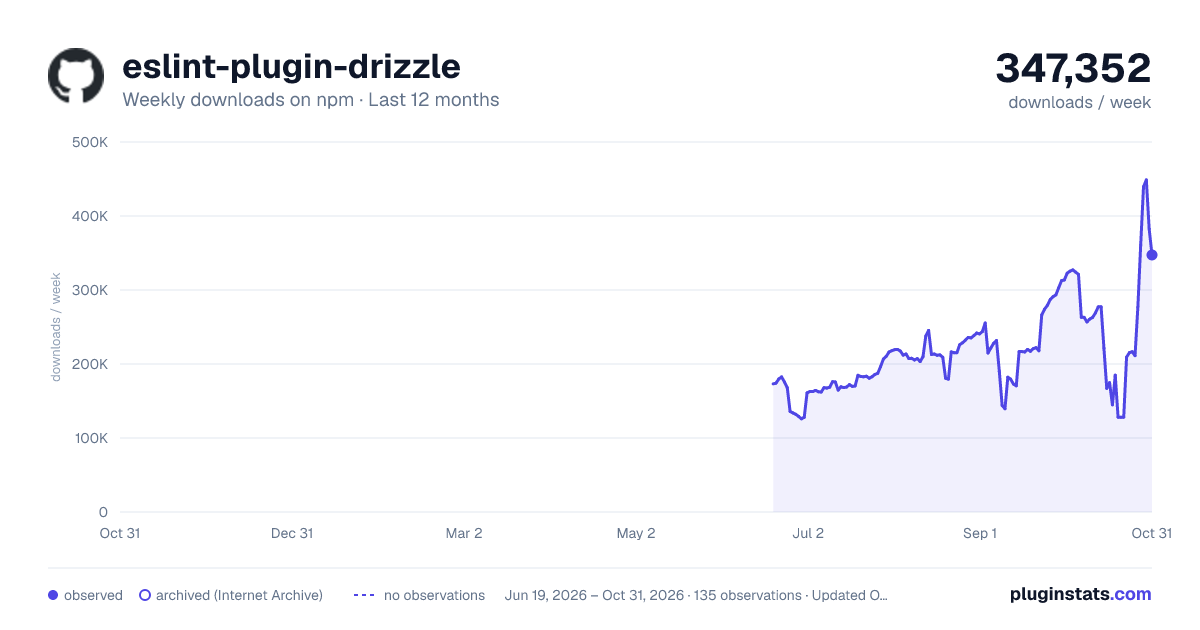
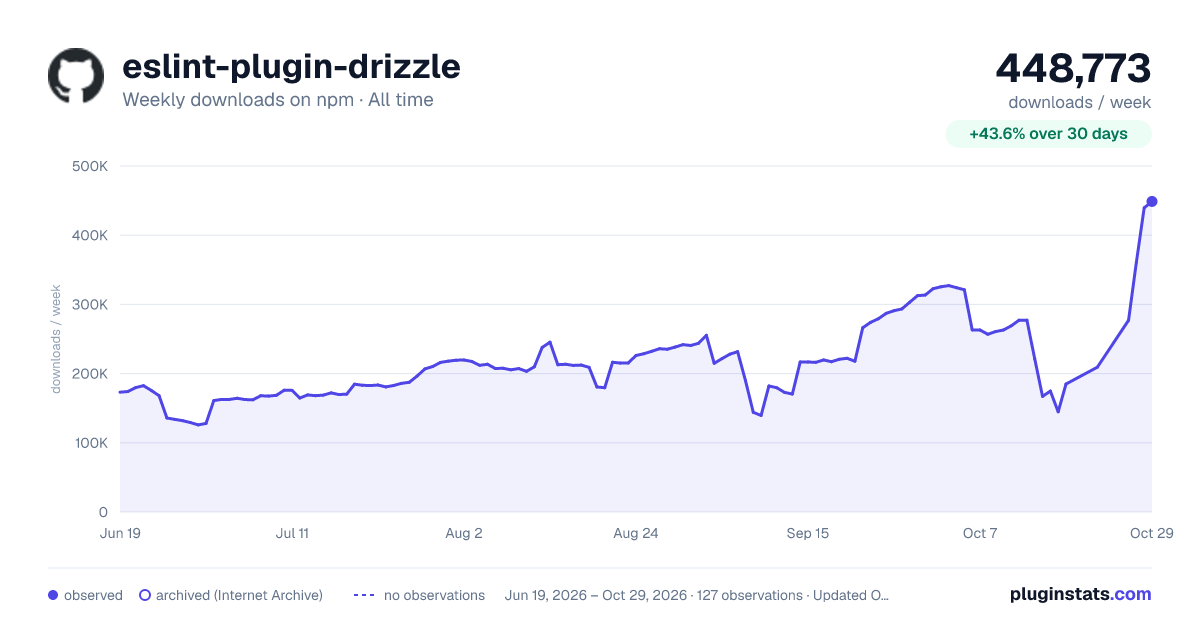

Adoption over time


7/30/90-day growth


Filled points are observed values; hollow points come from Internet Archive snapshots of the listing page. Dashed segments span periods with no observations — values between points are not interpolated.
Recent observations
Full history (121)Similar npm ESLint plugins plugins
Data source
Weekly downloads (trailing 7 complete days) come from the official npm downloads API. Downloads include CI and mirrors and are not equivalent to installs or users. npm publishes no ratings.
Listing: https://www.npmjs.com/package/eslint-plugin-drizzle. First seen Oct 16, 2026; last successful collection Oct 18, 2026. See the methodology.