 PluginStats
@chat-adapter/github weekly downloads statistics
By chat-adapter (14 listings) · npm · AI SDKs
GitHub adapter for Chat SDK — respond to @mentions in pull request and issue comment threads
@chat-adapter/github has 59,488 recorded weekly downloads on npm, an increase of 11.7% over the past 30 days, ranking #522 of 2,256 tracked listings.
About @chat-adapter/github
@chat-adapter/github
npm package: @chat-adapter/github
GitHub adapter for Chat SDK. Respond to @mentions in PR and issue comment threads.
The GitHub adapter treats issue and pull request comments as messages, and issues/PRs as threads.
Documentation: chat-sdk.dev/adapters/official/github · Guides: vercel.com/kb/chat-sdk
Installation
Scaffold with the CLI
To scaffold a new GitHub bot with this adapter preselected:
Visit the adapters directory to see other available official and vendor-official adapters.
Quick start
For managed credentials and webhook verification, see Vercel Connect.
The adapter auto-detects credentials from GITHUB_TOKEN (or GITHUB_APP_ID/GITHUB_PRIVATE_KEY), GITHUB_WEBHOOK_SECRET, and GITHUB_BOT_USERNAME environment variables:
Configuration
All options are auto-detected from environment variables when not provided.
| Option | Required | Description |
| token | No* | Personal Access Token. Auto-detected from GITHUB_TOKEN | | appId | No* | GitHub App ID. Auto-detected from GITHUB_APP_ID | | privateKey | No | GitHub App private key (PEM). Auto-detected from GITHUB_PRIVATE_KEY | | installationId | No | Installation ID (omit for multi-tenant). Auto-detected from GITHUB_INSTALLATION_ID | | installationToken | No* | Vercel Connect mode: installation access token, or a () => string | Promise resolver invoked per API call. Skips the App JWT exchange. | | webhookSecret | No** | Webhook secret. Auto-detected from GITHUB_WEBHOOK_SECRET | | webhookVerifier | No** | Custom verifier (request, body) => unknown | Promise used in place of webhookSecret. Takes precedence over webhookSecret/GITHUB_WEBHOOK_SECRET. Required in Connect mode | | userName | No | Bot username for @mention detection. Auto-detected from GITHUB_BOT_USERNAME (default: "github-bot") | | botUserId | No | Bot's numeric user ID (auto-detected if not provided) | | apiUrl | No | Override the GitHub API base URL (e.g. for GitHub Enterprise Server). Auto-detected from GITHUB_API_URL | | logger | No | Logger instance (defaults to ConsoleLogger("info")) |
*One of token/GITHUB_TOKEN, appId+privateKey/GITHUB_APP_ID+GITHUB_PRIVATE_KEY, or installationToken (Vercel Connect) is required.
**Either webhookSecret (via config or GITHUB_WEBHOOK_SECRET) or a webhookVerifier is required. When webhookVerifier is set it takes precedence and the secret is ignored.
Authentication
Option A — Vercel Connect
Use Vercel Connect to source installation access tokens at runtime instead of storing a GitHub App private key. The installationToken resolver supplies the token the adapter sends directly (skipping the App JWT exchange), and webhookVerifier verifies Connect trigger-forwarded webhooks via a Vercel OIDC token instead of a webhook secret.
The simplest path is the connectGitHubAdapter() helper from @vercel/connect/chat:
Or wire the fields yourself:
installationToken accepts a string or () => string | Promise resolver invoked per API call, so it composes with Connect's short-lived tokens. When webhookVerifier is set it takes precedence over webhookSecret and GITHUB_WEBHOOK_SECRET.
Freshness: OIDC verification replaces GitHub's signature check, so request freshness relies on the short-lived OIDC token's expiry rather than a signed timestamp, and there is no built-in nonce/delivery-id de-duplication. Keep your webhook handlers idempotent (GitHub may also redeliver events).
Set botUserId for self-message detection. In Connect mode the adapter only holds an installation token, so it can't auto-detect its own bot user id (the /app lookup needs the App's JWT). Without it, the adapter can't tell its own comments apart from users' and will reply to itself in a loop. The adapter learns the id from the first comment it posts, but that lives in memory — on serverless (where each webhook may hit a fresh instance) that isn't enough. Pass botUserId (the numeric id of your …[bot] user) so every instance knows it up front:
Or set the GITHUB_BOT_USER_ID environment variable, which the adapter auto-detects. Find the id (no auth needed) with curl -s 'https://api.github.com/users/your-app%5Bbot%5D'.
Option B — Personal Access Token
Best for personal projects, testing, or single-repo bots.
- Go to Settings > Developer settings > Personal access tokens 2. Create a new token with repo scope 3. Set GITHUB_TOKEN environment variable
Option C — GitHub App (recommended)
Better rate limits, security, and supports multiple installations.
-
Create the app:
-
Go to Settings > Developer settings > GitHub Apps > New GitHub App 2. Set Webhook URL to https://your-domain.com/api/webhooks/github 3. Generate and set a Webhook secret 4. Set permissions: • Repository > Issues: Read & write • Repository > Pull requests: Read & write • Repository > Metadata: Read-only 5. Subscribe to events: Issue comment, Pull request review comment 6. Click Create GitHub App 7. Note the App ID and click Generate a private key
-
Install the app:
-
Go to your app's settings then Install App 2. Click Install and choose repositories 3. Note the Installation ID from the URL:
Single-tenant:
Set installationId to accept comments only from that GitHub App installation. After verification, a new comment (issue_comment or pull_request_review_comment with action created) from a different installation gets a 404, handlers don't run, and the adapter logs a warning with both IDs. The check runs whether you verify with webhookSecret or a custom webhookVerifier, and other event types and actions aren't checked.
Deliveries without an installation object still reach handlers. GitHub omits it from repository and organization webhooks, so those keep working in this mode. Vercel Connect mode (installationToken) has no configured installation ID and skips this check.
Multi-tenant (omit installationId):
The adapter automatically extracts installation IDs from webhooks and caches API clients per-installation.
Installation lookup…
Description from the npm listing.
- chat
- chat-sdk
- chatbot
- github
- github-bot
- github-app
- bot
- adapter
- pull-request
- issue
- code-review
- ai-agent
- ai-sdk
- vercel
README badge
Show your rank in a README or on your website. The badge updates automatically.
Charts
Images: 30d · 1y · all time · 1600×900 dark
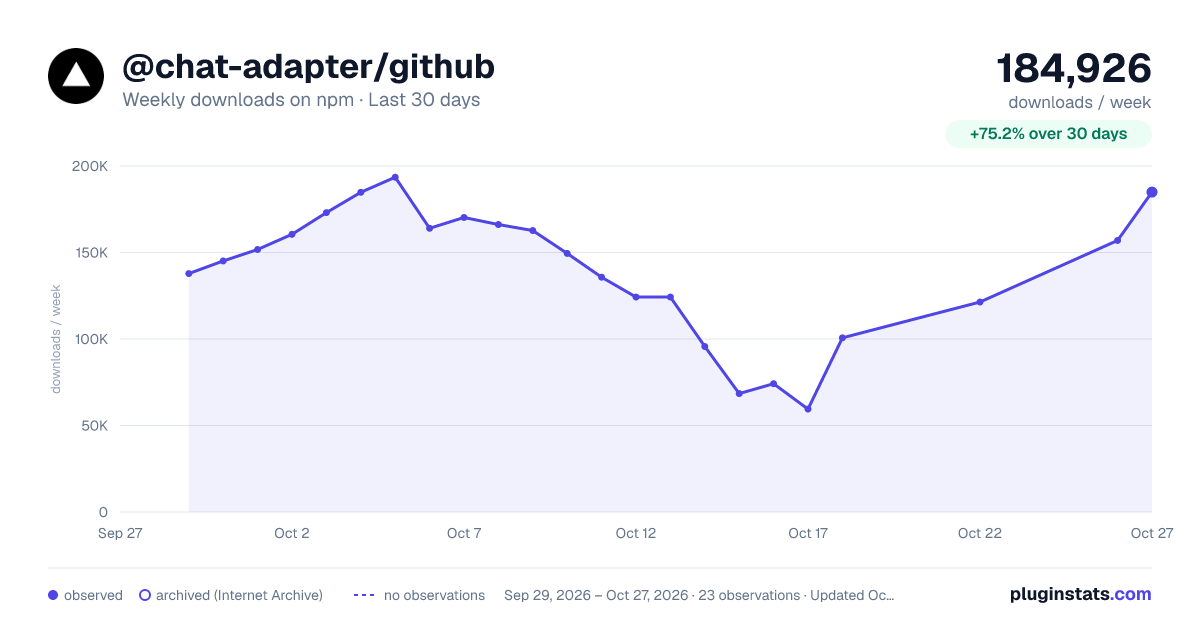
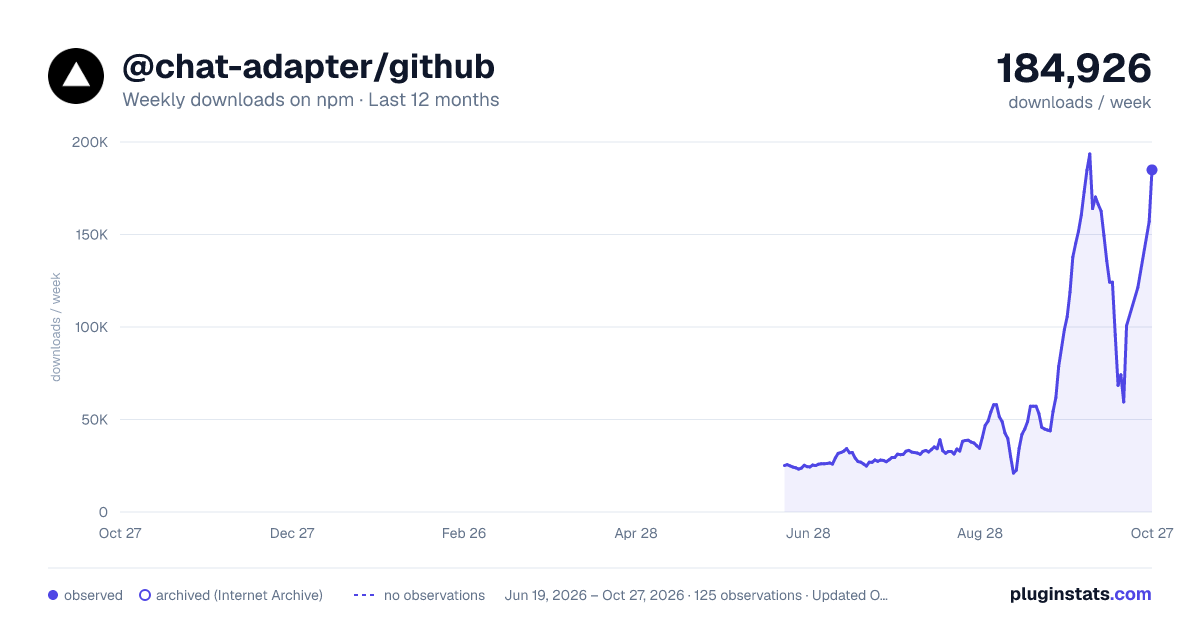
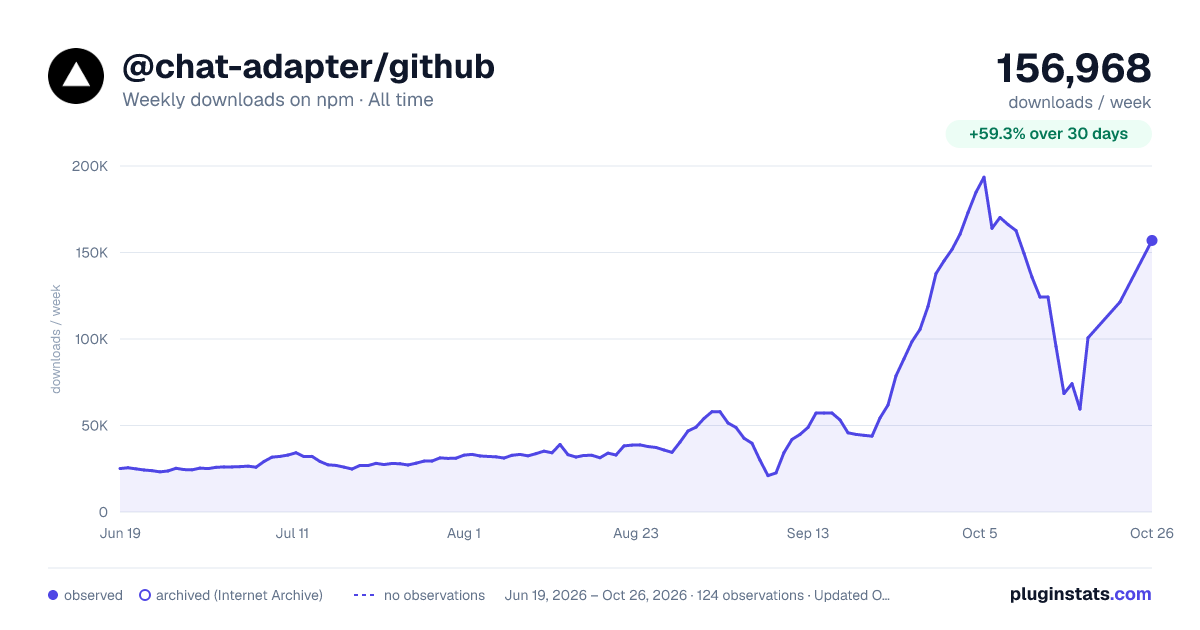

Adoption over time
7/30/90-day growth
Ranking history
Listing placement
Listing placement
Filled points are observed values; hollow points come from Internet Archive snapshots of the listing page. Dashed segments span periods with no observations — values between points are not interpolated.
Each band is one page of 20. Weekly downloads on a linear scale. Placement is projected from weekly downloads, so it can differ from the marketplace's own sort order. Hover a dot to see the listing.
Recent observations
Full history (121)Similar npm AI SDKs plugins
All 20 @chat-adapter/github alternativesData source
Weekly downloads (trailing 7 complete days) come from the official npm downloads API. Downloads include CI and mirrors and are not equivalent to installs or users. npm publishes no ratings.
Listing: https://www.npmjs.com/package/@chat-adapter/github. First seen Oct 16, 2026; last successful collection Oct 19, 2026. See the methodology.