 PluginStats
@chat-adapter/discord weekly downloads statistics
By chat-adapter (14 listings) · npm · AI SDKs
Discord adapter for Chat SDK — HTTP interactions, Gateway events, slash commands, and embeds
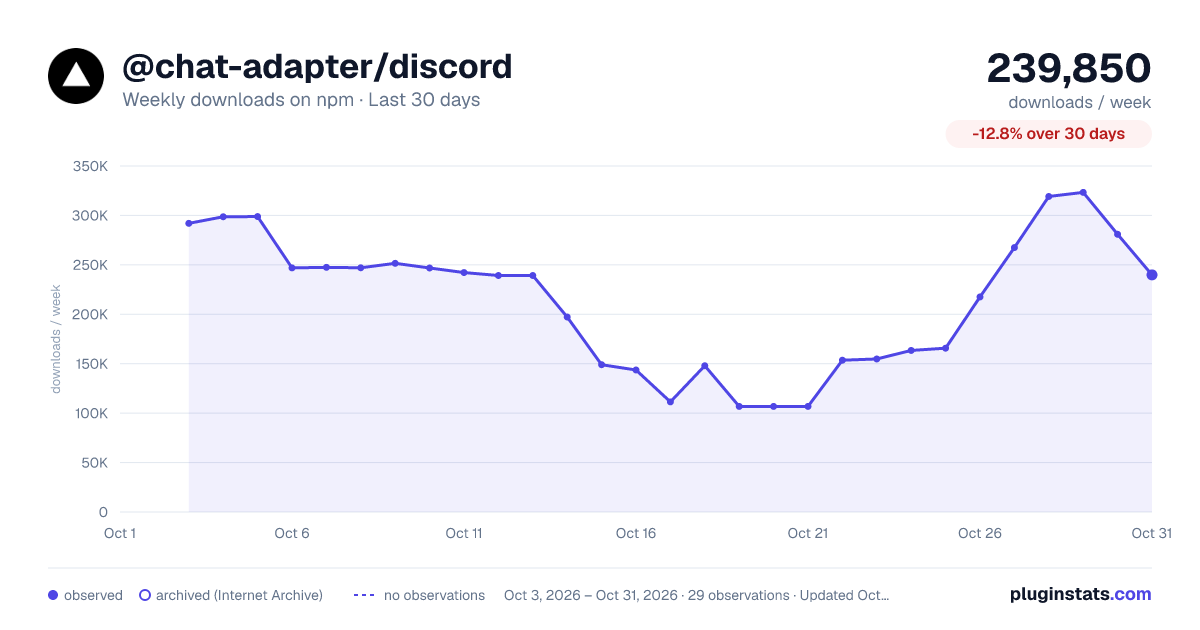
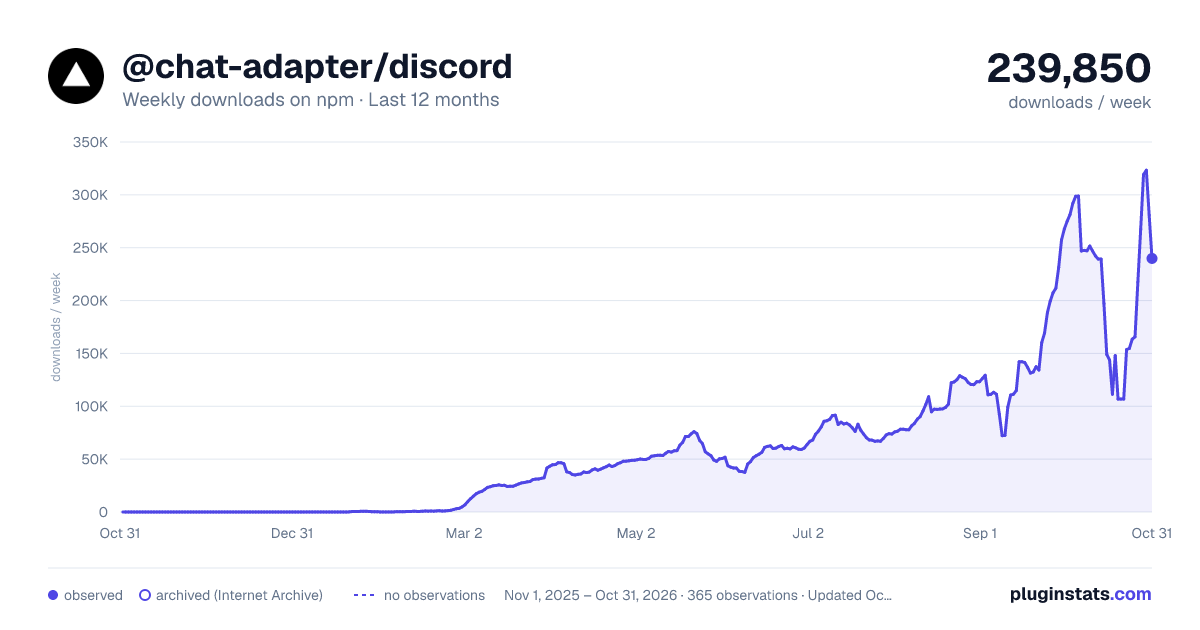
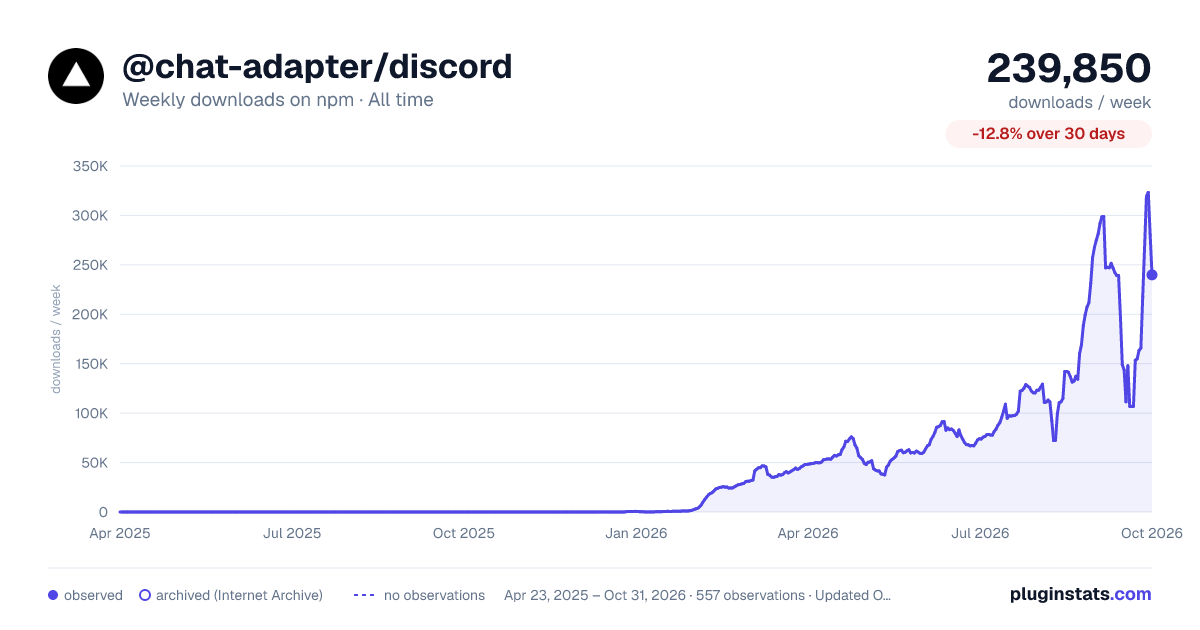
@chat-adapter/discord has 111,392 recorded weekly downloads on npm, a decrease of 18.6% over the past 30 days.
It ranks #440 of 2,251 tracked npm listings by weekly downloads.
Over 90 days, weekly downloads changed by +34.2%.
PluginStats has 543 daily observations since Apr 23, 2025; the latest is from Oct 17, 2026.
About @chat-adapter/discord
@chat-adapter/discord
npm package: @chat-adapter/discord
Discord adapter for Chat SDK. Configure with HTTP Interactions and Gateway WebSocket support.
Documentation: chat-sdk.dev/adapters/official/discord · Guides: vercel.com/kb/chat-sdk
Installation
Scaffold with the CLI
To scaffold a new Discord bot with this adapter preselected:
Visit the adapters directory to see other available official and vendor-official adapters.
Quick start
For managed credentials and webhook verification, see Vercel Connect.
The adapter auto-detects DISCORD_BOT_TOKEN, DISCORD_PUBLIC_KEY, DISCORD_APPLICATION_ID, and DISCORD_MENTION_ROLE_IDS from environment variables:
Configuration
All options are auto-detected from environment variables when not provided.
| Option | Required | Description |
| botToken | No* | Discord bot token or async resolver. Auto-detected from DISCORD_BOT_TOKEN | | publicKey | No* | Application public key. Auto-detected from DISCORD_PUBLIC_KEY | | applicationId | No* | Discord application ID or async resolver. Auto-detected from DISCORD_APPLICATION_ID | | webhookVerifier | No | Custom webhook verifier that replaces Discord's Ed25519 publicKey verification | | contentFormat | No | Render Chat SDK cards as DiscordContentFormat.Embeds or DiscordContentFormat.ComponentsV2. Defaults to DiscordContentFormat.Embeds | | mentionRoleIds | No | Array of role IDs that trigger mention handlers. Auto-detected from DISCORD_MENTION_ROLE_IDS (comma-separated) | | respondToChannelIds | No | Parent channel IDs whose non-bot messages, including messages in child threads, trigger mention handlers without an @mention. Top-level messages use the adapter's normal per-message Discord thread. Auto-detected from DISCORD_RESPOND_TO_CHANNEL_IDS (comma-separated). Defaults to [] | | respondToGlobalMentions | No | Treat @everyone/@here pings as mentions of the bot. Defaults to false | | interactionFlags | No | Function returning Discord interaction flags for the initial deferred slash command response | | apiUrl | No | Override the Discord API base URL. Auto-detected from DISCORD_API_URL | | logger | No | Logger instance (defaults to ConsoleLogger("info")) |
*botToken and applicationId are required via config or env vars. Provide either publicKey or webhookVerifier for inbound webhook verification.
Authentication
Option A — Vercel Connect
Use connectDiscordAdapter to resolve the bot token and application ID from a Vercel Connect Discord connector and verify trigger-forwarded interactions with Vercel OIDC:
No DISCORD_BOT_TOKEN, DISCORD_PUBLIC_KEY, or DISCORD_APPLICATION_ID is needed in this mode.
Regular messages and reactions still require a Gateway connection.
Option B — Discord app credentials
1. Create application
1. Go to the Discord Developer Portal 2. Click New Application and give it a name 3. Note the Application ID from the General Information page 4. Copy the Public Key from the General Information page
2. Create bot
1. Go to the Bot section in the left sidebar 2. Click Reset Token to generate a new bot token 3. Copy and save the token (you won't see it again) 4. Enable these Privileged Gateway Intents: • Message Content Intent • Server Members Intent (if needed)
3. Configure interactions endpoint
1. Go to General Information 2. Set Interactions Endpoint URL to https://your-domain.com/api/webhooks/discord 3. Discord sends a PING to verify the endpoint
4. Add bot to server
1. Go to OAuth2 then URL Generator 2. Select scopes: bot, applications.commands 3. Select bot permissions: Send Messages, Send Messages in Threads, Create Public Threads, Manage Threads, Read Message History, Add Reactions, Attach Files 4. Copy the generated URL and open it to invite the bot to your server
Architecture: HTTP Interactions vs Gateway
Discord has two ways to receive events:
HTTP Interactions (default): • Receives button clicks, slash commands, and verification pings • Works out of the box with serverless • Does not receive regular messages
Gateway WebSocket (required for messages): • Receives regular messages and reactions • Receives slash commands and button clicks when no Interactions Endpoint URL is configured • Requires a persistent connection • In serverless environments, use a cron job to maintain the connection
Discord sends interactions through either the Gateway or an Interactions Endpoint URL, not both. Use the HTTP endpoint for serverless apps. For resident gateway-only apps, leave the Interactions Endpoint URL unset and start the Gateway listener without webhookUrl so interactions are processed directly.
Gateway setup for serverless
1. Create Gateway route
2. Configure Vercel Cron
This runs every 9 minutes, ensuring overlap with the 10-minute listener duration.
3. Add environment variables
Add CRON_SECRET to your Vercel project settings.
Role mentions
By default, only direct user mentions (@BotName) trigger onNewMention handlers. To also trigger on role mentions (e.g., @AI):
1. Create a role in your Discord server (e.g., "AI") 2. Assign the role to your bot 3. Copy the role ID (right-click role in server settings with Developer Mode enabled) 4. Add to mentionRoleIds:
Or set DISCORD_MENTION_ROLE_IDS as a comma-separated string in your environment variables.
Interaction flags
Discord interactions return a transient "thinking..." message, which then gets replaced with your content. Because of Discord's API, your message's ephemerality must be set on this initial response, not later in an onSlashCommand handler.
Use the interactionFlags option to make the loading state and your custom response visible only to the user who invoked the command:
Later calls to event.channel.post() will share the same ephemeral message. Calls to event.channel.postEphemeral() will fallback to a private DM.
Components v2 cards
Discord cards render as embeds by default. To render Chat SDK cards with Discord Components v2 instead, set contentFormat:…
Description from the npm listing.
- chat
- chat-sdk
- chatbot
- discord
- discord-bot
- bot
- adapter
- slash-commands
- interactions
- messaging
- ai-agent
- ai-sdk
- vercel
Where @chat-adapter/discord sits in the listing
Each band is one page of 20. Weekly downloads on a log scale. Placement is projected from weekly downloads, so it can differ from the marketplace's own sort order. Hover a dot to see the listing.


Charts
Images: 30d · 1y · all time · 1600×900 dark

Adoption over time


7/30/90-day growth


Filled points are observed values; hollow points come from Internet Archive snapshots of the listing page. Dashed segments span periods with no observations — values between points are not interpolated.
Recent observations
Full history (543)Similar npm AI SDKs plugins
Data source
Weekly downloads (trailing 7 complete days) come from the official npm downloads API. Downloads include CI and mirrors and are not equivalent to installs or users. npm publishes no ratings.
Listing: https://www.npmjs.com/package/@chat-adapter/discord. First seen Oct 16, 2026; last successful collection Oct 18, 2026. See the methodology.