 PluginStats
@chat-adapter/whatsapp weekly downloads statistics
By chat-adapter (14 listings) · npm · AI SDKs
WhatsApp adapter for Chat SDK — Business Cloud API webhooks, interactive messages, and templates
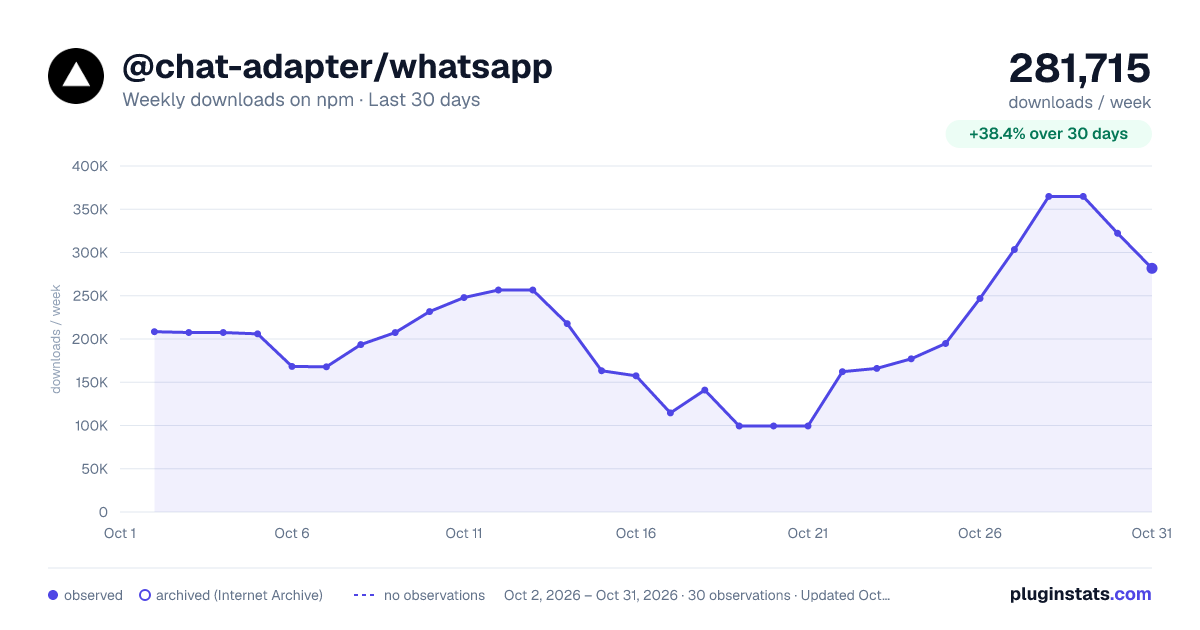
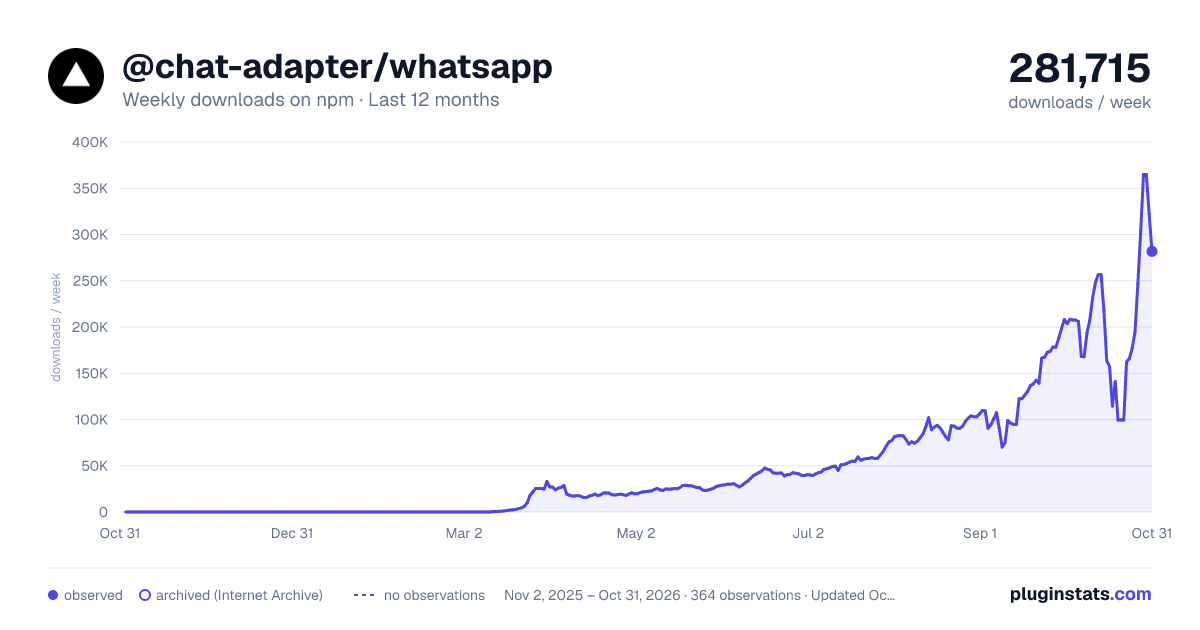
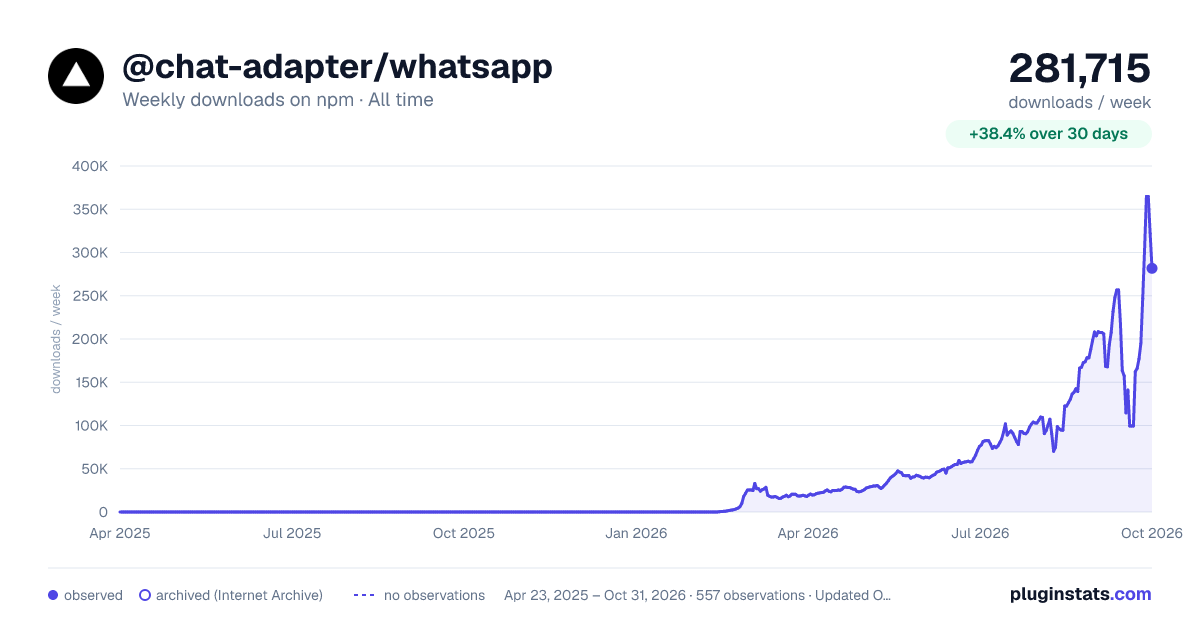
@chat-adapter/whatsapp has 114,546 recorded weekly downloads on npm, a decrease of 12.1% over the past 30 days.
It ranks #438 of 2,251 tracked npm listings by weekly downloads.
Over 90 days, weekly downloads changed by +92.3%.
PluginStats has 543 daily observations since Apr 23, 2025; the latest is from Oct 17, 2026.
About @chat-adapter/whatsapp
@chat-adapter/whatsapp
npm package: @chat-adapter/whatsapp
WhatsApp Business Cloud adapter for Chat SDK, using the WhatsApp Business Cloud API.
Documentation: chat-sdk.dev/adapters/official/whatsapp · Guides: vercel.com/kb/chat-sdk
Installation
Scaffold with the CLI
To scaffold a new WhatsApp bot with this adapter preselected:
Visit the adapters directory to see other available official and vendor-official adapters.
Usage
When using createWhatsAppAdapter() without arguments, credentials are auto-detected from environment variables.
WhatsApp Business setup
1. Create a Meta app
1. Go to developers.facebook.com/apps 2. Click Create App, select Business type 3. Add the WhatsApp product to your app 4. Go to WhatsApp > API Setup and note your Phone Number ID and Access Token
2. Configure webhooks
1. Go to WhatsApp > Configuration in your Meta app 2. Set Callback URL to https://your-domain.com/api/webhooks/whatsapp 3. Set Verify Token to a secret string of your choice (this becomes WHATSAPP_VERIFY_TOKEN) 4. Subscribe to the messages webhook field
3. Get credentials
From your Meta app dashboard, copy:
• App Secret (under App Settings > Basic) as WHATSAPP_APP_SECRET • Access Token (under WhatsApp > API Setup) as WHATSAPP_ACCESS_TOKEN • Phone Number ID (under WhatsApp > API Setup) as WHATSAPP_PHONE_NUMBER_ID
For production, generate a permanent System User Token instead of the temporary access token.
Inbound attachments
Incoming media attachments expose a lazy fetchData(). Media is downloaded only from Meta's fbcdn.net and fbsbx.com hosts or the configured Graph origin. Downloads refuse private and internal addresses, are limited to 25 MB, and time out after 30 seconds, and the access token never follows a redirect off those hosts. Pass a custom transport to downloadMedia() to route downloads through a proxy.
Configuration
All options are auto-detected from environment variables when not provided. You can call createWhatsAppAdapter() with no arguments if the env vars are set.
| Option | Required | Description |
| accessToken | No* | Meta access token. Auto-detected from WHATSAPP_ACCESS_TOKEN | | appSecret | No* | App secret for webhook verification. Auto-detected from WHATSAPP_APP_SECRET | | phoneNumberId | No* | Bot's phone number ID. Auto-detected from WHATSAPP_PHONE_NUMBER_ID | | verifyToken | No* | Webhook verification secret. Auto-detected from WHATSAPP_VERIFY_TOKEN | | apiVersion | No | Graph API version (defaults to v25.0) | | userName | No | Bot username for self-message detection. Auto-detected from WHATSAPP_BOT_USERNAME (defaults to whatsapp-bot) | | apiUrl | No | Override the Meta Graph API base URL. Auto-detected from WHATSAPP_API_URL | | logger | No | Logger instance (defaults to ConsoleLogger("info")) |
*Required at runtime — either via config or environment variable.
Environment variables
Webhook setup
WhatsApp uses two webhook mechanisms:
1. Verification handshake (GET) — Meta sends a hub.verify_token challenge that must match your WHATSAPP_VERIFY_TOKEN. 2. Event delivery (POST) — incoming messages, reactions, and interactive responses, verified via X-Hub-Signature-256.
Features
Messaging
| Feature | Supported |
| Post message | Yes | | Edit message | No (WhatsApp limitation) | | Delete message | No (WhatsApp limitation) | | Streaming | Buffered (accumulates then sends) | | Mark as read | Yes | | Auto-chunking | Yes (splits at 4096 chars) | | Template messages | Yes (via sendTemplate) |
Rich content
| Feature | Supported |
| Interactive buttons | Yes (up to 3) | | Link buttons | Partial (single link button becomes a native CTA URL message) | | Button title limit | 20 characters | | List messages | Yes | | Text fallback | Yes (for >3 buttons) |
Conversations
| Feature | Supported |
| Reactions | Yes (add and remove) | | Typing indicator | Yes (requires a recent inbound message, marks it as read, and displays for up to 25 seconds) | | DMs | Yes | | Open DM | Yes |
Typing indicators
WhatsApp supports typing indicators through thread.startTyping() or adapter.startTyping(threadId).
Use it when the bot is about to respond and may take a few seconds. The adapter uses the most recent inbound message ID from thread history, so startTyping() only works after the bot has received a message.
WhatsApp-specific behavior:
• If there is no inbound message context, startTyping() no-ops. • The typing indicator is dismissed when the bot sends its reply, or after the WhatsApp platform timeout.
Read receipts
Use thread.markAsRead() in a message handler to acknowledge the current inbound message:
You can also pass an inbound Message or its ID. WhatsApp marks that message and earlier messages in the conversation as read. It does not allow outgoing message IDs to be marked as read and recommends acknowledging inbound messages within 30 days.
Incoming message types
| Type | Supported |
| Text | Yes | | Images | Yes (with captions) | | Documents | Yes (with captions) | | Audio / Voice | Yes | | Video | Yes (with captions) | | Stickers | Yes | | Locations | Yes (converted to map URL) | | Interactive replies | Yes (button and list) | | Reactions | Yes |
Message history
| Feature | Supported |
| Fetch messages | No (Cloud API limitation) | | Fetch thread info | Yes |
Interactive messages
Card elements are automatically converted to WhatsApp interactive messages:
• 3 or fewer buttons — rendered as WhatsApp reply buttons (max 20 chars per title) • More than 3 buttons — falls back to formatted text • Max body text — 1024 characters
When a card with reply buttons also contains link buttons, each link button is appended to the interactive message body as a Label: url line, since WhatsApp reply buttons cannot open URLs.
Link buttons (CTA URL)
A card whose only interactive element is a single link button is sent as a native CTA URL message with a tappable link button. The card is promoted only when all of these hold:…
Description from the npm listing.
- chat
- chat-sdk
- chatbot
- whatsapp-business
- bot
- adapter
- messaging
- meta
- cloud-api
- ai-agent
- ai-sdk
- vercel
Where @chat-adapter/whatsapp sits in the listing
Each band is one page of 20. Weekly downloads on a log scale. Placement is projected from weekly downloads, so it can differ from the marketplace's own sort order. Hover a dot to see the listing.


Charts
Images: 30d · 1y · all time · 1600×900 dark

Adoption over time


7/30/90-day growth


Filled points are observed values; hollow points come from Internet Archive snapshots of the listing page. Dashed segments span periods with no observations — values between points are not interpolated.
Recent observations
Full history (543)Similar npm AI SDKs plugins
Data source
Weekly downloads (trailing 7 complete days) come from the official npm downloads API. Downloads include CI and mirrors and are not equivalent to installs or users. npm publishes no ratings.
Listing: https://www.npmjs.com/package/@chat-adapter/whatsapp. First seen Oct 16, 2026; last successful collection Oct 18, 2026. See the methodology.