 PluginStats
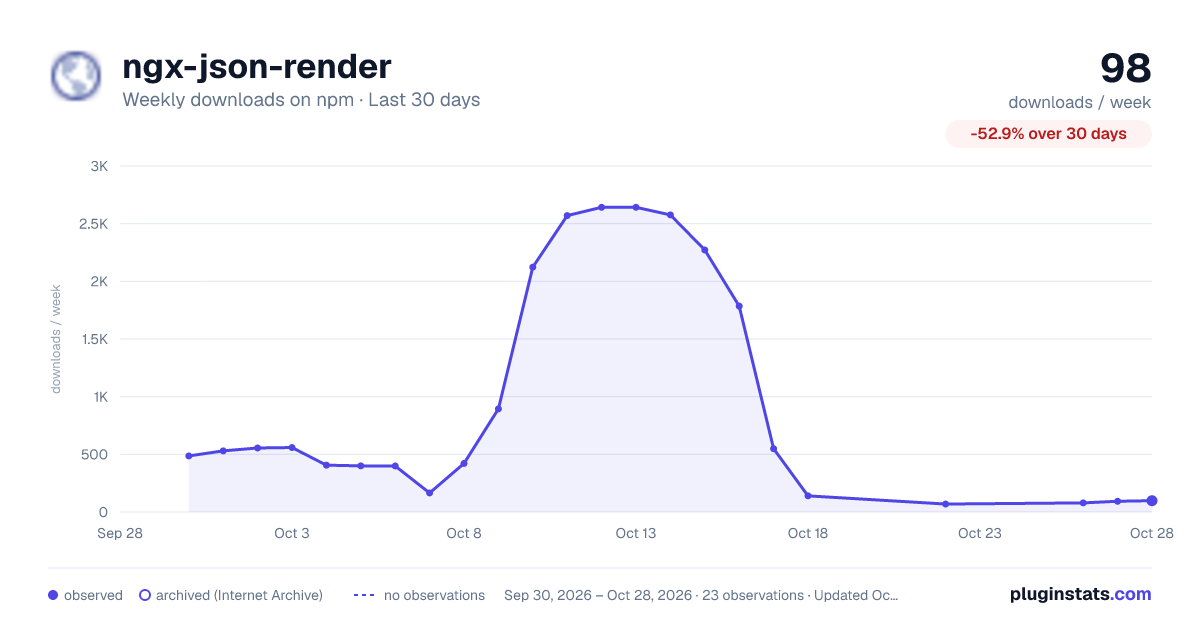
ngx-json-render has 549 recorded weekly downloads on npm, a decrease of 10.4% over the past 30 days.
It ranks #1485 of 2,251 tracked npm listings by weekly downloads.
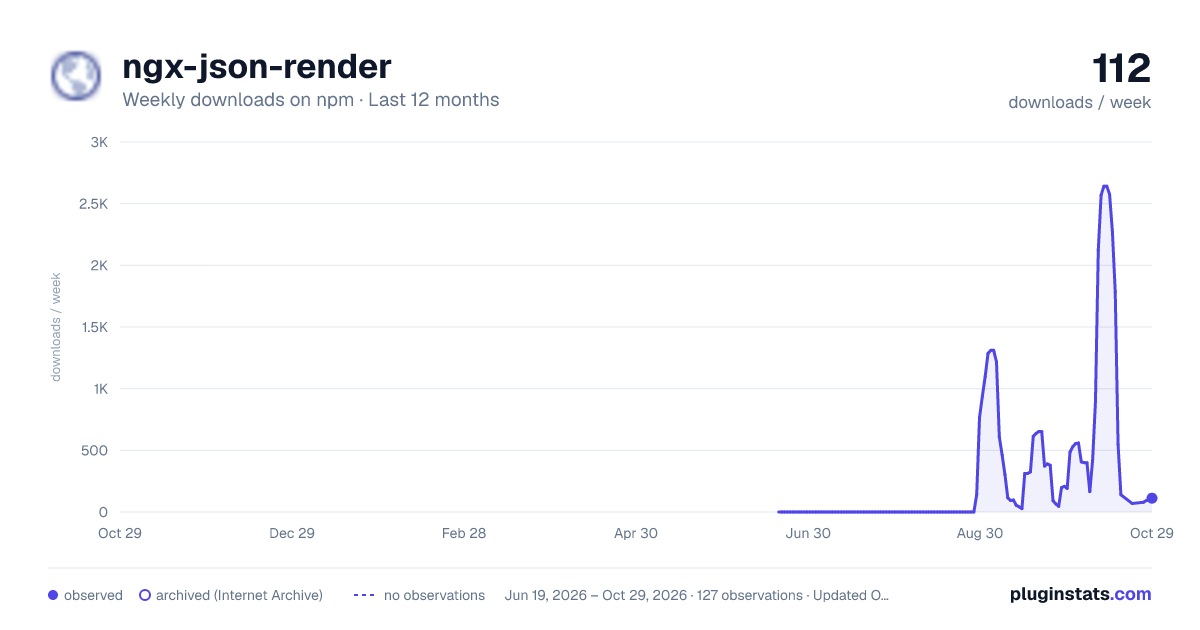
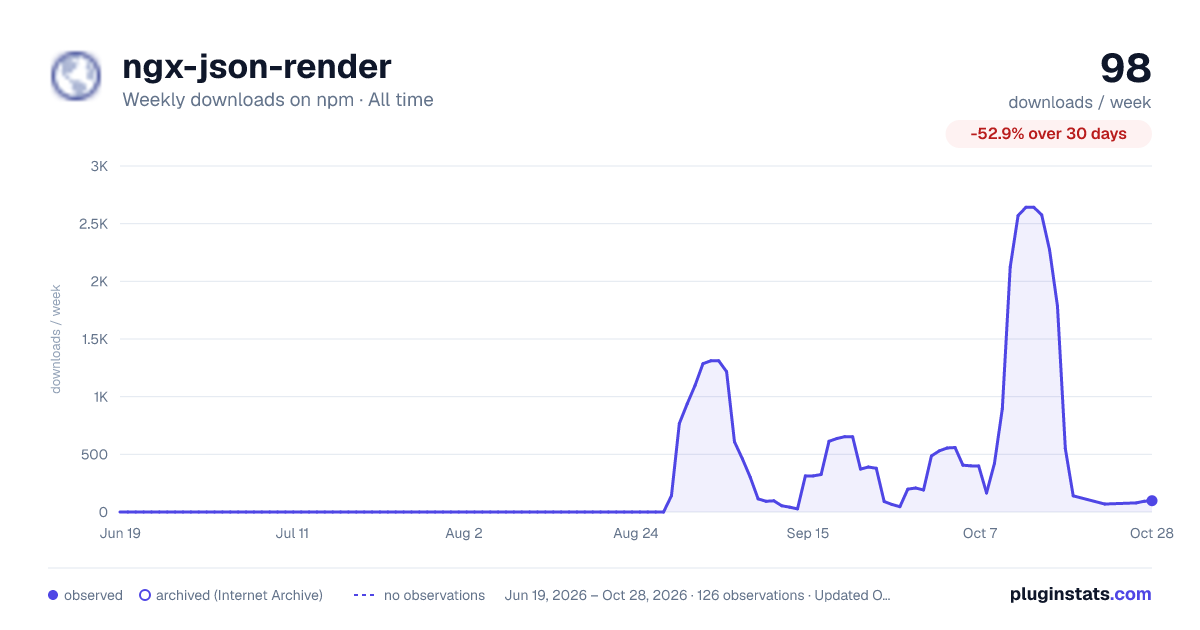
PluginStats has 121 daily observations since Jun 19, 2026; the latest is from Oct 17, 2026.
About ngx-json-render
ngx-json-render
Generative UI for Angular: a renderer for json-render. Give an LLM a catalog of your components, stream back a JSON spec, and render it as real Angular components. No innerHTML, no eval, no framework lock-in on the wire format.
Built on @json-render/core (the same spec format, expressions, state store, actions, and streaming compiler used by the React, Vue, Solid, and Svelte renderers) and idiomatic modern Angular: standalone components, signals, OnPush everywhere, and zoneless — no NgZone, no Zone.js.
This is an Angular adapter over the official core, not a second implementation of it — @json-render/core is a peer dependency, and the spec your model emits is the same one the React, Vue, Solid and Svelte renderers consume. A catalog and a spec written here move to another framework unchanged.
Works with: AG-UI agents, CopilotKit and LangGraph among them · MCP Apps in Claude, ChatGPT and VS Code · the Vercel AI SDK · Genkit · any endpoint that streams text. The AG-UI and AI SDK paths run against the real clients in CI.
Live demo — opens on a sales dashboard streaming in patch by patch, which you can stop mid-generation; plus a playground, an interactive spec (bindings, repeat, confirm, watch), and a chat where prose and UI patches arrive in one reply. Both streaming tabs replay a recording, or call a real model on your own key (source) — or
Install
ng add installs the package and adds its peers, @json-render/core and zod, at the ranges it admits. By hand, that is
Requires Angular ≥ 19. CI proves both ends of that range on every push: the library builds on Angular 19 (the floor), and its suite passes on 20 and on 22 (the current release) as well as on the 21 the workspace itself pins — Angular 19's CLI has no unit-test builder to run it with. What npm serves is checked too: the package built on 21 is installed into a fresh app on 19, 20 and 22, built with strict templates and driven in Chrome. On Angular 19 the ngx-json-render/testing harness uses 19's provideExperimentalZonelessChangeDetection by itself. The Material catalog, ngx-json-render-material, needs Angular ≥ 20. The same goes for @json-render/core: 0.20 and 0.21 are both admitted (>=0.20.0 .
The shortest path: a ready-made catalog
Writing a catalog is the honest first step, but you do not have to take it to see a spec render. ngx-json-render-material ships 33 Angular Material components already registered, so a generated spec renders with nothing else wired up:
Those are real Material components, so the app needs a Material theme and the icon font; ng add sets both up through Material's own ng add when the workspace has no Material yet (see the catalog's README for installing by hand).
materialCatalog.prompt() is the system prompt that teaches a model that vocabulary. Everything below is the other path — your own components, which is what the catalog API is for.
Quick start
1. Define a catalog — the vocabulary the model (or your server) is allowed to use:
2. Implement catalog components — plain Angular components that read the render context:
InferComponentProps reads a component's props type off its Zod schema in the catalog, so the component and the catalog cannot drift apart; a hand-written type such as injectRenderContext() works too. One mismatch to know: a .default() field comes out required, but the renderer passes props as the spec wrote them and applies no Zod defaults, so keep such a field optional or fall back in the template.
renders the element's children where you place it — like a router-outlet for the spec tree. Use for named slots.
3. Build the registry and render:
Defaults for the whole app
A chat renders a spec in every message, and binding the same registry and handlers on each one gets old. provideJsonRender sets them once:
Every option input can be provided: registry, fallback, validate, renderLimits, catalog, handlers, onAction, navigate, validationFunctions, functions and directives. Per-instance inputs (spec, loading, state, store) cannot. The rules:
• An input bound on the element wins over the provided value. One left null or undefined falls through to it. • handlers, functions, validationFunctions and directives merge by name instead, the element's entry winning a name both define. A chat can provide app-wide handlers and still add one for a single message. • Everything else replaces. A registry belongs to its catalog, so two are never mixed behind your back; to combine them, spread them yourself ({ ...registry, ...extraRegistry }). • It works in application, route and component providers. A provider below another extends it by the same rules.
With no registry bound and none provided, the renderer throws, naming both ways to supply one.
Streaming a UI from an LLM
Specs stream as JSONL patch lines (RFC 6902). Render partial specs as they arrive — the renderer tolerates missing elements while loading is true:
Placeholders while props stream
An element can arrive before its props do: a Card with no title yet, a Text with no content. By default the component mounts anyway and renders what it has. Pass the catalog and the renderer waits instead: while loading is true, an element whose props do not pass its component's schema shows its registry entry's fallback, or nothing, and the component mounts once they do.
• The fallback gets the same render context as the component: it can read the props that have arrived, and a in it lays out the children that have. • Props are checked as the spec writes them. { "$state": "/title" } counts as arrived, whatever it resolves to. • Once an element's component has mounted it stays, even if a later patch takes a prop away again. • When loading turns false every element mounts, valid or not; reporting what is wrong with the finished spec is validate's job. • Without a catalog, or for a type the catalog has no props schema for, nothing is held back.
The server side…
Description from the npm listing.
- angular
- json-render
- generative-ui
- genui
- ai
- renderer
- signals
- server-driven-ui
- sdui
- dynamic-components
- angular-library
- ngx
- llm
- ai-ui
- streaming
- json-patch
- chat-ui
- mcp
- mcp-apps
- ag-ui
Where ngx-json-render sits in the listing
Each band is one page of 20. Weekly downloads on a log scale. Placement is projected from weekly downloads, so it can differ from the marketplace's own sort order. Hover a dot to see the listing.


Charts
Images: 30d · 1y · all time · 1600×900 dark

Adoption over time


7/30/90-day growth


Filled points are observed values; hollow points come from Internet Archive snapshots of the listing page. Dashed segments span periods with no observations — values between points are not interpolated.
Recent observations
Full history (121)Similar npm AI SDKs plugins
Data source
Weekly downloads (trailing 7 complete days) come from the official npm downloads API. Downloads include CI and mirrors and are not equivalent to installs or users. npm publishes no ratings.
Listing: https://www.npmjs.com/package/ngx-json-render. First seen Oct 16, 2026; last successful collection Oct 18, 2026. See the methodology.