 PluginStats
@ai-sdk-tools/agents weekly downloads statistics
By ai-sdk-tools (5 listings) · npm · AI SDKs
Multi-agent orchestration system built on AI SDK v5 - handoffs, routing, and coordination for any AI provider
@ai-sdk-tools/agents has 4,283 recorded weekly downloads on npm, a decrease of 49.3% over the past 30 days.
It ranks #1132 of 2,251 tracked npm listings by weekly downloads.
Over 90 days, weekly downloads changed by -9.4%.
PluginStats has 121 daily observations since Jun 19, 2026; the latest is from Oct 17, 2026.
About @ai-sdk-tools/agents
@ai-sdk-tools/agents
Multi-agent orchestration for AI SDK v5. Build intelligent workflows with specialized agents, automatic handoffs, and seamless coordination. Works with any AI provider.
Why Multi-Agent Systems?
Complex tasks benefit from specialized expertise. Instead of a single model handling everything, break work into focused agents:
Customer Support: Triage → Technical Support → Billing Content Pipeline: Research → Writing → Editing → Publishing Code Development: Planning → Implementation → Testing → Documentation Data Analysis: Collection → Processing → Visualization → Insights
Benefits
• Specialization - Each agent focuses on its domain with optimized instructions and tools • Context Preservation - Full conversation history maintained across handoffs • Provider Flexibility - Use different models for different tasks (GPT-4 for analysis, Claude for writing) • Programmatic Routing - Pattern matching and automatic agent selection • Production Ready - Built on AI SDK v5 with streaming, error handling, and observability
When to Use Agents
Use multi-agent systems when: • Tasks require distinct expertise (technical vs. creative vs. analytical) • Workflow has clear stages that could be handled independently • Different models excel at different parts of the task • You need better control over specialized behavior
Use single model when: • Task is straightforward and can be handled by general instructions • No clear separation of concerns • Response time is critical (multi-agent adds orchestration overhead)
Core Concepts
Agent
An AI with specialized instructions, tools, and optional context. Each agent is configured with a language model and system prompt tailored to its role.
Memory & Conversation History
Agents automatically load conversation history from storage when memory is enabled. This creates a clean separation of concerns: • Frontend: Sends only the new user message • Backend: Loads conversation history from storage • Storage: Single source of truth for all conversations
This approach: • Reduces network payload (no need to send full history) • Provides consistent context across requests • Enables server-side control of context window size via lastMessages config • Integrates seamlessly with @ai-sdk-tools/memory providers
Handoffs
Agents can transfer control to other agents while preserving conversation context. Handoffs include the reason for transfer and any relevant context.
Enhanced Context Management: The system now supports OpenAI-style context filtering during handoffs, allowing you to control exactly what information is passed between agents using HandoffInputFilter functions.
Orchestration
Automatic routing between agents based on: • Programmatic matching: Pattern-based routing with matchOn • LLM-based routing: The orchestrator agent decides which specialist to invoke • Hybrid: Combine both for optimal performance
Enhanced Features (v0.3.0+)
Context Management & Handoff Filtering
The package now includes OpenAI-style context management with AgentRunContext and HandoffInputFilter support:
Agent Communication During Handoffs
Agents automatically share context through conversationMessages during handoffs. No separate tools needed.
Working Memory
Working memory automatically loads and provides update capability when enabled:
When enabled: • Working memory loads automatically into system instructions • Agent gets updateWorkingMemory tool to update preferences/context • Updates persist in storage via the memory provider
Pre-built Handoff Filters
• removeAllTools() - Remove all tool-related messages • keepLastNMessages(n) - Keep only the last N messages for context windowing
Quick Start
Basic: Single Agent
Handoffs: Two Specialists
Orchestration: Auto-Routing
Use programmatic routing for instant agent selection without LLM overhead:
Advanced Patterns
Streaming with UI
For Next.js route handlers and real-time UI updates:
Tools and Context
Context-Aware Agents
Use typed context for team/user-specific behavior:
Custom Routing Function
Multi-Provider Setup
Use the best model for each task:
Guardrails
Control agent behavior with input/output validation:
Tool Permissions
Control which tools agents can access:
Complex Multi-Agent Example
Here's a real-world example: determining if a user can afford a Tesla Model Y by combining web research and financial analysis:
API Reference
Agent Class
Constructor Options: • name: string - Unique agent identifier • model: LanguageModel - AI SDK language model • instructions: string | ((context: TContext) => string) - System prompt • tools?: Record - Available tools • handoffs?: Agent[] - Agents this agent can hand off to • maxTurns?: number - Maximum tool call iterations (default: 10) • temperature?: number - Model temperature • matchOn?: (string | RegExp)[] | ((message: string) => boolean) - Routing patterns • onEvent?: (event: AgentEvent) => void - Lifecycle event handler • inputGuardrails?: InputGuardrail[] - Pre-execution validation • outputGuardrails?: OutputGuardrail[] - Post-execution validation • permissions?: ToolPermissions - Tool access control
Methods:
Utility Functions
Handoff Filters
Context Management
Event Types
Integration with Other Packages
With @ai-sdk-tools/cache
Cache expensive tool calls across agents:
With @ai-sdk-tools/artifacts
Stream structured artifacts from agents:
With @ai-sdk-tools/devtools
Debug agent execution in development:
Examples
Real-world implementations in /apps/example/src/ai/agents/:
• Triage Agent - Route customer questions to specialists • Financial Agent - Multi-step analysis with artifacts • Code Review - Analyze → Test → Document workflow • Multi-Provider - Use different models for different tasks
Contributing
Contributions are welcome! See the contributing guide for details.
License
MIT
Description from the npm listing.
- ai
- ai-sdk
- agents
- multi-agent
- orchestration
- handoff
- routing
- llm
- openai
- anthropic
- claude
Where @ai-sdk-tools/agents sits in the listing
Each band is one page of 20. Weekly downloads on a log scale. Placement is projected from weekly downloads, so it can differ from the marketplace's own sort order. Hover a dot to see the listing.


Charts
Images: 30d · 1y · all time · 1600×900 dark
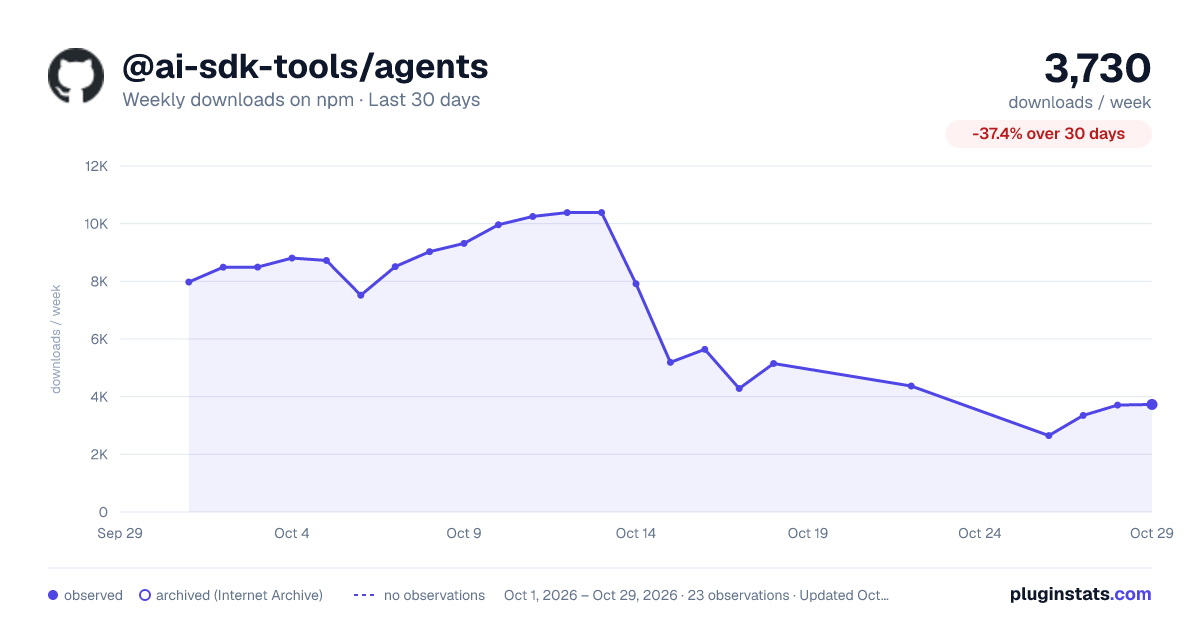
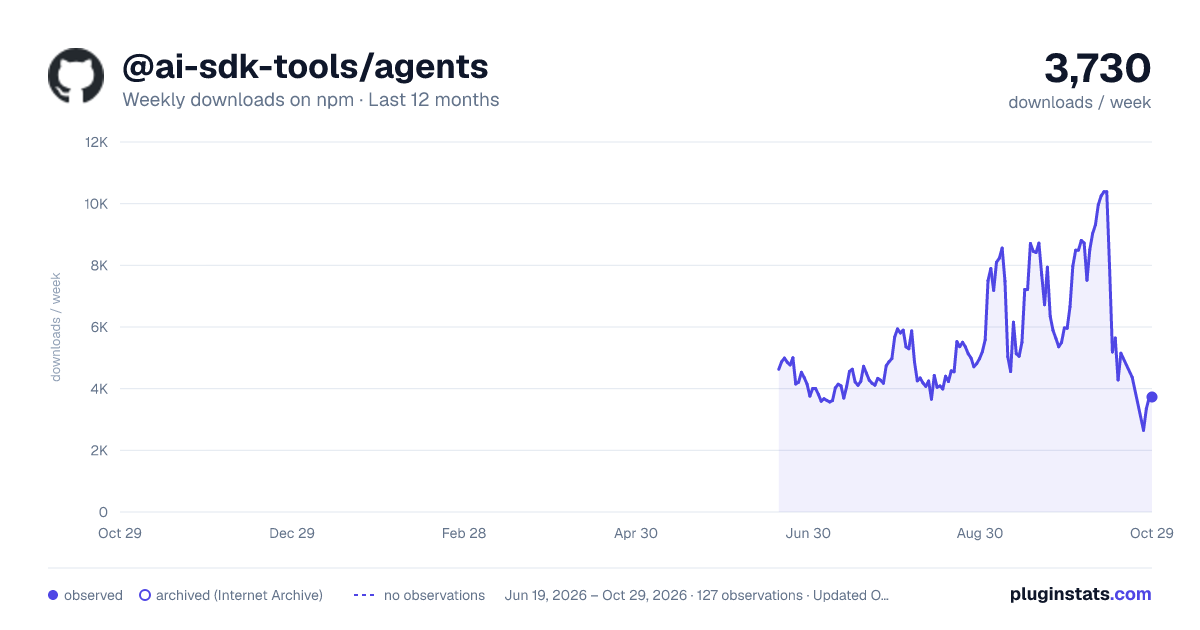
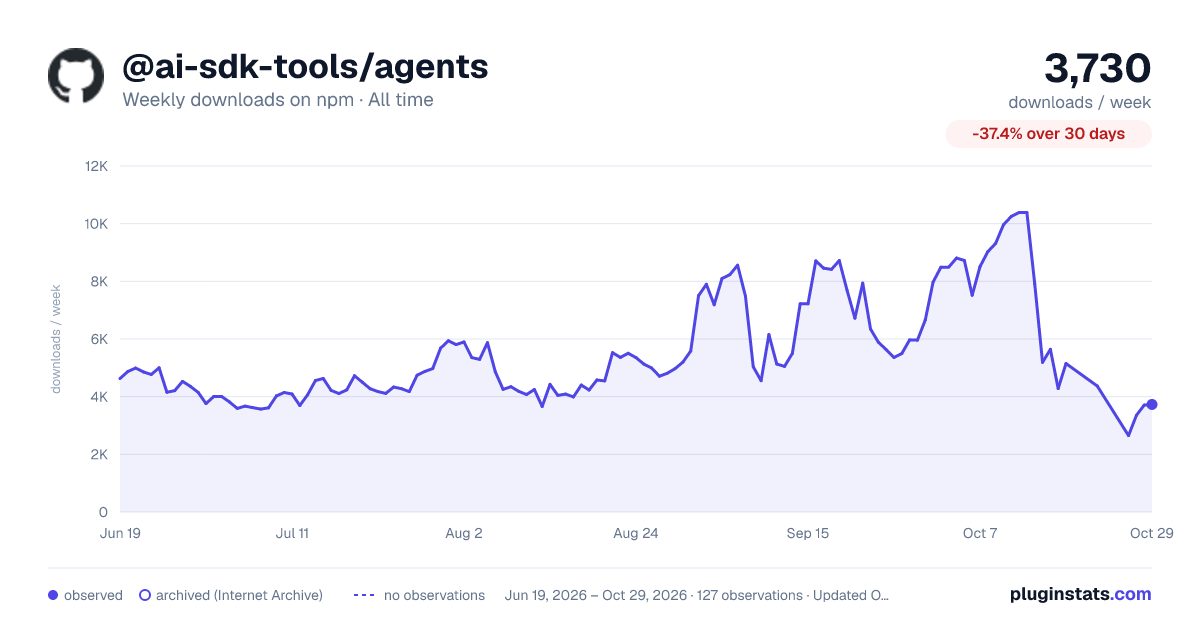

Adoption over time


7/30/90-day growth


Filled points are observed values; hollow points come from Internet Archive snapshots of the listing page. Dashed segments span periods with no observations — values between points are not interpolated.
Recent observations
Full history (121)Similar npm AI SDKs plugins
Data source
Weekly downloads (trailing 7 complete days) come from the official npm downloads API. Downloads include CI and mirrors and are not equivalent to installs or users. npm publishes no ratings.
Listing: https://www.npmjs.com/package/@ai-sdk-tools/agents. First seen Oct 16, 2026; last successful collection Oct 18, 2026. See the methodology.