 PluginStats
@chat-adapter/teams weekly downloads statistics
By chat-adapter (14 listings) · npm · AI SDKs
Microsoft Teams adapter for Chat SDK — Bot Framework webhooks, Adaptive Cards, and Graph API
@chat-adapter/teams has 207,601 recorded weekly downloads on npm, an increase of 50.5% over the past 30 days, ranking #384 of 2,322 tracked listings.
About @chat-adapter/teams
@chat-adapter/teams
npm package:
@chat-adapter/teams


Microsoft Teams adapter for Chat SDK.
Documentation: chat-sdk.dev/adapters/official/teams · Guides: vercel.com/kb/chat-sdk
Installation
pnpm add @chat-adapter/teams
Scaffold with the CLI
To scaffold a new Microsoft Teams bot with this adapter preselected:
npx create-chat-sdk@latest my-bot --adapter teams memory
Visit the adapters directory to see other available official and vendor-official adapters.
Quick start
For managed credentials and webhook verification, see Vercel Connect.
The adapter auto-detects TEAMS_APP_ID, TEAMS_APP_PASSWORD, and TEAMS_APP_TENANT_ID from environment variables:
import { Chat } from "chat";
import { createTeamsAdapter } from "@chat-adapter/teams";

const bot = new Chat({
  userName: "mybot",
  adapters: {
    teams: createTeamsAdapter({
      appType: "SingleTenant",
    }),
  },
});

bot.onNewMention(async (thread, message) => {
  await thread.post("Hello from Teams!");
});
Configuration
All options are auto-detected from environment variables when not provided. Internally, the adapter maps these options to the Teams SDK (@microsoft/teams.apps).
| Option | Required | Description |
|---|---|---|
appId | No* | Azure Bot App ID or sync/async resolver. Auto-detected from TEAMS_APP_ID |
appPassword | No** | Azure Bot App Password. Auto-detected from TEAMS_APP_PASSWORD |
federated | No** | Federated (workload identity) authentication config |
token | No** | Custom (scope, tenantId?) token factory for Bot Framework and Microsoft Graph |
webhookVerifier | No | Custom raw-body verifier that replaces Microsoft JWT verification |
appType | No | "MultiTenant" or "SingleTenant" (default: "MultiTenant") |
appTenantId | For SingleTenant | Azure AD Tenant ID. Auto-detected from TEAMS_APP_TENANT_ID |
userName | No | Bot display name (default: "bot") |
apiUrl | No | Override the Teams API base URL (e.g. for GCC-High or sovereign-cloud deployments). Auto-detected from TEAMS_API_URL |
logger | No | Logger instance (defaults to ConsoleLogger("info")) |
*appId is required — either via config or TEAMS_APP_ID env var.
**One authentication method is required: appPassword, federated, or token. token takes precedence over federated, which takes precedence over appPassword.
Authentication
Use Vercel Connect to manage the bot identity and tokens, or configure Microsoft app credentials directly.
Option A — Vercel Connect
Use Vercel Connect to resolve the bot's app ID and request short-lived tokens for Bot Framework and Microsoft Graph:
import { createTeamsAdapter } from "@chat-adapter/teams";
import { connectTeamsAdapter } from "@vercel/connect/chat";

const teams = createTeamsAdapter({
  ...connectTeamsAdapter("microsoft-teams/acme-teams"),
});
The helper resolves appId during initialization and supplies a scope-aware token callback. It also verifies Connect-forwarded webhooks with Vercel OIDC instead of Microsoft's native JWT. Enable trigger forwarding to /api/webhooks/teams and omit TEAMS_APP_ID and TEAMS_APP_PASSWORD when using the helper.
The callback requests separate tokens for https://api.botframework.com/.default and https://graph.microsoft.com/.default. Graph reads still require the appropriate installation and consent permissions; Connect uses the bot's home tenant for managed tokens.
An appId resolver runs once during successful initialization. Call await bot.initialize() before using adapter methods directly; Chat initializes automatically before handling webhooks. botUserId becomes available after initialization when using a resolver.
A custom webhookVerifier receives the incoming request and its raw body. Return a truthy value to accept, or return a falsy value or throw to reject with HTTP 401. Without a verifier, the adapter retains Microsoft's native JWT verification.
Option B — Microsoft app credentials
The Teams CLI handles AAD app registration, client secret generation, bot registration, and Teams channel setup in one command.
npm install -g @microsoft/teams.cli
1. Create the app
teams login
teams status          # verify auth + sideloading permissions
teams app create --name "My Bot" --endpoint "https://your-domain.com/api/webhooks/teams" --env .env
[!TIP] For local development, use a tunnel (e.g. devtunnel, ngrok) to expose your local server.
Credentials (CLIENT_ID, CLIENT_SECRET, TENANT_ID) are written to .env. Rename them to match the adapter:
TEAMS_APP_ID=<CLIENT_ID>
TEAMS_APP_PASSWORD=<CLIENT_SECRET>
TEAMS_APP_TENANT_ID=<TENANT_ID>
2. Install in Teams
Get a direct install link:
teams app get <appId> --install-link
Or download the app package for sideloading:
teams app package download <appId> -o my-bot.zip
Then in Teams: Apps > Manage your apps > Upload an app > Upload a custom app.
3. Verify…
Description from the npm listing.
- chat
- chat-sdk
- chatbot
- teams
- microsoft-teams
- microsoft
- bot
- adapter
- bot-framework
- messaging
- ai-agent
- ai-sdk
- vercel
README badge
Show your rank in a README or on your website. The badge updates automatically.
Charts
Images: 30d · 1y · all time · 1600×900 dark
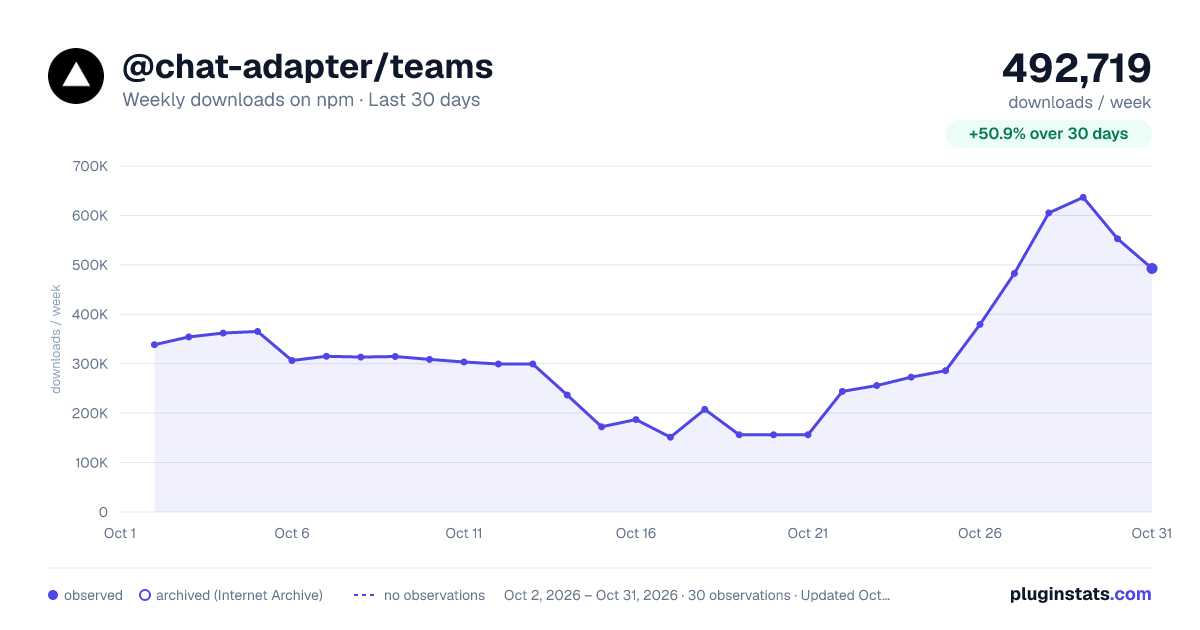
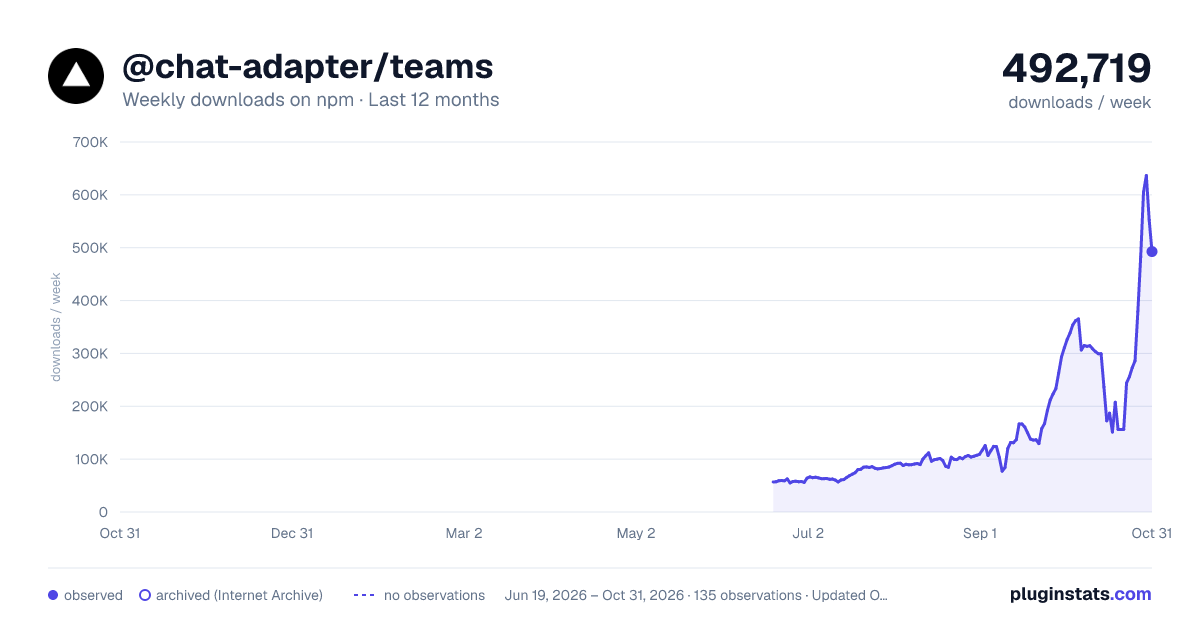
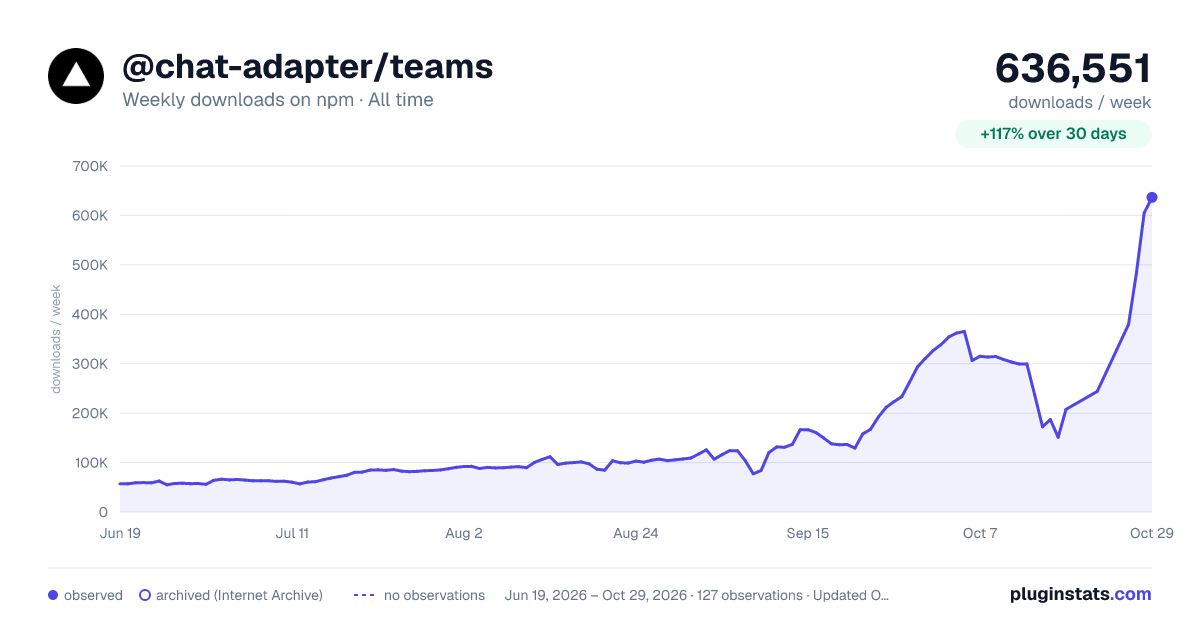

Adoption over time
7/30/90-day growth
Ranking history
Listing placement
Listing placement
Filled points are observed values; hollow points come from Internet Archive snapshots of the listing page. Dashed segments span periods with no observations — values between points are not interpolated.
Each band is one page of 20. Weekly downloads on a linear scale. Placement is projected from weekly downloads, so it can differ from the marketplace's own sort order. Hover a dot to see the listing.
Recent observations
Full history (122)Similar npm AI SDKs plugins
All 20 @chat-adapter/teams alternativesData source
Weekly downloads (trailing 7 complete days) come from the official npm downloads API. Downloads include CI and mirrors and are not equivalent to installs or users. npm publishes no ratings.
Listing: https://www.npmjs.com/package/@chat-adapter/teams. First seen Oct 16, 2026; last successful collection Oct 20, 2026. See the methodology.