 PluginStats
bashkit has 608 recorded weekly downloads on npm, a decrease of 51.9% over the past 30 days.
It ranks #1471 of 2,251 tracked npm listings by weekly downloads.
Over 90 days, weekly downloads changed by +527%.
PluginStats has 121 daily observations since Jun 19, 2026; the latest is from Oct 17, 2026.
About bashkit
bashkit
Agentic coding tools for Vercel AI SDK. Give AI agents the ability to execute code, read/write files, and perform coding tasks in a sandboxed environment.
Overview
bashkit provides a set of tools that work with the Vercel AI SDK to enable agentic coding capabilities. It gives AI models like Claude the ability to:
• Execute bash commands in a persistent shell • Read files and list directories • Create and write files • Edit existing files with string replacement • Search for files by pattern • Search file contents with regex • Spawn sub-agents for complex tasks • Track task progress with todos • Search the web and fetch URLs • Load skills on-demand via the Agent Skills standard
Breaking Changes in v0.4.0
Nullable Types for OpenAI Compatibility
All optional tool parameters now use .nullable() instead of .optional() in Zod schemas. This change enables compatibility with OpenAI's structured outputs, which require all properties to be in the required array.
What changed: • Tool input types changed from T | undefined to T | null • Exported interfaces (QuestionOption, StructuredQuestion) use T | null • AI models will send explicit null values instead of omitting properties
Migration:
Why this matters: • Works with both OpenAI and Anthropic models • OpenAI structured outputs require nullable (not optional) fields • Anthropic/Claude handles nullable fields correctly • The ?? operator handles both null and undefined, so runtime behavior is unchanged
Installation
For web tools, also install:
Quick Start
With Filesystem Access (Desktop Apps, Local Scripts, Servers)
When you have direct filesystem access, use LocalSandbox:
Without Filesystem Access (Web/Serverless Environments)
When you're in a web or serverless environment without filesystem access, use VercelSandbox or E2BSandbox:
Available Tools
Default Tools (always included)
| Tool | Purpose | Key Inputs |
| Bash | Execute shell commands | command, timeout?, description? | | Read | Read files or list directories | file_path, offset?, limit? | | Write | Create/overwrite files | file_path, content | | Edit | Replace strings in files | file_path, old_string, new_string, replace_all? | | Glob | Find files by pattern | pattern, path? | | Grep | Search file contents | pattern, path?, output_mode?, -i?, -C? |
Optional Tools (via config)
| Tool | Purpose | Config Key |
| AskUser | Ask user clarifying questions | askUser: true | | EnterPlanMode | Enter planning/exploration mode | planMode: true | | ExitPlanMode | Exit planning mode with a plan | planMode: true | | Skill | Execute skills | skill: { skills } | | WebSearch | Search the web | webSearch: { apiKey } | | WebFetch | Fetch URL and process with AI | webFetch: { apiKey, model } |
Workflow Tools (created separately)
| Tool | Purpose | Factory |
| Task | Spawn sub-agents | createTaskTool({ model, tools, subagentTypes? }) | | TodoWrite | Track task progress | createTodoWriteTool(state, config?, onUpdate?) |
Web Tools (require parallel-web peer dependency)
| Tool | Purpose | Factory |
| WebSearch | Search the web | createWebSearchTool({ apiKey }) | | WebFetch | Fetch URL and process with AI | createWebFetchTool({ apiKey, model }) |
Sandbox Types
LocalSandbox
Runs commands directly on your filesystem. Use when you have filesystem access (desktop apps, local scripts, servers you control).
VercelSandbox
Runs in isolated Firecracker microVMs on Vercel's infrastructure. Use when you don't have filesystem access (web apps, serverless functions, browser environments).
E2BSandbox
Runs in E2B's cloud sandboxes. Requires @e2b/code-interpreter peer dependency. Use when you don't have filesystem access and need E2B's features.
Configuration
You can configure tools with security restrictions and limits, and enable optional tools:
Configuration Options
Global Config
• defaultTimeout (number): Default timeout for all tools in milliseconds • workingDirectory (string): Default working directory for the sandbox
Per-Tool Config
• timeout (number): Tool-specific timeout • maxFileSize (number): Maximum file size in bytes (Write) • maxOutputLength (number): Maximum output length (Bash) • allowedPaths (string[]): Restrict file operations to specific paths • blockedCommands (string[]): Block commands containing these strings (Bash)
AI SDK Tool Options (v6+)
All tools support AI SDK v6 tool options:
• needsApproval (boolean | function): Require user approval before tool execution • strict (boolean): Enable strict schema validation • providerOptions (object): Provider-specific tool options
Sub-agents with Task Tool
The Task tool spawns new agents for complex subtasks:
The parent agent calls Task like any other tool:
Dynamic Agents
You can create custom agents on the fly by passing system_prompt and/or tools directly, without predefined subagent types:
This is useful when: • The parent agent needs to create specialized agents based on context • You want agents to delegate with custom instructions • Predefined subagent types don't fit the task
Streaming Sub-agent Activity to UI
Pass a streamWriter to stream real-time sub-agent activity to the UI:
When streamWriter is provided: • Uses streamText internally (instead of generateText) • Emits data-subagent events to the UI stream: • start - Sub-agent begins work • tool-call - Each tool the sub-agent uses (with args) • done - Sub-agent finished • complete - Full messages array for UI access
These appear in message.parts on the client as { type: "data-subagent", data: SubagentEventData }.
Important: The TaskOutput returned to the lead agent does NOT include messages (to avoid context bloat). The UI accesses the full conversation via the streamed complete event.
Context Management
Conversation Compaction
Automatically summarize conversations when they exceed token limits:
Context Status Monitoring
Monitor context usage and inject guidance to prevent agents from rushing:
Tool Result Caching…
Description from the npm listing.
- ai
- agent
- vercel
- ai-sdk
- sandbox
- tools
- bash
- code-execution
Where bashkit sits in the listing
Each band is one page of 20. Weekly downloads on a log scale. Placement is projected from weekly downloads, so it can differ from the marketplace's own sort order. Hover a dot to see the listing.


Charts
Images: 30d · 1y · all time · 1600×900 dark
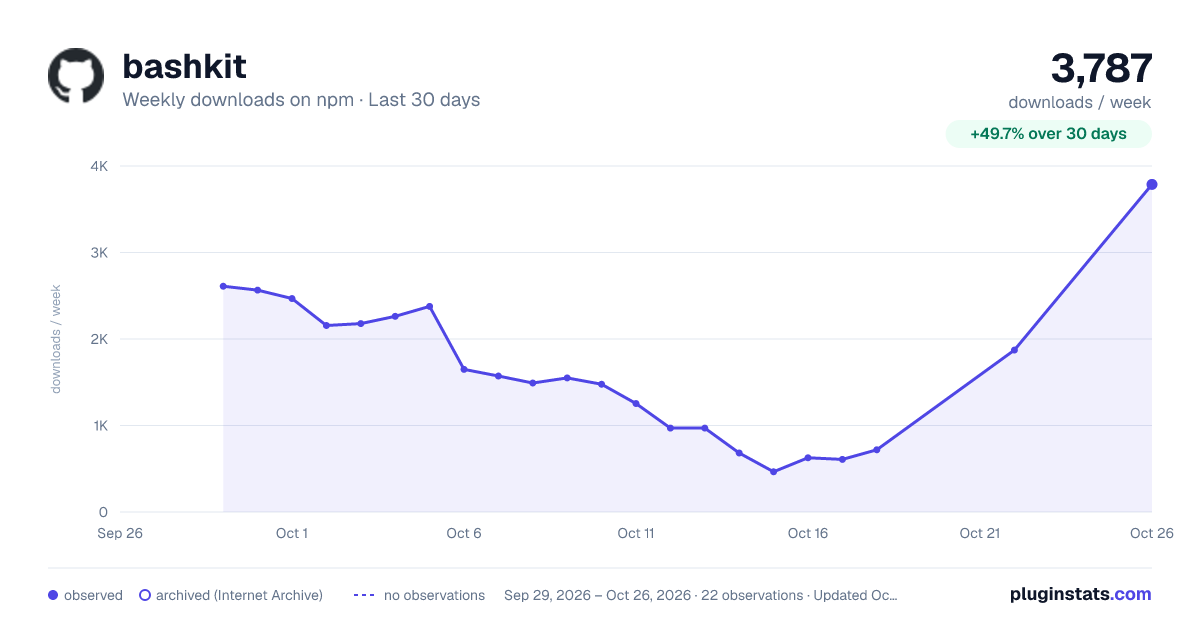
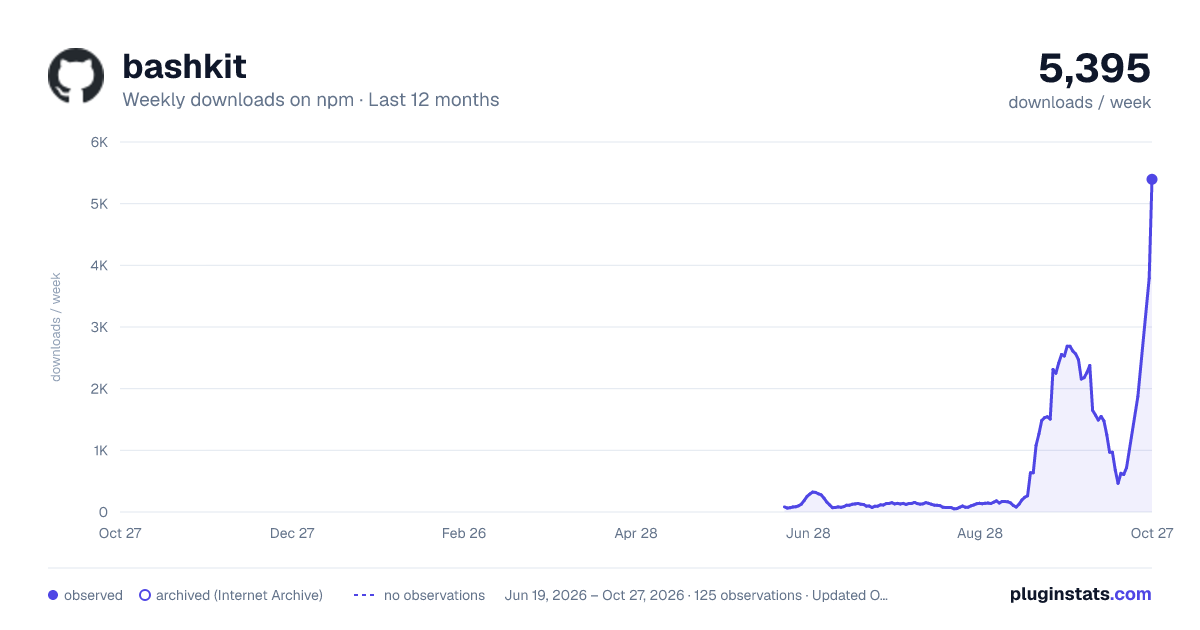
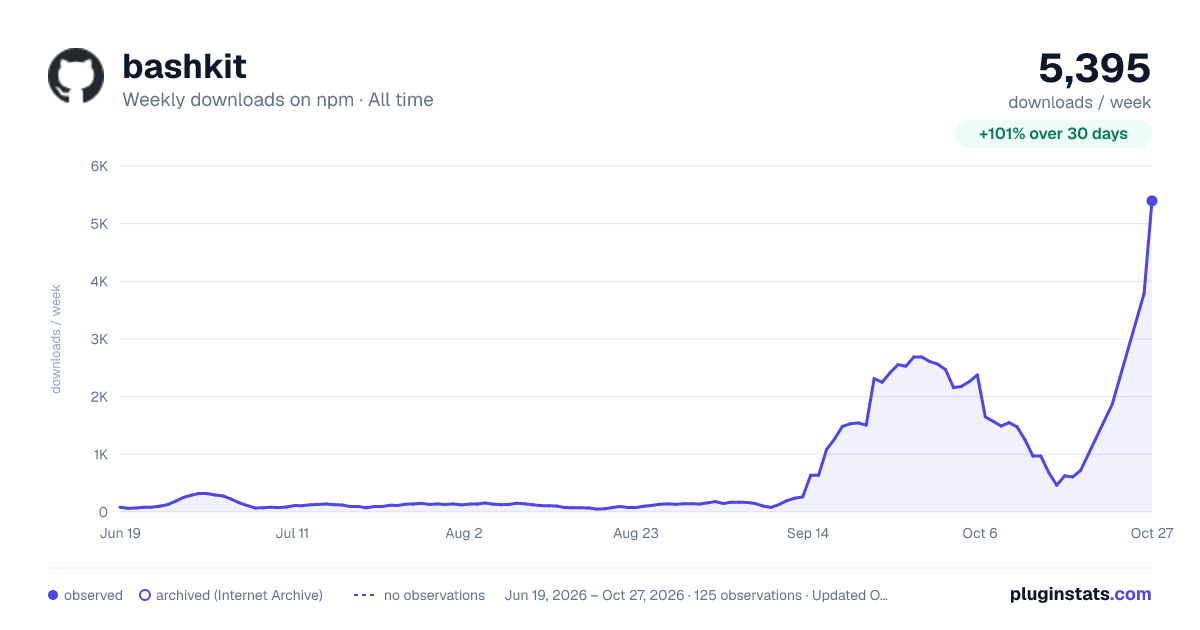

Adoption over time


7/30/90-day growth


Filled points are observed values; hollow points come from Internet Archive snapshots of the listing page. Dashed segments span periods with no observations — values between points are not interpolated.
Recent observations
Full history (121)Similar npm AI SDKs plugins
Data source
Weekly downloads (trailing 7 complete days) come from the official npm downloads API. Downloads include CI and mirrors and are not equivalent to installs or users. npm publishes no ratings.
Listing: https://www.npmjs.com/package/bashkit. First seen Oct 16, 2026; last successful collection Oct 18, 2026. See the methodology.