 PluginStats
apple-notes-mcp weekly downloads statistics
By sweetrb · npm · Claude Code
MCP server for Apple Notes - read, search, create, edit, organize, and export notes on macOS via Claude and other AI assistants
apple-notes-mcp has 1,371 recorded weekly downloads on npm, a decrease of 79.4% over the past 30 days, ranking #1343 of 2,256 tracked listings.
About apple-notes-mcp
Apple Notes MCP Server
A Model Context Protocol (MCP) server that lets Claude (Claude Code and Claude Desktop), Codex, and other MCP clients read, search, create, edit, organize, and export notes in Apple Notes on macOS. It runs locally on your Mac and talks to Notes through AppleScript, Apple Shortcuts, and read-only access to the Notes database.
Beyond creating and editing notes, it manages folders and accounts, native tags, checklists, tables, pinned notes, links, and attachments. It can also export notes as Markdown (through templates you can edit in a local web editor), HTML (with classic drawings as SVG), or JSON, read audio transcripts and drawings, link to single paragraphs with anchors that survive edits, and run a query language across your whole library.
Contents
• What is This? · Setup on your Mac · Requirements · Features • Tool Reference: notes, folders, accounts, batch, export, attachments, and media, diagnostics, native background operations, private helper • Usage Patterns · Installation choices and upgrades · Server settings · Full Disk Access · Public native helper · Permission broker • Security and Privacy · Known Limitations · Troubleshooting · Recurring macOS permission prompts · Development
What is This?
This server acts as a bridge between AI assistants and Apple Notes. Once configured, you can ask Claude (or any MCP-compatible AI) to:
• "Save this conversation as a note called 'Meeting Summary'" • "Find all my notes about the project deadline" • "Read my shopping list note" • "Move my draft notes to the Archive folder" • "What notes do I have in my Work folder?"
The AI assistant communicates with this server, which then uses AppleScript to interact with the Notes app on your Mac. Some features also use packaged Apple Shortcuts (native tags, checklists, tables, pinning) or read the Notes database read-only (queries, checklist state, transcripts). Notes operations and speech recognition run locally. If you explicitly enable downloadAssets: true, the public helper may download speech models; what your MCP client does with tool results is up to that client.
Setup on your Mac
Apple Notes MCP runs on the Mac that holds your Notes library. Your assistant starts a local MCP server over stdio, and the server uses AppleScript, signed Apple Shortcuts, and read-only database access. Choose one client setup below, then complete the macOS permissions and optional feature setup you need.
Version boundary: these instructions describe v2.15.1, including the optional permission broker. Normal client registration starts an in-process server unless a matching broker is already installed and answering. Broker installation is a separate opt-in step.
Manual client entries, setup commands, and the source checkout below select v2.15.1. Run setup from the same release as the server your client actually launches. The Claude Code plugin bundles its server; the Codex plugin manifest launches an unpinned npm package even when its marketplace is pinned. For reproducible Codex setup, use the manual registration below instead of the plugin. When upgrading, update the selected version consistently in the client and setup commands.
Run each setup target separately and use the exact options shown. Version 2.15.1 does not reject all unknown or mixed setup flags; a misspelled target can fall through to Shortcut setup and open import windows.
Requirements
• macOS with Notes.app and at least one configured Notes account. Features depend on the installed macOS version and account type; inspect get-capabilities before relying on optional features. • Node.js 20 or newer. The npx examples also need npm, normally included with Node.js. • A client that can launch a local stdio MCP server on this Mac. The configurations below cover Claude Code, Claude Desktop, Codex, Hermes, and Antigravity. • Automation permission to control Notes.app for AppleScript operations. Database-backed operations also need Full Disk Access for the process macOS holds responsible for the server. • Apple Shortcuts for native writes such as native tags, checklists, tables, pinning, and rich append. The optional native Markdown creation route needs macOS 26 or newer and an iCloud account. • An Apple developer toolchain only if you choose to build an optional native helper or permissions window. The public helper needs a current Swift toolchain and macOS SDK that expose the macOS 26 speech APIs; older SDK compatibility is unverified.
Python is not an Apple Notes MCP runtime dependency. The package includes its compiled JavaScript server and signed Shortcut files. Python is used by developer scripts that regenerate those workflows, not by normal installation or MCP tool calls.
You do not need an Apple ID password, API key, or NotesCTL installation to configure this server. A client's own login and tool-approval policy are separate from macOS privacy permissions.
- Choose one client registration
Use either a plugin or a manual MCP entry for the same client. Registering both can load duplicate servers or leave you using a different package version than expected. Adding a client entry does not grant macOS permissions or import Shortcuts.
Claude Code
For the plugin, run these commands inside a Claude Code session:
The plugin bundles the server and the Apple Notes skill. For a manual MCP registration instead, run this in your terminal:
Check the connection with /mcp in Claude Code. claude mcp get apple-notes inspects the manually registered server. Project-scoped .mcp.json entries require workspace/server approval and can override a user-scoped entry.
Claude Desktop
Open Settings → Developer → Edit Config. Merge the following server entry into ~/Library/Application Support/Claude/claude_desktop_config.json, preserving any existing servers:…
Description from the npm listing.
- mcp
- apple-notes
- claude
- codex
- ai
- applescript
- macos
- notes
- model-context-protocol
- mcp-server
- apple
- notes-app
- claude-code
- claude-desktop
- shortcuts
- markdown
- note-taking
- icloud
README badge
Show your rank in a README or on your website. The badge updates automatically.
Charts
Images: 30d · 1y · all time · 1600×900 dark
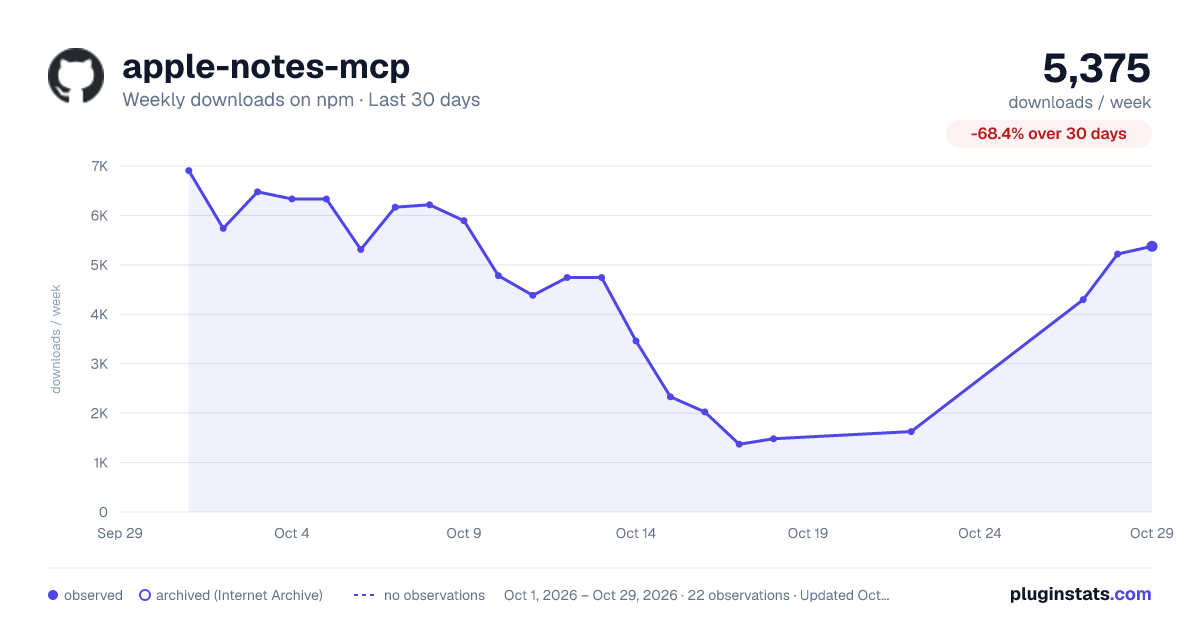
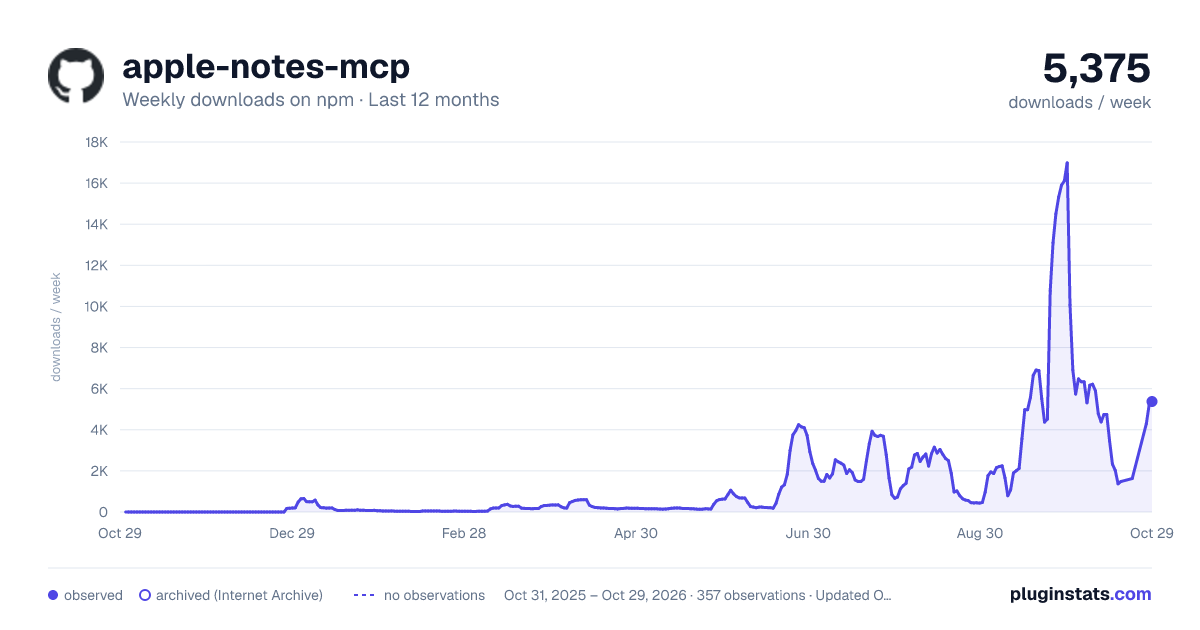
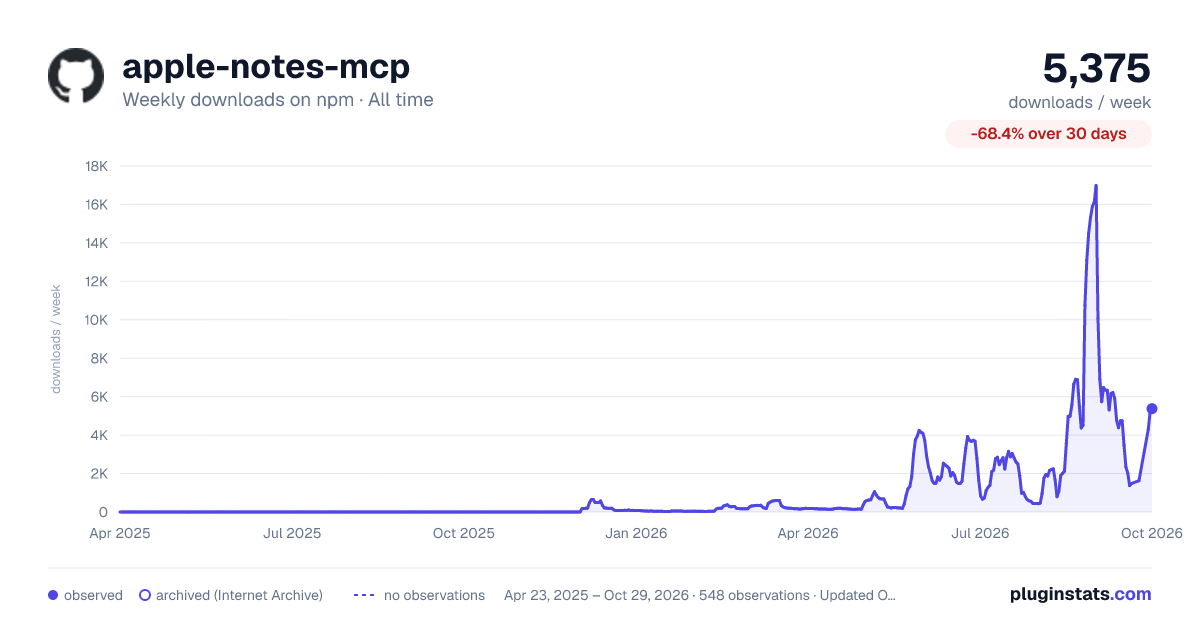

Adoption over time
7/30/90-day growth
Ranking history
Listing placement
Listing placement
Filled points are observed values; hollow points come from Internet Archive snapshots of the listing page. Dashed segments span periods with no observations — values between points are not interpolated.
Each band is one page of 20. Weekly downloads on a linear scale. Placement is projected from weekly downloads, so it can differ from the marketplace's own sort order. Hover a dot to see the listing.
Recent observations
Full history (543)Similar npm Claude Code plugins
All 20 apple-notes-mcp alternativesData source
Weekly downloads (trailing 7 complete days) come from the official npm downloads API. Downloads include CI and mirrors and are not equivalent to installs or users. npm publishes no ratings.
Listing: https://www.npmjs.com/package/apple-notes-mcp. First seen Oct 16, 2026; last successful collection Oct 19, 2026. See the methodology.