 PluginStats
@codemieai/code weekly downloads statistics
By codemieai · npm · Claude Code
Unified AI coding assistant CLI - Manage Claude Code, Gemini & custom agents. Multi-provider support (OpenAI, Azure, LiteLLM, SSO). Built-in LangGraph agent with file operations & git integration.
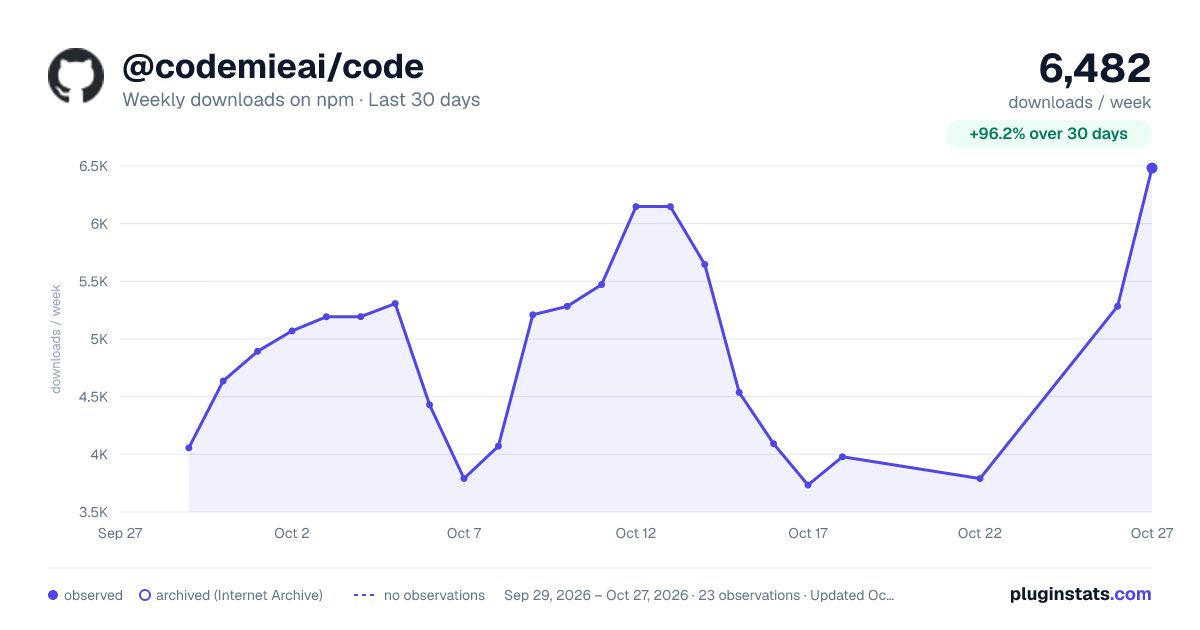
@codemieai/code has 3,734 recorded weekly downloads on npm, an increase of 19.7% over the past 30 days.
It ranks #1156 of 2,256 tracked npm listings by weekly downloads.
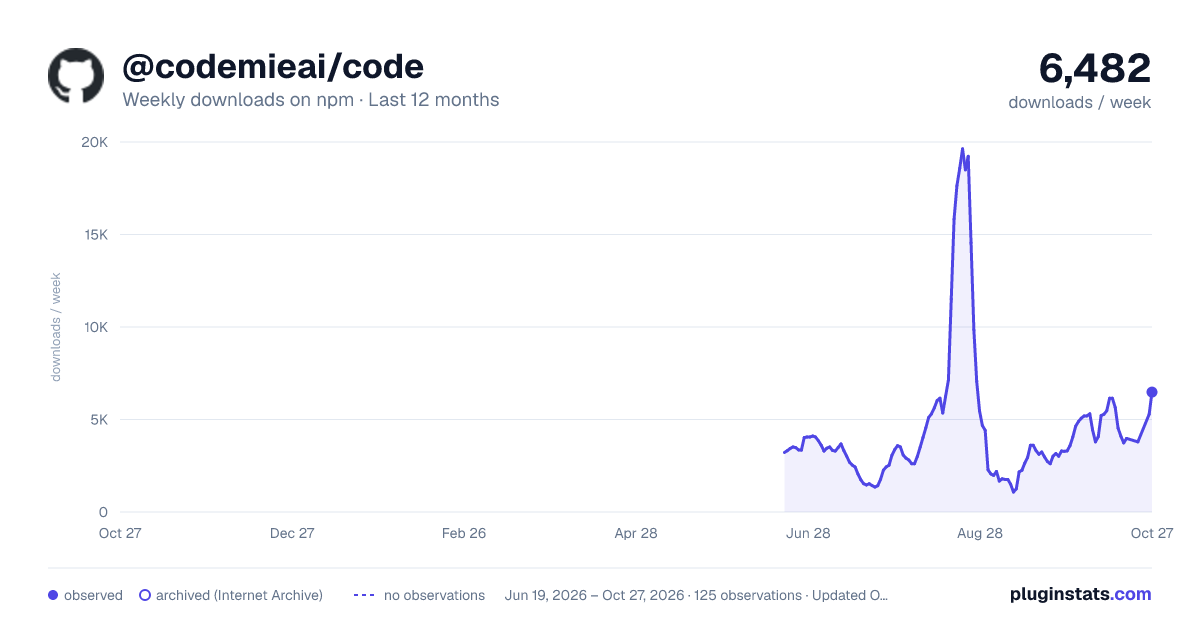
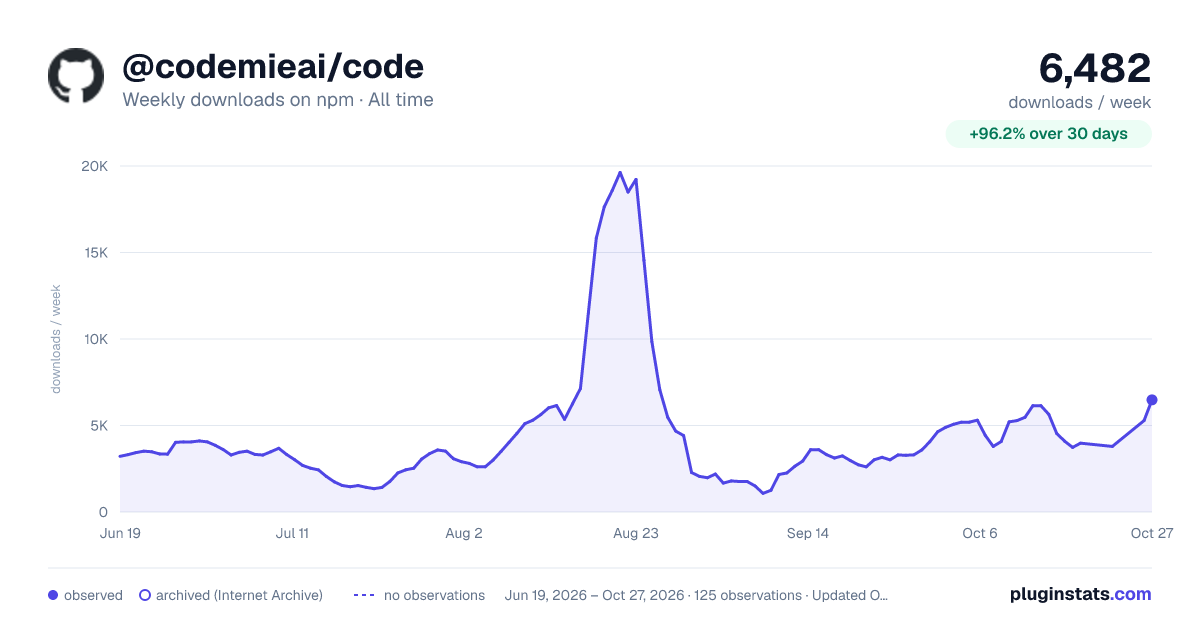
Over 90 days, weekly downloads changed by +144%.
PluginStats has 121 daily observations since Jun 19, 2026; the latest is from Oct 17, 2026.
About @codemieai/code
AI/Run CodeMie CLI
Unified AI Coding Assistant CLI - Manage Claude Code, OpenAI Codex, GitHub Copilot CLI, Google Gemini, OpenCode, Pi, Kimi Code, and custom AI agents from one powerful command-line interface. Multi-provider support (CodeMie SSO, Bearer Auth, LiteLLM, AWS Bedrock, Ollama, Anthropic Subscription, Moonshot Subscription). Built-in native agent with file operations, command execution, planning mode, and plugins. Cross-platform support for Windows, Linux, and macOS.
Why CodeMie CLI?
CodeMie CLI is the all-in-one AI coding assistant for developers.
• ✨ One CLI, Multiple AI Agents - Switch between Claude Code, OpenAI Codex, GitHub Copilot CLI, Gemini, OpenCode, Pi, Kimi Code, and built-in agent. • 🔄 Multi-Provider Support - CodeMie SSO, Bearer Authorization, LiteLLM, AWS Bedrock, Ollama, Anthropic Subscription, and Moonshot Subscription. • 🚀 Built-in Agent - codemie-code ships with the CLI: file operations, command execution, planning mode, and native plugins. • 🖥️ Cross-Platform - Full support for Windows, Linux, and macOS with platform-specific optimizations. • 🔗 MCP Proxy - Connect to remote MCP servers with automatic OAuth authorization. • 🔐 Enterprise Ready - SSO and JWT authentication, audit logging, and role-based access. • ⚡ Productivity Boost - Code review, refactoring, test generation, and bug fixing. • 🎯 Profile Management - Manage work, personal, and team configurations separately. • 🧩 CodeMie Assistants in Claude - Connect your available CodeMie assistants as Claude subagents or skills. • 🛠️ CodeMie Platform Skills - Install CodeMie platform skills directly as Claude Code slash commands with auto-sync. • 📊 Usage Analytics - Track and analyze AI usage across all agents with detailed insights. • 🔧 CI/CD Workflows - Automated code review, fixes, and feature implementation.
Perfect for developers seeking a powerful alternative to GitHub Copilot or Cursor.
Quick Start
Install CodeMie using the instructions for your shell, then run:
Prefer not to install globally? Use npx with the full package name:
Installation
System Requirements
Before installing, verify the following:
| Requirement | Details |
| Node.js | >=20.0.0 | | npm | Required for the npm fallback and local/project installation methods; ships with Node.js | | Operating System | Windows, macOS, Linux, or WSL | | Network access | Access to registry.npmjs.org (or an enterprise npm mirror that exposes the @codemieai scope) and to GitHub Releases (github.com, objects.githubusercontent.com) — some native dependencies (e.g. keytar) fetch prebuilt binaries from there via prebuild-install | | npm permissions | A user-writable global npm prefix is recommended for npm install -g; when global npm is not writable, the bootstrap installers configure a user-local prefix automatically |
Confirm the installed Node.js version with node --version before proceeding. Agent shortcuts (codemie-claude, codemie-codex, codemie-opencode, codemie-pi, codemie-kimi, etc.) additionally require a global installation — see Local/Project npm Installation.
Native Bootstrap Installers
For Windows and macOS, CodeMie ships two installer options:
• CodeMie Connect — a signed desktop app for macOS (Apple Silicon) that sets up Node.js and the CodeMie CLI on first launch, so there is nothing to install first. It runs a guided setup (sign in, pick a model, install a tool) and then opens to a Home screen, a Tools screen for installing or removing coding tools, and a Health screen that runs codemie doctor. • Script installers — plain shell/PowerShell scripts stored in this repo that install via npm. Prefer these for CI, headless machines, or when CodeMie Connect is unavailable.
The script installers are plain scripts stored in this public GitHub repo, so they do not require a Windows-built .exe or a private Artifactory mirror.
The bootstrap path is recommended for non-technical users and managed enterprise machines because it:
• avoids PowerShell npm.ps1 execution-policy failures on Windows, • avoids global npm permission errors such as macOS EACCES, • installs into a user-writable location where possible, • checks Node.js, npm, registry access, and CodeMie package visibility before installing, • prints actionable remediation when the enterprise npm registry is not configured correctly.
The examples below use GitHub raw URLs from the main branch. For reproducible installs, replace main with a release tag such as v0.0.57. Enterprise teams can mirror the same scripts to Artifactory later by setting CODEMIE_INSTALL_URL to the mirrored script directory.
Channel selection is not implemented in the bootstrap scripts yet. To pin a version on Windows PowerShell, pass -Version 0.0.57. To pin a version on macOS, Linux, or WSL, set CODEMIE_PACKAGE_VERSION=0.0.57 before running the install command.
Windows PowerShell
The Windows bootstrapper installs CodeMie in user-local portable mode by default and calls npm.cmd directly, so it does not permanently change PowerShell execution policy.
To pass explicit options:
Windows CMD
Use this fallback when PowerShell copy-paste guidance is not practical:
macOS
The macOS bootstrapper uses npm global installation only when it is user-writable. If global npm is not writable, it configures a user-local npm prefix instead.
To install a specific package version:
Linux and WSL
Use the same shell bootstrapper for Linux and WSL:
npm Fallback
Use npm fallback only when Node.js 20+ and npm global installs are already configured correctly:
Local/Project npm Installation
For project-specific usage:
Note: Agent shortcuts (codemie-claude, codemie-codex, codemie-code, codemie-opencode, codemie-pi, codemie-kimi, etc.) require global installation.
Installation Troubleshooting
If PowerShell reports that npm.ps1 cannot be loaded, use the CodeMie bootstrap installer. It calls npm.cmd directly and does not permanently change your execution policy.…
Description from the npm listing.
- ai
- artificial-intelligence
- coding-assistant
- code-generation
- cli
- command-line
- claude
- claude-code
- openai
- gemini
- anthropic
- gpt
- chatgpt
- ai-agents
- coding-agents
- langgraph
- langchain
- code-review
- refactoring
- test-generation
Where @codemieai/code sits in the listing
Each band is one page of 20. Weekly downloads on a log scale. Placement is projected from weekly downloads, so it can differ from the marketplace's own sort order. Hover a dot to see the listing.


Charts
Images: 30d · 1y · all time · 1600×900 dark

Adoption over time


7/30/90-day growth


Filled points are observed values; hollow points come from Internet Archive snapshots of the listing page. Dashed segments span periods with no observations — values between points are not interpolated.
Recent observations
Full history (121)Similar npm Claude Code plugins
Data source
Weekly downloads (trailing 7 complete days) come from the official npm downloads API. Downloads include CI and mirrors and are not equivalent to installs or users. npm publishes no ratings.
Listing: https://www.npmjs.com/package/@codemieai/code. First seen Oct 16, 2026; last successful collection Oct 19, 2026. See the methodology.