 PluginStats
notion-mcp-server weekly downloads statistics
By awkoy · npm · Claude Code
Notion MCP server with token auth: connect Claude Code, Claude Desktop, Cursor, VS Code, Codex and any MCP client to Notion. Search, create and edit pages, query databases, comment and upload files. Runs headless in CI and agents.
notion-mcp-server has 2,210 recorded weekly downloads on npm, ranking #1309 of 2,322 tracked listings.
About notion-mcp-server
Notion MCP Server — Connect Claude, Cursor, VS Code & Codex to Notion



notion-mcp-server is a Model Context Protocol (MCP) server that gives Claude Code, Claude Desktop, Cursor, VS Code, Codex and any other MCP client read/write access to Notion with one token. Your AI can search, create and edit pages, query databases, comment and upload files, in plain language.
- Token auth on every Notion plan, Free included. No browser sign-in, so it also runs headless: in CI, cron jobs, background agents and on your own server.
- Light on context. Its three tools cost 1,005 tokens at connection, against 17,163 for Notion's open-source server, and page reads come back 82% smaller. Benchmark →
- Built for agents. Batched writes with atomic rollback and idempotency keys, retry on rate limits, markdown in and out, and errors that tell the model how to fix the call.
Quick start
1. Get a Notion token. Open app.notion.com/developers/tokens → + New token → name it, pick your workspace → Create token → copy the ntn_… value. A Personal Access Token sees everything you can see, with no per-page sharing. Can't create one? See the other token option.
2. Install it.
npx add-mcp notion-mcp-server --env NOTION_TOKEN=ntn_paste_your_token_here
add-mcp finds the MCP clients on your machine and writes the config for the ones you pick: Claude Code, Claude Desktop, Cursor, VS Code, Codex, Gemini CLI, Cline, Windsurf, Zed and more. Add -g to install for your user instead of the current project.
Keep the
--envflag. Without it the entry is written without a token, and every call fails with an auth error.
Or install in one click:



- Cursor: replace
YOUR_NOTION_TOKENin the generated entry. - VS Code (Copilot agent mode): it asks for the token and stores it as a secret.
- Claude Desktop: double-click the
.mcpbfile (or drag it into Settings → Extensions) and paste your token. No Node.js needed. New to all this? The step-by-step walkthrough assumes nothing.
Using Claude Code? Install it as a plugin instead. The plugin bundles the server with a Notion workflow skill, which teaches Claude when to search, how to filter a database with where, and how to batch writes. Claude Code asks for the token when you install it (or later with /plugin configure notion-mcp-server@awkoy) and keeps it in your system keychain:
/plugin marketplace add awkoy/notion-mcp-server
/plugin install notion-mcp-server@awkoy
The plugin runs the npm release that matches its own version and needs Node.js 20 or later. It also offers a default parent page and a read-only switch; the plugin's README has the details.
<details> <summary><b>Manual setup: JSON config, Claude Code, Codex, Gemini CLI, Docker</b></summary>Any client that reads an mcpServers block (Cursor's ~/.cursor/mcp.json, Claude Desktop's claude_desktop_config.json, Cline, Zed, Continue…):
{
  "mcpServers": {
    "notion": {
      "command": "npx",
      "args": ["-y", "notion-mcp-server"],
      "env": { "NOTION_TOKEN": "ntn_paste_your_token_here" }
    }
  }
}
Claude Code:
claude mcp add notion -s user -e NOTION_TOKEN=ntn_paste_your_token_here -- npx -y notion-mcp-server
Codex (~/.codex/config.toml):
[mcp_servers.notion]
command = "npx"
args = ["-y", "notion-mcp-server"]
env = { NOTION_TOKEN = "ntn_paste_your_token_here" }
Gemini CLI: gemini extensions install https://github.com/awkoy/notion-mcp-server asks for the token once and keeps it in your system keychain.
Docker (Podman, OrbStack and colima take the same flags; -i is required for stdio):
claude mcp add notion -s user -e NOTION_TOKEN=ntn_paste_your_token_here \
  -- docker run --rm -i -e NOTION_TOKEN ghcr.io/awkoy/notion-mcp-server:latest
3. Try it. In a new chat:
"Use Notion to make a page called 'Hello from my agent' and add a checklist of three things to try today."
Your AI calls notion_write and replies with a link to the new page.
What you can ask…
Description from the npm listing.
- notion
- notion-mcp
- notion-mcp-server
- notion-api
- notion-integration
- notion-database
- mcp
- mcp-server
- modelcontextprotocol
- model-context-protocol
- claude
- claude-code
- claude-desktop
- cursor
- vscode
- copilot
- codex
- gemini-cli
- chatgpt
- anthropic
README badge
Show your rank in a README or on your website. The badge updates automatically.
Charts
Images: 30d · 1y · all time · 1600×900 dark
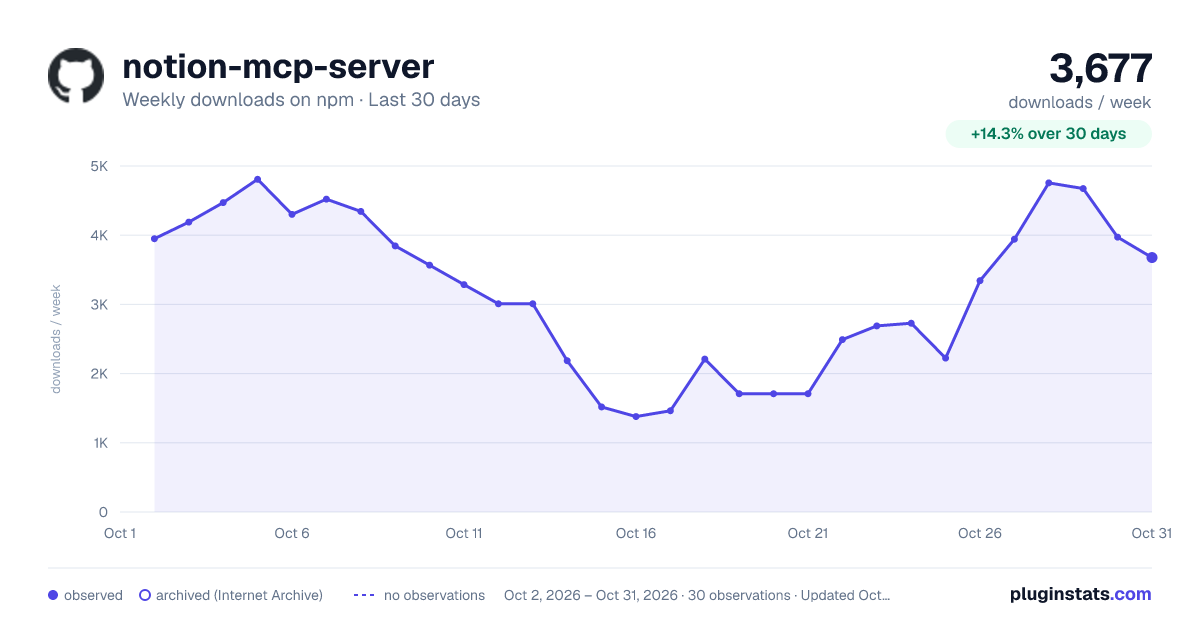
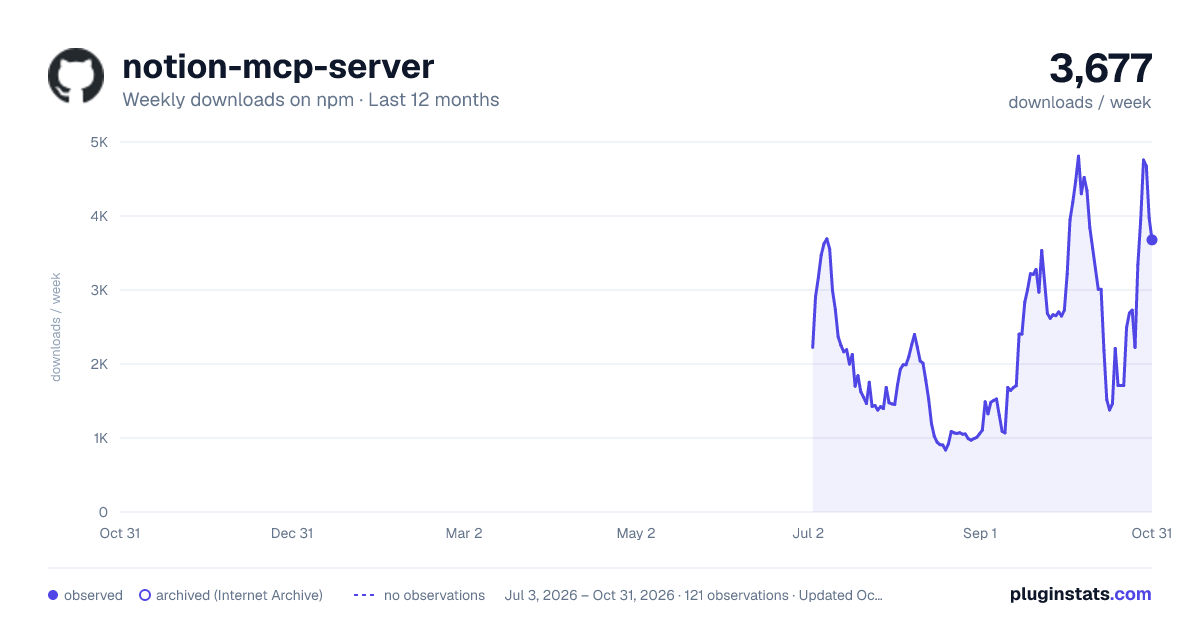
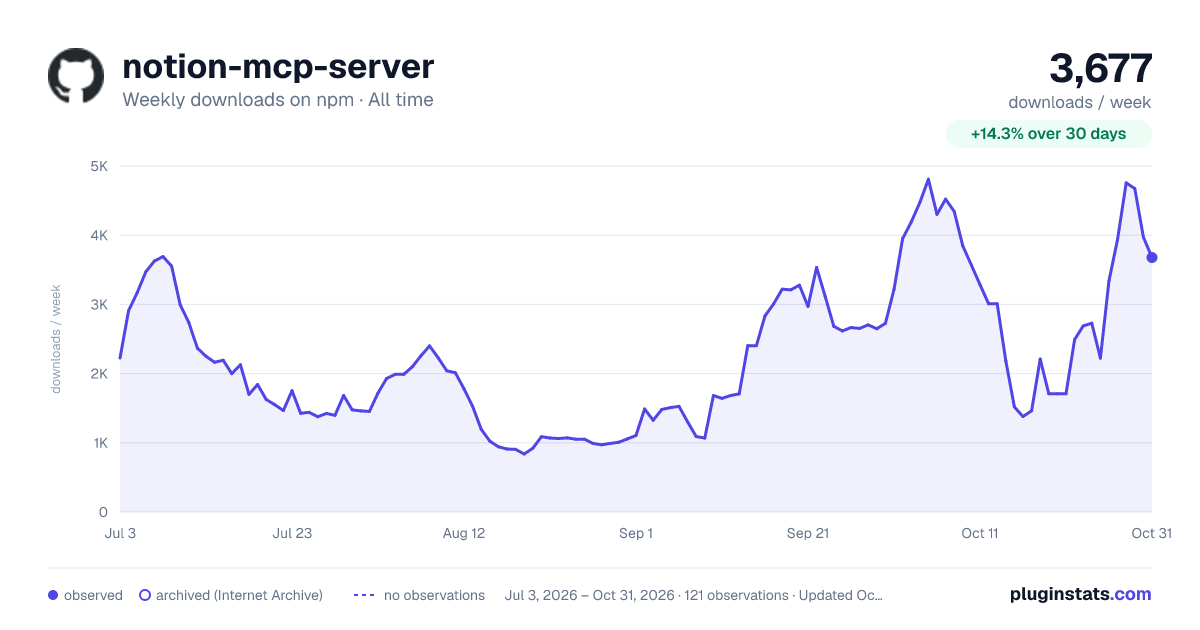

Adoption over time
7/30/90-day growth
Ranking history
Listing placement
Listing placement
Filled points are observed values; hollow points come from Internet Archive snapshots of the listing page. Dashed segments span periods with no observations — values between points are not interpolated.
Each band is one page of 20. Weekly downloads on a linear scale. Placement is projected from weekly downloads, so it can differ from the marketplace's own sort order. Hover a dot to see the listing.
Recent observations
Full history (2)Similar npm Claude Code plugins
All 20 notion-mcp-server alternativesData source
Weekly downloads (trailing 7 complete days) come from the official npm downloads API. Downloads include CI and mirrors and are not equivalent to installs or users. npm publishes no ratings.
Listing: https://www.npmjs.com/package/notion-mcp-server. First seen Oct 19, 2026; last successful collection Oct 20, 2026. See the methodology.