 PluginStats
worktrust weekly downloads statistics
By fhomey · npm · Claude Code
Couple this computer to WorkTrust: approve a code in your browser, and every AI app here reports what you built. Metadata only, no dependencies.
worktrust has 936 recorded weekly downloads on npm.
It ranks #1400 of 2,251 tracked npm listings by weekly downloads.
Over the past 7 days it changed by -88.8%.
PluginStats has 121 daily observations since Jun 19, 2026; the latest is from Oct 17, 2026.
About worktrust
worktrust
Couple a computer to WorkTrust in one command. WorkTrust keeps a verified record of the work you do with AI without anyone reading that work: it receives metadata only.
The official npm package is worktrust, published by the npm account worktrustio with provenance from this repository (github.com/fhomey/worktrust-cli). Check it on npmjs.com before you run it; a package of another name or from another publisher is not ours. Without npm, the same script runs from WorkTrust's own site:
Python tool runners: this repository also builds worktrust for uvx and pipx from the same measurement modules. Native wheels (0.10.13+) include a pinned official Node runtime, so that route needs no separate Node/npm installation. See the Python distribution for supported platforms and installation commands, and the official PyPI project for published versions. npm and Python versions are checked together.
Omit preserve to connect your computer. These runners install and invoke the same CLI; they do not automatically instrument Python applications or measure different activity.
Connecting through the Python package installs the runtime and engine in an immutable directory under ~/.worktrust/installations/; client hooks use that persistent path, so clearing a tool-runner cache does not break the coupling. Updates retain older installations for running clients. Run worktrust disconnect before removing an installed Python tool if you also want to remove its WorkTrust coupling. Disconnect removes the key and client wiring; it leaves runtime files in place.
Agent observations (requires 0.10.14+): the optional Python worktrust_cli.telemetry SDK lets an application explicitly record parent/child runs, its own token counters, token budgets, checks and security events in a local file. The shared engine inspects it with worktrust orchestration report --file agent-events.jsonl, without uploading. The private platform import is Sources → Agent teams when that platform change is deployed. These are application reports, not human hours or independently verified outcomes. Installing through npm, uvx or pipx alone does not instrument agents. See the Python README for the opt-in SDK, fixed metadata fields, consent and local deletion. Install worktrust>=0.10.14 in the agent application's own Python environment to import the SDK; a uvx/pipx tool environment is separate. Check the registry for availability: a GitHub release awaiting approval is not a completed npm or PyPI publication.
No account? Keep your history anyway. Claude Code and Gemini CLI delete their sessions after 30 days by default, and a deleted session can never be measured again. npx worktrust@latest preserve shows what each AI app on this computer keeps, keeps it longer on your yes, and writes a local, metadata-only record. It needs no account and opens no network connection: it stays on this computer until you yourself run a command that sends. See Keep your history.
For AI agents: read AGENTS.md. An agent does not run this CLI's commands for a person (they stop in an agent's shell), does not report work it did not see, and does not rebuild, fork or strip it.
What happens
1. A plan, then a question. The command lists every AI app it found on this computer and the file each one gets changed, then asks Continue? [Y/n]. Nothing is written or sent before you answer. --dry-run shows the plan and stops. 2. Approve this computer in your browser. WorkTrust opens; you see this computer's name, its system and the AI apps that will get the WorkTrust door, and approve it, signed in with your own account and second factor. That decides which WorkTrust account the computer belongs to: the terminal never sees a password and cannot choose an account. Nothing is typed: the browser is sent back to this computer (127.0.0.1), where the terminal waits for one answer and exchanges it with a secret only it holds (PKCE). A link forwarded to someone else approves nothing they can collect. Without a browser (over SSH, or --device), the terminal shows a code that you type yourself at app.worktrust.io/connect/computer on another device. 3. The terminal finishes by itself. It keeps the key in its private file and gives every AI app here the WorkTrust door, then installs the session hook. Quit your AI apps and open them again. 4. Earlier work only if you say yes. It counts your AI apps' sessions already on this computer and asks Send these as history? [y/N]. Enter sends nothing. What goes is hours and tokens per day, never text, and WorkTrust shows it as earlier work, never as verified hours. Nothing from before the coupling is ever sent without that yes: the session hook starts at the moment of coupling. Beside the seconds, each day says what they were (the model answering, tools running, your own turns, pauses) and what the session's subagents did on their own clocks, as counts; a subagent's hour is shown as an agent-hour and never as one of yours. 5. Codex only if you say yes. With Codex on this computer it asks `Let Codex wake the session hook? [y/N] and, on a yes, sets the one notify line in ~/.codex/config.toml` (the file is kept as config.toml.worktrust-backup first). Another program's notify is never replaced. 6. Antigravity only if you say yes. With Google Antigravity on this computer it asks `Let Antigravity wake the session hook? [y/N] and, on a yes, adds one hook named worktrust` with a single Stop command to ~/.gemini/config/hooks.json (kept as hooks.json.worktrust-backup first). Other hooks in that file stay as they are. Antigravity records no token counts, so its sessions arrive with durations and turn counts only. 7. Hermes Agent with the other apps. With Hermes on this computer (~/.hermes, and every profile under ~/.hermes/profiles) its config.yaml gets the WorkTrust entry under mcp_servers and one on_session_end hook that wakes the session hook; Hermes itself asks once before it runs a new hook. A file that writes those sections inline is left as it…
Description from the npm listing.
- worktrust
- mcp
- claude-code
- codex
- antigravity
- cursor
- ai
- provenance
Where worktrust sits in the listing
Each band is one page of 20. Weekly downloads on a log scale. Placement is projected from weekly downloads, so it can differ from the marketplace's own sort order. Hover a dot to see the listing.


Charts
Images: 30d · 1y · all time · 1600×900 dark
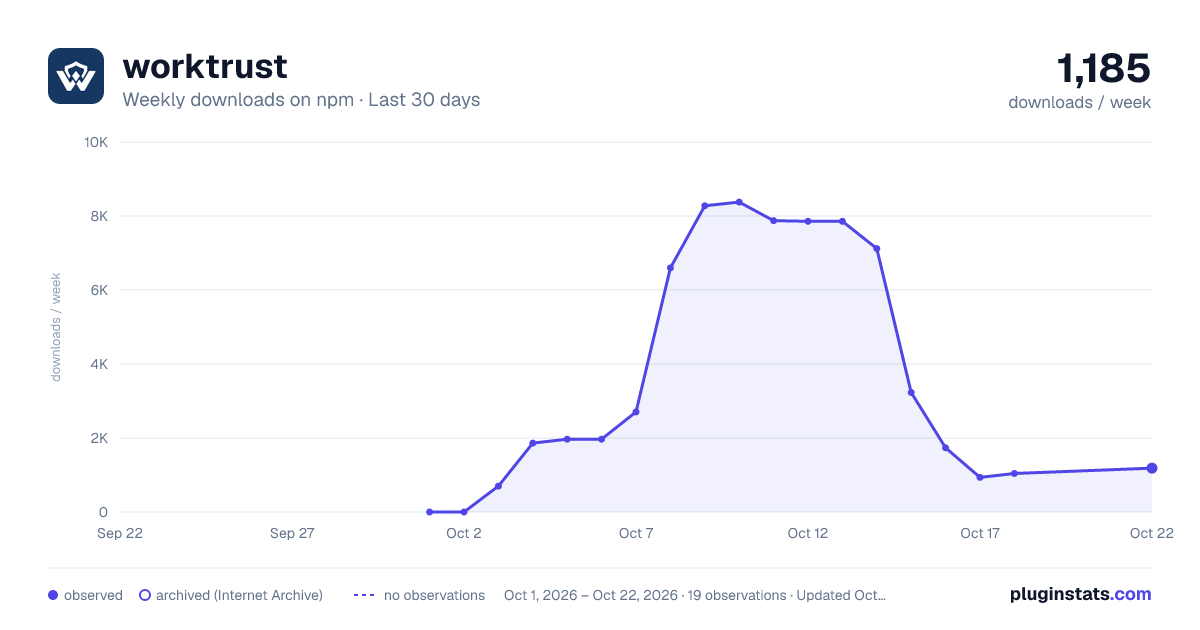
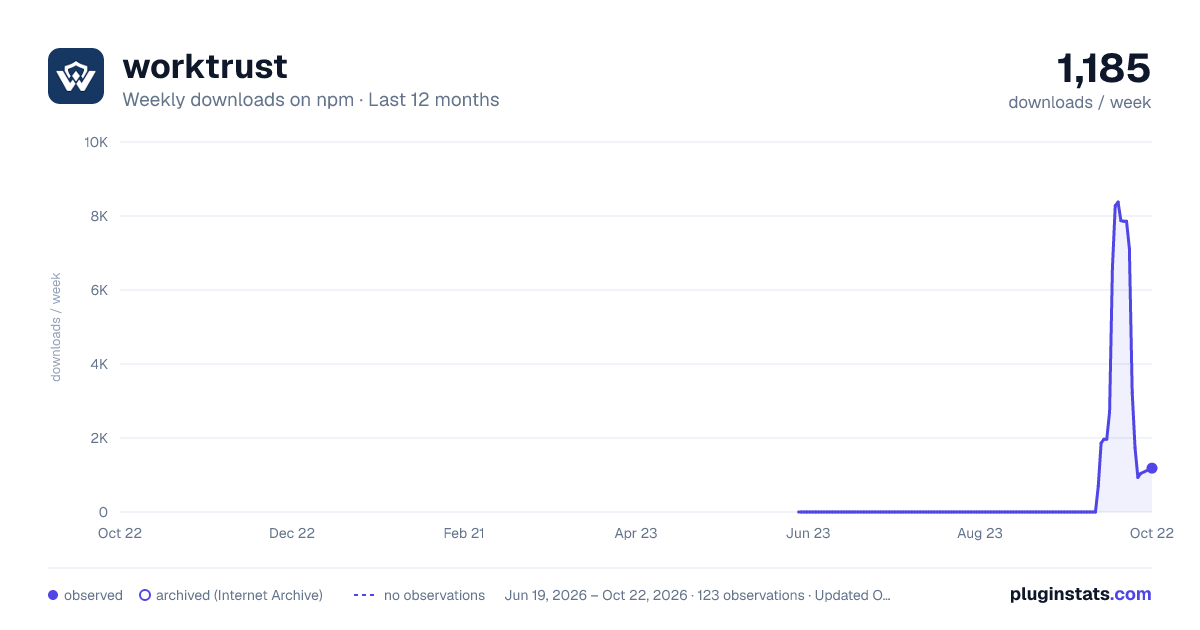
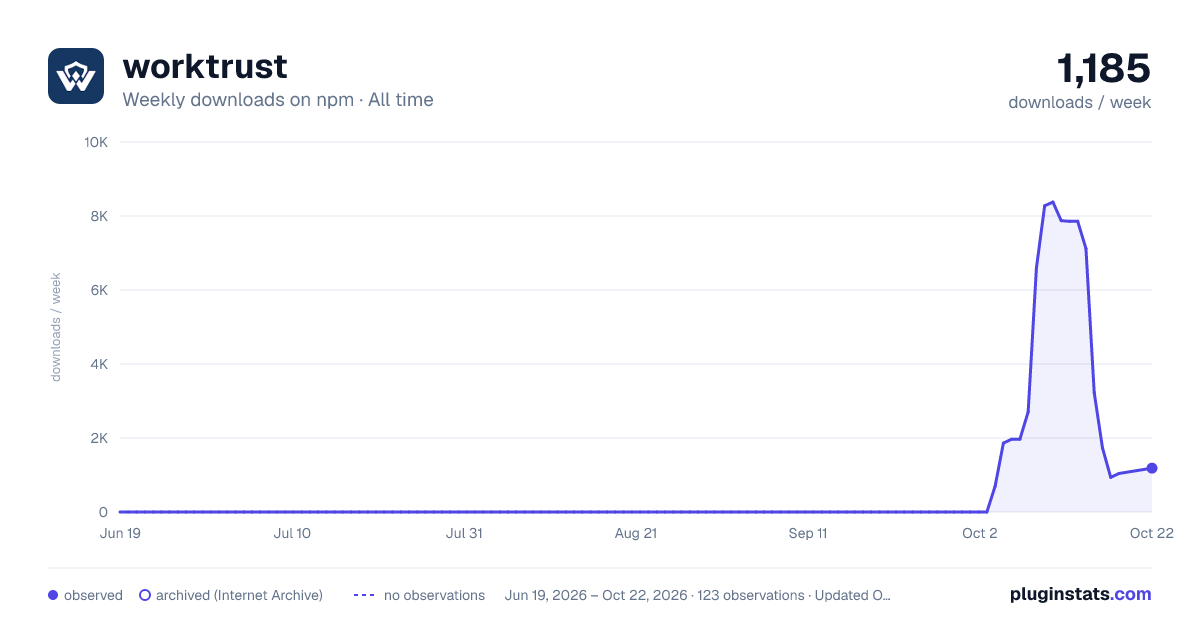

Adoption over time


7/30/90-day growth


Filled points are observed values; hollow points come from Internet Archive snapshots of the listing page. Dashed segments span periods with no observations — values between points are not interpolated.
Recent observations
Full history (121)Similar npm Claude Code plugins
Data source
Weekly downloads (trailing 7 complete days) come from the official npm downloads API. Downloads include CI and mirrors and are not equivalent to installs or users. npm publishes no ratings.
Listing: https://www.npmjs.com/package/worktrust. First seen Oct 16, 2026; last successful collection Oct 16, 2026. See the methodology.