 PluginStats
@hongvanpc10/tailwindcss-responsive weekly downloads statistics
By hongvanpc10 · npm · Tailwind plugins
A plugin that provides utilities for responsive: show and hide element.
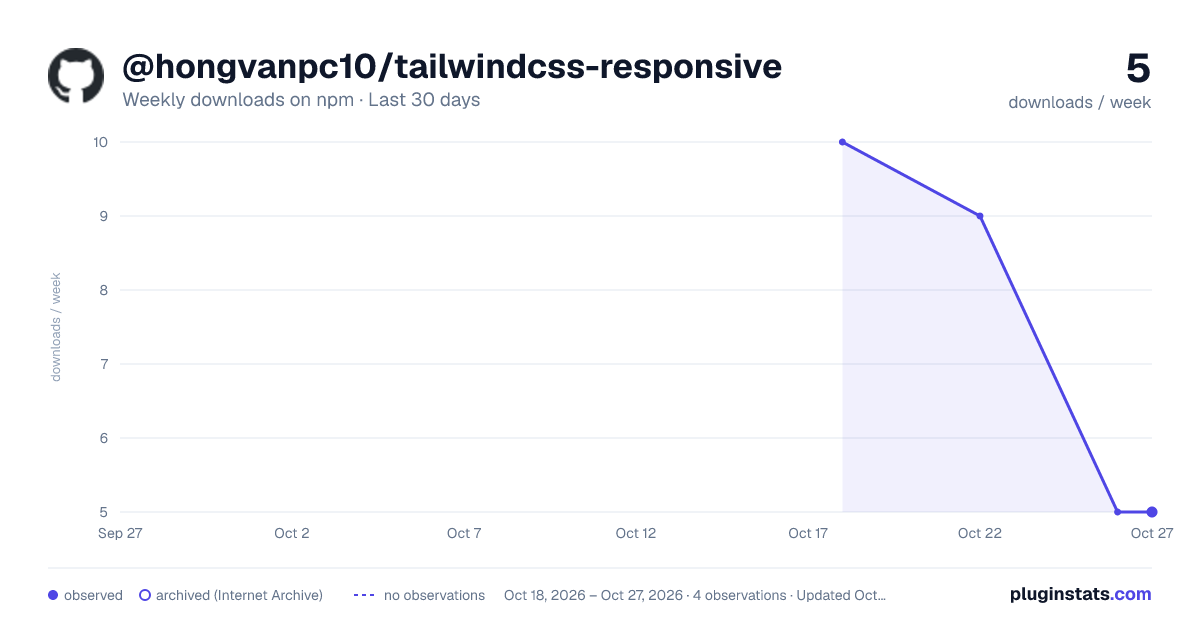
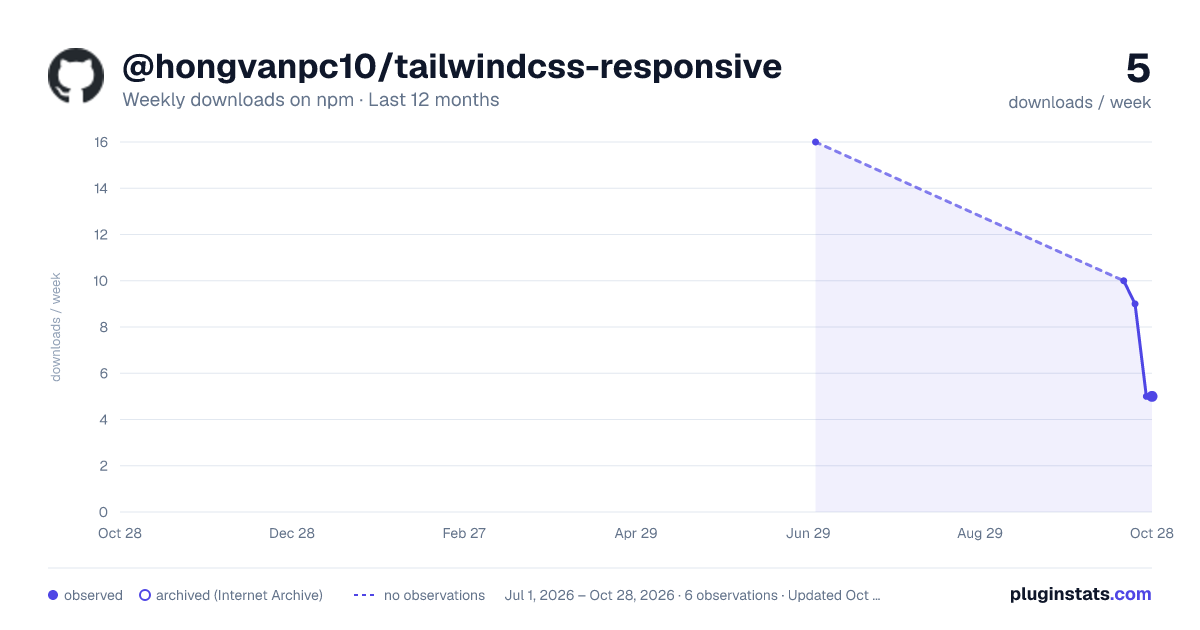
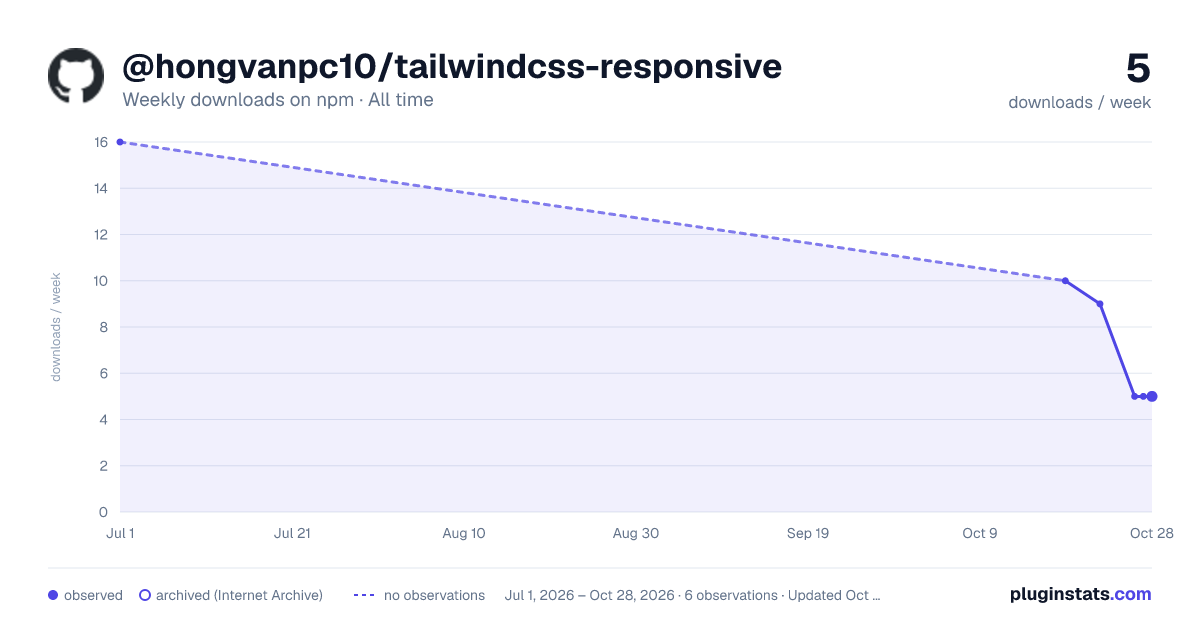
@hongvanpc10/tailwindcss-responsive has 10 recorded weekly downloads on npm.
About @hongvanpc10/tailwindcss-responsive
@hongvanpc10/tailwindcss-responsive
A plugin that provides utilities for responsive: show and hide element.
Installation
Install the plugin from npm:
npm install -D @hongvanpc10/tailwindcss-responsive
Or yarn:
yarn add @hongvanpc10/tailwindcss-responsive --dev
Then add the plugin to your tailwind.config.js file:
// tailwind.config.js
module.exports = {
  theme: {
    // ...
  },
  plugins: [
    require('@hongvanpc10/tailwindcss-responsive'),
    // ...
  ],
}
Usage
Use the show-on-{breakpoint} and hide-on-{breakpoint} utilities to specify when element should be shown or hidden
Examples
To show element on xl devices and higher:
<p class="show-on-xl">
  Et molestiae hic earum repellat aliquid est doloribus delectus. Enim illum
  odio porro ut omnis dolor debitis natus. Voluptas possimus deserunt sit
  delectus est saepe nihil. Qui voluptate possimus et quia. Eligendi voluptas
  voluptas dolor cum. Rerum est quos quos id ut molestiae fugit.
</p>
Result:
@media (max-width: 1280px) {
  .show-on-xl {
    display: none;
  }
}
To hide element on xl devices and higher:
<p class="hide-on-xl">
  Et molestiae hic earum repellat aliquid est doloribus delectus. Enim illum
  odio porro ut omnis dolor debitis natus. Voluptas possimus deserunt sit
  delectus est saepe nihil. Qui voluptate possimus et quia. Eligendi voluptas
  voluptas dolor cum. Rerum est quos quos id ut molestiae fugit.
</p>
Result:
@media (min-width: 1280px) {
  .hide-on-xl {
    display: none;
  }
}
To show element from md devices to lg devices:
<p class="show-on-md hide-on-lg">
  Et molestiae hic earum repellat aliquid est doloribus delectus. Enim illum
  odio porro ut omnis dolor debitis natus. Voluptas possimus deserunt sit
  delectus est saepe nihil. Qui voluptate possimus et quia. Eligendi voluptas
  voluptas dolor cum. Rerum est quos quos id ut molestiae fugit.
</p>
Configuration
You can configure which breakpoints and value are generated by this plugin under the breakpoint key in your tailwind.config.js file:
// tailwind.config.js
module.exports = {
  theme: {
    extend: {
      breakpoints: {
        sm: '640px',
        md: '768px',
        lg: '1024px',
        xl: '1280px',
        '2xl': '1536px',
      },
    },
  },
}
Description from the npm listing.
- tailwind
- tailwindcss
- css
- plugin
- tailwind-plugin
- tailwindcss-plugin
- responsive
README badge
Show your rank in a README or on your website. The badge updates automatically.
Charts
Images: 30d · 1y · all time · 1600×900 dark

Adoption over time
7/30/90-day growth
Ranking history
Listing placement
Listing placement
Filled points are observed values; hollow points come from Internet Archive snapshots of the listing page. Dashed segments span periods with no observations — values between points are not interpolated.
Each band is one page of 20. Weekly downloads on a linear scale. Placement is projected from weekly downloads, so it can differ from the marketplace's own sort order. Hover a dot to see the listing.
Recent observations
Full history (1)Similar npm Tailwind plugins plugins
All 20 @hongvanpc10/tailwindcss-responsive alternativesData source
Weekly downloads (trailing 7 complete days) come from the official npm downloads API. Downloads include CI and mirrors and are not equivalent to installs or users. npm publishes no ratings.
Listing: https://www.npmjs.com/package/@hongvanpc10/tailwindcss-responsive. First seen Oct 22, 2026; last successful collection Oct 22, 2026. See the methodology.