 PluginStats
@smartbear/mcp weekly downloads statistics
By smartbear (3 listings) · npm · MCP servers
MCP server for interacting SmartBear Products
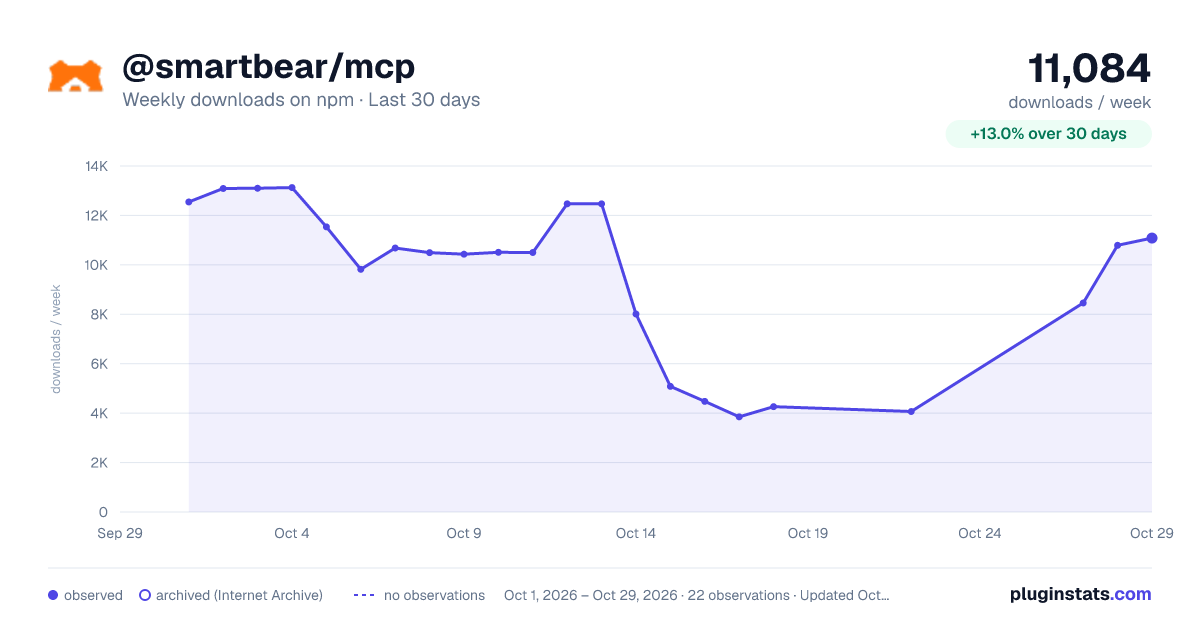
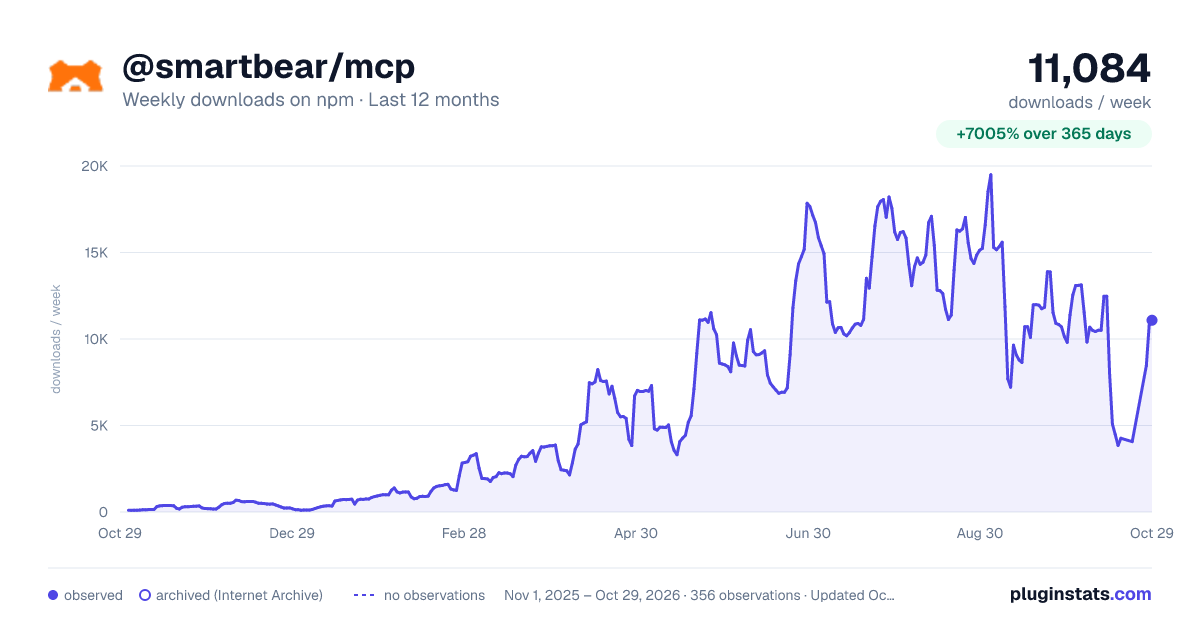
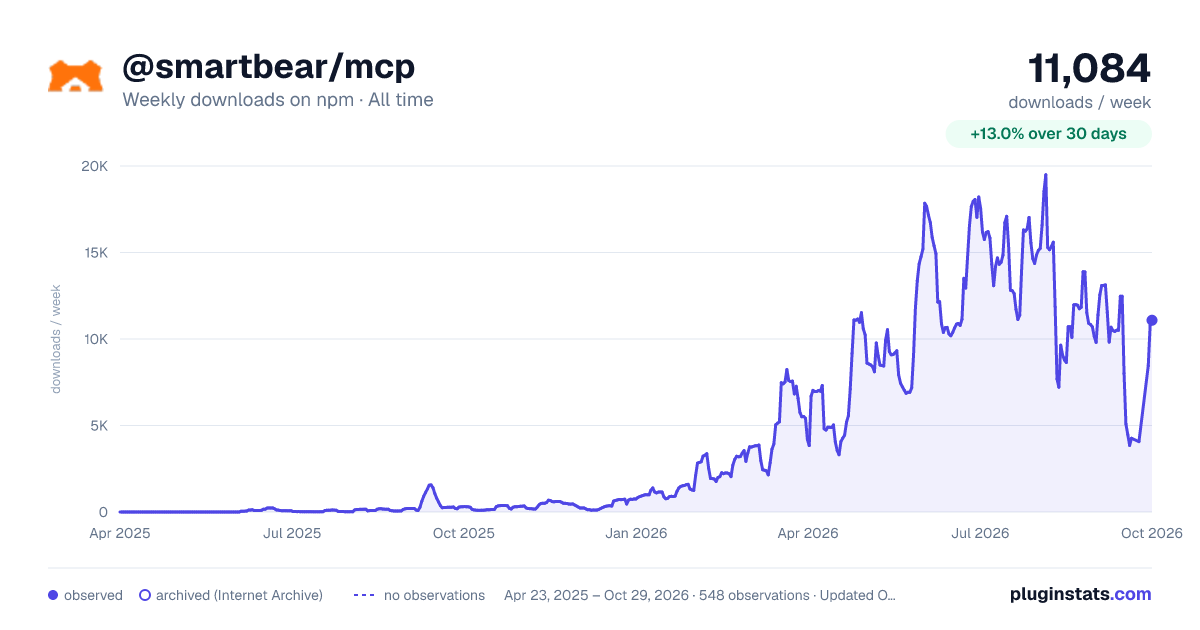
@smartbear/mcp has 3,850 recorded weekly downloads on npm, a decrease of 67.8% over the past 30 days.
It ranks #1154 of 2,256 tracked npm listings by weekly downloads.
Over 90 days, weekly downloads changed by -65.4%.
PluginStats has 543 daily observations since Apr 23, 2025; the latest is from Oct 17, 2026.
About @smartbear/mcp
SmartBear MCP server
A Model Context Protocol (MCP) server which provides AI assistants with seamless access to SmartBear's suite of testing and monitoring tools, including BearQ, BugSnag, Reflect, Swagger, PactFlow, Pact Broker, QMetry, QTM4J, Zephyr and Collaborator.
What is MCP?
The Model Context Protocol (MCP) is an open standard that enables AI assistants to securely connect to external data sources and tools. This server exposes SmartBear's APIs through natural language interfaces, allowing you to query your testing data, analyze performance metrics, and manage test automation directly from your AI workflow.
Supported Tools
See individual guides for suggested prompts and supported tools and resources:
• BearQ - AI-powered QA test management and execution capabilities • BugSnag - Comprehensive error monitoring and debugging capabilities • Reflect - Test management and execution capabilities • Swagger • Portal - Portal and product management capabilities • Studio - API and Domain management capabilities, including AI-powered API generation from prompts and automatic standardization • Contract Testing (PactFlow) - Contract testing capabilities • Functional Testing - API test discovery capabilities • QMetry - QMetry Test Management capabilities • Zephyr - Zephyr Test Management capabilities • Collaborator - Review and Remote System Configuration management capabilities • QTM4J - QTM4J Test Management for Jira capabilities
Remote MCP Servers
For BugSnag, Swagger, and Zephyr, SmartBear hosts Remote MCP Servers that you can connect to directly from your MCP client via a URL — no installation, Node.js, or API tokens required. Authentication is handled through an OAuth browser flow.
| Product | Server URL |
| Swagger | https://swagger.mcp.smartbear.com/mcp | | BugSnag | https://bugsnag.mcp.smartbear.com/mcp | | Zephyr | https://zephyr.mcp.smartbear.com/mcp |
See the Remote MCP Servers guide for per-client setup instructions. You can connect to multiple remote servers at the same time.
Need BearQ, Reflect, QMetry, QTM4J, PactFlow, Collaborator, or Functional Testing? These products are only available via the local npm package below, which bundles all products into a single MCP server.
Prerequisites
• Node.js 22+ and npm • Access to SmartBear products (BugSnag, Reflect, Swagger, QMetry, QTM4J or Zephyr) • Valid API tokens for the products you want to integrate
Local MCP Server Installation (npm)
For all products — or if you prefer running the server locally — the MCP server is distributed as an npm package @smartbear/mcp, making it easy to integrate into your development workflow.
The server is started with the API key or auth token that you use with your SmartBear product(s). They are optional and can be removed from your configuration if you aren't using the product. For BugSnag, if you provide a project API key it will narrow down all searches to a single project in your BugSnag dashboard. Leave this field blank if you wish to interact across multiple projects at a time.
VS Code with Copilot
For the quickest setup, use the "MCP: Add server…" command in the Command Palette to add the @smartbear/mcp npm package.
📋 Manual installation
Alternatively, you can use npx (or globally install) the @smartbear/mcp package to run the server and add the following to your .vscode/mcp.json file:
Claude Desktop
Add the following configuration to your claude_desktop_config.json to launch the MCP server via npx:
Loading only the products you use
Set MCP_CLIENTS to a comma-separated, case-insensitive list of product names (for example "MCP_CLIENTS": "QMetry") to load only those products. This reduces startup time, which helps on clients with a short initialize timeout. Valid names are BearQ, BugSnag, Collaborator, Contract Testing, QMetry, QTM4J, Reflect, Swagger and Zephyr. When unset, all products are loaded.
Server Configuration (HTTP mode)
| Variable | Default | Purpose |
| BASE_URL | *(derived from request)* | The server's own public URL, e.g. https://mcp.example.com. Set this on any deployment behind a proxy or load balancer — otherwise the address advertised for OAuth discovery is derived from the client-supplied Host header. | | TRUST_PROXY | false | Set to true only when a proxy in front of the server sets X-Forwarded-Host and strips any client-supplied value. | | MCP_SERVER_AMPLITUDE_API_KEY | *(unset — analytics off)* | API key for the shared SmartBear Amplitude project. When set, the server reports Server Initialized, Session Started, Session Ended, Tool Called and Tools Listed usage events (tool outcome and timing only — never tool arguments, results, credentials or raw email). Unset, nothing is tracked. HTTP mode only. |
Documentation
For detailed introduction, examples, and advanced configuration visit our 📖 Full Documentation
Local Development
For developers who want to contribute to the SmartBear MCP server, please see the CONTRIBUTING.md guide.
License
This MCP server is licensed under the MIT License. This means you are free to use, modify, and distribute the software, subject to the terms and conditions of the MIT License. For more details, please see the LICENSE file in the project repository.
Support
• Search open and closed issues for similar problems • Report a bug or request a feature
SmartBear MCP Server - Bringing the power of SmartBear's testing and monitoring ecosystem to your AI-powered development workflow.
Description from the npm listing.
- smartbear
- mcp
- bugsnag
- reflect
- swagger
- pactflow
- zephyr
- qtm4j
Where @smartbear/mcp sits in the listing
Each band is one page of 20. Weekly downloads on a log scale. Placement is projected from weekly downloads, so it can differ from the marketplace's own sort order. Hover a dot to see the listing.


Charts
Images: 30d · 1y · all time · 1600×900 dark

Adoption over time


7/30/90-day growth


Filled points are observed values; hollow points come from Internet Archive snapshots of the listing page. Dashed segments span periods with no observations — values between points are not interpolated.
Recent observations
Full history (543)Similar npm MCP servers plugins
Data source
Weekly downloads (trailing 7 complete days) come from the official npm downloads API. Downloads include CI and mirrors and are not equivalent to installs or users. npm publishes no ratings.
Listing: https://www.npmjs.com/package/@smartbear/mcp. First seen Oct 16, 2026; last successful collection Oct 19, 2026. See the methodology.