 PluginStats
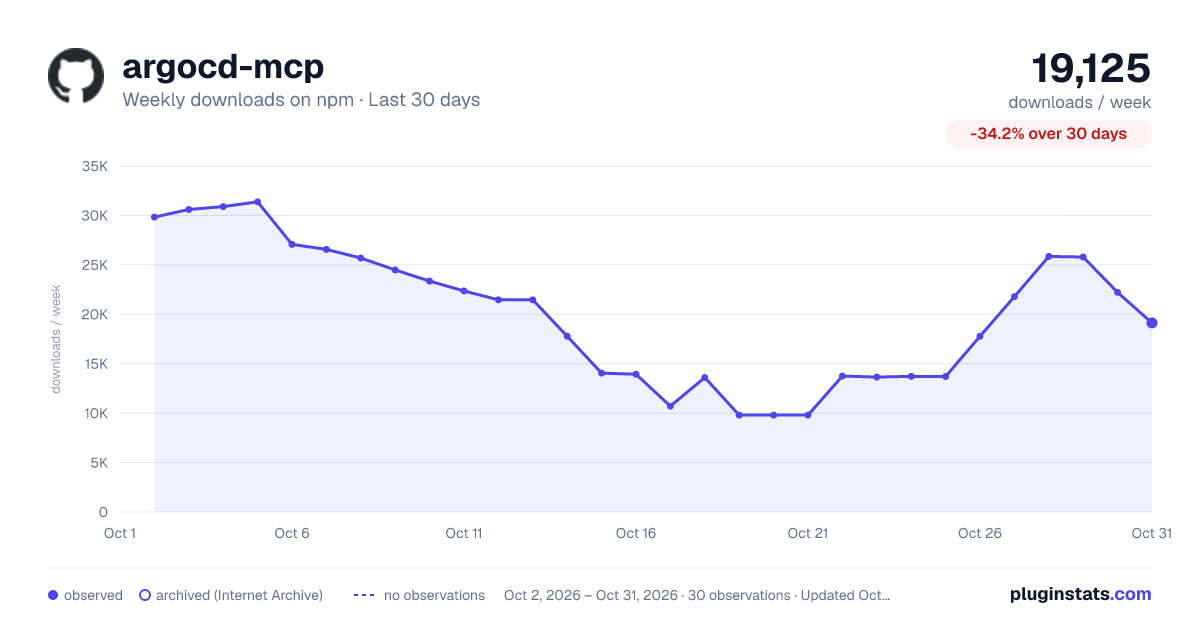
argocd-mcp has 10,709 recorded weekly downloads on npm, a decrease of 39.6% over the past 30 days.
It ranks #889 of 2,251 tracked npm listings by weekly downloads.
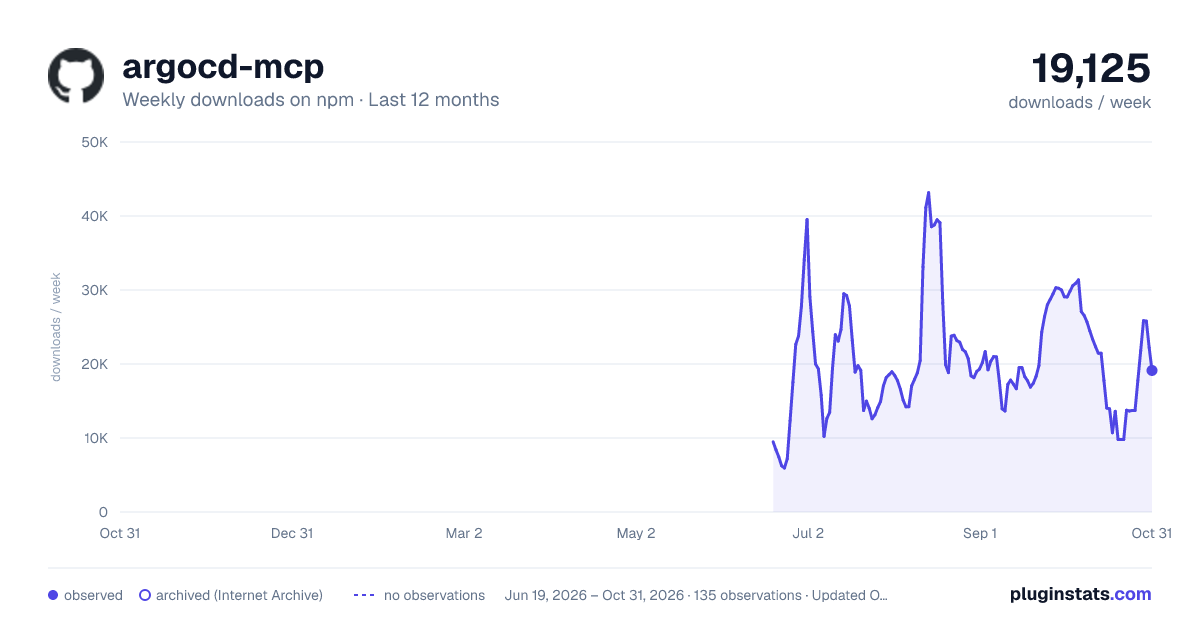
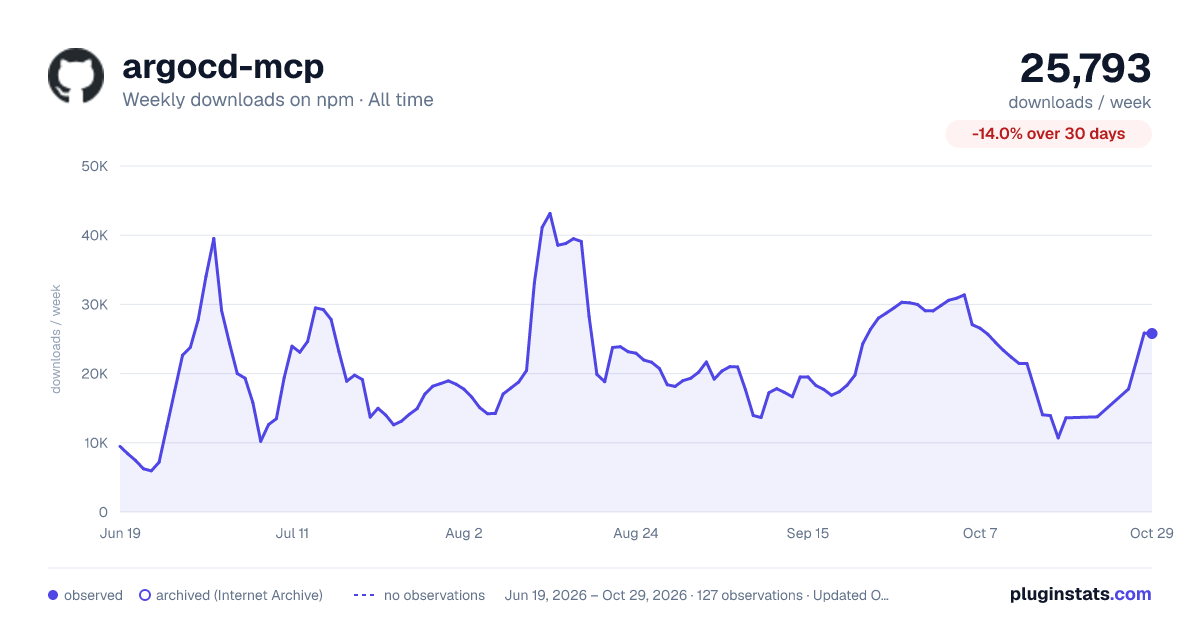
Over 90 days, weekly downloads changed by -45.8%.
PluginStats has 121 daily observations since Jun 19, 2026; the latest is from Oct 17, 2026.
About argocd-mcp
Argo CD MCP Server
An implementation of Model Context Protocol (MCP) server for Argo CD, enabling AI assistants to interact with your Argo CD applications through natural language. This server allows for seamless integration with Visual Studio Code and other MCP clients through stdio and HTTP stream transport protocols.
Features
• Transport Protocols: Supports both stdio and HTTP stream transport modes for flexible integration with different clients • Complete Argo CD API Integration: Provides comprehensive access to Argo CD resources and operations • AI Assistant Ready: Pre-configured tools for AI assistants to interact with Argo CD in natural language
Available Tools
The server provides the following ArgoCD management tools:
Cluster Management
• list_clusters: List all clusters registered with ArgoCD
Project Management
• get_appproject: Get detailed information about a specific AppProject (project)
Application Management
• list_applications: List and filter all applications • get_application: Get detailed information about a specific application • create_application: Create a new application • update_application: Update an existing application • delete_application: Delete an application • sync_application: Trigger a sync operation on an application
Resource Management
• get_application_resource_tree: Get the resource tree for a specific application • get_application_managed_resources: Get managed resources for a specific application • get_application_workload_logs: Get logs for application workloads (Pods, Deployments, etc.) • get_resource_events: Get events for resources managed by an application • get_resource_actions: Get available actions for resources • run_resource_action: Run an action on a resource
Installation
Prerequisites
• Node.js (v18 or higher recommended) • pnpm package manager (for development) • Argo CD instance with API access • Argo CD API token (see the docs for instructions)
Usage with Cursor
1. Follow the Cursor documentation for MCP support, and create a .cursor/mcp.json file in your project:
2. Start a conversation with Agent mode to use the MCP.
Usage with VSCode
1. Follow the Use MCP servers in VS Code documentation, and create a .vscode/mcp.json file in your project:
2. Start a conversation with an AI assistant in VS Code that supports MCP.
Usage with Claude Desktop
1. Follow the MCP in Claude Desktop documentation, and create a claude_desktop_config.json configuration file:
2. Configure Claude Desktop to use this configuration file in settings.
Self-signed Certificates
If your Argo CD instance uses self-signed certificates or certificates from a private Certificate Authority (CA), you may need to add the following environment variable to your configuration:
This disables TLS certificate validation for Node.js when connecting to Argo CD instances using self-signed certificates or certificates from private CAs that aren't trusted by your system's certificate store.
Warning: Disabling SSL verification reduces security. Use this setting only in development environments or when you understand the security implications.
Providing ArgoCD Credentials
The server connects to ArgoCD using a base URL and an API token.
API token — header / env var only (mandatory)
The ArgoCD API token is a secret and is only ever read from the transport layer, never from a tool-call argument:
• HTTP headers (HTTP transport only): x-argocd-api-token. • Environment variables: ARGOCD_API_TOKEN (all transports).
This token is outbound only: it authenticates this server to ArgoCD and never authorizes an inbound caller. See Network Exposure for who may reach the listener.
This is the default token. It is mandatory unless a token registry is configured: on the HTTP transport, a connection that supplies no token (neither header nor env var) is rejected with 400 Bad Request, but when a registry is configured a tokenless connection is allowed because each call resolves its own registry token. Keeping the token out of tool arguments ensures it never enters prompts, model context, or tool-call logs.
Base URL — header / env var, or per-call argument
The base URL may be supplied at the session level (resolved once when the server starts or when an HTTP client connects):
• HTTP headers (HTTP transport only): x-argocd-base-url. • Environment variables: ARGOCD_BASE_URL (all transports).
In addition, every tool accepts an optional argocdBaseUrl argument:
• If a session default base URL exists, argocdBaseUrl is optional and overrides the default for that single call. • If no session default base URL is configured (header and env var both absent), argocdBaseUrl is required; a call without it returns an error.
Token registry — per-base-URL tokens (multi-instance)
To target multiple ArgoCD instances, each with its own token, configure a token registry. Because the tokens are secrets, the registry is read from a JSON file, not an environment variable — point ARGOCD_TOKEN_REGISTRY_PATH at the file (e.g. a mounted Kubernetes secret). This keeps the tokens out of the process environment, crash dumps, and child-process inheritance.
The file contains a JSON array mapping a base URL to the token that should be used for it:
Secure the file. Restrict it to the server's user (e.g. chmod 400) and prefer a secret-management mechanism (Kubernetes secret volume, Vault agent, etc.) over a plaintext file on disk.
Local development. The make run / make dev targets run without a registry by default; pass ARGOCD_TOKEN_REGISTRY_PATH=/path/to/tokens.json to use one. Do not place the file under dist/ — tsup runs with clean: true and wipes that directory on every build. See Running locally.
With a registry configured, a caller targets an instance by passing only the (non-secret) argocdBaseUrl argument; the server pairs it with the registered token. The token never appears in the tool-call payload.
Two kinds of token…
Description from the npm listing.
- mcp
- argocd
- argocd-mcp
- argocd-mcp-server
- argo-cd
- argo-cd-mcp
- argo-cd-mcp-server
- cicd
- cicd-mcp
- cicd-mcp-server
- gitops
- gitops-mcp
- gitops-mcp-server
- kubernetes
- kubernetes-mcp
- kubernetes-mcp-server
Where argocd-mcp sits in the listing
Each band is one page of 20. Weekly downloads on a log scale. Placement is projected from weekly downloads, so it can differ from the marketplace's own sort order. Hover a dot to see the listing.


Charts
Images: 30d · 1y · all time · 1600×900 dark

Adoption over time


7/30/90-day growth


Filled points are observed values; hollow points come from Internet Archive snapshots of the listing page. Dashed segments span periods with no observations — values between points are not interpolated.
Recent observations
Full history (121)Similar npm MCP servers plugins
Data source
Weekly downloads (trailing 7 complete days) come from the official npm downloads API. Downloads include CI and mirrors and are not equivalent to installs or users. npm publishes no ratings.
Listing: https://www.npmjs.com/package/argocd-mcp. First seen Oct 16, 2026; last successful collection Oct 18, 2026. See the methodology.