 PluginStats
@hypothesi/tauri-mcp-server weekly downloads statistics
By hypothesi · npm · Claude Code
A Model Context Protocol server for use with Tauri v2 applications
@hypothesi/tauri-mcp-server has 1,688 recorded weekly downloads on npm, ranking #1381 of 2,391 tracked listings.
About @hypothesi/tauri-mcp-server
@hypothesi/tauri-mcp-server


A Model Context Protocol (MCP) server that enables AI assistants like Claude, Cursor, and Windsurf to build, test, and debug Tauri® v2 applications.
Features
| Category | Capabilities |
|---|---|
| 🎯 UI Automation | Screenshots, clicks, typing, scrolling, element finding, visual element picker |
| 🔍 IPC Monitoring | Capture and inspect Tauri IPC calls in real-time |
| 📱 Mobile Dev | List Android emulators & iOS simulators |
| 📋 Logs | Stream console, Android logcat, iOS, and system logs |
Quick Start
1. Add the MCP Bridge Plugin to Your Tauri App
cargo add tauri-plugin-mcp-bridge
// src-tauri/src/main.rs
fn main() {
    let mut builder = tauri::Builder::default();

    #[cfg(debug_assertions)]
    {
        builder = builder.plugin(tauri_plugin_mcp_bridge::init());
    }

    builder
        .run(tauri::generate_context!())
        .expect("error while running tauri application");
}
Note: The npm package
@hypothesi/tauri-plugin-mcp-bridgeis optional—only needed if you want to call the plugin from your app's frontend code. The MCP server communicates with the Rust plugin directly via WebSocket.
2. Configure Your AI Assistant
Use aix to add the server to your AI assistant:
npx -y @a1st/aix add mcp tauri --command 'npx @hypothesi/tauri-mcp-server' --user
Supported clients: claude-code, cursor, windsurf, vscode, cline, roo-cline, claude, zed, goose, warp, codex
Terminal CLI
If you want to call the same tools directly from a shell, install the companion CLI package:
npm install -g @hypothesi/tauri-mcp-cli
tauri-mcp driver-session start --port 9223
tauri-mcp driver-session status --json
The CLI keeps the underlying MCP server warm in the background so stateful commands such as driver_session work across separate invocations.
Multi-App Support
The MCP server supports connecting to multiple Tauri apps simultaneously. Each app runs on a unique port, and the most recently connected app becomes the "default" app.
Key Features:
- Connect to multiple apps on different ports
- Default app used when no
appIdentifierspecified - Target specific apps using port number or bundle ID
- Stop individual sessions or all sessions at once
Example Usage:
// Connect to first app
await driver_session({ action: "start", port: 9223 })

// Connect to second app
await driver_session({ action: "start", port: 9224 })

// Check status - shows both apps with default indicator
await driver_session({ action: "status" })

// Use default app (most recent - port 9224)
await webview_screenshot()

// Target specific app by port
await webview_screenshot({ appIdentifier: 9223 })

// Stop specific app
await driver_session({ action: "stop", appIdentifier: 9223 })

// Stop all apps
await driver_session({ action: "stop" })
Available Tools (20 total)
Setup & Configuration
| Tool | Description |
|---|---|
get_setup_instructions | Get setup/update instructions for the MCP Bridge plugin |
UI Automation
| Tool | Description |
|---|---|
driver_session | Start/stop/status automation session |
webview_find_element | Find elements by CSS selector, XPath, text, or ref ID |
read_logs | Read console, Android, iOS, or system logs |
webview_interact | Click, scroll, swipe, focus, long-press |
webview_screenshot | Capture webview screenshots (JPEG default) |
webview_keyboard | Type text or send key events |
webview_wait_for | Wait for elements, text, or events |
webview_get_styles | Get computed CSS styles |
webview_execute_js | Execute JavaScript in webview |
webview_dom_snapshot | Get structured DOM snapshot (accessibility or structure) |
webview_select_element | Visual element picker — user clicks an element, returns metadata + screenshot |
webview_get_pointed_element | Get metadata for element user Alt+Shift+Clicked |
manage_window | List windows, get info, or resize |
IPC & Plugin
| Tool | Description |
|---|---|
ipc_execute_command | Execute Tauri IPC commands |
ipc_get_backend_state | Get app metadata and state |
ipc_monitor | Start/stop IPC monitoring |
ipc_get_captured | Get captured IPC traffic |
ipc_emit_event | Emit custom events |
Mobile Development
| Tool | Description |
|---|---|
list_devices | List Android devices and iOS simulators |
Links
License
MIT © hypothesi
Trademark Notice
TAURI® is a registered trademark of The Tauri Programme within the Commons Conservancy. https://tauri.app/
This project is not affiliated with, endorsed by, or sponsored by The Tauri Programme within the Commons Conservancy.
Description from the npm listing.
- mcp
- model-context-protocol
- tauri
- automation
- screenshot
- verification
- testing
- debugging
- cursor
- windsurf
- vscode
- claude-code
README badge
Show your rank in a README or on your website. The badge updates automatically.
Charts
Images: 30d · 1y · all time · 1600×900 dark
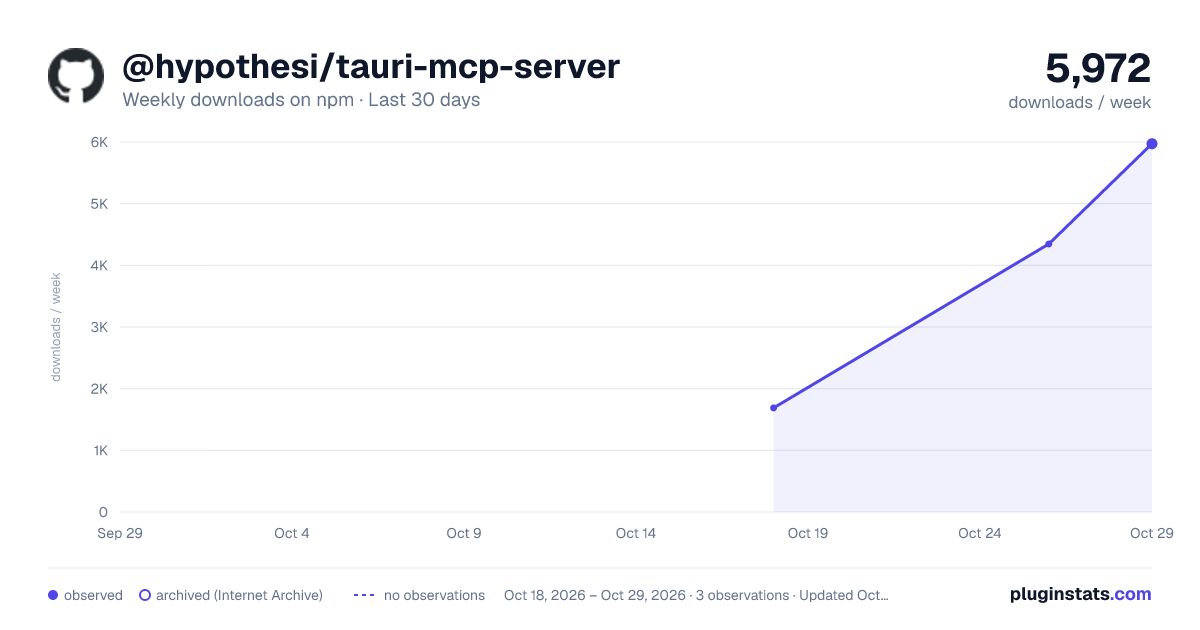
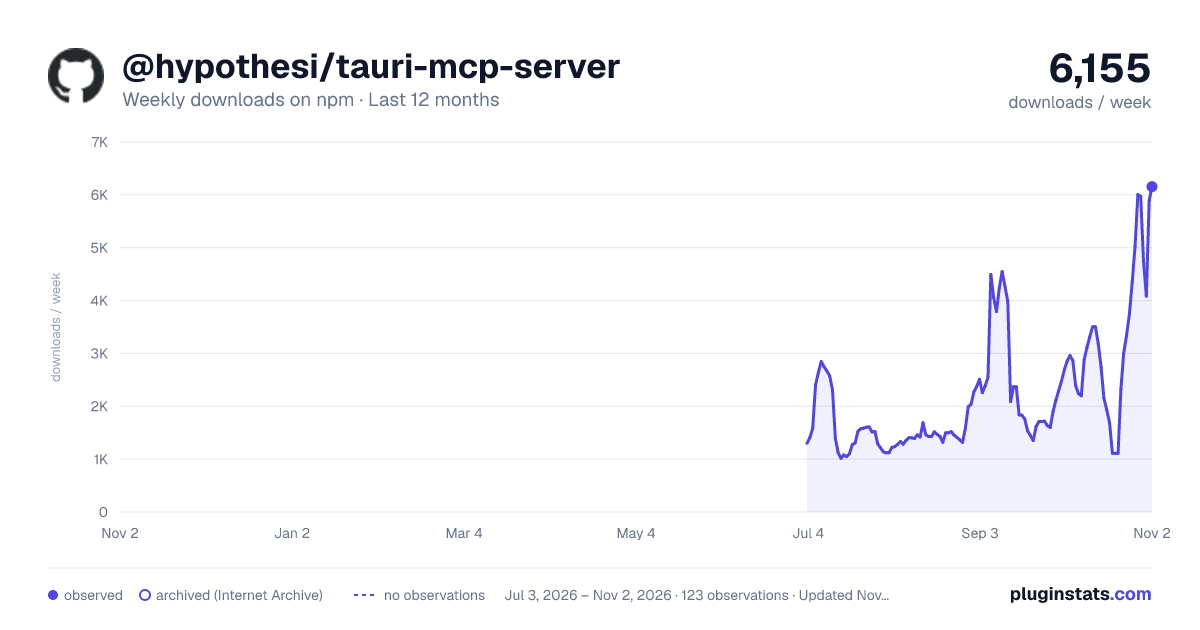
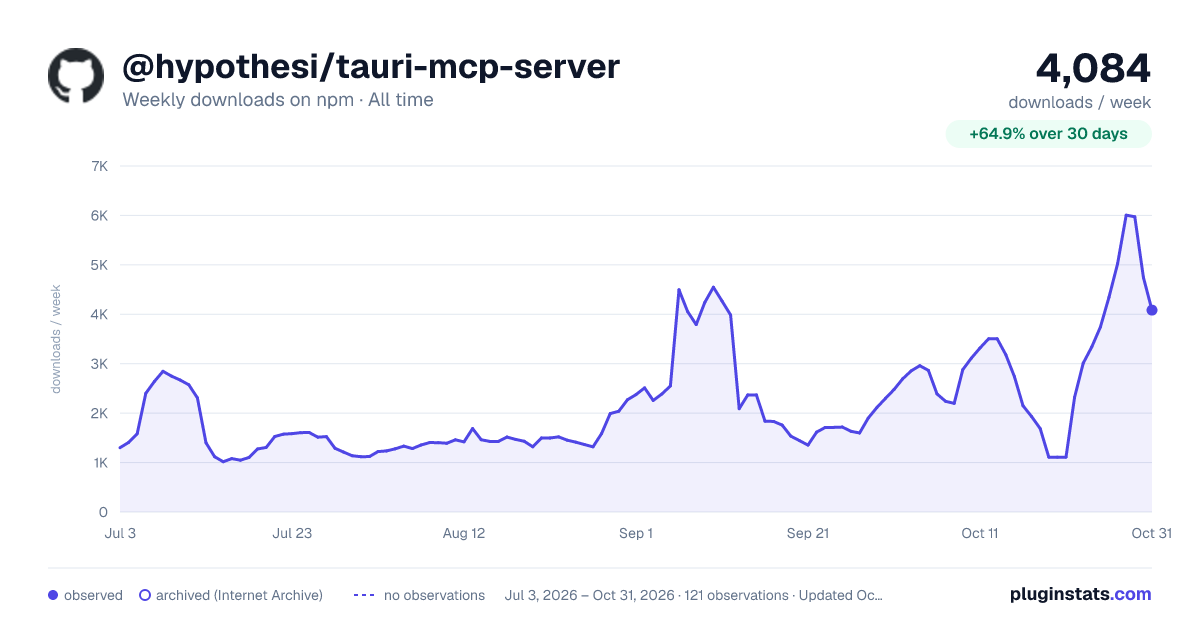

Adoption over time
7/30/90-day growth
Ranking history
Listing placement
Listing placement
Filled points are observed values; hollow points come from Internet Archive snapshots of the listing page. Dashed segments span periods with no observations — values between points are not interpolated.
Each band is one page of 20. Weekly downloads on a linear scale. Placement is projected from weekly downloads, so it can differ from the marketplace's own sort order. Hover a dot to see the listing.
Recent observations
Full history (1)Similar npm Claude Code plugins
All 20 @hypothesi/tauri-mcp-server alternativesData source
Weekly downloads (trailing 7 complete days) come from the official npm downloads API. Downloads include CI and mirrors and are not equivalent to installs or users. npm publishes no ratings.
Listing: https://www.npmjs.com/package/@hypothesi/tauri-mcp-server. First seen Oct 21, 2026; last successful collection Oct 21, 2026. See the methodology.