 PluginStats
@clerk/eslint-plugin weekly downloads statistics
By clerk (5 listings) · npm · ESLint plugins
ESLint plugin for enforcing Clerk patterns across JavaScript frameworks.
@clerk/eslint-plugin has 10,162 recorded weekly downloads on npm, ranking #959 of 2,391 tracked listings.
About @clerk/eslint-plugin
@clerk/eslint-plugin
<div align="center">


Changelog · Report a Bug · Request a Feature · Get help
</div>Overview
[!NOTE] This lint rule is experimental, but should already be working well.
We encourage trying it out and getting in touch with us about your experience.
If you try it out, pin your version as we might do breaking changes in minors before v1.
ESLint rules to help with Clerk patterns across JavaScript frameworks.
Currently includes a Next.js App Router rule to help enforce protecting resources where they are used. Instead of relying on a proxy matcher, you declare which folders are protected and the require-auth-protection rule flags any page, layout, template, default, route, or Server Function under those folders that doesn't guard itself.
Client components are not checked by the rule. These can only get privileged access through other protected resources, or via external API calls which are assumed to be separately protected.
The rule only detects protected or not, which corresponds to signed in/signed out. You are still responsible for making sure the checks are correct and that the user has the correct permissions to access the resource.
The config declares intent for tooling — it does not guard anything at runtime. Protection only happens when each resource calls
await auth.protect()(or an equivalent check). This rule verifies that it does.
Installation
npm install --save-dev @clerk/eslint-plugin
Requires ESLint >=9 (flat config), and also works with Oxlint when configured as a jsPlugin.
Usage
Register the plugin and declare your protected/public folder globs in eslint.config.mjs, for example:
import clerkNext from '@clerk/eslint-plugin/next';

export default [
  {
    plugins: { '@clerk/next': clerkNext },
    rules: {
      '@clerk/next/require-auth-protection': [
        'error',
        {
          protected: ['**'],
          public: ['src/app/sign-in/**', 'src/app/sign-up/**'],
        },
      ],
    },
  },
];
You need to adapt the exact paths to your application structure.
This rule also works with Oxlint, you can configure the rules just like above after adding the plugin as a jsPlugin in .oxlintrc.json:
"jsPlugins": [
  {
    "name": "@clerk/next",
    "specifier": "@clerk/eslint-plugin/next"
  }
]
Note that the bulk auto-fixer described further down does require eslint to be installed.
Options
| Option | Type | Default | Description |
|---|---|---|---|
protected | string[] (required) | — | Folder globs relative to the project root whose resources must be guarded. |
public | string[] | [] | Folder globs relative to the project root that are exempt. |
resources | object | all true | Resource groups to check. Supports routeHandlers, serverFunctions, and serverComponentEntrypoints, each as an optional boolean. |
mixedScopeLayouts | 'auto' | string[] | 'auto' | Layouts/templates that intentionally wrap both protected and public descendants. 'auto' allows them silently; a list requires each such folder to be acknowledged explicitly. |
rootDir | string | (auto) | Project root used to resolve project-relative folder globs. Defaults to the nearest ancestor eslint.config.*, then ESLint/Oxlint cwd. Relative paths are resolved against cwd. |
Globs use a minimal dialect — only * (single segment) and ** (any depth). When a folder matches both protected and public, the most specific pattern wins, and protected wins ties.
Path matching
protected and public are project-relative folder globs. Use app/** for a root app directory, src/app/** for a src/app directory, and src/**, shared/**, etc. for other project folders.
The project root is normally determined by the nearest eslint.config.* ancestor of the file being checked, and falls back to cwd. You can configure it manually using rootDir; relative rootDir values are resolved against ESLint/Oxlint cwd.…
Description from the npm listing.
- auth
- authentication
- eslint
- eslintplugin
- eslint-plugin
- next
- nextjs
- clerk
README badge
Show your rank in a README or on your website. The badge updates automatically.
Charts
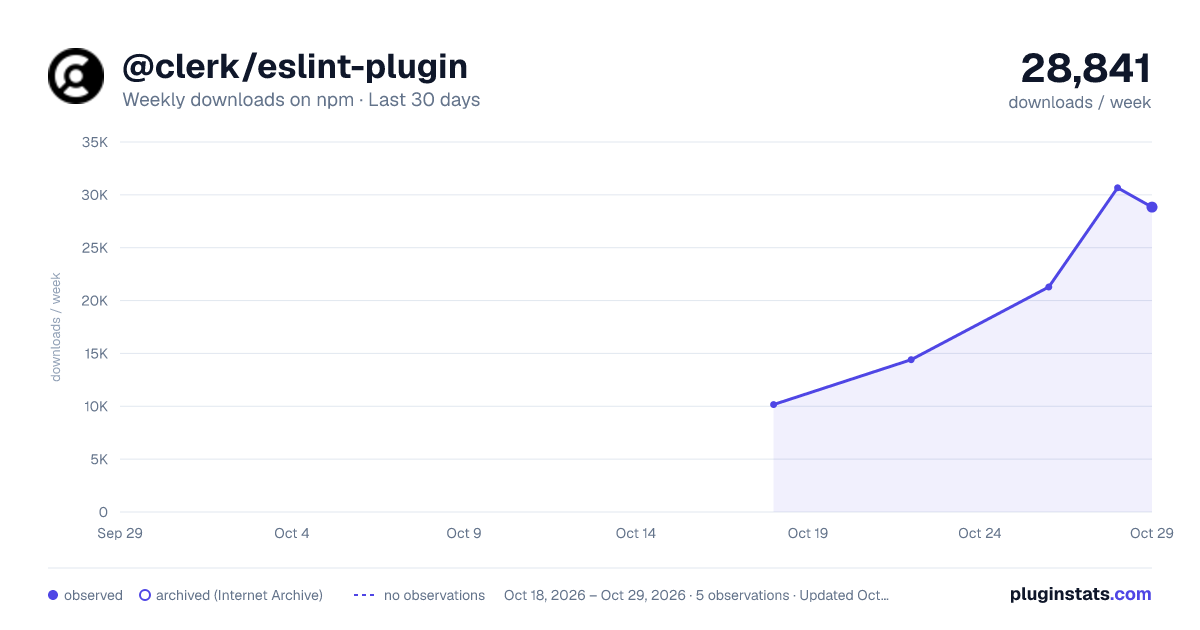
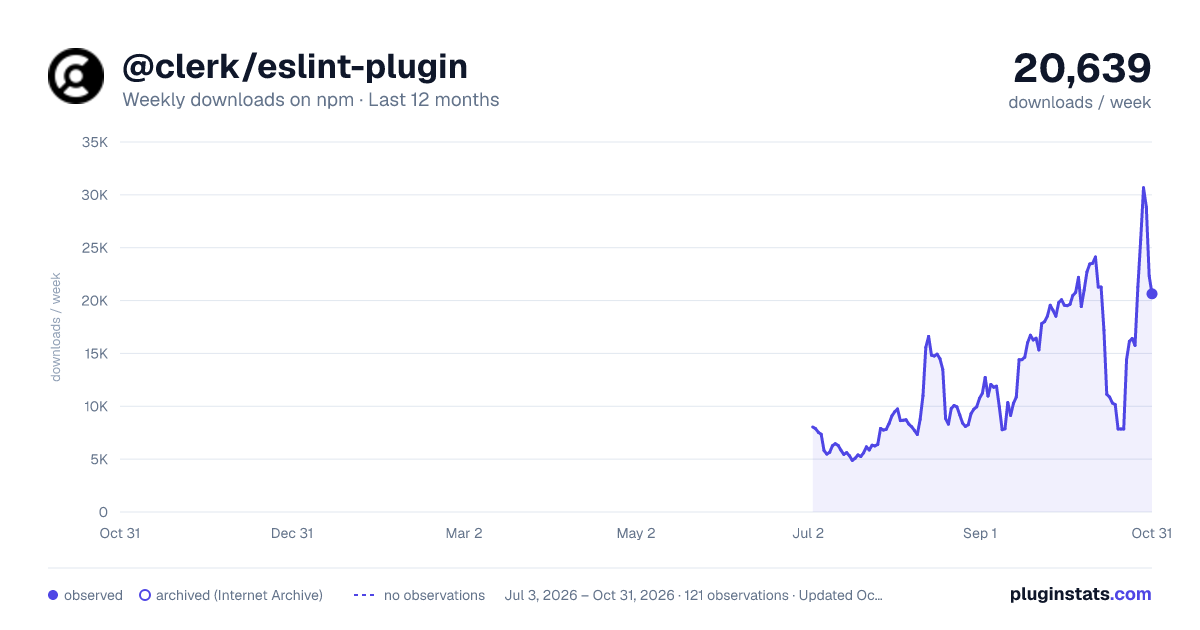
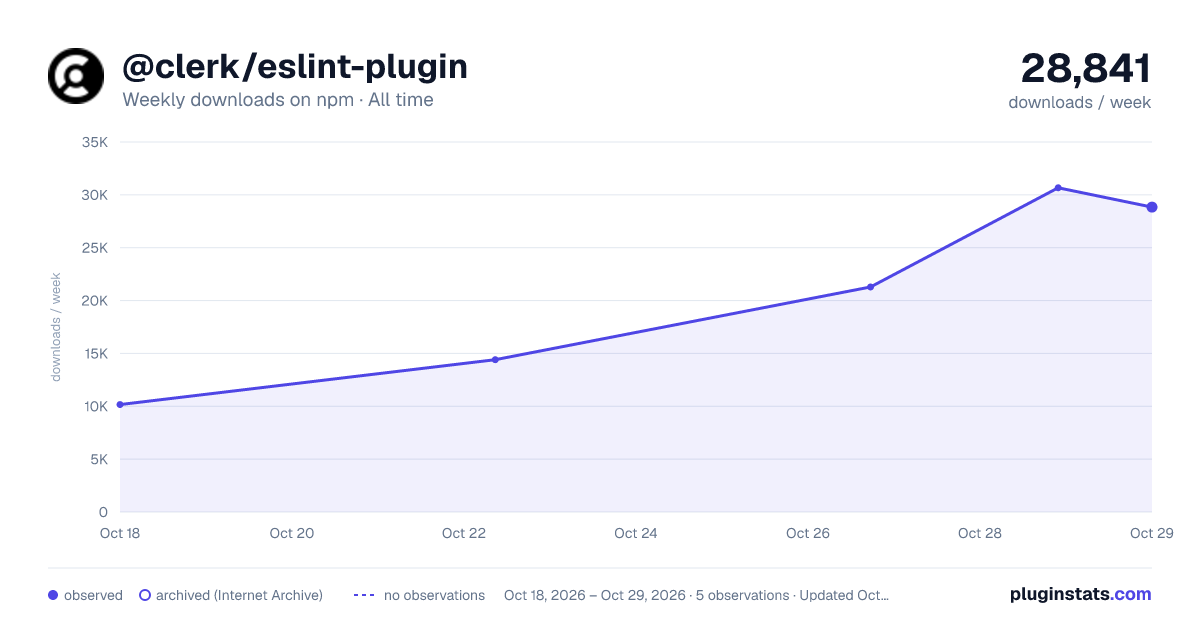
Images: 30d · 1y · all time · 1600×900 dark

Adoption over time
7/30/90-day growth
Ranking history
Listing placement
Listing placement
Filled points are observed values; hollow points come from Internet Archive snapshots of the listing page. Dashed segments span periods with no observations — values between points are not interpolated.
Each band is one page of 20. Weekly downloads on a linear scale. Placement is projected from weekly downloads, so it can differ from the marketplace's own sort order. Hover a dot to see the listing.
Recent observations
Full history (1)Similar npm ESLint plugins plugins
All 20 @clerk/eslint-plugin alternativesData source
Weekly downloads (trailing 7 complete days) come from the official npm downloads API. Downloads include CI and mirrors and are not equivalent to installs or users. npm publishes no ratings.
Listing: https://www.npmjs.com/package/@clerk/eslint-plugin. First seen Oct 21, 2026; last successful collection Oct 21, 2026. See the methodology.