 PluginStats
crewly weekly downloads statistics
By stevehuang0115 · npm · MCP servers
Multi-agent orchestration platform for AI coding teams — coordinates Claude Code, Gemini CLI, and Codex agents with a real-time web dashboard
crewly has 9,357 recorded weekly downloads on npm, an increase of 2269% over the past 30 days.
It ranks #926 of 2,251 tracked npm listings by weekly downloads.
Over 90 days, weekly downloads changed by +2144%.
PluginStats has 121 daily observations since Jun 19, 2026; the latest is from Oct 17, 2026.
About crewly
Crewly
Website: crewlyai.com
Your judgment, run by an AI crew.
You're closest to the problem. Crewly gives you an AI crew that works the way you'd decide — even when you're not in the room.
Under the hood, Crewly is an open-source multi-agent orchestration platform that coordinates AI coding agents (Claude Code, Gemini CLI, Codex, OpenCode) to work together as a team. It provides a web dashboard for real-time monitoring, task management, and team coordination — all running locally on your machine.
Features
• Multi-agent teams — Create teams with different roles (developer, QA, PM, orchestrator) and watch them collaborate • Multi-runtime support — Use Claude Code, Gemini CLI, OpenAI Codex, or OpenCode — mix and match per agent • Real-time dashboard — Monitor all agents through live terminal streams, task boards, and activity feeds • Skill system — Agents coordinate through bash skills (report status, delegate tasks, manage memory) • Agent memory — Persistent knowledge that agents build and share across sessions • Slack integration — Optional two-way Slack bridge for team notifications • Local-first — Everything runs on your machine. No data leaves your environment.
Quick Start
The installer needs no sudo: if your global npm folder is not writable (a system Node on Linux), it installs Crewly under ~/.crewly/npm-global and adds that to your PATH. Then it runs the setup wizard (the same as crewly init). When it finishes, open a new terminal and run:
Prefer npm? With Node from nvm, fnm or Homebrew (your user owns the global npm folder):
EACCES: permission denied from npm install -g on Linux? A system Node (from apt, NodeSource or the official Docker images) keeps its global packages under /usr/local, which a normal user cannot write. Do not use sudo. Install into your home folder instead, which is what the installer script does, and crewly upgrade keeps using that folder:
The init command walks you through provider selection, installs agent skills, and scaffolds a .crewly/ directory. Then crewly start launches the backend server and prints the web dashboard URL (add --open or set CREWLY_OPEN_BROWSER=1 to open it). From there:
1. Create a team with agents assigned to roles 2. Assign the team to a project (any local code directory) 3. Watch agents work in real time through live terminal streams
Requirements
• Node.js 22 or later (with npm). Node 20 is end-of-life and its better-sqlite3 has no prebuilt binary. • No C/C++ toolchain on macOS (x64/arm64) or glibc Linux (x64/arm64). The native modules install from prebuilt binaries there. You do need python3, make and g++ (Xcode Command Line Tools on macOS) in these cases: • Alpine/musl, glibc older than 2.28, or other architectures, where node-pty compiles from source • a network that blocks the prebuilt download: better-sqlite3 fetches its binary from GitHub at install time and compiles from source if it cannot
On Debian/Ubuntu, install the toolchain with sudo apt-get install -y python3 make g++. crewly doctor tells you whether you need it. • jq (brew install jq on macOS, sudo apt-get install -y jq on Debian/Ubuntu). Agent skills use it, and crewly init stops if it is missing. • curl • One AI coding CLI, installed and logged in: Claude Code (claude), Gemini CLI (gemini) or Codex (codex). OpenCode also works. • A normal user account, not root. Run Crewly as a normal user, not with sudo or as root. Claude Code refuses to start its agents under root.
tmux is not required.
| Runtime | Install | Verify |
| Claude Code (default) | npm install -g @anthropic-ai/claude-code | claude --version | | Gemini CLI | npm install -g @google/gemini-cli | gemini --version | | Codex (OpenAI) | npm install -g @openai/codex | codex --version | | OpenCode | npm install -g opencode-ai | opencode --version |
API keys: Gemini CLI requires GEMINI_API_KEY. On a Gemini agent's first run, answer its two terminal prompts: authentication (Use Gemini API Key) and folder trust (Yes). Codex requires an OpenAI API key. Claude Code: run claude once in a terminal, finish its first-run setup (choose a theme) and log in before you start a team. A Claude agent cannot get past those screens on its own. OpenCode uses whichever provider you connect via opencode auth login (or the ANTHROPIC_API_KEY / OPENAI_API_KEY / GEMINI_API_KEY env vars Crewly already exports to agent sessions).
Architecture
How It Works
1. You create a team in the dashboard with agents assigned to roles 2. You assign the team to a project (any local code directory) 3. Crewly launches each agent as a CLI process in its own PTY session 4. Agents receive role-specific prompts and use skills (bash scripts) to communicate, report progress, and manage tasks 5. You monitor everything in real time through the web dashboard
Agent Runtimes
| Runtime | Default Command | Notes |
| Claude Code | claude --dangerously-skip-permissions | Default runtime | | Gemini CLI | gemini --yolo | Requires GEMINI_API_KEY | | Codex (OpenAI) | codex -a never -s danger-full-access | Requires OpenAI API key | | OpenCode | opencode --auto | Any provider/model (-m provider/model); reads AGENTS.md; auth via opencode auth login |
You can change the default runtime or customize launch commands in Settings.
CLI Commands
Configuration
Optional environment variables (.env file or shell):
Slack
One click (recommended). Log in to Crewly Cloud (Settings → Cloud), open Settings → Integrations → Slack and press Connect Slack. Slack asks you to approve the Crewly app once; from then on every Crewly instance signed in to the same Crewly account gets Slack automatically — team channels, and one real Slack bot user per agent — with no tokens to copy. The instance pulls its config from Cloud on boot and every 10 minutes (cached 0600 at ~/.crewly/slack-cloud-config.json); Slack events reach it through the Cloud relay, so no Socket Mode connection is opened.…
Description from the npm listing.
- ai-agents
- multi-agent
- claude-code
- gemini-cli
- codex
- orchestration
- developer-tools
- team-coordination
- real-time-dashboard
- pty
- automation
- mcp
Where crewly sits in the listing
Each band is one page of 20. Weekly downloads on a log scale. Placement is projected from weekly downloads, so it can differ from the marketplace's own sort order. Hover a dot to see the listing.


Charts
Images: 30d · 1y · all time · 1600×900 dark
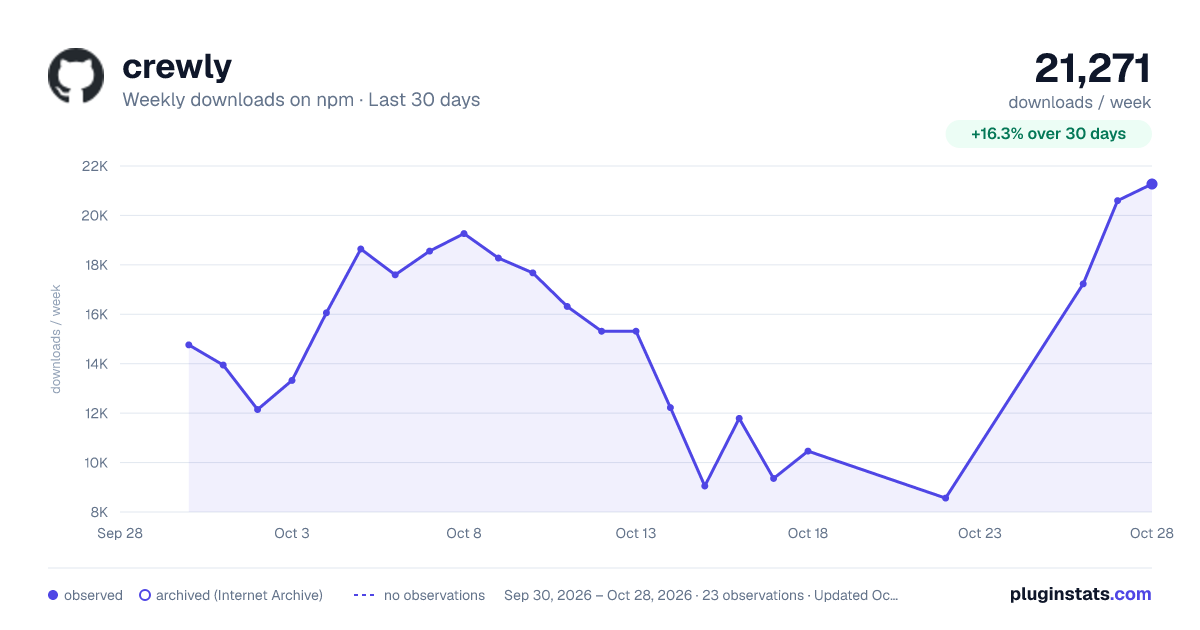
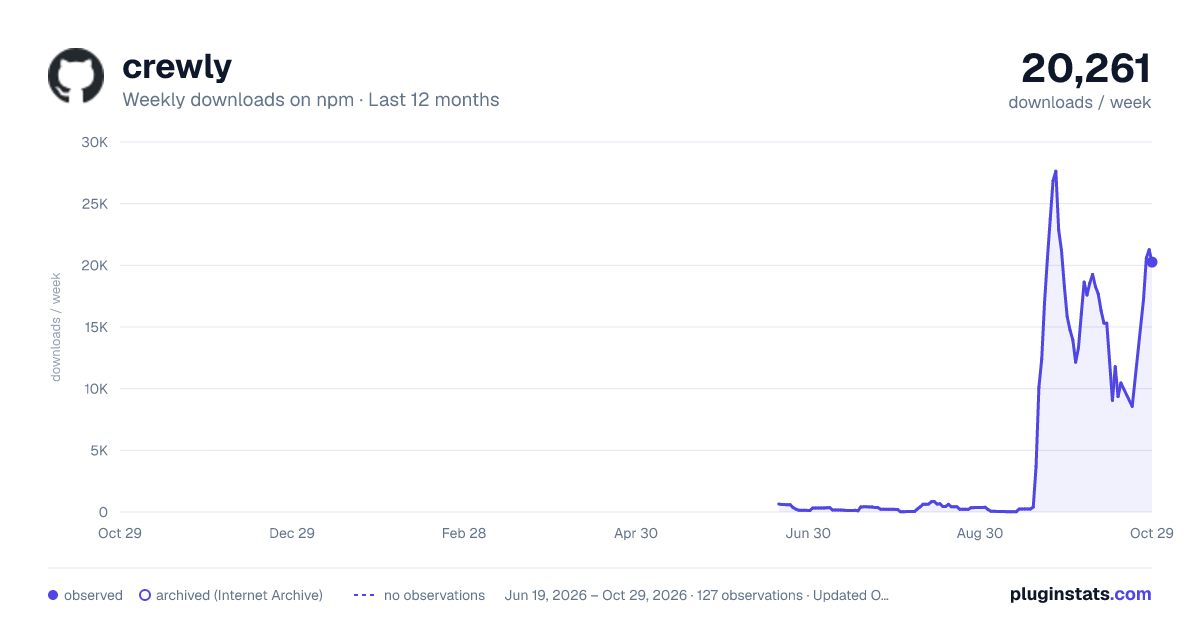
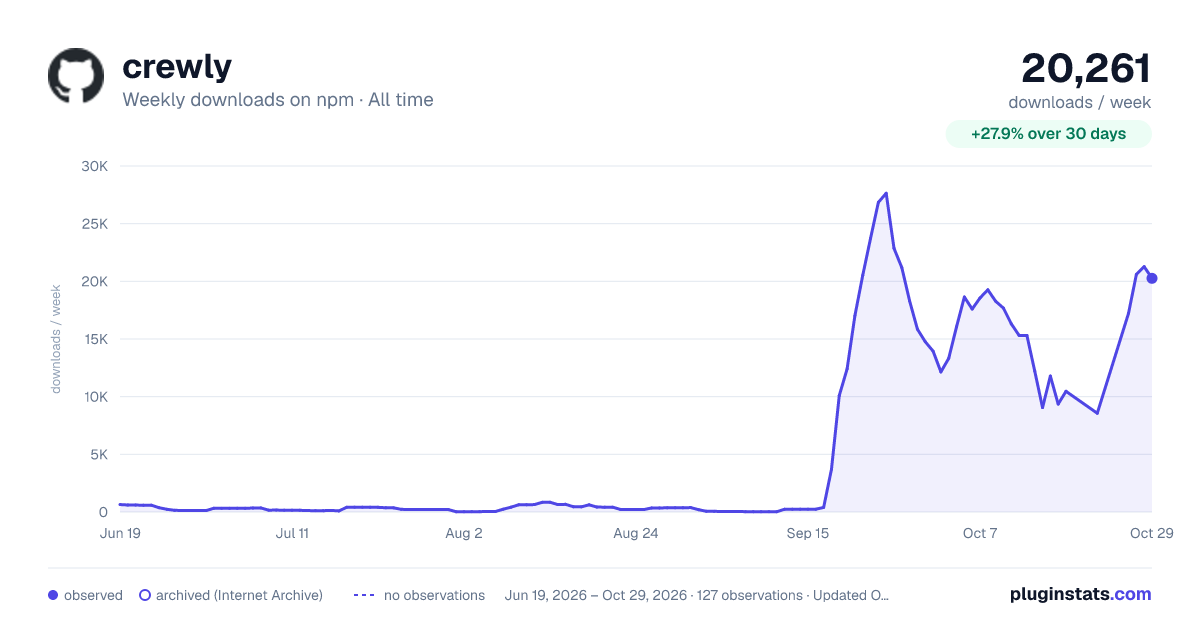

Adoption over time


7/30/90-day growth


Filled points are observed values; hollow points come from Internet Archive snapshots of the listing page. Dashed segments span periods with no observations — values between points are not interpolated.
Recent observations
Full history (121)Similar npm MCP servers plugins
Data source
Weekly downloads (trailing 7 complete days) come from the official npm downloads API. Downloads include CI and mirrors and are not equivalent to installs or users. npm publishes no ratings.
Listing: https://www.npmjs.com/package/crewly. First seen Oct 16, 2026; last successful collection Oct 18, 2026. See the methodology.