 PluginStats
@lushly-dev/afd-core weekly downloads statistics
By lushly-dev (4 listings) · npm · MCP servers
Core types and utilities for Agent-First Development
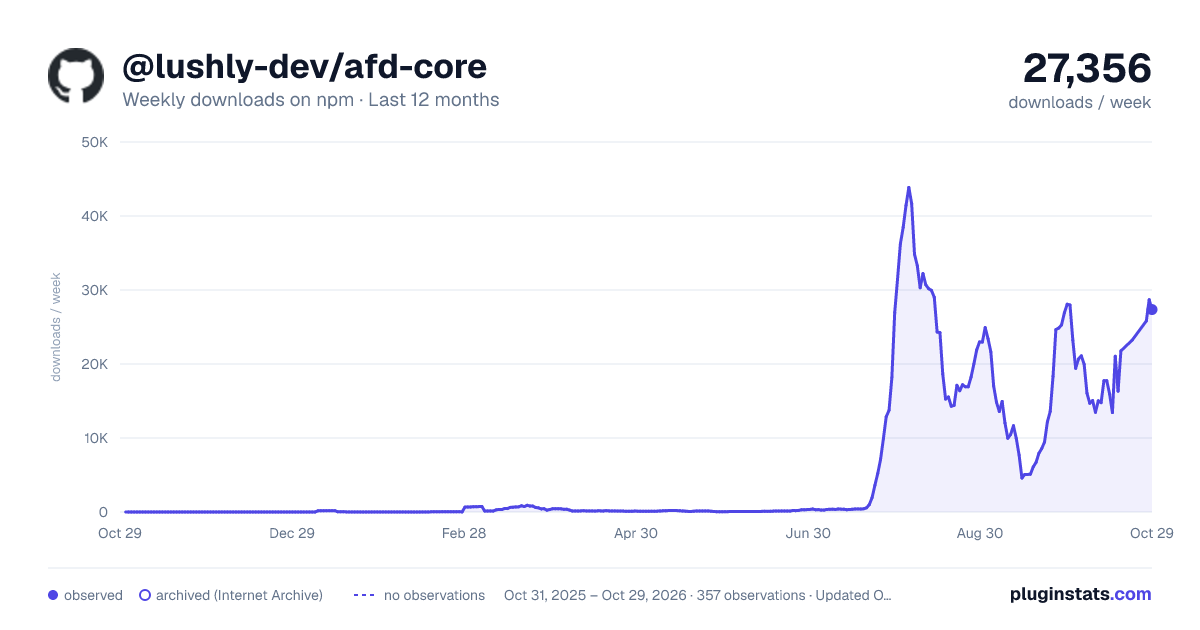
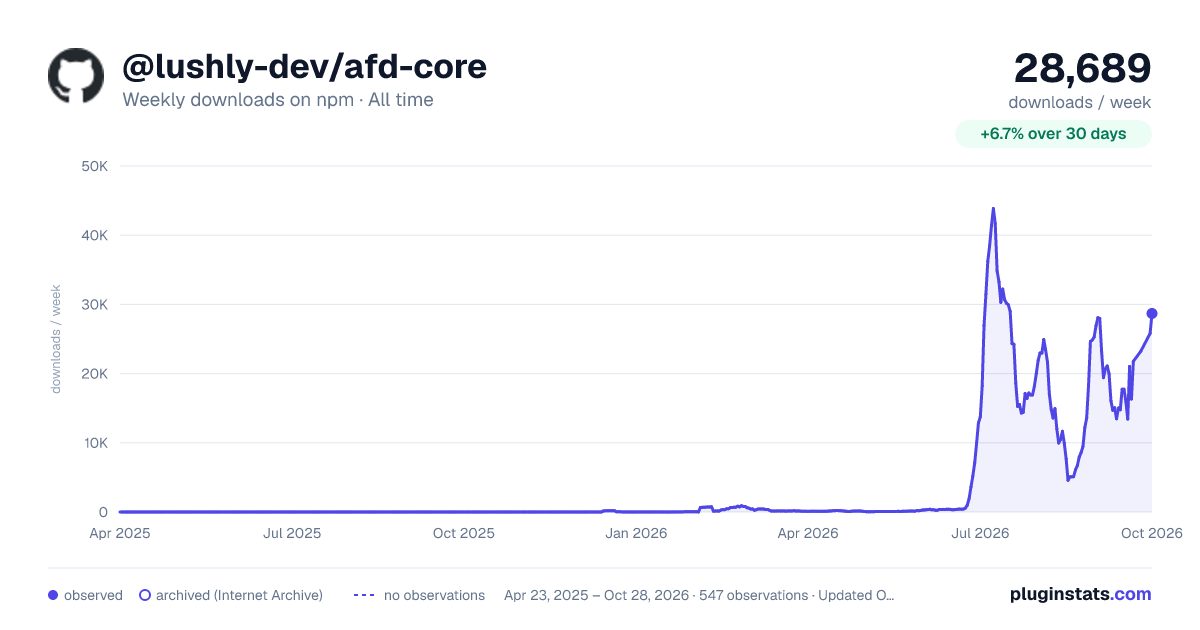
@lushly-dev/afd-core has 16,328 recorded weekly downloads on npm, an increase of 168% over the past 30 days, ranking #804 of 2,256 tracked listings.
About @lushly-dev/afd-core
@lushly-dev/afd-core
Core types and utilities for Agent-First Development.
Installation
Overview
This package provides the foundational types used across all AFD packages:
• CommandResult - Standard result type with UX-enabling fields • CommandError - Actionable error structure • CommandDefinition - Full command schema with handler • MCP types - Model Context Protocol types for agent communication
Entry points
| Import | Contents | Runs in |
| @lushly-dev/afd-core | All types and helpers; not connectors or platform | Node.js and browsers | | @lushly-dev/afd-core/commands | Command types, defaultExpose, validateCommandName, createCommandRegistry, MCP tool conversion | Node.js and browsers | | @lushly-dev/afd-core/result | CommandResult, success, failure, error, isSuccess, isFailure | Node.js and browsers | | @lushly-dev/afd-core/connectors | GitHubConnector, PackageManagerConnector and their types | Node.js only | | @lushly-dev/afd-core/platform | exec, findUp, isWindows and other process helpers | Node.js only |
Connectors live in their own subpath
GitHubConnector and PackageManagerConnector spawn processes through node:child_process, so they are exported only from the connectors subpath:
Since 2.0 the root entry no longer re-exports them, so it bundles for the browser (for example with esbuild --bundle --platform=browser).
Contract version
AFD_CONTRACT_VERSION is the version of the AFD contract this package implements: the wire shapes, pipeline variables, behavior vectors and conformance suite that the TypeScript, Python, Rust and C++ implementations share (spec/VERSION). It is independent of the package version. afd-help reports it as contractVersion.
Running processes
exec(['git', 'status'], options) from the platform subpath never uses a shell. It captures at most maxOutputBytes (default 10 MiB, DEFAULT_MAX_OUTPUT_BYTES) from each of stdout and stderr. Past that it kills the process and returns errorCode: 'OUTPUT_LIMIT_EXCEEDED' with the output captured up to the limit.
Usage
Creating Command Results
Using Type Guards
isSuccess checks only success === true, so a void command's success(undefined) is a success. isFailure checks only success === false, so every result is exactly one of the two, and { success: false } without an error is a failure. Results built with failure() always carry an error; read one from an untrusted peer defensively (result.error?.code).
Defining Commands
The registry follows the same rules as the MCP server:
• Pass { interface: 'mcp' } (or 'cli', 'agent', 'palette') as the context to execute, executeBatch or executeStream and the command's expose options are checked on every entry point, including each batch entry. • executeBatch validates the whole request with isBatchRequest() before running anything, and options.timeout is a deadline at any parallelism. • A handler that throws returns COMMAND_EXECUTION_ERROR without the exception message or stack. Pass createCommandRegistry({ devMode: true }) to include them.
Batch and stream execution live in executeBatch() and executeStream(), which take an execute callback like executePipeline(), so other hosts can reuse the same semantics. The MCP server uses them too.
executeStream() does not stream incrementally: the command runs to completion, then its result is turned into chunks (one data chunk per array item, or one for any other value, then complete). StreamableCommand is metadata only. registry.executeStream(name, input, { signal, timeout }) honors both options: timeout is a deadline for the whole stream, after which the command's signal aborts and the stream ends with a STREAM_TIMEOUT error chunk, even if the command ignores the signal.
Creating Errors
MCP Integration
Pipelines
executePipeline runs chained steps; the server's afd-pipe tool and DirectClient.pipe both use it. Variable references follow spec/pipeline-variables.md, which Python and Rust implement too:
• A string is a reference only when the whole string is $prev, $first, $steps[N], $steps. or $input, optionally followed by . (user.name, items[2], items.2). $prev is the last successful step. Other strings ($9.99, $HOME) pass through unchanged, $$ sends a literal $ ('$$USD' becomes '$USD'), and strings over 1024 characters are literals. • $input is the request's input field. It is never the executor's context; before this change it resolved to that context, so trace IDs, auth or other host values could be copied into a command input. • Paths follow only own keys of plain JSON objects and in-bounds array indices. constructor, proto, any __-prefixed segment and array length never resolve. • An unresolved reference is omitted from an object and becomes null in an array. In when conditions it is absent: $exists is false and every comparison with it is false. • Step inputs or a request input nested deeper than 64 levels fail with VALIDATION_ERROR before any step runs. A malformed request fails with INVALID_PIPELINE_REQUEST. • Step data is copied (structuredClone) when it is recorded and when it is resolved, so a handler that mutates its input cannot change another step's data. • Steps run one after another. options.parallel: true and a step with stream: true are not implemented: the offending step (step 0 for parallel) fails with UNSUPPORTED_OPTION and every other step is skipped, before any command runs. PipelineStep.stream and options.onProgress are deprecated; onProgress is accepted but never called.
Types
CommandResult
The standard return type for all AFD commands:
CommandError
Actionable error structure:…
Description from the npm listing.
- afd
- agent-first
- mcp
- ai-agents
- command-schema
README badge
Show your rank in a README or on your website. The badge updates automatically.
Charts
Images: 30d · 1y · all time · 1600×900 dark


Adoption over time
7/30/90-day growth
Ranking history
Listing placement
Listing placement
Filled points are observed values; hollow points come from Internet Archive snapshots of the listing page. Dashed segments span periods with no observations — values between points are not interpolated.
Each band is one page of 20. Weekly downloads on a linear scale. Placement is projected from weekly downloads, so it can differ from the marketplace's own sort order. Hover a dot to see the listing.
Recent observations
Full history (543)Similar npm MCP servers plugins
All 20 @lushly-dev/afd-core alternativesData source
Weekly downloads (trailing 7 complete days) come from the official npm downloads API. Downloads include CI and mirrors and are not equivalent to installs or users. npm publishes no ratings.
Listing: https://www.npmjs.com/package/@lushly-dev/afd-core. First seen Oct 16, 2026; last successful collection Oct 19, 2026. See the methodology.