 PluginStats
devlens-ai weekly downloads statistics
By Tushararora1210 · npm · Webpack plugins
Chat with Claude Code inside your running app: click an element, say what to change, and DevLens edits your code. Works with Vite, webpack, Rspack and Next.js.
devlens-ai has 715 recorded weekly downloads on npm.
About devlens-ai
DevLens
Chat with Claude Code inside your running app. Click any element on the page, type what should change, and DevLens edits your source code. Your dev server reloads, and you see the result right away.
DevLens is a small chat panel that appears in your app during local development only. It uses the Claude Code already installed on your computer, with your login and your settings.
npx devlens-ai init
What you can do
- Point and ask. Click an element and say "make this button bigger" or "match the spacing of the card above". DevLens tells Claude the exact file and line that rendered it.
- Pick from several pages. Select an element on one tab (for example, a Buy page) and another on a second tab (a Rent page). Both go into the same prompt: "make this one look like that one".
- Fix console errors. DevLens collects the page's errors (JavaScript errors,
console.error, failed API calls). Click Fix with DevLens: it explains the root cause first, then asks before changing any code. - Open the file in your editor. Hold Option (Mac) or Alt (Windows, Linux) and click an element. Its file opens in VS Code, Cursor, WebStorm or another installed editor, at the right line.
- See before and after. Compare the page with how it looked at the start of the session, as a slider, side by side, or with the changed parts outlined.
- Attach designs. Add screenshots, mockups, PDFs or code files with the paperclip, drag and drop, or paste.
- Keep working like in Claude Code. Send follow-ups while Claude works, answer its questions, and allow or deny commands from the chat.
Nothing from DevLens is added to your production build.
Requirements
| You need | Check with |
|---|---|
| Node.js 20 or newer | node -v |
| Claude Code, logged in | claude --version, then claude auth login if needed |
| A React, Preact or Solid app on Vite, webpack, Rspack or Next.js | |
| Google Chrome or Microsoft Edge | Only needed for before/after screenshots |
DevLens works with npm, pnpm, Yarn (1 and 4) and Bun.
Quick start
1. Install and set up (run this in your project folder):
npx devlens-ai init
This installs devlens-ai as a dev dependency, adds it to your Vite, webpack or Next.js config, and checks that Claude Code is ready.
2. Start your dev server as usual, for example:
npm run dev
3. Open your app in the browser. Click the round DevLens button in the bottom-right corner, and type what you want to change.
If anything doesn't work, run npx devlens-ai doctor. It checks your setup and tells you what to fix.
Manual setup
Use this if you prefer to edit the config yourself, or if init couldn't find your config file.
Install as a dev dependency:
npm install --save-dev devlens-ai
# or
pnpm add -D devlens-ai
# or
yarn add -D devlens-ai
In a monorepo, add the package at the workspace root with pnpm add -D -w devlens-ai or yarn add -D -W devlens-ai (Yarn 1).
Then add the plugin for your setup.
Vite
// vite.config.ts
import { defineConfig } from 'vite'
import react from '@vitejs/plugin-react'
import devlens from 'devlens-ai/vite'

export default defineConfig({
  plugins: [devlens(), react()],
})
Next.js
// next.config.mjs
import { withDevlens } from 'devlens-ai/next'

const nextConfig = {}

export default withDevlens(nextConfig)
DevLens needs the webpack dev server. On Next.js 16 (Turbopack by default), start it with next dev --webpack.
webpack or Rspack
// webpack.config.js
const devlens = require('devlens-ai/webpack').default

module.exports = {
  // ...your config
  plugins: [devlens()],
}
For Rspack, import from devlens-ai/rspack instead.
Create React App (with craco)
// craco.config.js
const devlens = require('devlens-ai/webpack').default

module.exports = {
  webpack: { plugins: { add: [devlens()] } },
}
Only when you want it
To turn DevLens on with an environment variable instead of always:
const plugins = []
if (process.env.DEVLENS === 'true' && process.env.NODE_ENV === 'development') {
  plugins.push(require('devlens-ai/webpack').default())
}
Then start your app with DEVLENS=true npm run dev.
How to use it
Change something on the page
- Click the DevLens button to open the chat.
- Click the target icon in the chat header, then click an element on the page. Hold Shift to pick several.
- Type what should change and press Enter.
You see one short status line while Claude works (for example, "Editing Button.tsx"), then a summary of what changed. Click Show details for every step.
Use elements from two tabs
Open both pages, each in its own tab. Pick an element in the first tab, switch tabs, and pick another. Both appear in the chat in every tab, each labelled with its page. Send the prompt from either tab.
Fix an error
When the page has errors, the chat shows "3 errors in console" above the input.
- Click it to see the list.
- Click Fix with DevLens next to an error. DevLens reads the code (without changing it) and explains the root cause and a suggested fix.
- Click Fix it to apply the fix, or Not now to leave the code as it is.
Click X to shrink the error label to a small icon.
Open a file in your editor
Hold Option (Mac) or Alt (Windows, Linux) and move the mouse: the element under it is outlined with its file name. Click to open that file at that line.
The first time, DevLens lists the editors installed on your computer so you can pick one. Type /editor to change it later. File names shown in the chat open the same way.
Compare before and after…
Description from the npm listing.
- claude
- claude-code
- ai
- devtools
- vite-plugin
- webpack-plugin
- nextjs
- react
- inspector
- visual-diff
README badge
Show your rank in a README or on your website. The badge updates automatically.
Charts
Images: 30d · 1y · all time · 1600×900 dark
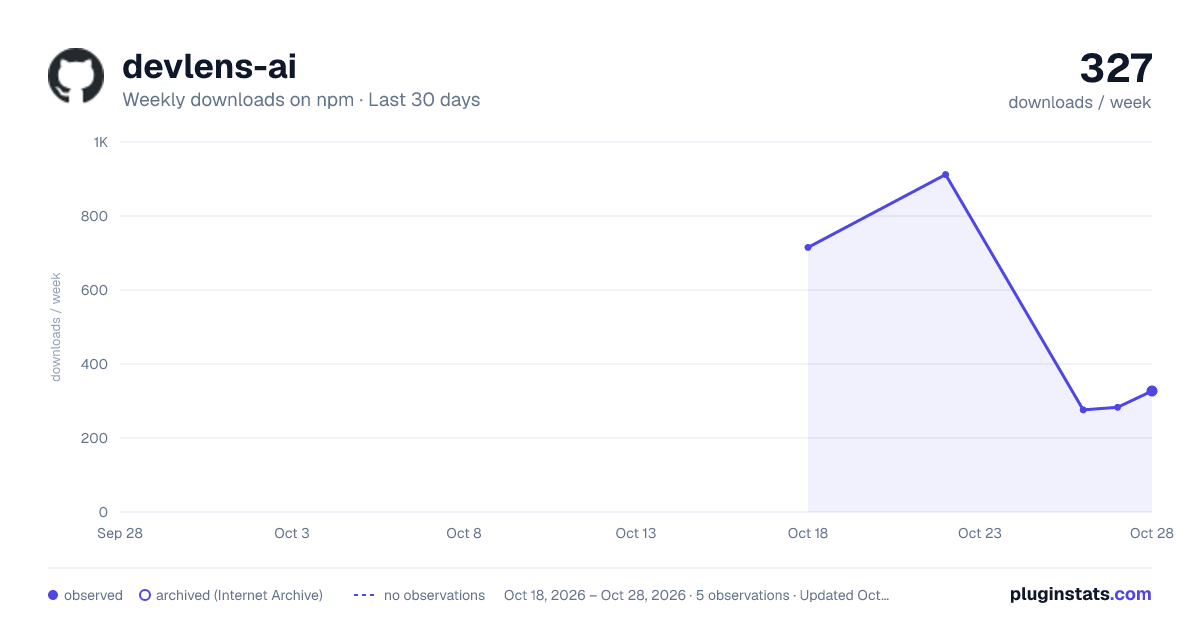
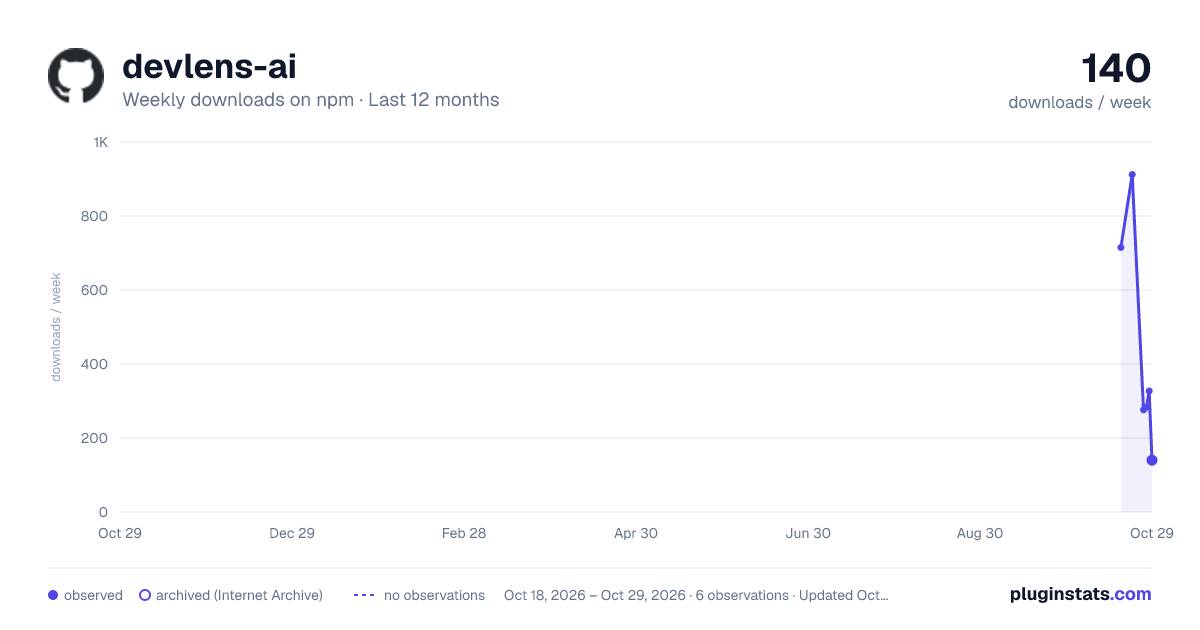
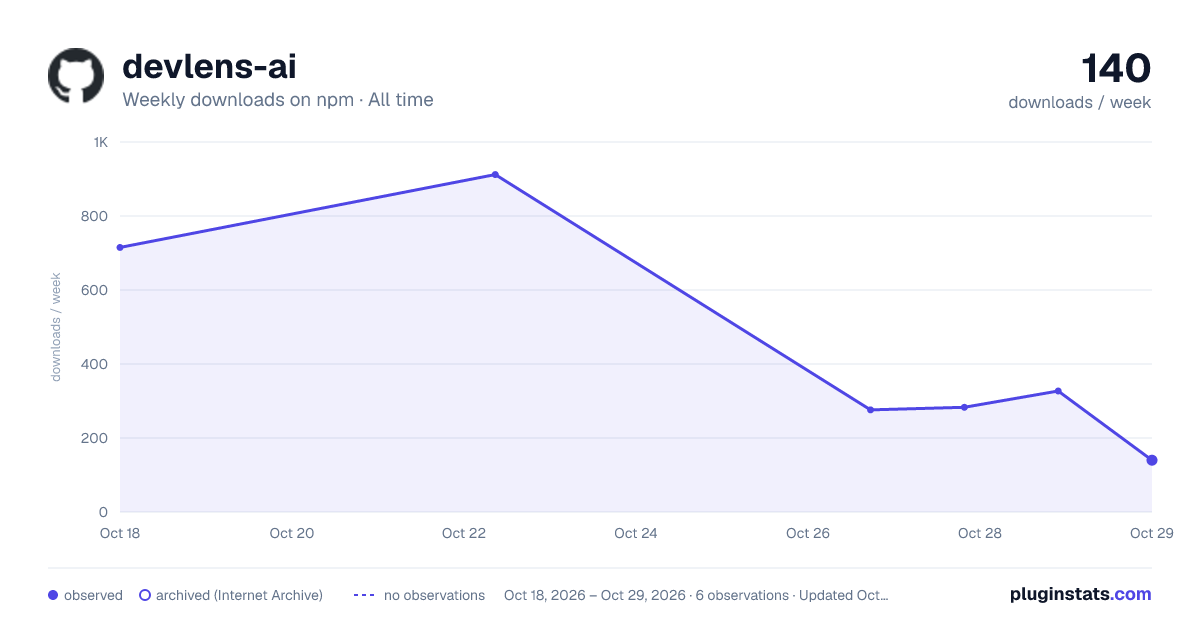

Adoption over time
7/30/90-day growth
Ranking history
Listing placement
Listing placement
Filled points are observed values; hollow points come from Internet Archive snapshots of the listing page. Dashed segments span periods with no observations — values between points are not interpolated.
Each band is one page of 20. Weekly downloads on a linear scale. Placement is projected from weekly downloads, so it can differ from the marketplace's own sort order. Hover a dot to see the listing.
Recent observations
Full history (1)Similar npm Webpack plugins plugins
All 20 devlens-ai alternativesData source
Weekly downloads (trailing 7 complete days) come from the official npm downloads API. Downloads include CI and mirrors and are not equivalent to installs or users. npm publishes no ratings.
Listing: https://www.npmjs.com/package/devlens-ai. First seen Oct 22, 2026; last successful collection Oct 22, 2026. See the methodology.