 PluginStats
@dbx-app/mcp-server weekly downloads statistics
By dbx-app · npm · MCP servers
MCP server for DBX — query databases from Claude Code, Cursor, and other AI agents
@dbx-app/mcp-server has 5,760 recorded weekly downloads on npm, a decrease of 40.2% over the past 30 days.
It ranks #1050 of 2,251 tracked npm listings by weekly downloads.
Over 90 days, weekly downloads changed by +37.6%.
PluginStats has 543 daily observations since Apr 23, 2025; the latest is from Oct 17, 2026.
About @dbx-app/mcp-server
DBX MCP Server
Rust-powered Model Context Protocol server for DBX. It lets MCP-compatible AI agents inspect schemas and run safe database operations using connections configured in DBX.
中文说明 | npm | Native releases
Architecture
The MCP protocol, connection loading, SQL safety, schema access, Redis support, MongoDB shell parsing, Web backend access, and database execution are implemented in Rust. Node.js is used only by the npm launcher so existing npm, npx, and MCP client configurations continue to work.
Features
• 18 MCP tools for connection and database discovery, schemas, SQL, Redis, sessions, messages, and DBX UI integration • Precompiled native binaries with no local Rust, Cargo, Python, or C/C++ build requirement • No better-sqlite3 runtime dependency and no Node native-addon ABI coupling • Local, Web, and Docker modes using the same tool interface • Optional Streamable HTTP transport protected by a bearer token, while stdio remains the default • Direct native execution for supported SQL, Redis, and MongoDB connections • Agent/JDBC database support through DBX agent infrastructure when the required agent and JRE are installed • DBX-managed access policy with a connection allowlist and three execution modes • SQL, Redis, and MongoDB safety controls that reload the policy for every request • Offline execution through downloadable native binaries • Optional desktop integration for opening tables and displaying query results in DBX
Installation
npm global install
Then configure the MCP client to run:
npx
No global installation is required:
The npm package automatically installs the native package matching the current operating system and CPU. Do not install with --no-optional, because npm optional dependencies carry the platform binary.
Native binary / offline install
Every package release publishes native archives and SHA256SUMS in GitHub Releases:
| Platform | Release asset | npm platform package |
| macOS Apple Silicon | dbx-mcp-darwin-arm64.tar.gz | @dbx-app/mcp-darwin-arm64 | | macOS Intel | dbx-mcp-darwin-x64.tar.gz | @dbx-app/mcp-darwin-x64 | | Linux glibc ARM64 | dbx-mcp-linux-arm64-gnu.tar.gz | @dbx-app/mcp-linux-arm64-gnu | | Linux glibc x64 | dbx-mcp-linux-x64-gnu.tar.gz | @dbx-app/mcp-linux-x64-gnu | | Windows ARM64 | dbx-mcp-win32-arm64.zip | @dbx-app/mcp-win32-arm64 | | Windows x64 | dbx-mcp-win32-x64.zip | @dbx-app/mcp-win32-x64 |
Verify a Unix archive before extracting it:
On macOS, use shasum -a 256 if sha256sum is unavailable. On Windows, use certutil -hashfile SHA256 and compare the value with SHA256SUMS.
Configure the MCP client to run the extracted file directly:
Direct native execution does not require Node.js. GitHub package releases are intentionally not marked as the repository's latest release, so they do not replace the latest DBX desktop release.
Requirements
npm installation
• Node.js 18.18.0 or newer • A supported operating system and CPU from the platform table • npm optional dependencies enabled
Native installation
• No Node.js or npm requirement • Linux builds currently require glibc; Alpine/musl is not supported yet
Database configuration
DBX MCP reads connection profiles from DBX storage. DBX does not need to remain open for native connections. However:
• the connection must already exist in DBX storage, unless it is added through dbx_add_connection; • DBX Agent/JDBC databases require the matching agent, JDBC driver, and JRE to be installed; • dbx_open_table and dbx_execute_and_show require a running DBX desktop application; • DBX Web mode requires a reachable DBX Web server.
Usage Examples
Ask the MCP client to:
• "List my DBX connections" • "Show tables in the production PostgreSQL connection" • "Describe the orders table" • "Build schema context for the billing database" • "Count orders created in the last seven days" • "Run INFO memory on the Redis connection" • "Find the latest MongoDB documents in the events collection" • "Open the orders table in DBX"
Tools
dbx_list_connections and dbx://connections include saved connection notes regardless of the sidebar display setting. Notes are visible to MCP clients that can access the connection; do not store passwords or other secrets in notes.
| Tool | Description |…
Description from the npm listing.
- ai-agent
- claude
- database
- dbx
- mcp
- mysql
- postgresql
Where @dbx-app/mcp-server sits in the listing
Each band is one page of 20. Weekly downloads on a log scale. Placement is projected from weekly downloads, so it can differ from the marketplace's own sort order. Hover a dot to see the listing.


Charts
Images: 30d · 1y · all time · 1600×900 dark
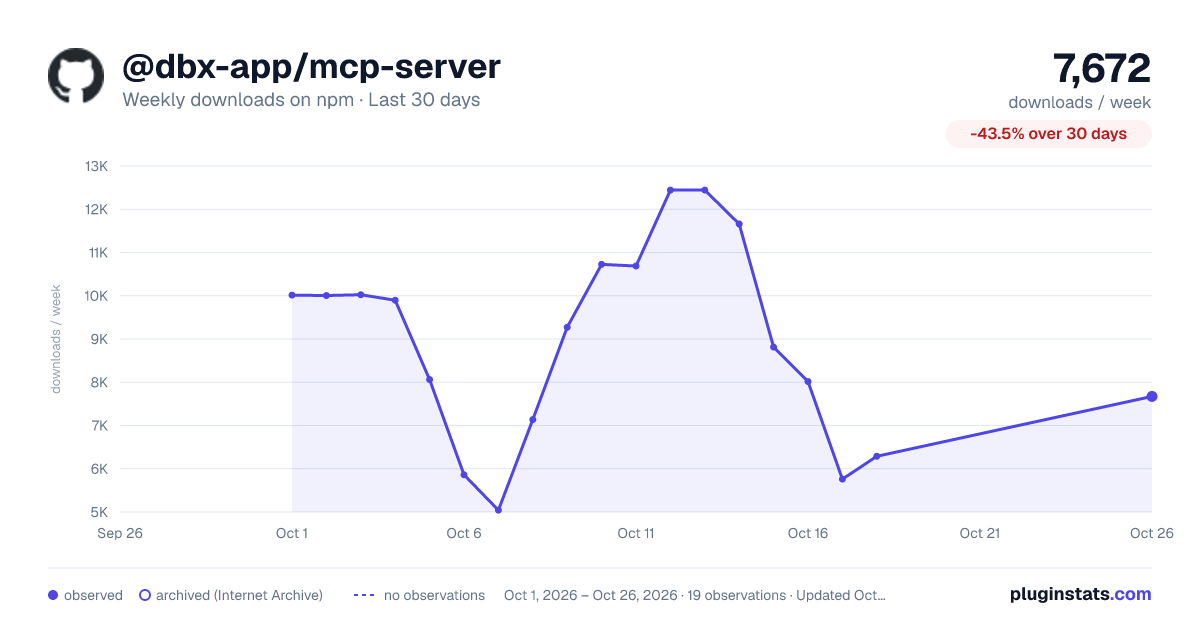
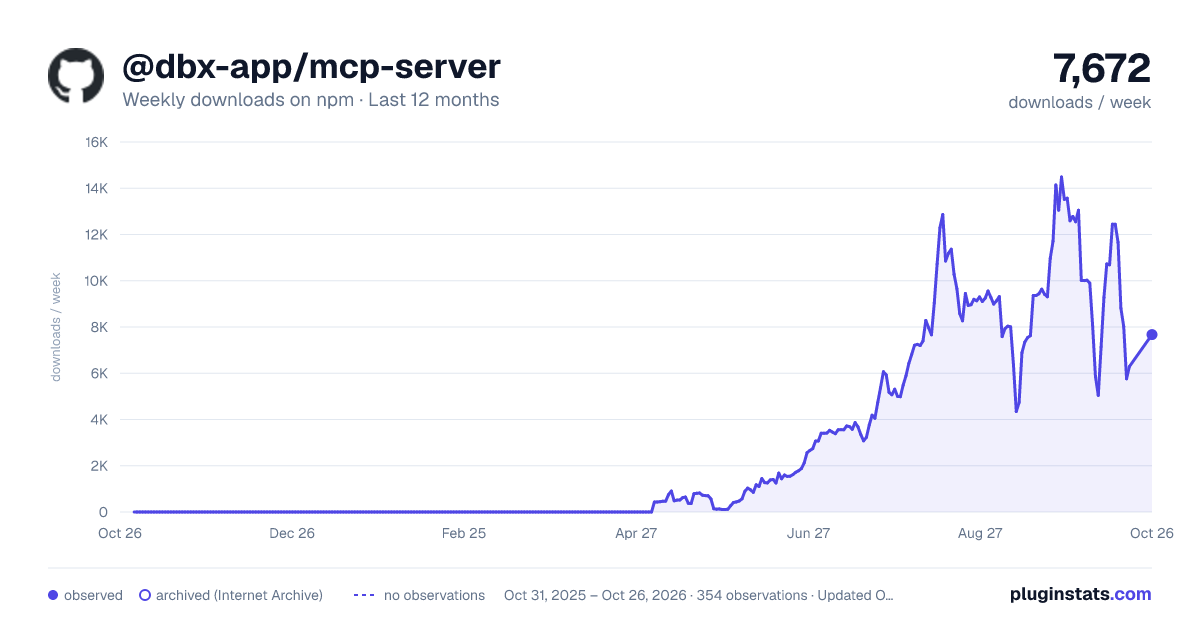
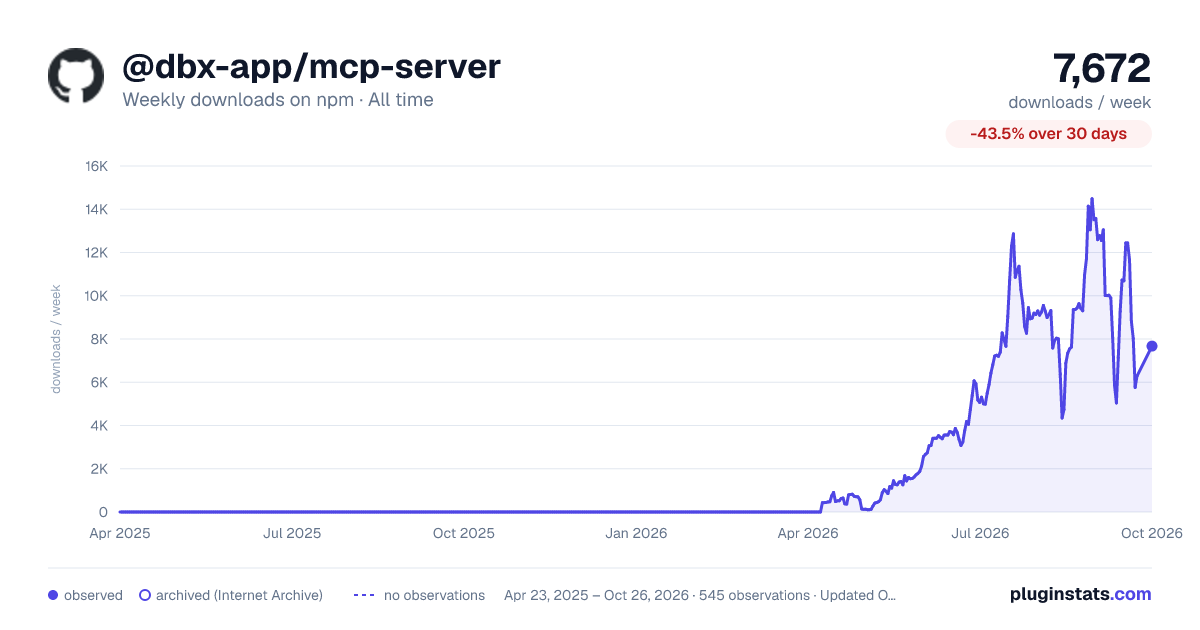

Adoption over time


7/30/90-day growth


Filled points are observed values; hollow points come from Internet Archive snapshots of the listing page. Dashed segments span periods with no observations — values between points are not interpolated.
Recent observations
Full history (543)Similar npm MCP servers plugins
Data source
Weekly downloads (trailing 7 complete days) come from the official npm downloads API. Downloads include CI and mirrors and are not equivalent to installs or users. npm publishes no ratings.
Listing: https://www.npmjs.com/package/@dbx-app/mcp-server. First seen Oct 16, 2026; last successful collection Oct 18, 2026. See the methodology.