 PluginStats
@lushly-dev/afd-client weekly downloads statistics
By lushly-dev (4 listings) · npm · MCP servers
MCP client library for Agent-First Development
@lushly-dev/afd-client has 16,259 recorded weekly downloads on npm, an increase of 201% over the past 30 days, ranking #806 of 2,256 tracked listings.
About @lushly-dev/afd-client
@lushly-dev/afd-client
MCP client library for Agent-First Development.
Installation
Overview
This package provides clients for AFD command servers. It supports:
• SSE Transport: Real-time streaming with Server-Sent Events • HTTP Transport: Simple request/response communication • Direct Transport: Zero-overhead in-process execution for co-located agents • Auto-reconnection: Exponential backoff with jitter and a cap • Type-safe API: Full TypeScript support with CommandResult integration
Supported servers
McpClient talks to AFD servers: createMcpServer() from @lushly-dev/afd-server (and the AFD Python server), through their HTTP transport:
| Route | Used for |
| GET /sse | Event stream of the sse transport | | POST /message | JSON-RPC requests (initialize, tools/list, tools/call) | | GET /health | Reachability check on connect (http transport) | | POST /stream/ | stream() |
McpClient is not a general MCP client. It does not implement the MCP Streamable HTTP transport (the Accept: application/json, text/event-stream negotiation and its session handling), and it ignores the endpoint event of the legacy MCP SSE transport. Servers built on the official MCP SDK answer it with HTTP 406 or 400. To talk to those servers, use the official @modelcontextprotocol/sdk client.
Usage
Basic Connection
Calling Commands
Pass per-request deadlines and cancellation to call(), callTool(), or request():
With the direct transport, deadlines and cancellation settle the request even when a handler ignores its abort signal. Disconnecting also aborts active execution. A handler that has already started may still complete its side effects; check a mutation's effect before retrying. Direct discovery preserves the registry's input schema and planning metadata. HTTP and SSE session renewal requires a successful JSON-RPC initialize result and a replacement session ID before replaying a rejected request. Concurrent requests share renewal work.
Event Handling
• connected fires once the server is initialized and the tools list is loaded, so client.getTools() is ready inside the handler. A failed tools refresh does not fail the connection; the list stays empty. • While reconnecting, each attempt emits reconnecting; failed attempts emit nothing else. If every attempt fails, the client emits one error ("Max reconnection attempts reached", with the last failure as cause) and moves to the error state. • The delay before attempt n is reconnectDelay * 2^(n-1) plus up to 100 ms of jitter, capped at maxReconnectDelay. • The sse transport notices a closed event stream. The http transport has no persistent connection, so it reports the connection as lost after 3 consecutive requests get no HTTP response at all; autoReconnect then applies to it too.
Client Status
Raw Tool Calls
For low-level access, use callTool which returns the raw MCP response:
callTool() and request() take an optional { timeout } that overrides the client timeout for that request. They throw NotConnectedError, RequestTimeoutError, JsonRpcResponseError (with the JSON-RPC code and data) or HttpStatusError; call(), batch(), pipe() and stream() never throw and return these as failures instead.
Batches and Pipelines
The request waits for the batch timeout or pipeline timeoutMs plus a 5 second margin (SERVER_DEADLINE_MARGIN_MS), and never less than the client timeout, so the server's own timeout result arrives first.
If the server rejected the request (a JSON-RPC error, an HTTP 4xx) or the client was not connected, nothing ran and the result is a definite failure. If the request timed out or the connection failed after it was sent, the server may already have run some commands, so the client does not guess: the result is an OUTCOME_UNKNOWN failure with retryable: false. A batch then has no per-command results and zero success and failure counts; a pipeline has a single pipeline-level step entry (index: -1) carrying the error. Check the commands' effects before retrying.
Streaming
stream() posts to /stream/, where is the client URL without a trailing /sse, /message or /messages (so https://host/api/mcp/sse streams from https://host/api/mcp/stream/). It parses the event stream per the SSE spec (data: with or without a space, multi-line data, comments, CRLF), and the last chunk is always a complete or error chunk. The client makes the error chunk itself when:
| Code | When |
| NOT_CONNECTED | stream() was called before connect() (nothing is sent) | | STREAM_TRUNCATED | The stream ended without a complete or error chunk | | STREAM_TIMEOUT | options.timeout passed | | STREAM_CANCELLED | options.signal aborted, or disconnect() was called | | STREAM_EVENT_TOO_LARGE | One event exceeded maxStreamEventSize (default 1 MiB) |
A stream runs in the client's MCP session: it sends the Mcp-Session-Id from initialize, so it sees the active context entered with afd-context-enter, like call(). If the server has expired the session (HTTP 404), the client starts a new session and retries the stream once.
Configuration
Other transport names ('websocket', 'stdio') are rejected by the type and, for JavaScript callers, by the constructor with an error that names the supported ones.
Transports
SSE Transport (Default)
Best for real-time applications. Maintains a persistent connection for server-pushed events.
HTTP Transport
Simple request/response. Good for serverless environments or when SSE isn't supported.
Direct Transport with McpClient
transport: 'direct' runs an McpClient against an in-process registry, so code written for a remote AFD server works unchanged in tests or embedded setups. call(), batch(), pipe() and stream() all work (batches and pipelines run through the same core executors as the server). No URL is needed.
An unknown command returns an UNKNOWN_TOOL failure whose suggestion names the closest command, exactly as DirectClient does, and a command that throws returns a COMMAND_EXECUTION_ERROR failure without the exception text.…
Description from the npm listing.
- afd
- mcp
- ai-agents
- sse
- client
README badge
Show your rank in a README or on your website. The badge updates automatically.
Charts
Images: 30d · 1y · all time · 1600×900 dark
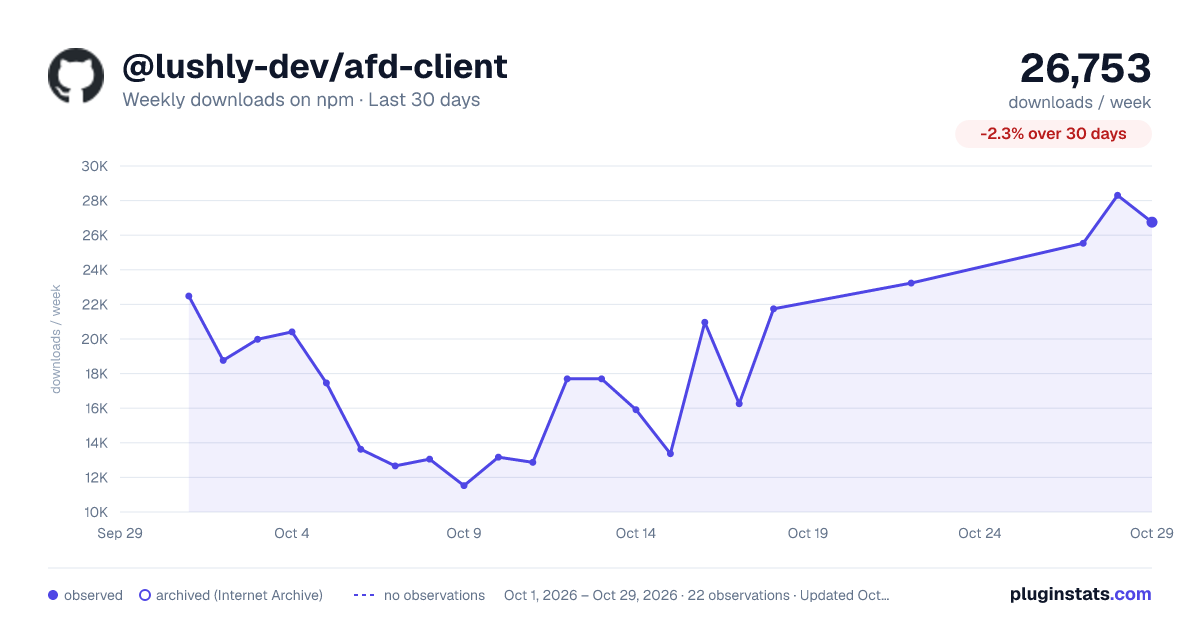
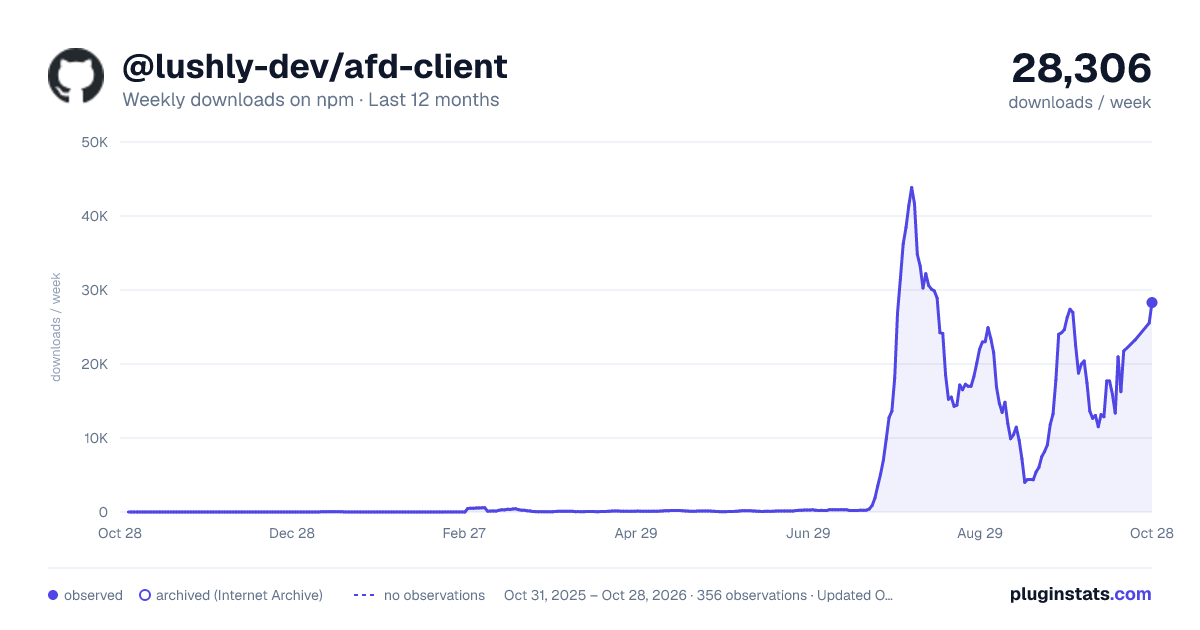
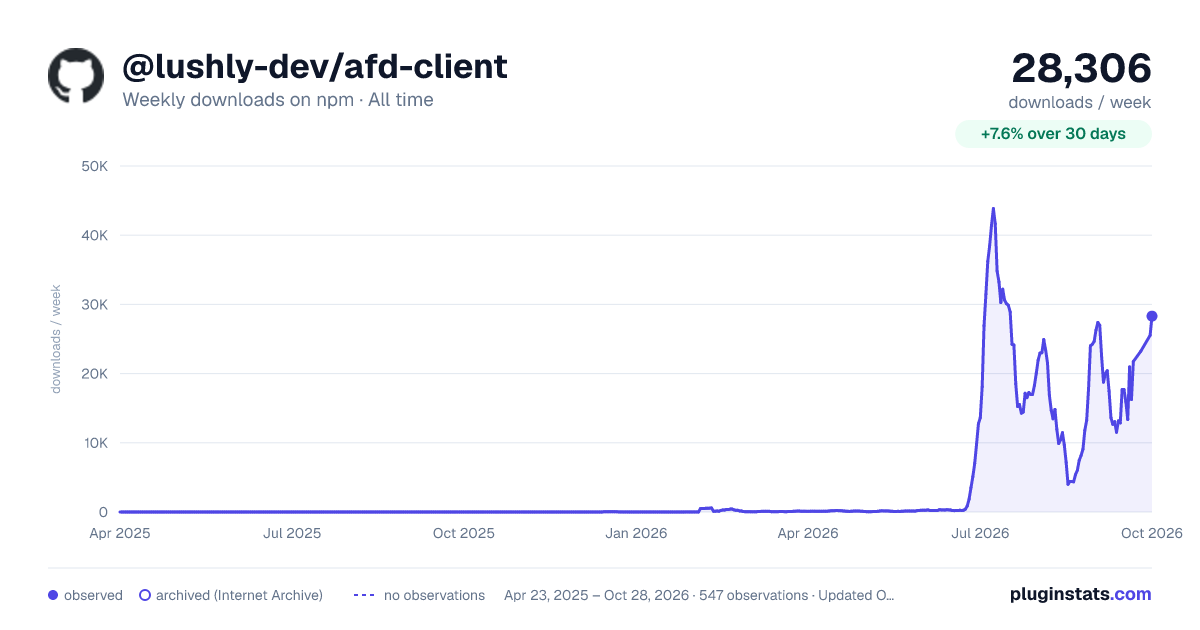

Adoption over time
7/30/90-day growth
Ranking history
Listing placement
Listing placement
Filled points are observed values; hollow points come from Internet Archive snapshots of the listing page. Dashed segments span periods with no observations — values between points are not interpolated.
Each band is one page of 20. Weekly downloads on a linear scale. Placement is projected from weekly downloads, so it can differ from the marketplace's own sort order. Hover a dot to see the listing.
Recent observations
Full history (543)Similar npm MCP servers plugins
All 20 @lushly-dev/afd-client alternativesData source
Weekly downloads (trailing 7 complete days) come from the official npm downloads API. Downloads include CI and mirrors and are not equivalent to installs or users. npm publishes no ratings.
Listing: https://www.npmjs.com/package/@lushly-dev/afd-client. First seen Oct 16, 2026; last successful collection Oct 19, 2026. See the methodology.