 PluginStats
igniteui-theming weekly downloads statistics
By IgniteUI · npm · MCP servers
A set of Sass variables, mixins, and functions for generating palettes, typography, and elevations used by Ignite UI components.
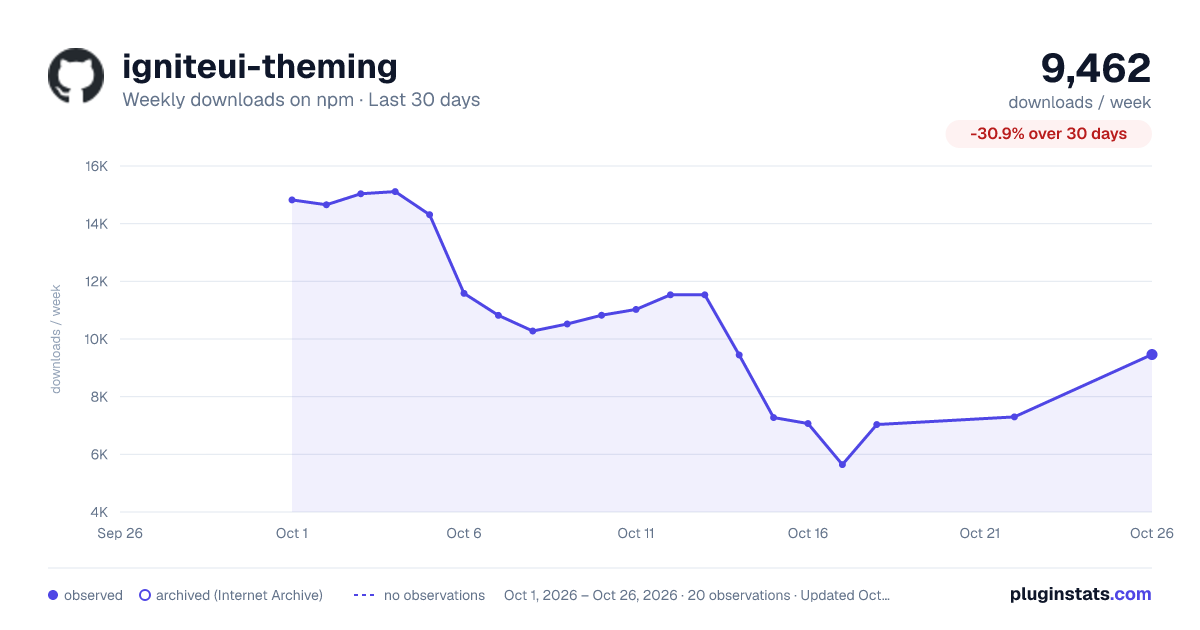
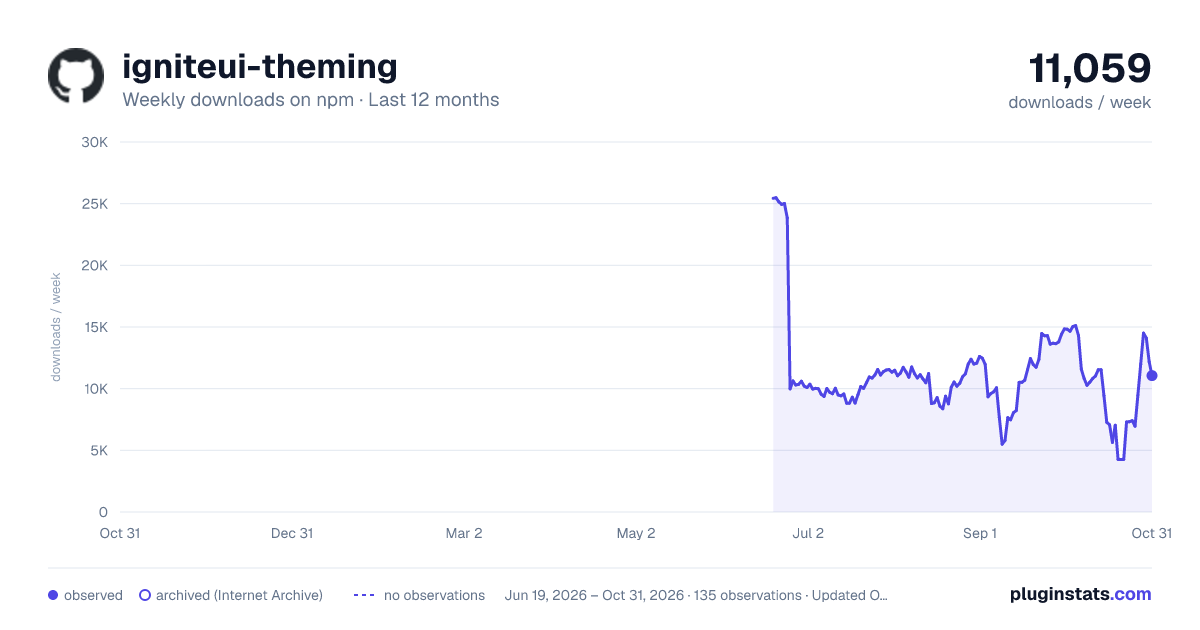
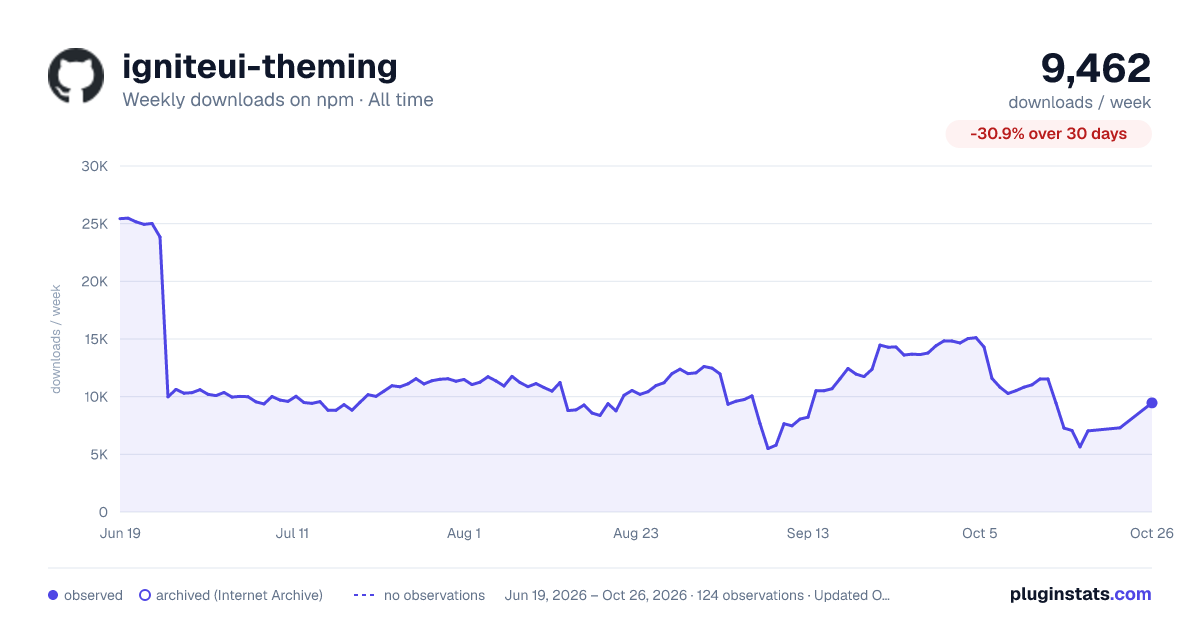
igniteui-theming has 5,644 recorded weekly downloads on npm, a decrease of 51.1% over the past 30 days.
It ranks #1060 of 2,256 tracked npm listings by weekly downloads.
Over 90 days, weekly downloads changed by -40.7%.
PluginStats has 121 daily observations since Jun 19, 2026; the latest is from Oct 17, 2026.
About igniteui-theming
Ignite UI Theming - from Infragistics
The Ignite UI Theming repository collects a set of Sass mixins, functions, and variables used to create themes for a variety of UI frameworks built by Infragistics. The theming package makes it super easy to create palettes, elevations and typography styles for your projects.
Repository Structure
This repository is an npm workspaces monorepo with two packages:
| Package | Name | Description |
| packages/theming | igniteui-theming | Sass source, JSON build artifacts, published to npm | | packages/mcp | igniteui-theming-mcp | MCP server sources, built into packages/theming/dist/mcp/ |
The igniteui-theming package is the only published artifact — it includes both the Sass theming library and the MCP server binary.
The MCP server is also listed in the MCP Registry as io.github.IgniteUI/igniteui-theming. The server.json at the repo root is its registry manifest, published automatically on release.
Common commands from the repo root:
Palettes
We provide four predefined palettes - material, bootstrap, fluent and indigo that have all the necessary colors along with diffent variants of those colors to make it even easier picking the right one for your case. Here's what they look like:
To access any of the colors in the palettes, you can use the color function:
You can take a further look on what color functions and mixins the package contains and how to use them in the Colors Wiki Page>)
Typography
Another valuable module of our theming package is the typography, helping you have consistency all over your project. There are again four typography presets for the four themes that we provide out of the box.
You can set any of the typefaces by using the typography mixin, which accepts 2 arguments(font-family and type-scale). By default the typography is using the material typeface and type-scale.
Learn more about the typography module in the package by checking out the Typography Wiki Page>)
Elevations
The theming package is providing one preset of shadows that can be used to give your components a lift. They're super helpful using with buttons, cards, navigation bars, etc.
You can set elevations 0-24, by using the elevation function, which accepts the elevation level as an argument:
Learn more about elevations and their abilities in the Elevations Wiki Page>)
Usage
In order to use the Ignite UI Theming in your application you should install the igniteui-theming package:
Next, you will need to use it in the file that you want like this:
You can also use just a fraction of the package:
We provide presets for material, bootstrap, fluent and indigo themes for the color(light and dark palettes), typography and elevations fractions. You can import them into your scss file like this:
You can read more about what the package contains on the Wiki page
Linting and Testing
To scan the project for linting errors, run
To run the suite of tests, run
Testing and Debugging
Preview Palettes
Run from packages/theming. Pass the palette (material, bootstrap, fluent, indigo) and variant (light or dark).
MCP Server (AI-Assisted Theming)
The Ignite UI Theming package includes a Model Context Protocol (MCP) server that enables AI assistants to generate production-ready theming code for your Ignite UI applications. This MCP server is part of the larger AI-assisted development toolchain for Ignite UI.
What is MCP?
The Model Context Protocol allows AI assistants (like Claude, GitHub Copilot, and others) to connect to external tools and data sources. The Ignite UI Theming MCP server acts as an expert theming assistant that can:
• 🎨 Generate color palettes with automatic shade variations • 📝 Create typography systems following design standards • 🌓 Build complete themes for light and dark modes • 🎯 Customize components with design tokens • ✅ Validate colors for accessibility compliance
Quick Start
Most users don't need to clone anything. The server ships inside the published igniteui-theming package and is listed in the MCP Registry as io.github.IgniteUI/igniteui-theming — clients that support registry installation can add it by that name, and everything else uses the npx configuration shown below.
To run it from source instead:
1. Clone and Build
Clone the repository and build:
2. Configure Your AI Client
The MCP server works with any MCP-compatible client. Here are setup instructions for popular clients:
VS Code (with MCP-compatible extensions)
For local development - Create or edit .vscode/mcp.json:
Using published package:
WebStorm / JetBrains IDEs
1. Go to Settings → Tools → AI Assistant → MCP Servers 2. Click + Add MCP Server 3. Configure: • Name: igniteui-theming • Command: node (for local) or npx (for package) • Arguments: • Local: /absolute/path/to/igniteui-theming/packages/theming/dist/mcp/index.js • Package: -y igniteui-theming 4. Click OK and restart AI Assistant
Claude Desktop
Add to your configuration file:
macOS: ~/Library/Application Support/Claude/claude_desktop_config.json Windows: %APPDATA%\Claude\claude_desktop_config.json
For local development:
Using published package:
Cursor
Create or edit .cursor/mcp.json in your project:
For local development:
Using published package:
What Can It Do?
🎨 Create Complete Themes
Simply describe your theme to your AI assistant:
"Create a Material Design dark theme for my Angular app with that takes inspiration from the Gruvbox color scheme."
The AI will generate production-ready Sass code with:
• Color palette with all shade variations • Typography setup with proper type scales • Elevation shadows • Platform-specific imports and configuration
🌈 Generate Color Palettes
"Generate a light theme palette using teal as primary and purple as secondary"
Get perfectly calculated color shades following design system standards.
📝 Setup Typography
"Set up typography using Inter font with Material Design type scale for Web Components"…
Description from the npm listing.
- sass
- scss
- Ignite
- UI
- theming
- palettes
- elevations
- typography
- design systems
- model context protocol
- mcp
Charts
Images: 30d · 1y · all time · 1600×900 dark

Adoption over time


7/30/90-day growth


Listing placement


Filled points are observed values; hollow points come from Internet Archive snapshots of the listing page. Dashed segments span periods with no observations — values between points are not interpolated.
Each band is one page of 20. Weekly downloads on a log scale. Placement is projected from weekly downloads, so it can differ from the marketplace's own sort order. Hover a dot to see the listing.
Recent observations
Full history (121)Similar npm MCP servers plugins
All 20 igniteui-theming alternativesData source
Weekly downloads (trailing 7 complete days) come from the official npm downloads API. Downloads include CI and mirrors and are not equivalent to installs or users. npm publishes no ratings.
Listing: https://www.npmjs.com/package/igniteui-theming. First seen Oct 16, 2026; last successful collection Oct 19, 2026. See the methodology.