 PluginStats
@mixmaxhq/publish-extension-webpack-plugin weekly downloads statistics
By mixmaxhq · npm · Webpack plugins
A webpack plugin that publishes extension builds to the Chrome Web Store.
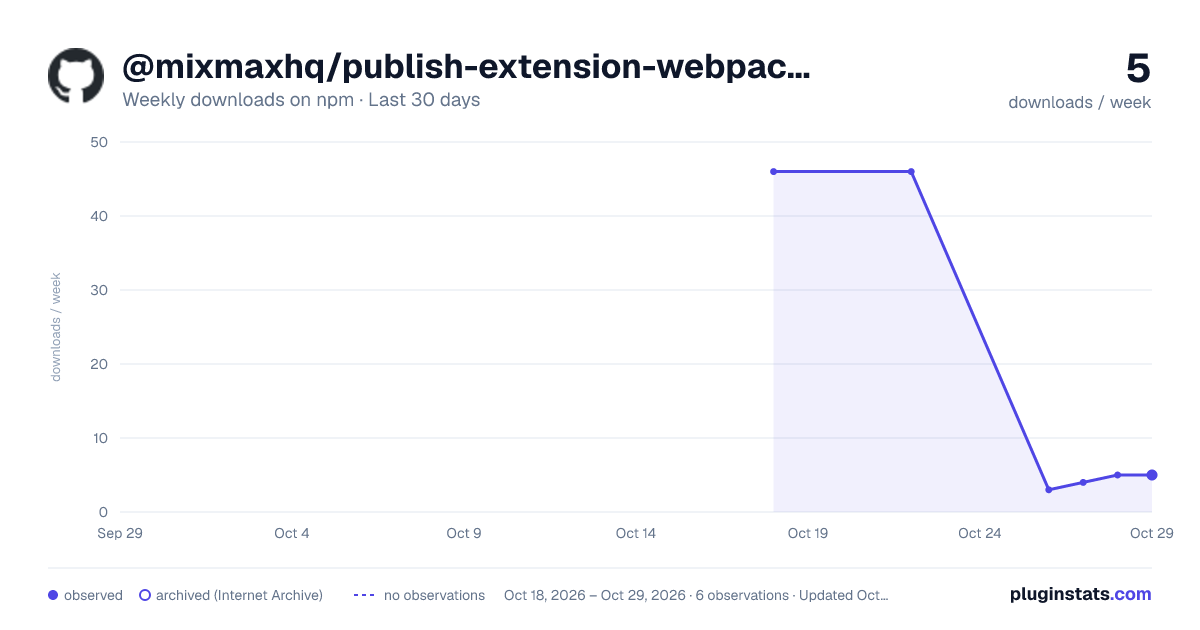
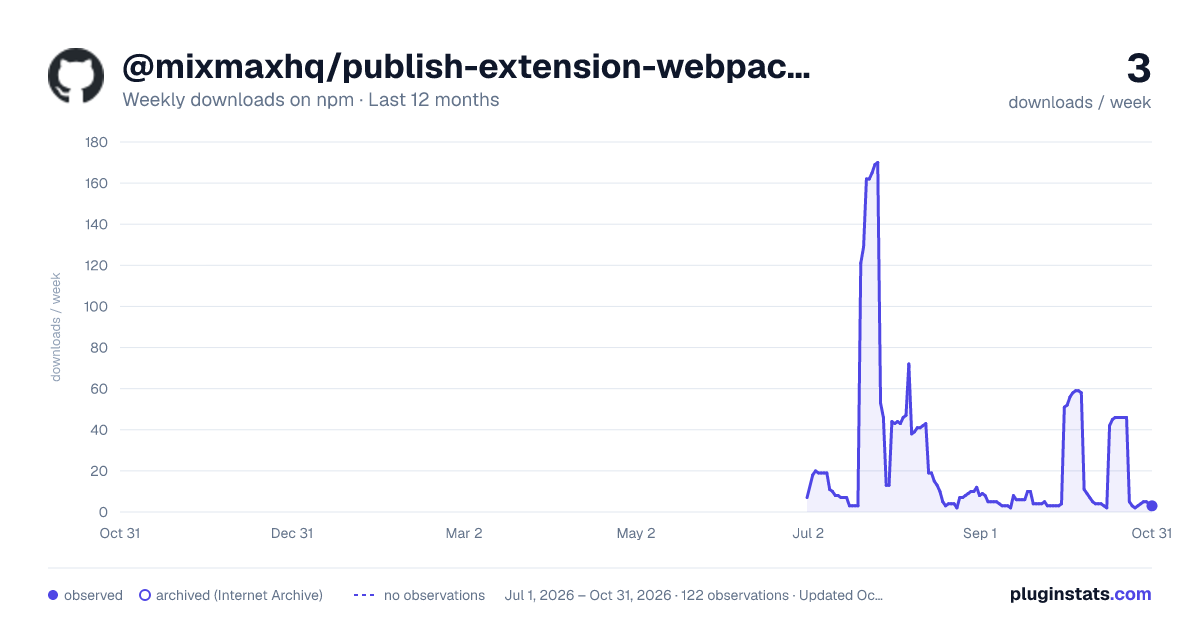
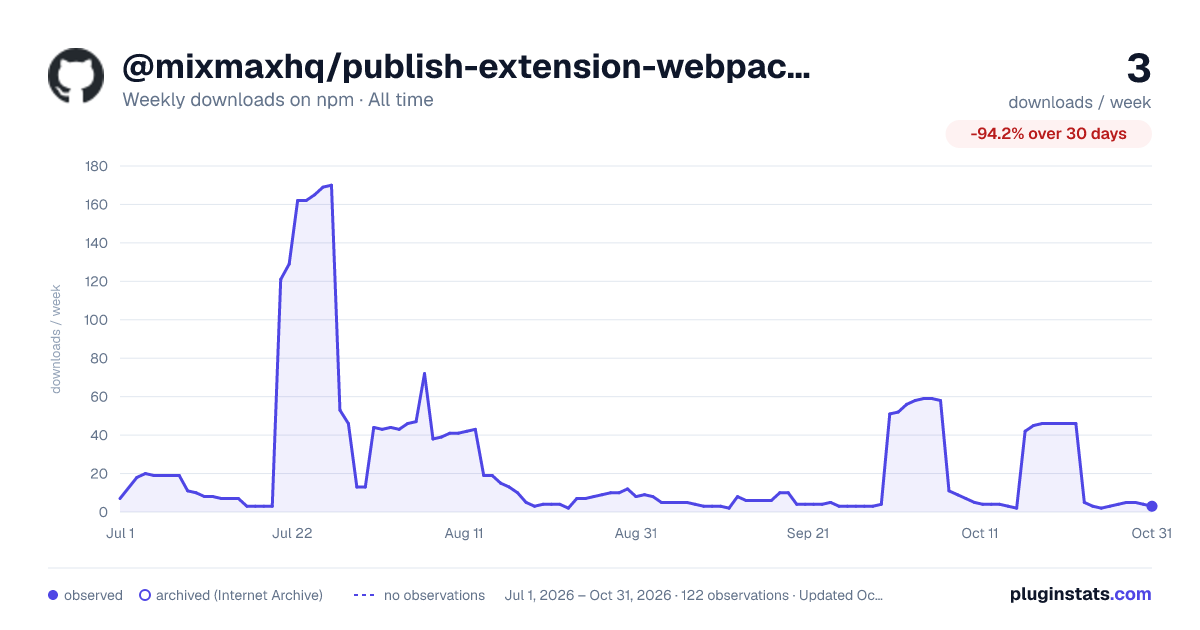
@mixmaxhq/publish-extension-webpack-plugin has 46 recorded weekly downloads on npm.
About @mixmaxhq/publish-extension-webpack-plugin
Publish Extension Webpack Plugin
A webpack plugin that publishes extension builds to the Chrome Web Store.
Getting Started
To begin, you'll need to install @mixmaxhq/publish-extension-webpack-plugin:
$ npm install @mixmaxhq/publish-extension-webpack-plugin --save-dev
Then add the plugin to your webpack config. For example:
webpack.config.babel.js
import PublishExtensionPlugin from '@mixmaxhq/publish-extension-webpack-plugin';

export default {
  // ...
  plugins: [
    new PublishExtensionPlugin({
      // options go here
    }),
  ],
};
And run webpack via your preferred method.
Options
extensionId
Type: String
Default: process.env.GOOGLE_EXTENSION_ID
If not provided via options, this must be present in your environment as GOOGLE_EXTENSION_ID. You can get this from your extension's control panel on the Developer Dashboard.
$ GOOGLE_EXTENSION_ID=extensionidgoeshere123 webpack
clientId
Type: String
Default: process.env.GOOGLE_CLIENT_ID
If not provided via options, this must be present in your environment as GOOGLE_CLIENT_ID. You can get this and your other secret keys by following this guide.
$ GOOGLE_CLIENT_ID=clientidgoeshere123 webpack
clientSecret
Type: String
Default: process.env.GOOGLE_CLIENT_SECRET
If not provided via options, this must be present in your environment as GOOGLE_CLIENT_SECRET. You can get this and your other secret keys by following this guide.
$ GOOGLE_CLIENT_SECRET=clientsecretgoeshere123 webpack
refreshToken
Type: String
Default: process.env.GOOGLE_REFRESH_TOKEN
If not provided via options, this must be present in your environment as GOOGLE_REFRESH_TOKEN. You can get this and your other secret keys by following this guide.
$ GOOGLE_REFRESH_TOKEN=refreshtokengoeshere123 webpack
target
Type: String
Default: default
The publish target for the extension:
default- the extension will be available to everyone (published as public extension).trustedTesters- the extension will be available only to trusted testers (published as private extension).draft- the extension will be uploaded to the store, but not published.
// in your webpack.config.js
new PublishExtensionPlugin({
  target: 'trustedTesters',
})
path
Type: String
Default: webpack.output.path
The path containing the build of your extension. This should include a manifest file.
// in your webpack.config.js
new PublishExtensionPlugin({
  path: './dist/my-chrome-extension/',
})
keepBundleOnSuccess
Type: Boolean
Default: false
By default, the generated ZIP file used for publishing the extension is deleted if the upload is successful. Set this to true to keep the ZIP file.
// in your webpack.config.js
new PublishExtensionPlugin({
  keepBundleOnSuccess: true,
})
silent
Type: Boolean
Default: false
Set this to true to suppress logging.
// in your webpack.config.js
new PublishExtensionPlugin({
  silent: true,
})
disabled
Type: Boolean
Default: false
Set this to true to disable the plugin (this is the same as not including it to begin with).
// in your webpack.config.js
new PublishExtensionPlugin({
  disabled: true,
})
Contributing
PRs are welcome! Please see the contributing guide.
Publishing a new version
GH_TOKEN=xxx npx semantic-release --no-ci
Description from the npm listing.
- chrome
- extension
- publish
- webext
- webextension
- webpack-plugin
- webpack
README badge
Show your rank in a README or on your website. The badge updates automatically.
Charts
Images: 30d · 1y · all time · 1600×900 dark

Adoption over time
7/30/90-day growth
Ranking history
Listing placement
Listing placement
Filled points are observed values; hollow points come from Internet Archive snapshots of the listing page. Dashed segments span periods with no observations — values between points are not interpolated.
Each band is one page of 20. Weekly downloads on a linear scale. Placement is projected from weekly downloads, so it can differ from the marketplace's own sort order. Hover a dot to see the listing.
Recent observations
Full history (1)Similar npm Webpack plugins plugins
All 20 @mixmaxhq/publish-extension-webpack-plugin alternatives- 46 weekly downloads-46.5%
- 47 weekly downloads+88.0%
- 45 weekly downloads-32.8%
- 48 weekly downloads-61.3%
- 43 weekly downloads-43.4%
Data source
Weekly downloads (trailing 7 complete days) come from the official npm downloads API. Downloads include CI and mirrors and are not equivalent to installs or users. npm publishes no ratings.
Listing: https://www.npmjs.com/package/@mixmaxhq/publish-extension-webpack-plugin. First seen Oct 23, 2026; last successful collection Oct 23, 2026. See the methodology.