 PluginStats
@heroku/mcp-server weekly downloads statistics
By heroku · npm · MCP servers
Heroku Platform MCP Server
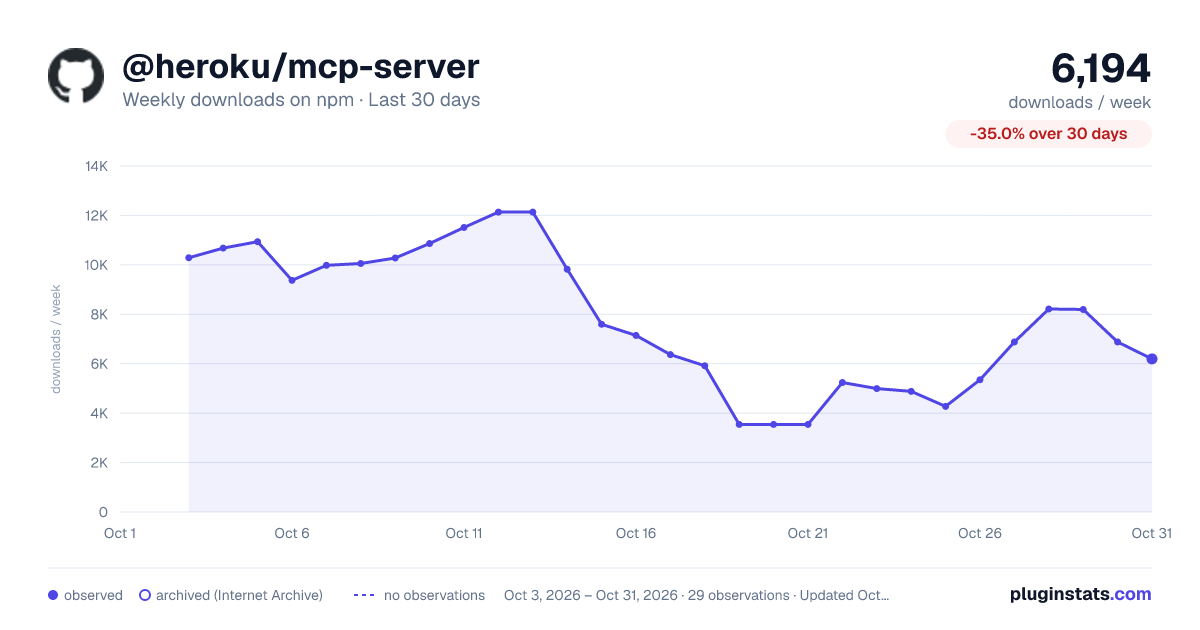
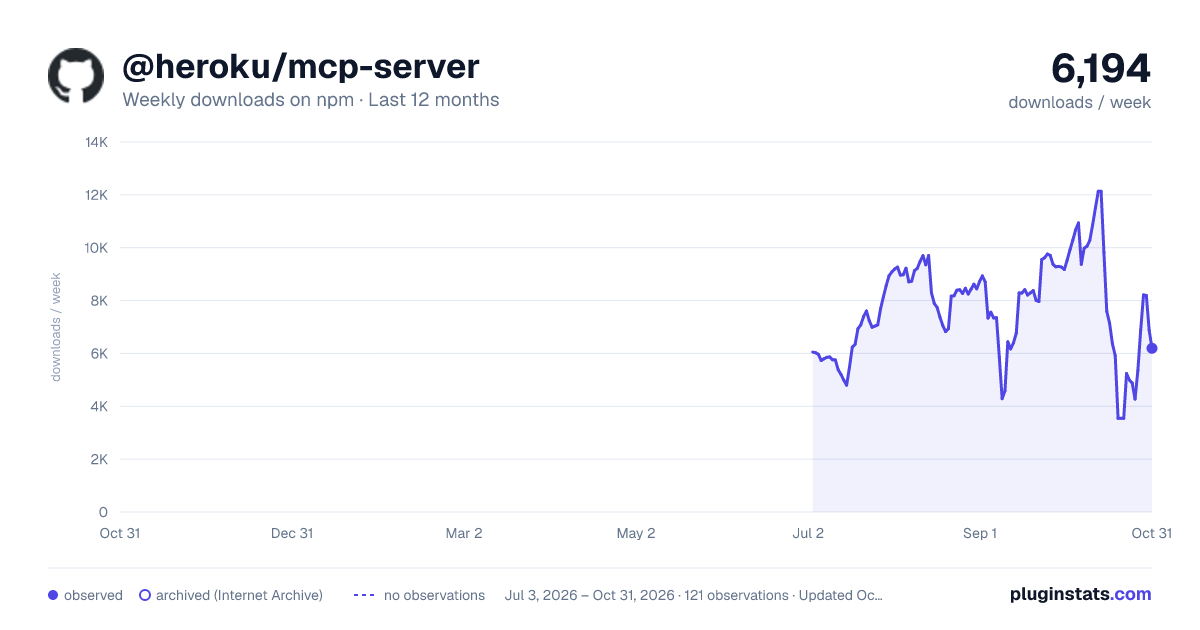
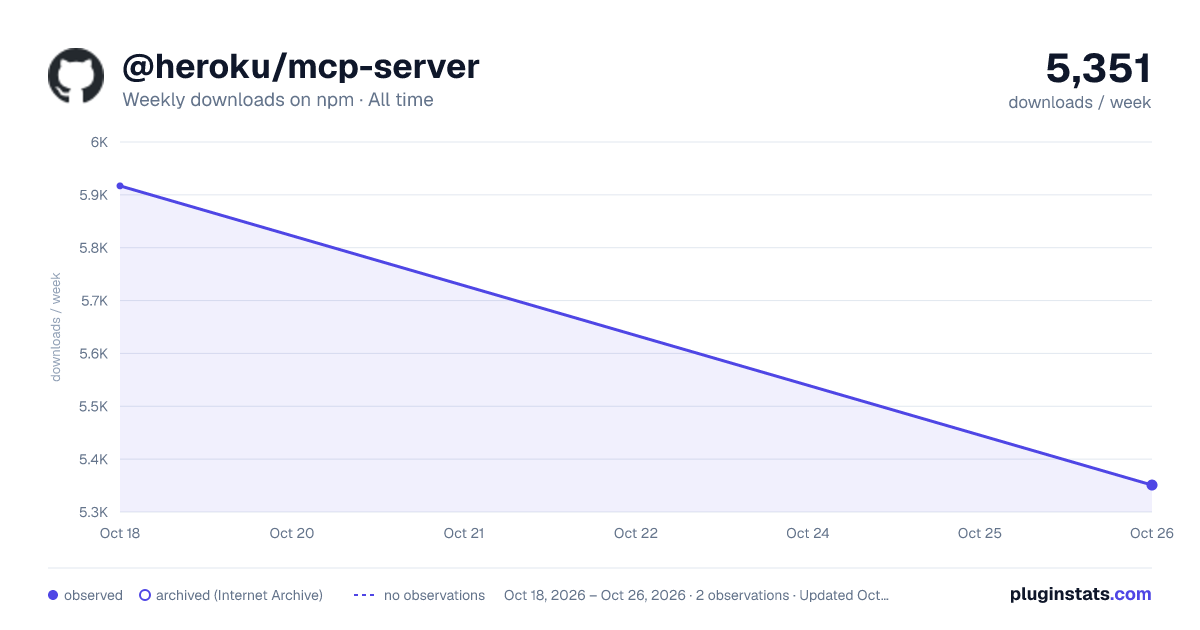
@heroku/mcp-server has 5,917 recorded weekly downloads on npm.
About @heroku/mcp-server
heroku-mcp-server

The Heroku Platform MCP Server works on Common Runtime, Cedar Private and Shield Spaces, and Fir Private Spaces.
Prerequisites
- Heroku CLI must be installed globally on your system, version 10.8.1 or higher.
Deploy on Heroku

Overview
The Heroku Platform MCP Server is a specialized Model Context Protocol (MCP) implementation designed to facilitate seamless interaction between large language models (LLMs) and the Heroku Platform. This server provides a robust set of tools and capabilities that enable LLMs to read, manage, and operate Heroku Platform resources.
Key Features:
- Direct interaction with Heroku Platform resources through LLM-driven tools
- Secure and authenticated access to Heroku Platform APIs, leveraging the Heroku CLI
- Natural language interface for Heroku Platform interactions
Note: The Heroku Platform MCP Server is currently in early development. As we continue to enhance and refine the implementation, the available functionality and tools may evolve. We welcome feedback and contributions to help shape the future of this project.
Note: The Heroku Platform MCP Server requires the Heroku CLI to be installed globally (v10.8.1+). Ensure you have the correct version by running
heroku --version.
Configure the Heroku Platform MCP Server
You can configure Claude Desktop, Zed, Cursor, Windsurf, and other clients to work with the Heroku Platform MCP Server.
Configure the Heroku Platform MCP Server with heroku mcp:start
Use heroku mcp:start to launch the Heroku Platform MCP Server. We recommend this method as it leverages your existing
Heroku CLI authentication, so you don't need to set the
HEROKU_API_KEY environment variable. The
heroku mcp:start command is available in Heroku CLI version 10.8.1 and later.
There are several benefits to configuring with heroku mcp:start:
- No need to manage or expose your Heroku API key
- Uses your current Heroku CLI authentication context
- Works seamlessly with supported clients
Example configuration for Claude Desktop:
{
  "mcpServers": {
    "heroku": {
      "command": "heroku mcp:start"
    }
  }
}
Example configuration for Zed:
{
  "context_servers": {
    "heroku": {
      "command": {
        "path": "heroku",
        "args": ["mcp:start"]
      }
    }
  }
}
Example configuration for Cursor:
{
  "mcpServers": {
    "heroku": {
      "command": "heroku mcp:start"
    }
  }
}
Example configuration for Windsurf:
{
  "mcpServers": {
    "heroku": {
      "command": "heroku mcp:start"
    }
  }
}
Example configuration for Cline:
{
  "mcpServers": {
    "heroku": {
      "command": "heroku mcp:start"
    }
  }
}
Example configuration for VSCode:
{
  "mcp": {
    "servers": {
      "heroku": {
        "type": "stdio",
        "command": "heroku",
        "args": ["mcp:start"]
      }
    }
  }
}
Example configuration for Trae:
{
  "mcpServers": {
    "heroku": {
      "command": "heroku mcp:start"
    }
  }
}
Note: When you use
heroku mcp:start, the server authenticates using your current Heroku CLI session so you don't need to set theHEROKU_API_KEYenvironment variable. We recommend you useheroku mcp:start, but if you prefer to use an API key, you can use the alternate configuration below.
Configure the Heroku Platform MCP Server with npx -y @heroku/mcp-server
You can also launch the Heroku Platform MCP Server using the npx -y @heroku/mcp-server command. This method requires
you to set the HEROKU_API_KEY environment
variable with your Heroku
authorization token.
Generating the HEROKU_API_KEY
Generate a Heroku authorization token with one of these methods:
-
Use the Heroku CLI command:
heroku authorizations:create -
Use an existing token in the CLI
heroku auth:tokenCopy the token and use it as your
HEROKU_API_KEYin the following steps. -
In your Heroku Dashboard:
- Select your avatar, then select Account Settings.
- Open the Applications tab.
- Next to Authorizations, click Create authorization.
Example configuration for Claude Desktop:
{
  "mcpServers": {
    "heroku": {
      "command": "npx",
      "args": ["-y", "@heroku/mcp-server"],
      "env": {
        "HEROKU_API_KEY": "<YOUR_HEROKU_AUTH_TOKEN>"
      }
    }
  }
}
Example configuration for Zed:
{
  "context_servers": {
    "heroku": {
      "command": {
        "path": "npx",
        "args": ["-y", "@heroku/mcp-server"],
        "env": {
          "HEROKU_API_KEY": "<YOUR_HEROKU_AUTH_TOKEN>"
        }
      }
    }
  }
}
Example configuration for Cursor:…
Description from the npm listing.
- heroku
- mcp
README badge
Show your rank in a README or on your website. The badge updates automatically.
Charts
Images: 30d · 1y · all time · 1600×900 dark

Adoption over time
7/30/90-day growth
Ranking history
Listing placement
Listing placement
Filled points are observed values; hollow points come from Internet Archive snapshots of the listing page. Dashed segments span periods with no observations — values between points are not interpolated.
Each band is one page of 20. Weekly downloads on a linear scale. Placement is projected from weekly downloads, so it can differ from the marketplace's own sort order. Hover a dot to see the listing.
Recent observations
Full history (1)Similar npm MCP servers plugins
All 20 @heroku/mcp-server alternativesData source
Weekly downloads (trailing 7 complete days) come from the official npm downloads API. Downloads include CI and mirrors and are not equivalent to installs or users. npm publishes no ratings.
Listing: https://www.npmjs.com/package/@heroku/mcp-server. First seen Oct 21, 2026; last successful collection Oct 21, 2026. See the methodology.