 PluginStats
@redocly/mcp-typescript-sdk weekly downloads statistics
By redocly (2 listings) · npm · MCP servers
Model Context Protocol implementation for TypeScript
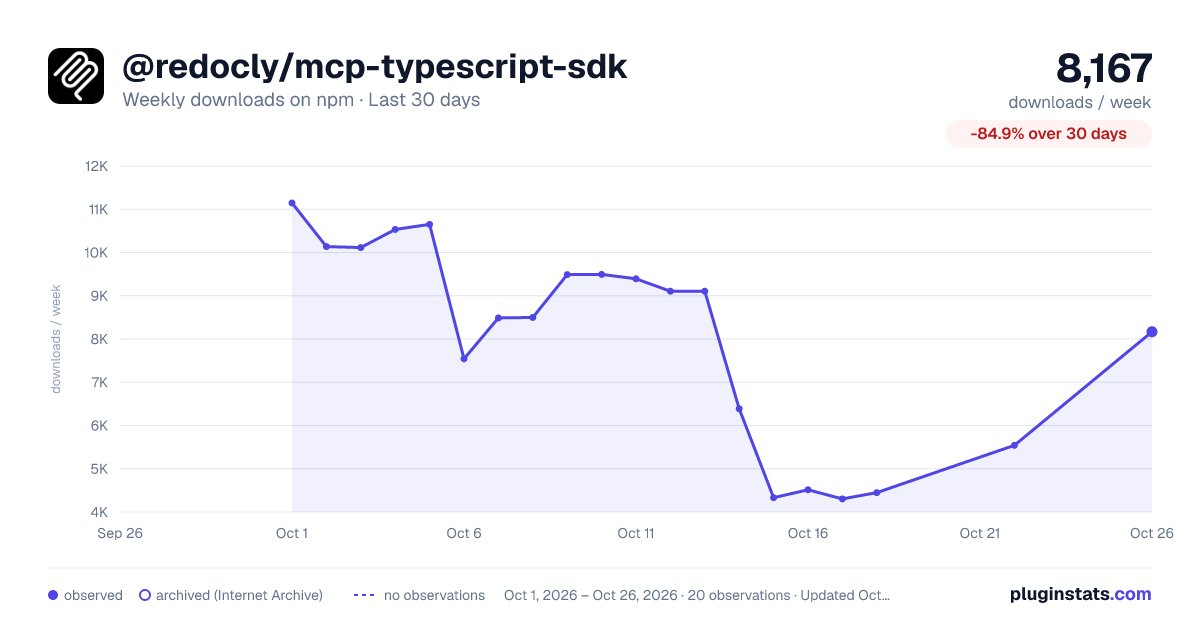
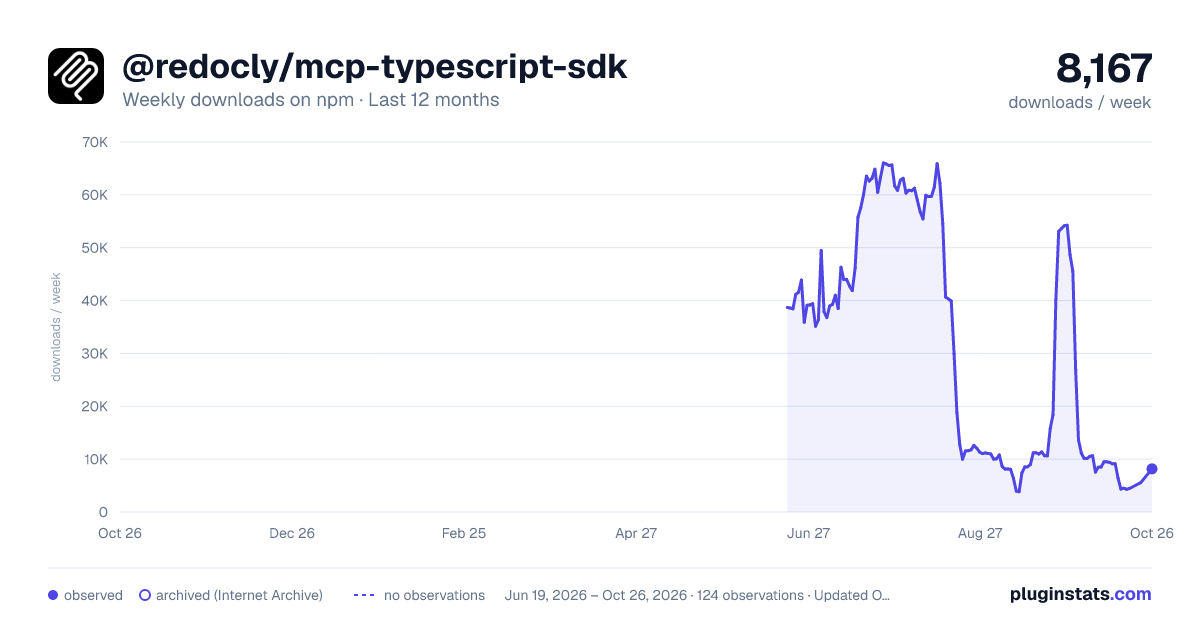
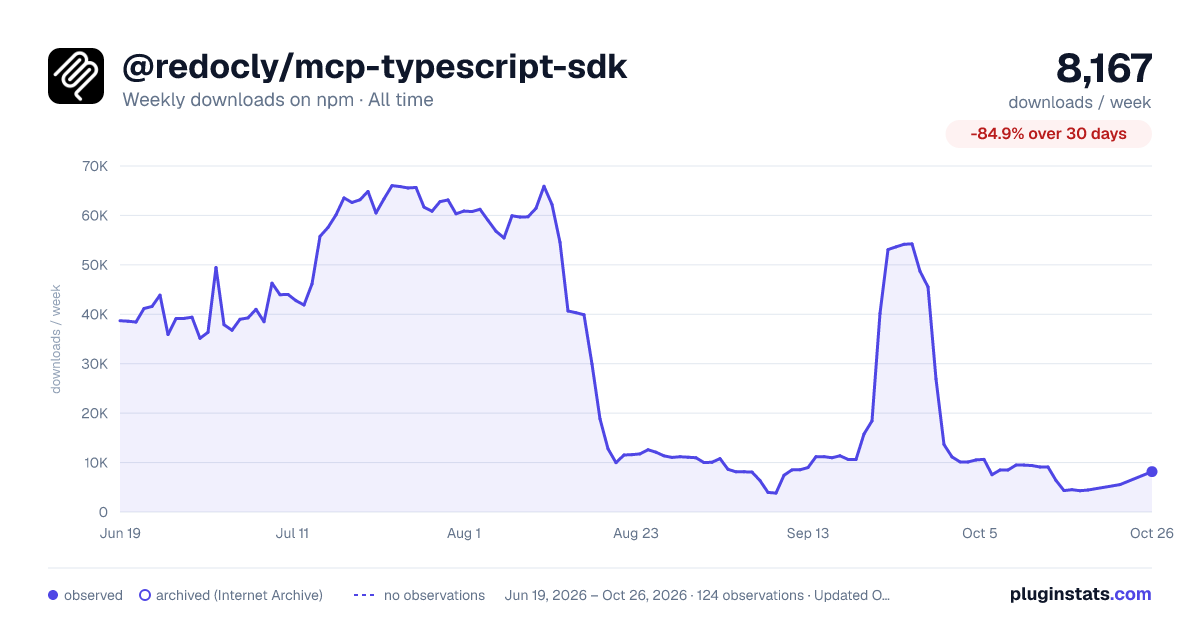
@redocly/mcp-typescript-sdk has 4,303 recorded weekly downloads on npm, a decrease of 62.2% over the past 30 days.
It ranks #1130 of 2,251 tracked npm listings by weekly downloads.
Over 90 days, weekly downloads changed by -93.2%.
PluginStats has 121 daily observations since Jun 19, 2026; the latest is from Oct 17, 2026.
About @redocly/mcp-typescript-sdk
MCP TypeScript SDK
Table of Contents
• Overview • Installation • Quickstart • What is MCP? • Core Concepts • Server • Resources • Tools • Prompts • Completions • Sampling • Running Your Server • stdio • Streamable HTTP • Testing and Debugging • Examples • Echo Server • SQLite Explorer • Advanced Usage • Dynamic Servers • Low-Level Server • Writing MCP Clients • Proxy Authorization Requests Upstream • Backwards Compatibility • Documentation • Contributing • License
Overview
The Model Context Protocol allows applications to provide context for LLMs in a standardized way, separating the concerns of providing context from the actual LLM interaction. This TypeScript SDK implements the full MCP specification, making it easy to:
• Build MCP clients that can connect to any MCP server • Create MCP servers that expose resources, prompts and tools • Use standard transports like stdio and Streamable HTTP • Handle all MCP protocol messages and lifecycle events
Installation
⚠️ MCP requires Node.js v18.x or higher to work fine.
Quick Start
Let's create a simple MCP server that exposes a calculator tool and some data:
What is MCP?
The Model Context Protocol (MCP) lets you build servers that expose data and functionality to LLM applications in a secure, standardized way. Think of it like a web API, but specifically designed for LLM interactions. MCP servers can:
• Expose data through Resources (think of these sort of like GET endpoints; they are used to load information into the LLM's context) • Provide functionality through Tools (sort of like POST endpoints; they are used to execute code or otherwise produce a side effect) • Define interaction patterns through Prompts (reusable templates for LLM interactions) • And more!
Core Concepts
Server
The McpServer is your core interface to the MCP protocol. It handles connection management, protocol compliance, and message routing:
Resources
Resources are how you expose data to LLMs. They're similar to GET endpoints in a REST API - they provide data but shouldn't perform significant computation or have side effects:
Tools
Tools let LLMs take actions through your server. Unlike resources, tools are expected to perform computation and have side effects:
ResourceLinks
Tools can return ResourceLink objects to reference resources without embedding their full content. This is essential for performance when dealing with large files or many resources - clients can then selectively read only the resources they need using the provided URIs.
Prompts
Prompts are reusable templates that help LLMs interact with your server effectively:
Completions
MCP supports argument completions to help users fill in prompt arguments and resource template parameters. See the examples above for resource completions and prompt completions.
Client Usage
Display Names and Metadata
All resources, tools, and prompts support an optional title field for better UI presentation. The title is used as a display name, while name remains the unique identifier.
Note: The register* methods (registerTool, registerPrompt, registerResource) are the recommended approach for new code. The older methods (tool, prompt, resource) remain available for backwards compatibility.
Title Precedence for Tools
For tools specifically, there are two ways to specify a title: • title field in the tool configuration • annotations.title field (when using the older tool() method with annotations)
The precedence order is: title → annotations.title → name
When building clients, use the provided utility to get the appropriate display name:
Sampling
MCP servers can request LLM completions from connected clients that support sampling.
Running Your Server
MCP servers in TypeScript need to be connected to a transport to communicate with clients. How you start the server depends on the choice of transport:
stdio
For command-line tools and direct integrations:
Streamable HTTP
For remote servers, set up a Streamable HTTP transport that handles both client requests and server-to-client notifications.
With Session Management
In some cases, servers need to be stateful. This is achieved by session management.
[!TIP] When using this in a remote environment, make sure to allow the header parameter mcp-session-id in CORS. Otherwise, it may result in a Bad Request: No valid session ID provided error. Read the following section for examples.
CORS Configuration for Browser-Based Clients
If you'd like your server to be accessible by browser-based MCP clients, you'll need to configure CORS headers. The Mcp-Session-Id header must be exposed for browser clients to access it:
This configuration is necessary because: • The MCP streamable HTTP transport uses the Mcp-Session-Id header for session management • Browsers restrict access to response headers unless explicitly exposed via CORS • Without this configuration, browser-based clients won't be able to read the session ID from initialization responses
Without Session Management (Stateless)
For simpler use cases where session management isn't needed:
This stateless approach is useful for:
• Simple API wrappers • RESTful scenarios where each request is independent • Horizontally scaled deployments without shared session state
DNS Rebinding Protection
The Streamable HTTP transport includes DNS rebinding protection to prevent security vulnerabilities. By default, this protection is disabled for backwards compatibility.
Important: If you are running this server locally, enable DNS rebinding protection:
Testing and Debugging
To test your server, you can use the MCP Inspector. See its README for more information.
Examples
Echo Server
A simple server demonstrating resources, tools, and prompts:
SQLite Explorer
A more complex example showing database integration:
Advanced Usage
Dynamic Servers…
Description from the npm listing.
- modelcontextprotocol
- mcp
Where @redocly/mcp-typescript-sdk sits in the listing
Each band is one page of 20. Weekly downloads on a log scale. Placement is projected from weekly downloads, so it can differ from the marketplace's own sort order. Hover a dot to see the listing.


Charts
Images: 30d · 1y · all time · 1600×900 dark

Adoption over time


7/30/90-day growth


Filled points are observed values; hollow points come from Internet Archive snapshots of the listing page. Dashed segments span periods with no observations — values between points are not interpolated.
Recent observations
Full history (121)Similar npm MCP servers plugins
Data source
Weekly downloads (trailing 7 complete days) come from the official npm downloads API. Downloads include CI and mirrors and are not equivalent to installs or users. npm publishes no ratings.
Listing: https://www.npmjs.com/package/@redocly/mcp-typescript-sdk. First seen Oct 16, 2026; last successful collection Oct 18, 2026. See the methodology.