 PluginStats
configure weekly downloads statistics
By christiansancheta · npm · MCP servers
Identity layer SDK for AI agents
configure has 12,062 recorded weekly downloads on npm, an increase of 327% over the past 30 days.
It ranks #866 of 2,251 tracked npm listings by weekly downloads.
Over 90 days, weekly downloads changed by +3033%.
PluginStats has 543 daily observations since Apr 23, 2025; the latest is from Oct 17, 2026.
About configure
Configure TypeScript SDK
Configure is a personalization SDK for agents. It gives your agent user-approved context from other agents, app contexts, preferences, memories, and more over API, MCP, or tool calls.
Most projects should integrate Configure into an existing agent: add hosted Link or a Personalization entry in the browser, send the configure:linked token to your backend, expose Configure tools, route configure_* calls, and commit after read-backed turns. Use the packaged template only when you want a fresh Configure-backed chat shell.
Install and setup:
Then prove the credentials work and generate the callback:
verify completes a real sign-in, exchanges the code, and reads a profile (--offline checks credentials and callback registration without a browser). add callback takes next, express, or vite and writes the callback route, the server-side exchange, and the sign-in button, keeping the client secret off the browser. The generated callback exchanges the single-use code once, recovers the PKCE verifier when state is missing, and hands off to the opener in a popup instead of navigating. add origin registers a deployed callback on the same client before you ship: it opens the dashboard to confirm the exact client and callback, since an sk_ key cannot change an OAuth client, and registration is additive so CONFIGURE_OAUTH_CLIENT_ID never changes.
Choose For my users when adding Configure to a product you already ship. Choose your existing agent handle at setup; register a new handle only for a fresh agent shell. Setup opens Configure in your browser, creates production credentials, and writes CONFIGURE_API_KEY, CONFIGURE_PUBLISHABLE_KEY, CONFIGURE_AGENT, CONFIGURE_OAUTH_CLIENT_ID, and CONFIGURE_OAUTH_CLIENT_SECRET to .env. If all five already exist, reuse them and skip setup; if the OAuth pair is missing, rerun setup to add it.
The public server-side SDK shape is:
Concrete OpenAI and Anthropic loops: .
Use Configure tools as the normal personalization path. Configure does not own or mutate your system prompt. If your app deliberately supports a preloaded approved context slot, you can read explicit sections and format them there, while keeping Configure tools available for model-driven reads and searches:
For concrete or source-specific questions, let the model call configure_profile_search, for example source: "chatgpt", query: "*".
For tight prompt budgets, choose narrower optional sections and keep profile.search() / configure_profile_search available for concrete follow-up retrieval.
The stable default behavior remains tool-driven: expose profile.tools() and route configure_* calls through profile.executeTool(). When your hosted/product surface requested connector or action capabilities and the app supports them, add those tools explicitly. Tool visibility means app capability, not user authorization; profile.executeTool() and the backend still fail closed when the user is unlinked, disconnected, underscoped, missing permissions, unapproved, or needs recovery:
When a connector or action is unavailable, catch the structured Configure failure and send the user through the hosted connect, reconnect, permissions, or approval surface instead of inventing URLs or permission logic in the model. The model may see supported write capabilities, but final execution still requires a clear user request plus the relevant connection, permission, scope, approval, and runtime policy.
Verify the wiring without a model — execute the read tool directly. When the model calls configure_profile_read in your loop, that is the same dispatch:
For app-local users that have not linked a Configure identity yet, pass your stable user identifier as externalId:
Message-agent SSO
Every registered agent has one hosted sign-in URL. Send the sign_in_url returned by the agent API, or get the same value from configure.auth.signInUrl():
Configure resolves the browser credential, branding, phone verification, consent, and connectors server-side. Multiple Gmail accounts work by default. New integrations do not pass a publishable key, delivery mode, or phone number in the URL.
For message channels that provide provider-signed sender binding or need a thread-specific completion webhook, use the advanced SDK helpers below.
This advanced path binds the provider's current return line and signed sender evidence. Register agentPhone before generating a managed URL. createMessageSignInUrl() falls back to the canonical hosted URL when Configure cannot verify sender proof. Application code always sends the returned URL unchanged.
On each inbound message, resolve the best Configure identity. A linked user returns a token; everyone else keeps working with your app-local externalId:
For existing Better Auth apps, pass configureBetterAuthOAuthProvider() into Better Auth's Generic OAuth plugin:
Use configure.auth.signInUrl({ returnTo, state, ... }), auth.allowSignInReturnTo(), and auth.exchangeSignInCode() when Configure is an account connection inside an already signed-in app session.
baseUrl is only for internal staging/local development and advanced deployments; it should not appear in the normal production path.
Default model tools are only:
• configure_profile_read • configure_profile_search • configure_profile_remember
Everything else is explicit app capability. Connector tools, action tools, utility web tools, raw file tools, and hosted UI tool helpers are optional surfaces; expose only the categories your runtime actually supports, then let profile.executeTool() enforce user state and permissions.
profile.search() returns compact attributed hits by default. Compact hits omit raw CFS paths and provenance; pass detail: "full" when an inspector or admin flow needs safe metadata such as path, markers, provenance, and updated_at.…
Description from the npm listing.
- configure
- personalization
- personalization-infrastructure
- agents
- context
- mcp
- tool-calls
- memory
- llm
- sdk
Where configure sits in the listing
Each band is one page of 20. Weekly downloads on a log scale. Placement is projected from weekly downloads, so it can differ from the marketplace's own sort order. Hover a dot to see the listing.


Charts
Images: 30d · 1y · all time · 1600×900 dark
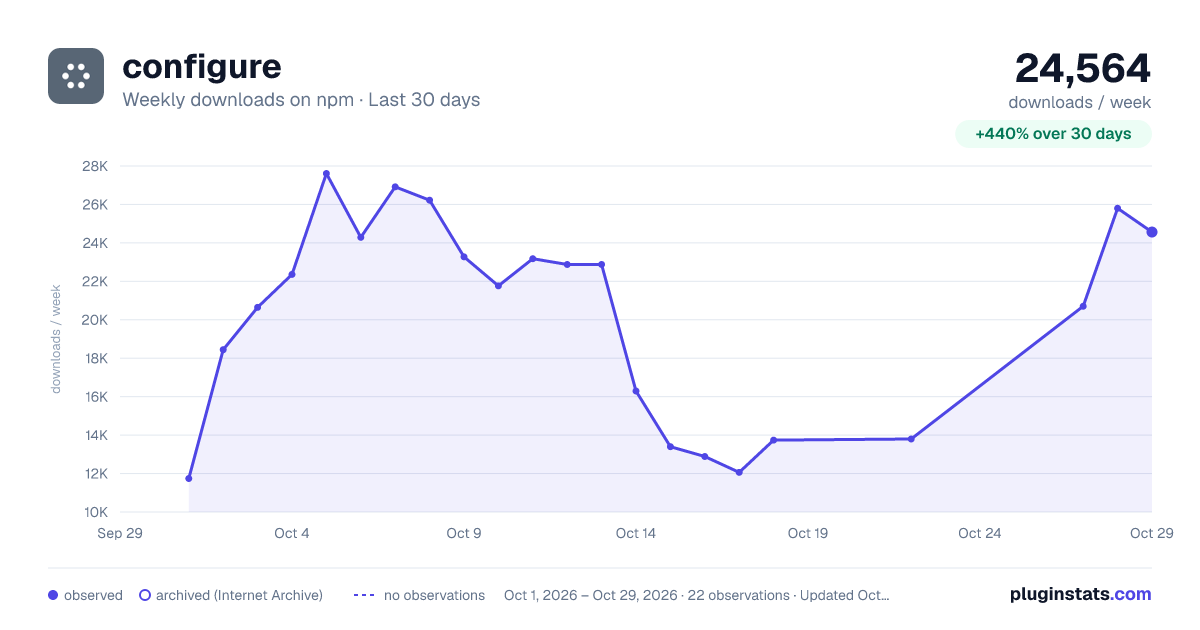
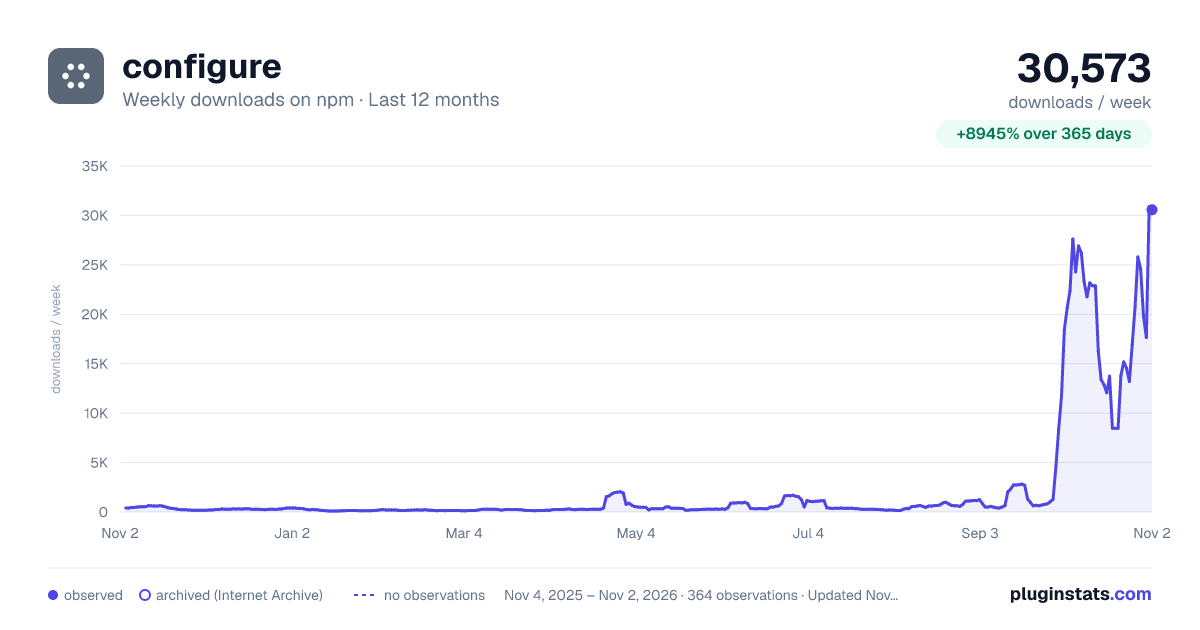
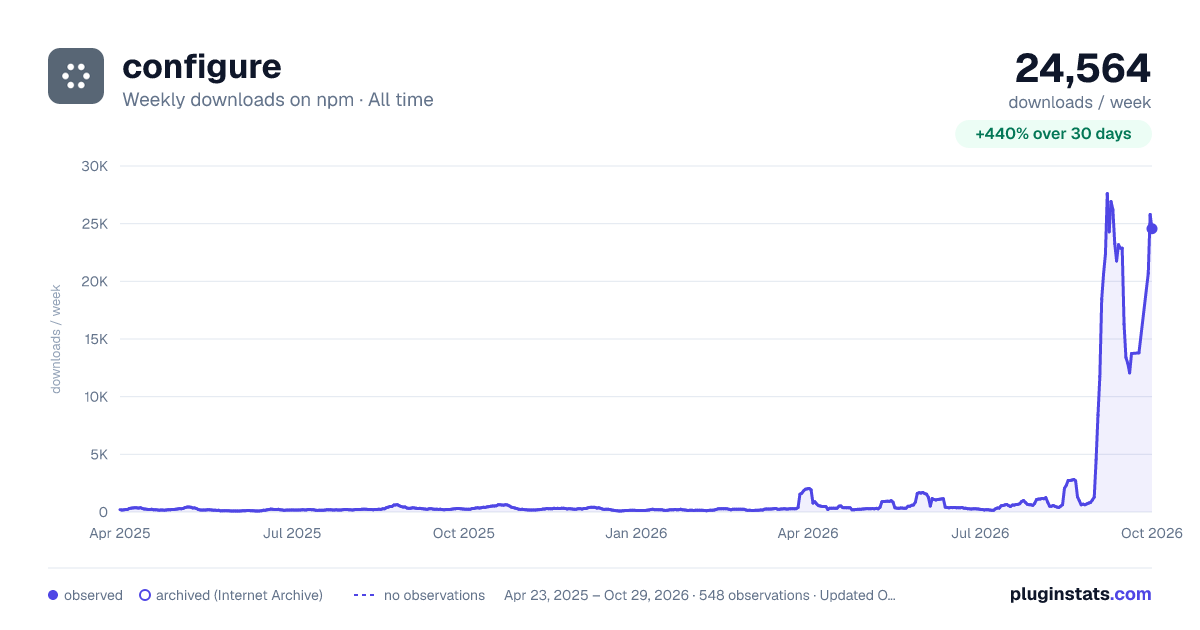

Adoption over time


7/30/90-day growth


Filled points are observed values; hollow points come from Internet Archive snapshots of the listing page. Dashed segments span periods with no observations — values between points are not interpolated.
Recent observations
Full history (543)Similar npm MCP servers plugins
Data source
Weekly downloads (trailing 7 complete days) come from the official npm downloads API. Downloads include CI and mirrors and are not equivalent to installs or users. npm publishes no ratings.
Listing: https://www.npmjs.com/package/configure. First seen Oct 16, 2026; last successful collection Oct 18, 2026. See the methodology.