 PluginStats
@1password/eslint-config weekly downloads statistics
By 1password (2 listings) · npm · ESLint plugins
1Password’s shared ESLint configuration.
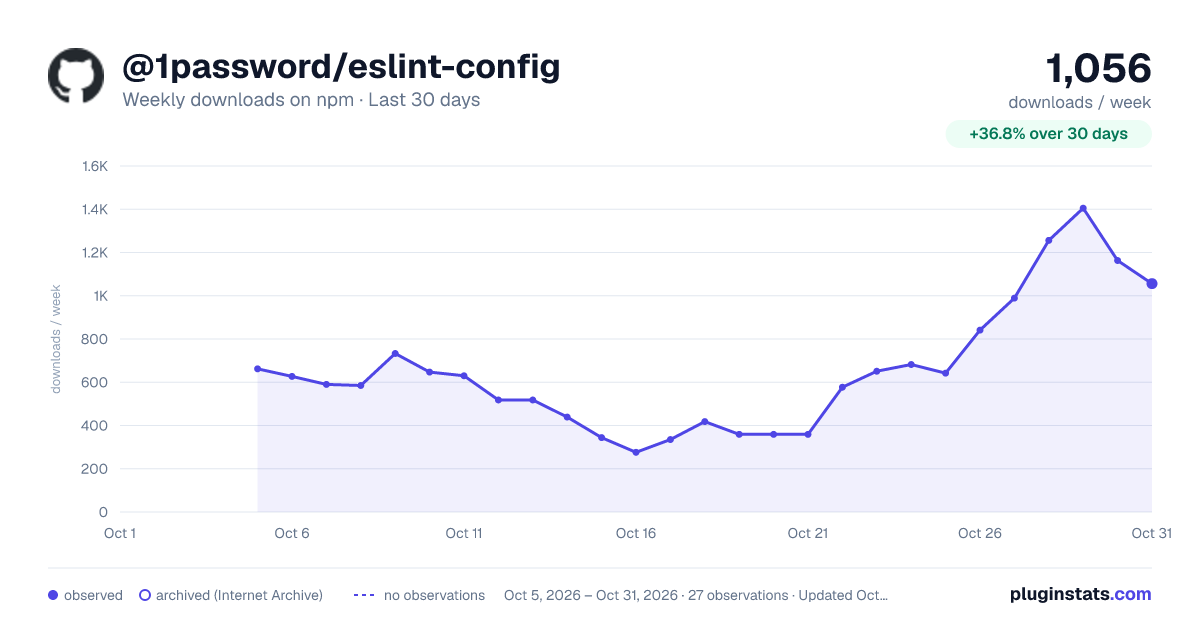
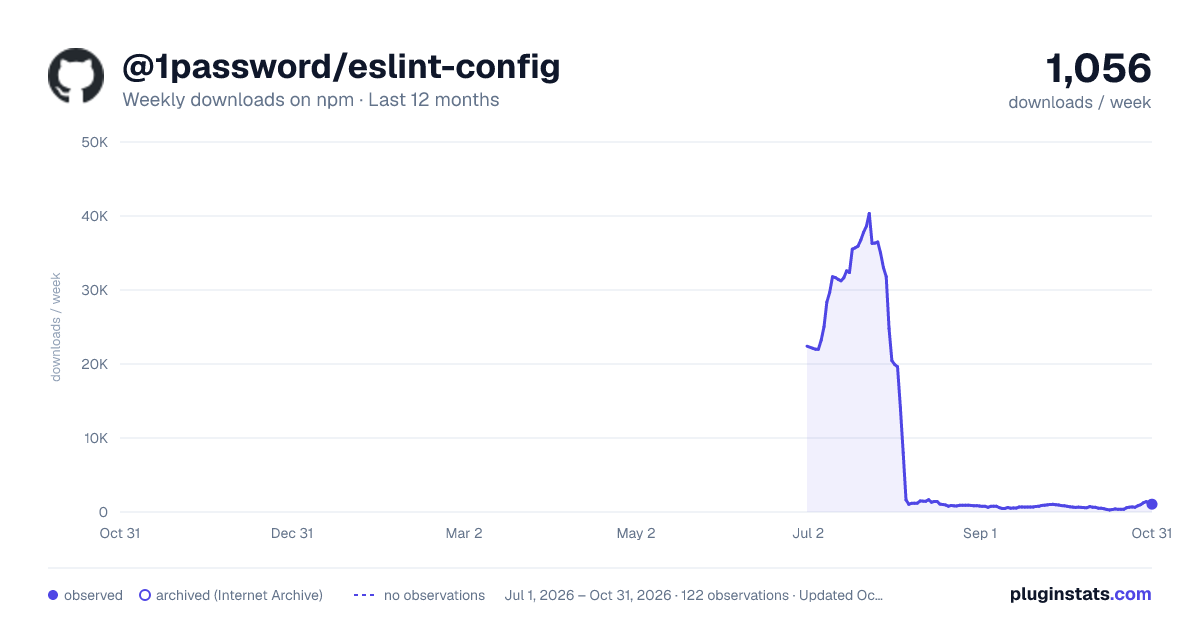
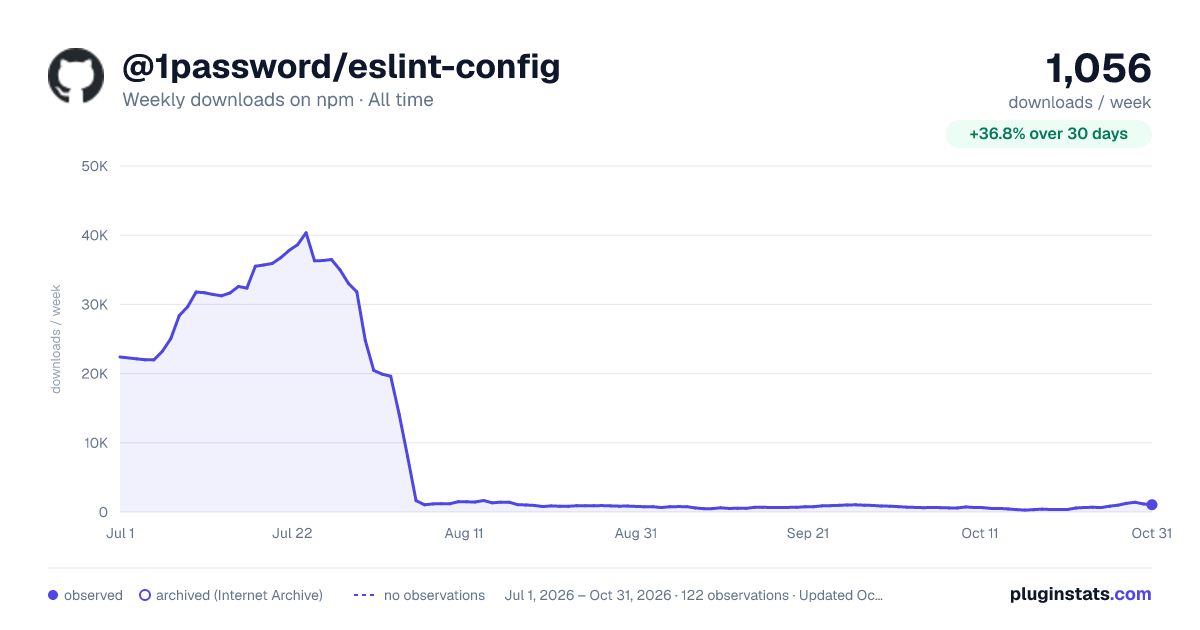
@1password/eslint-config has 22,404 recorded weekly downloads on npm.
About @1password/eslint-config
@1password/eslint-config
1Password’s shared ESLint configs:
javascript: for vanilla JavaScripttypescript: for TypeScriptreact: for React + TypeScriptdisabled-formatting-rules: for disabling deprecated ESLint formatting rules
Getting Started
-
Navigate to the root of your project. Note that the root is wherever your manifest (or
package.json) file lives, and that can be a subdirectory or the root of your repo. -
Use your project’s package manager to install @1password/eslint-config and ESLint:
pnpm add --save-dev @1password/eslint-config eslint
npm install --save-dev @1password/eslint-config eslint
yarn add --dev @1password/eslint-config eslint
- Add an
eslint.config.mjsfile, if one does not yet exist:
touch eslint.config.mjs
- Extend the appropriate ESLint config you need in your
eslint.config.mjsfile. Thetypescript-eslintpackage includes a niceconfigfunction that helps apply file rules to extended configs.
// Base config
import opLintConfig from "@1password/eslint-config";
// Alternatively, import `opLintConfig` from one of the other shared
// configurations listed above, according to the needs of your web project.
//
// For example, if your repo is a React project:
// import opLintConfig from "@1password/eslint-config/react";
import tseslint from "typescript-eslint";

export default tseslint.config({
	extends: [opLintConfig],
	files: ["src/**/*.ts"],
	// other settings
});
- If needed, disable the formatting rules that have been deprecated in (but not yet removed from) ESLint, will be deprecated in
typescript-eslint, and might be deprecated ineslint-plugin-react, by extending the config in which the formatting rules have been turned off:
import opLintConfig from "@1password/eslint-config";
import disabledFormattingRules from "@1password/eslint-config/disabled-formatting-rules";

// Base Config
export default tseslint.config({
	extends: [opLintConfig, disabledFormattingRules],
	// other settings
});
If the custom config can’t disable all of the formatting rules in your project, see if you’re using an ESLint plugin that isn’t included in @1password/eslint-config, but is included in this list:
https://github.com/prettier/eslint-config-prettier#plugins
If you are, you’ll be able to turn off that plugin’s formatting rules through eslint-config-prettier instead of the custom config.
Customizing ESLint Rules
You can customize the ESLint configuration by adding or overriding specific rules in your eslint.config.mjs file. This is useful when your project has unique linting needs that differ from the defaults provided by @1password/eslint-config.
- If your project does not use React, extend
@1password/eslint-configand add or override rules underrules. Example:
import opLintConfig from "@1password/eslint-config";
import tseslint from "typescript-eslint";

export default tseslint.config({
	extends: [opLintConfig],
	rules: {
		"@typescript-eslint/switch-exhaustiveness-check": "error",
		"no-console": ["error", { allow: ["warn", "error"] }],
		// ...more rules
	},
});
- If your project uses React, extend
@1password/eslint-config/reactand add or override React specific rules underrules. Example:
import opLintConfig from "@1password/eslint-config/react";
import tseslint from "typescript-eslint";

export default tseslint.config({
	extends: [opLintConfig],
	rules: {
		"react/react-in-jsx-scope": "off",
		"react/prop-types": "off",
		// ...more rules
	},
});
- If your project requires additional ESLint plugins not included in
@1password/eslint-config, install them separately and declare them in theeslint.config.mjs. For example, addingeslint-plugin-vitestforVitesttesting rules:
pnpm add --save-dev eslint-plugin-vitest
Then update your eslint.config.mjs file:
import opLintConfig from "@1password/eslint-config/react";
import tseslint from "typescript-eslint";
import vitest from "eslint-plugin-vitest";

export default tseslint.config({
	extends: [opLintConfig],
	plugins: { vitest },
	rules: {
		"vitest/no-focused-tests": "error",
	},
});
Config Format
In ESLint v9, the default config format has changed to "flat config", which is what you see above. See the docs for more information about migrating to the new format.
Integrating ESLint with Your Editor
If you want to integrate ESLint with your IDE or text editor so that you can have your JavaScript and TypeScript code linted as you code, visit
https://eslint.org/docs/latest/use/integrations#editors
to see which integrations are currently supported.
Philosophy
Discussions around this package have caused us to identify a sort of philosophy to guide how we manage rules. The current state of the package may not meet these ideals completely.
-
Changes must consider that this package is intended to be used in every TypeScript project at 1Password. Thus, changes shouldn't focus on the needs of one particular project, and they should be kept as uncontroversial as possible, while considering that hundreds of people will rarely fully agree about anything.
-
If a rules package has broad acceptance within the JS/TS community, its recommended ruleset should be extended (e.g.
eslint.configs.recommended), with minimal overrides as needed. See./internal/eslint.jsfor an example. -
If a rules package has a recommended set containing a good portion of controversial/preferential rules, that set should not be extended. Enable individual rules instead of enabling an entire set of rules and then disabling controversial rules. See
./internal/sonar.jsfor an example.
Description from the npm listing.
- eslint
- eslintconfig
- eslintplugin
- eslint-config
- eslint-plugin
README badge
Show your rank in a README or on your website. The badge updates automatically.
Charts
Images: 30d · 1y · all time · 1600×900 dark

Adoption over time
7/30/90-day growth
Ranking history
Listing placement
Listing placement
Filled points are observed values; hollow points come from Internet Archive snapshots of the listing page. Dashed segments span periods with no observations — values between points are not interpolated.
Each band is one page of 20. Weekly downloads on a linear scale. Placement is projected from weekly downloads, so it can differ from the marketplace's own sort order. Hover a dot to see the listing.
Recent observations
Full history (1)Similar npm ESLint plugins plugins
All 20 @1password/eslint-config alternativesData source
Weekly downloads (trailing 7 complete days) come from the official npm downloads API. Downloads include CI and mirrors and are not equivalent to installs or users. npm publishes no ratings.
Listing: https://www.npmjs.com/package/@1password/eslint-config. First seen Oct 27, 2026; last successful collection Oct 27, 2026. See the methodology.