 PluginStats
react-native-dotenv weekly downloads statistics
By dotenvx · npm · Babel plugins
Load .env into React Native with import statements. A Babel plugin that inlines environment variables at build time.
react-native-dotenv has 154,167 recorded weekly downloads on npm, a decrease of 51.6% over the past 30 days.
It ranks #404 of 2,251 tracked npm listings by weekly downloads.
Over 90 days, weekly downloads changed by -53.4%.
PluginStats has 543 daily observations since Apr 23, 2025; the latest is from Oct 17, 2026.
About react-native-dotenv
react-native-dotenv
Load .env into React Native with import statements. A Babel plugin that inlines your environment variables at build time — with multi-environment support.
Usage
Install it.
Add it to your Babel config:
Create a .env file in the root of your project:
Import your environment variables:
That's it. Your environment variables from .env are available via @env!
Advanced
with the dotenv CLI
Use dotenv v18's dotenv run command when you want the same environment variables available to build tooling and your app's @env imports. The Babel plugin still inlines values into the app at build time.
Install dotenv directly so your package manager makes its CLI available to your project scripts:
Select a file when starting Metro:
Keep the Babel plugin configured as shown in Usage, then import normally:
The CLI loads the selected file into the process environment before Metro starts. Existing shell/CI values win unless you pass --override to dotenv run. The plugin then gives non-empty process environment values priority over its own .env files.
The plugin still loads its usual files; -f selects the CLI's file, not the plugin's path or APP_ENV. This can change precedence: plain dotenv run loads .env into the process environment, so those values win over the plugin's .env.local values. Use the CLI when you intend its injected values to take priority.
With the default safe: false, keys loaded only by the CLI work through @env imports. With safe: true, those keys must also appear in files the plugin reads. Likewise, process.env.X is only inlined for keys in the plugin's files (plus NODE_ENV, BABEL_ENV, and envName).
Stop Metro and rerun the script after changing CLI-loaded values; its process environment is set at startup. The script resets Metro's cache when restarting.
The CLI is optional. For values used only by app code, the Babel plugin can continue loading .env files on its own.
with Expo 🧭
Then start with a clean Metro cache: npx expo start --clear.
envName (default: 'APP_ENV')
Override which environment variable selects the mode file (separate from NODE_ENV). Metro can overwrite the test environment even if you specify a config, so this gives you a dedicated override.
The above example would use the .env.staging file.
To use your own name:
Note: if you're using APP_ENV (or envName), you cannot use development nor production as values, and you should avoid having a .env.development or .env.production. This is a Babel and Node thing that I have little control over unfortunately and is consistent with many other platforms that have an override option, like Gatsby. If you want to use development and production, you should not use APP_ENV (or envName), but rather the built-in NODE_ENV=development or NODE_ENV=production or you can just use debug vs release modes. It actually does compile but only for the start command so it is up to you but then you have to run react-native start every time you change the values.
moduleName (default: '@env')
The module name used in import statements.
For TypeScript or Next.js it is often advised to set moduleName to react-native-dotenv.
path (default: '.env')
Path to the base env file.
allowlist (default: null)
Limit imports to only these env variable names.
blocklist (default: null)
Prevent these env variable names from being imported.
safe (default: false)
Only allow variables defined in your .env files. Host environment variables can still override values for those same keys at build time, but keys that exist only in the environment (and not in .env) are not imported.
When using safe mode, it's highly recommended to set allowUndefined to false.
allowUndefined (default: true)
Allow importing undefined variables; their value will be undefined.
When set to false, an error will be thrown.
verbose (default: false)
Also print the active dotenv mode to stderr while transforming.
quiet (default: false)
Suppress the stderr inject message (◇ injected env (N) from .env).
process.env
You can also use process.env — the plugin inlines matching keys at build time the same way.
process.env.X is only inlined when X is in your .env files (plus NODE_ENV / BABEL_ENV / envName). That keeps build-tooling noise out of the bundle without special-casing tool names.
For host/CI-only values, use @env imports — or put the key in .env and let CI override the value.
Multi-env
This package now supports environment specific variables. This means you may now import environment variables from multiple files, i.e. .env, .env.development, .env.production, and .env.test. This is based on dotenv-flow.
Note: it is not recommended that you commit any sensitive information in .env file to code in case your git repo is exposed. The best practice is to put a .env.template or .env.development.template that contains dummy values so other developers know what to configure. Then add your .env and .env.development to .gitignore. You can also keep sensitive keys in a separate .env.local (and respective .env.local.template) in .gitignore and you can use your other .env files for non-sensitive config.
If you are publishing your apps on an auto-publishing platform like EAS (Expo Application Services), make sure to put your secrets on the platform dashboard directly. If you are wondering what environment the platforms choose it is likely .env.production (not .env.prod) and there is likely no way to change this.
The base set of variables will be .env and the environment-specific variables will overwrite them.
The variables will automatically be pulled from the appropriate environment and development is the default. The choice of environment is based on your Babel environment first and if that value is not set, your NPM environment, which should actually be the same, but this makes it more robust.
In general, Release is production and Debug is development.
To choose, setup your scripts with NODE_ENV for each environment
Types with Zod…
Description from the npm listing.
- dotenv
- babel-plugin
- babel
- dotenv-flow
- react
- react-native
- config
- env
- 12factor
Where react-native-dotenv sits in the listing
Each band is one page of 20. Weekly downloads on a log scale. Placement is projected from weekly downloads, so it can differ from the marketplace's own sort order. Hover a dot to see the listing.


Charts
Images: 30d · 1y · all time · 1600×900 dark
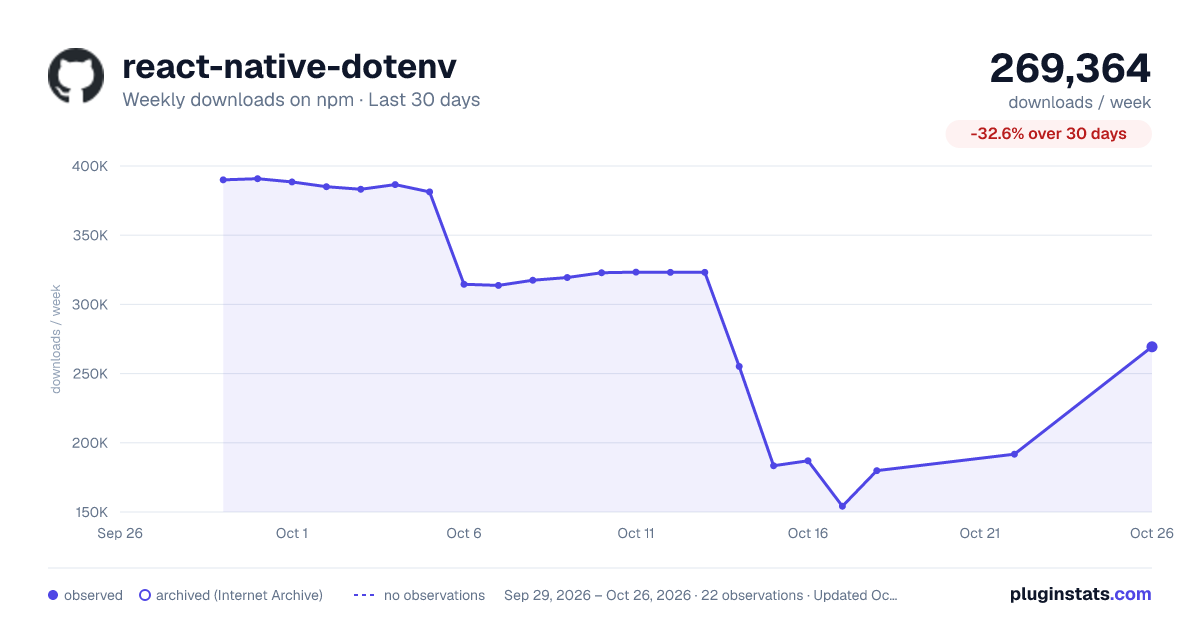
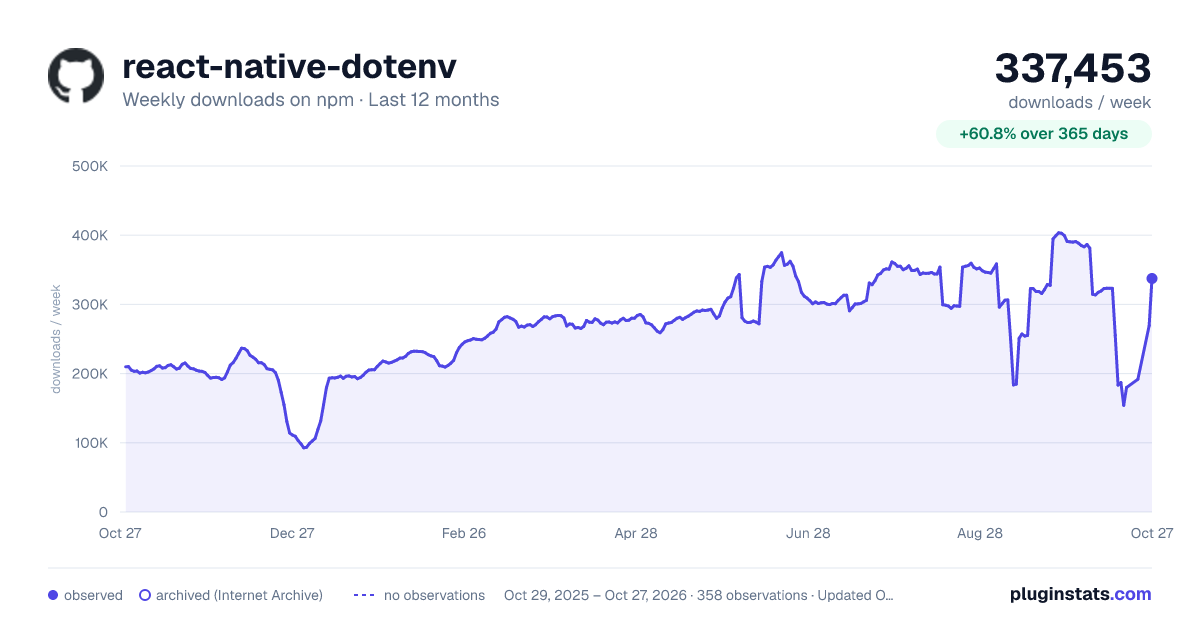
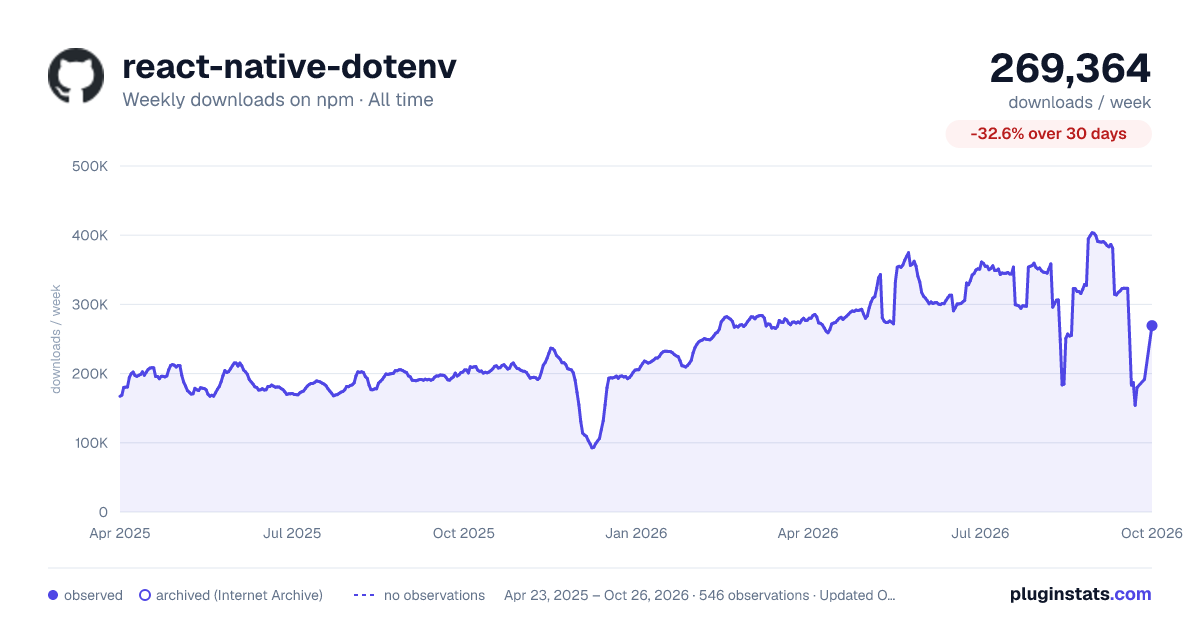

Adoption over time


7/30/90-day growth


Filled points are observed values; hollow points come from Internet Archive snapshots of the listing page. Dashed segments span periods with no observations — values between points are not interpolated.
Recent observations
Full history (543)Similar npm Babel plugins plugins
Data source
Weekly downloads (trailing 7 complete days) come from the official npm downloads API. Downloads include CI and mirrors and are not equivalent to installs or users. npm publishes no ratings.
Listing: https://www.npmjs.com/package/react-native-dotenv. First seen Oct 16, 2026; last successful collection Oct 18, 2026. See the methodology.