 PluginStats
poke weekly downloads statistics
By anthropics (78 listings) · npm · MCP servers
Poke.com Developer SDK
poke has 17,567 recorded weekly downloads on npm.
About poke
poke
The official Poke developer toolkit — a CLI and Node.js SDK for managing authentication, MCP server connections, and programmatic access to your Poke agent.
Built by Interaction Company in California.
Installation
npm install -g poke
Requires Node.js >= 18.
SDK
Use the SDK to interact with your Poke agent programmatically.
npm install poke
Quick start
import { Poke } from "poke";

const poke = new Poke({ apiKey: "pk_..." });

// Send a message to your agent
await poke.sendMessage("Summarize my unread emails");

// Create a webhook trigger
const webhook = await poke.createWebhook({
  condition: "When a deploy fails",
  action: "Send me a summary of the error",
});

// Fire the webhook with data
await poke.sendWebhook({
  webhookUrl: webhook.webhookUrl,
  webhookToken: webhook.webhookToken,
  data: { event: "deploy_failed", repo: "my-app", error: "OOM killed" },
});
Authentication
The SDK resolves credentials in this order:
apiKeypassed to the constructorPOKE_API_KEYenvironment variable- Credentials from
poke login(~/.config/poke/credentials.json)
// Option 1: Pass directly
const poke = new Poke({ apiKey: "pk_..." });

// Option 2: Set POKE_API_KEY in your environment
const poke = new Poke();

// Option 3: Run `poke login` first, then
const poke = new Poke();
Get your API key at poke.com/kitchen/api-keys.
Methods
poke.sendMessage(text)
Send a text message to your Poke agent.
const response = await poke.sendMessage("What meetings do I have today?");
// { success: true, message: "..." }
poke.createWebhook({ condition, action })
Create a webhook trigger. Returns a webhookUrl and webhookToken that you use with sendWebhook.
const webhook = await poke.createWebhook({
  condition: "When a new user signs up",
  action: "Send me a welcome summary in Slack",
});
// {
//   triggerId: "...",
//   webhookUrl: "https://poke.com/api/v1/inbound/webhook",
//   webhookToken: "eyJhbG..."
// }
poke.sendWebhook({ webhookUrl, webhookToken, data })
Fire a webhook trigger with data. Use the webhookUrl and webhookToken returned by createWebhook.
await poke.sendWebhook({
  webhookUrl: webhook.webhookUrl,
  webhookToken: webhook.webhookToken,
  data: { event: "new_signup", email: "user@example.com", plan: "pro" },
});
// { success: true }
Configuration
| Option | Environment Variable | Default |
|---|---|---|
apiKey | POKE_API_KEY | — |
baseUrl | POKE_API | https://poke.com/api/v1 |
CLI
poke login
Authenticate with your Poke account. Opens a browser for device code login.
poke login
poke logout
Clear stored credentials.
poke logout
poke whoami
Display the currently authenticated user.
poke whoami
poke mcp add <url>
Register a remote MCP server connection.
poke mcp add https://example.com/mcp --name "My Server"
poke mcp add https://example.com/mcp --name "My Server" --api-key sk-xxx
| Option | Description |
|---|---|
-n, --name <name> | Display name for the connection (required) |
-k, --api-key <key> | API key if the server requires one |
poke tunnel <url>
Forward a local port to Poke so your agent can reach a server running on your machine.
The tunnel only forwards the port — it does not start or manage the server itself. You must start your MCP server separately, then point the tunnel at it:
# 1. Start your MCP server (example)
uv run python -m server          # listening on http://localhost:3000/mcp

# 2. In another terminal, tunnel that port to Poke
poke tunnel http://localhost:3000/mcp --name "Local Dev"
| Option | Description |
|---|---|
-n, --name <name> | Display name for the connection (required) |
--recipe | Create a shareable recipe with QR code |
The tunnel stays active until you press Ctrl+C. Tools are synced automatically every 5 minutes.
Configuration
Credentials are stored in ~/.config/poke/credentials.json (respects $XDG_CONFIG_HOME).
| Environment Variable | Description | Default |
|---|---|---|
POKE_API_KEY | API key for SDK usage | — |
POKE_API | API base URL | https://poke.com/api/v1 |
POKE_FRONTEND | Frontend URL | https://poke.com |
Description from the npm listing.
- poke
- cli
- tunnel
- localhost
- mcp
README badge
Show your rank in a README or on your website. The badge updates automatically.
Charts
Images: 30d · 1y · all time · 1600×900 dark
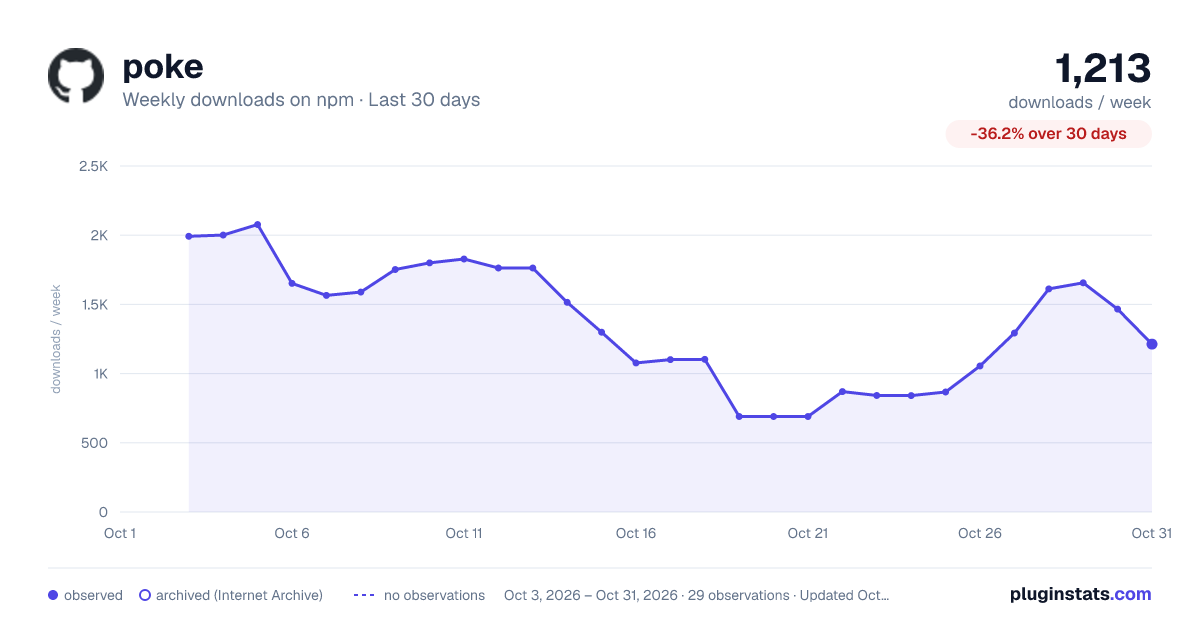
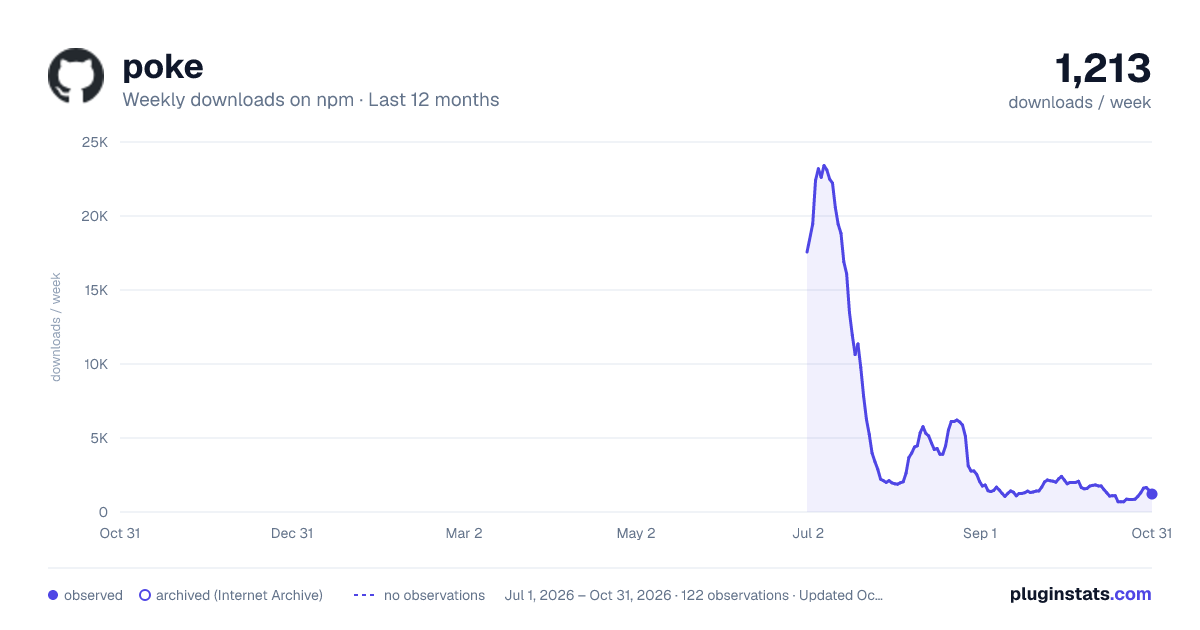
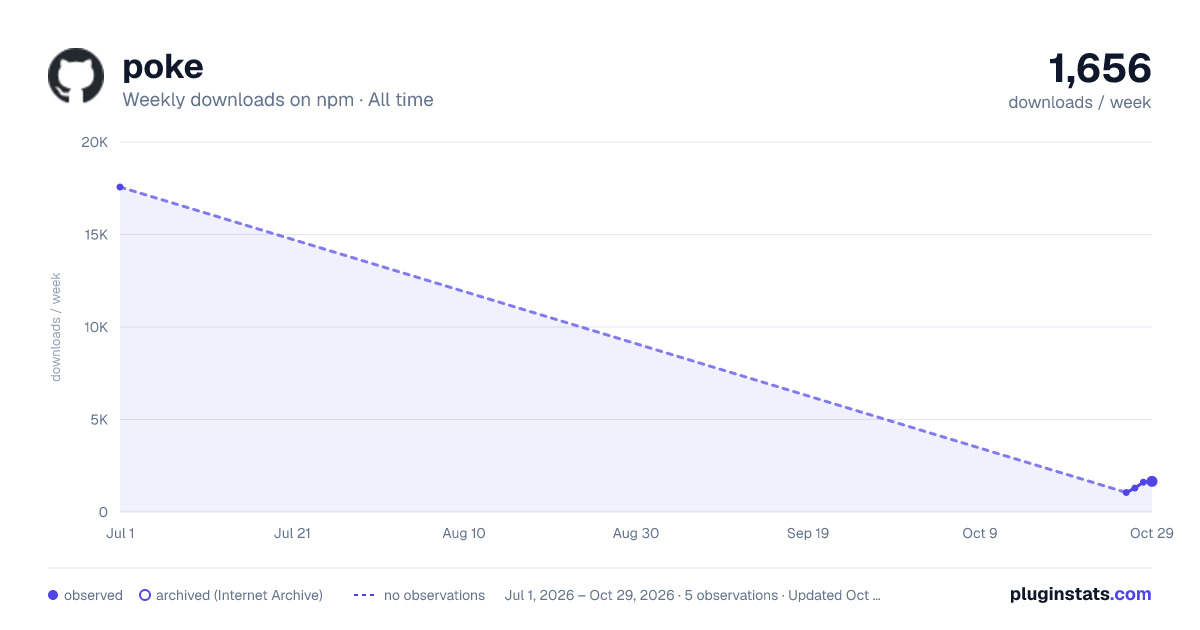

Adoption over time
7/30/90-day growth
Ranking history
Listing placement
Listing placement
Filled points are observed values; hollow points come from Internet Archive snapshots of the listing page. Dashed segments span periods with no observations — values between points are not interpolated.
Each band is one page of 20. Weekly downloads on a linear scale. Placement is projected from weekly downloads, so it can differ from the marketplace's own sort order. Hover a dot to see the listing.
Recent observations
Full history (1)Similar npm MCP servers plugins
All 20 poke alternativesData source
Weekly downloads (trailing 7 complete days) come from the official npm downloads API. Downloads include CI and mirrors and are not equivalent to installs or users. npm publishes no ratings.
Listing: https://www.npmjs.com/package/poke. First seen Oct 27, 2026; last successful collection Oct 27, 2026. See the methodology.