 PluginStats
lark-channel-bridge weekly downloads statistics
By zarazhangrui · npm · Claude Code
Bridge Feishu/Lark messenger with local CLI coding agents
lark-channel-bridge has 4,131 recorded weekly downloads on npm.
About lark-channel-bridge
lark-channel-bridge
A lightweight bot that bridges Feishu / Lark messenger with your local Claude Code or Codex CLI. Run one command, scan a QR code to bind a PersonalAgent app, and talk to your local coding agent from chat.
For a product walkthrough, see the Feishu document.
What it does
- Forwards Feishu / Lark messages to local Claude Code or Codex CLI. Send a DM directly, or
@botin a group. - Streaming card: text replies and tool calls update on one Lark card in real time.
- COT process messages: optionally send a process message with agent progress text and tool calls, then send the final answer separately.
- Session continuity: each chat, topic, or document comment thread keeps its own session.
- Queueing and batching: messages sent in quick succession are handled together; messages sent during a run are queued for the next turn, while commands like
/new,/cd,/ws use, and/stopcan interrupt the current task. - Multiple workspaces: use
/cdto switch the current project, and/wsto save and reuse common project directories. - Images and files: send them to the bot directly, and the bridge downloads them locally for the agent.
- Interactive cards:
/help,/ws list, and/statusreturn cards with clickable buttons.
Prerequisites
- Node.js >= 20.12.0
- At least one local agent installed and logged in:
- Claude Code:
claude, see https://docs.anthropic.com/en/docs/claude-code/quickstart - Codex CLI:
codex, see https://developers.openai.com/codex/cli
- Claude Code:
- A Feishu / Lark PersonalAgent app. The first-run QR wizard can create and bind one for you.
Install
npm i -g lark-channel-bridge
# or
pnpm add -g lark-channel-bridge
First run
lark-channel-bridge run
The first run opens a QR-code wizard:
- A QR code renders in your terminal.
- Scan it with the Feishu / Lark app.
- Pick or create a PersonalAgent app.
- If prompted, choose which agent to initialize.
- Config is written to
~/.lark-channel/config.json.
You do not need to choose a project directory up front. The bridge creates a profile-managed default working directory; after startup, send /cd <path> in Feishu / Lark to switch to a real project.
If you already have a PersonalAgent app, pass --app-id during initialization to skip app creation. The command prompts for the App Secret.
lark-channel-bridge run --app-id cli_xxx
# or initialize and start the background service directly
lark-channel-bridge start --app-id cli_xxx
For Lark global apps, add --tenant lark.
Background service
Use run for first-run setup and foreground debugging. After the bot can send and receive messages, stop the foreground process with Ctrl-C, then use an OS-managed service for background operation:
lark-channel-bridge start
lark-channel-bridge status
lark-channel-bridge stop
Install globally before using service commands. The daemon's launchd plist / systemd unit / Windows task records the bridge CLI path; if that path comes from an npm temp cache through npx, the daemon can break when the cache is cleaned. run is fine through npx as a one-shot foreground process.
Service commands install a per-profile service:
lark-channel-bridge start [--profile <name>]
lark-channel-bridge stop [--profile <name>]
lark-channel-bridge restart [--profile <name>]
lark-channel-bridge status [--profile <name>]
lark-channel-bridge unregister [--profile <name>]
Platform mapping:
- macOS: launchd user agent
ai.lark-channel-bridge.bot.<profile> - Linux: systemd user unit
lark-channel-bridge.bot.<profile>.service - Windows: Task Scheduler task
LarkChannelBridge.Bot.<profile>, launched through a.cmdwrapper
Daemon logs are under ~/.lark-channel/profiles/<profile>/logs/daemon/.
Multiple profiles: Claude and Codex
By default, the bridge starts with the currently selected profile. Use profile use <name> to change it. Each profile keeps its own app credentials, sessions, working directories, and logs. Create multiple profiles only when you need to connect multiple PersonalAgent apps, or run Claude and Codex as separate bots:
lark-channel-bridge start --profile claude --agent claude
lark-channel-bridge start --profile codex --agent codex
For example, to restart only the Codex bot:
lark-channel-bridge restart --profile codex
lark-channel-bridge status --profile codex
Commands
Host CLI
lark-channel-bridge run [--profile <name>] [--agent claude|codex] [--workspace <path>] [-c <config>]
lark-channel-bridge migrate [--profile <name>] [--agent claude|codex]
lark-channel-bridge ps
lark-channel-bridge kill <id|#>
lark-channel-bridge --help
profile use <name> changes the profile used by later default starts. Use these profile management commands when running separate Claude / Codex bots, connecting multiple PersonalAgent apps, or doing scripted deployment:
lark-channel-bridge profile create claude --agent claude
lark-channel-bridge profile create codex --agent codex
lark-channel-bridge profile list
lark-channel-bridge profile use <name>
lark-channel-bridge profile remove <name>
lark-channel-bridge profile remove <name> --purge --yes
lark-channel-bridge profile export <name> [--output ./profile.json] [--force]
lark-channel-bridge profile export <name> --include-secrets --yes
profile remove archives local state by default, including the active profile. If other profiles remain, the bridge switches to the next one; if it was the last profile, the root config is cleared so the same name can be created again. --purge --yes permanently deletes local state. profile export redacts app secrets by default; --include-secrets --yes includes sensitive config.…
Description from the npm listing.
- feishu
- lark
- claude
- claude-code
- codex
- cli
- channel
- bridge
README badge
Show your rank in a README or on your website. The badge updates automatically.
Charts
Images: 30d · 1y · all time · 1600×900 dark
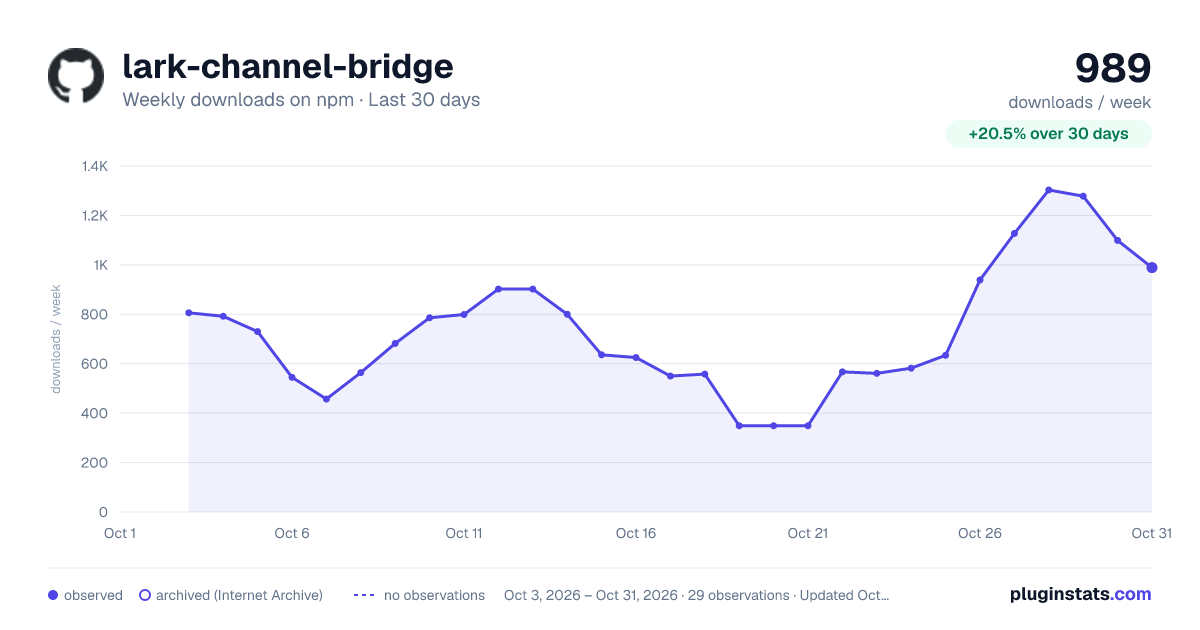
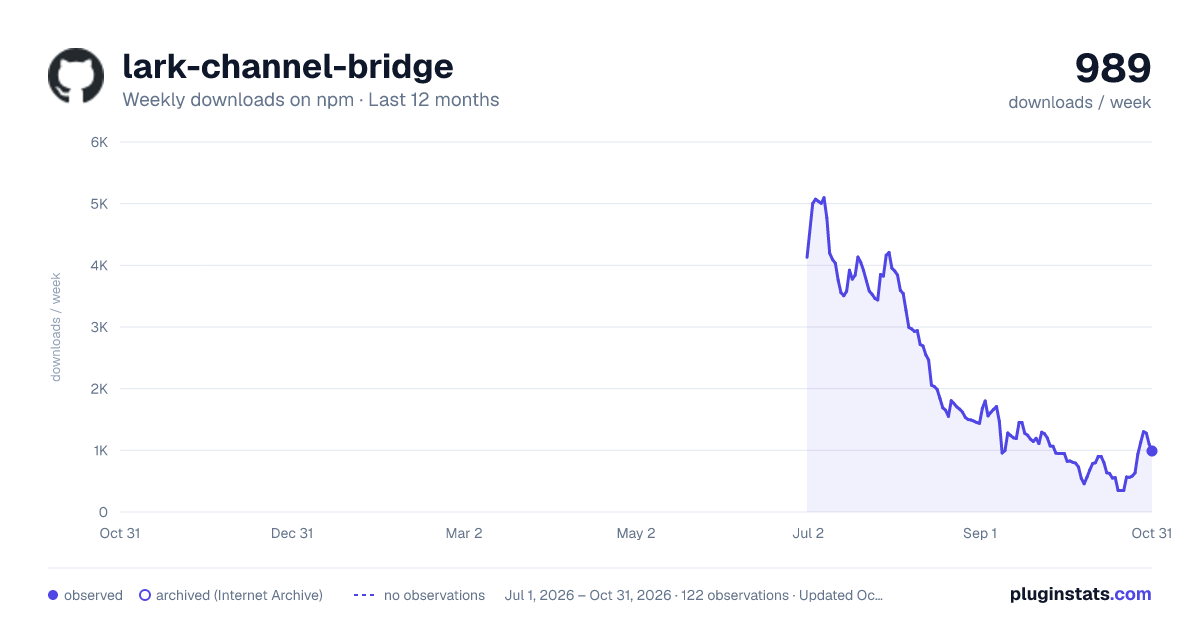
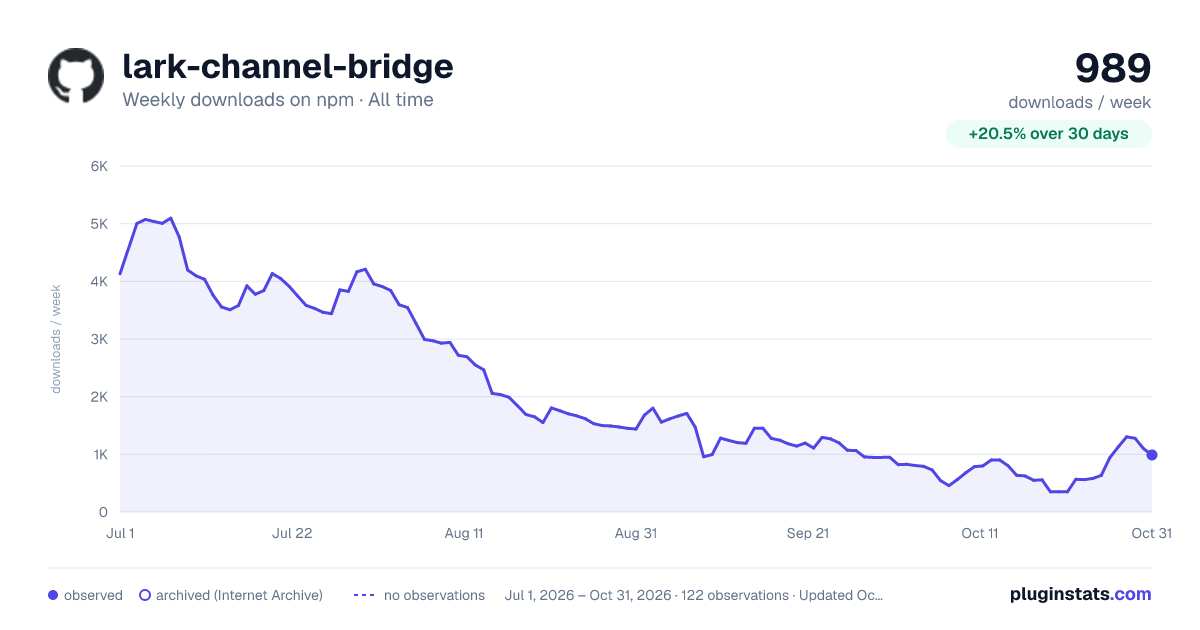

Adoption over time
7/30/90-day growth
Ranking history
Listing placement
Listing placement
Filled points are observed values; hollow points come from Internet Archive snapshots of the listing page. Dashed segments span periods with no observations — values between points are not interpolated.
Each band is one page of 20. Weekly downloads on a linear scale. Placement is projected from weekly downloads, so it can differ from the marketplace's own sort order. Hover a dot to see the listing.
Recent observations
Full history (1)Similar npm Claude Code plugins
All 20 lark-channel-bridge alternativesData source
Weekly downloads (trailing 7 complete days) come from the official npm downloads API. Downloads include CI and mirrors and are not equivalent to installs or users. npm publishes no ratings.
Listing: https://www.npmjs.com/package/lark-channel-bridge. First seen Oct 27, 2026; last successful collection Oct 27, 2026. See the methodology.