 PluginStats
@lightupai/polaris weekly downloads statistics
By lightupai · npm · Claude Code
Record and stream Claude Code sessions to Slack. Like Gong for AI coding — capture every prompt, response, and tool call. Multiplayer collaboration across AI coding agents.
@lightupai/polaris has 157 recorded weekly downloads on npm, ranking #1646 of 2,644 tracked listings.
About @lightupai/polaris
Polaris — It's like Gong for Claude Code sessions
Record, stream, and collaborate on AI coding sessions in real time. Polaris captures every prompt, response, and tool call from Claude Code and streams them to Slack so your team can observe, advise, and learn from each other's sessions.
AI coding session recording for teams. Instead of AI sessions disappearing when the terminal closes, Polaris captures the full session — what was asked, what the agent did, which files it touched, and what tools it called. Every session is searchable, shareable, and streamable to Slack.
What Polaris does
- Record Claude Code sessions — hooks capture prompts, responses, and tool calls automatically
- Stream to Slack in real time — every session gets a dedicated Slack channel with live updates
- Multiplayer AI coding — teammates can watch sessions, send advice from Slack, and redirect agents mid-session
- Session history and search — browse past sessions, search across projects, attach context to PRs
- Team dashboard — see who's working on what, active sessions, prompt activity across the org
Works with Claude Code today. Designed to support Cursor, Codex, and other AI coding tools.
Architecture
- API (
src/service/server.ts) — Cloud service. REST + WebSocket for projects, sessions, events. - Web (
src/web/) — Dashboard and landing page. Google SSO, Slack OAuth, real-time SSE updates. - Daemon (
src/daemon/daemon.ts) — Local daemon. Routes hook events from coding agents to the API. - MCP Client (
src/client/client.ts) — MCP channel server for Claude Code. Provides/polariscommands. - Slack Bridge (
src/slack/bridge.ts) — Bidirectional bridge between project event streams and Slack channels. - Hooks (
hooks/) — Shell scripts that capture coding agent interactions (prompts, responses, tool calls).
Prerequisites
Install these before running the Quick Start:
| Tool | Why | Install |
|---|---|---|
| Bun | Runtime for all services, the CLI, and the test suite | npm install -g bun, brew install oven-sh/bun/bun, or curl -fsSL https://bun.sh/install | bash |
| Docker | Runs the Postgres container | Docker Desktop (macOS/Windows) or Docker Engine (Linux) — must be running |
Then verify:
bun --version       # 1.x
docker info         # should succeed (daemon running)
Port 5432 must be free.
docker compose up -dbinds Postgres to5432. If another Postgres already uses that port, either stop it, or run the container on5433and setDATABASE_URL=postgres://polaris:polaris@127.0.0.1:5433/polaris(and pass the sameDATABASE_URLtomake test, pointing at thepolaris_testdatabase).
Login needs Google OAuth.
make devandpolaris loginauthenticate via Google SSO, soGOOGLE_CLIENT_ID/GOOGLE_CLIENT_SECRETmust be set in.env(see Configuration). The test suite (make test) does not require this.
Quick Start
# Install dependencies
bun install

# Start Postgres
docker compose up -d

# Start all services (API, web, daemon, bridge)
make dev

# Run tests
make test

# Stop everything
make clean
New Developer Setup
After cloning and completing the Quick Start above, a few extra steps to get the MCP + daemon working for local development:
1. Install the CLI
npm install -g @lightupai/polaris
polaris login --local   # authenticates against localhost:3000
This generates a shared daemon secret and stores it in ~/.polaris/config.json.
2. Set up .mcp.json
The project .mcp.json is gitignored (it contains your machine-specific daemon secret). Copy the example and fill it in:
cp .mcp.json.example .mcp.json
Then open .mcp.json and replace the placeholder with your daemonSecret:
# Print your daemon secret:
cat ~/.polaris/config.json | python3 -c "import sys,json; print(json.load(sys.stdin)['daemonSecret'])"
3. Restart Claude Code
Restart Claude Code so it picks up the updated .mcp.json. The Polaris MCP tools (polaris_connect, polaris_reply, etc.) will then be available in your session.
CLI
# Install globally
npm install -g @lightupai/polaris

# Default setup: install local components + login to production
polaris

# Or run steps independently:
polaris install          # Install MCP server, hooks, skill, status line + restart daemon
polaris login            # Authenticate against production
polaris login --local    # Authenticate against localhost (for local dev)

# Multi-account support
polaris profiles                        # List all logged-in accounts
polaris use you@work.com               # Switch to a work account
polaris use you@personal.com           # Switch to a personal account (triggers login if not yet authenticated)

# Other commands
polaris daemon           # Start the local daemon (kills any existing daemon first)
polaris status           # Show active account, daemon state, sessions
polaris feedback                          # Report a bug or request a feature (opens GitHub)
polaris feedback "it crashed on startup"  # Pre-fill the issue title
polaris feedback --bug "description"      # Open with bug label
polaris feedback --feature "description"  # Open with feature-request label
polaris logout           # Remove active account credentials
polaris logout --all     # Remove all credentials
Multiple accounts
Polaris supports multiple accounts (work and personal) side by side. Each Claude Code session can connect to a different account independently — switching one session does not affect others.
# Log in to both accounts (one-time)
polaris login                          # first account (stored as you@work.com)
polaris login                          # second account (stored as you@personal.com)

# Switch the active account for the daemon
polaris use you@personal.com…
Description from the npm listing.
- claude-code
- ai-coding
- session-recording
- slack
- gong
- observability
- multiplayer
- collaboration
- mcp
- claude
README badge
Show your rank in a README or on your website. The badge updates automatically.
Charts
Images: 30d · 1y · all time · 1600×900 dark
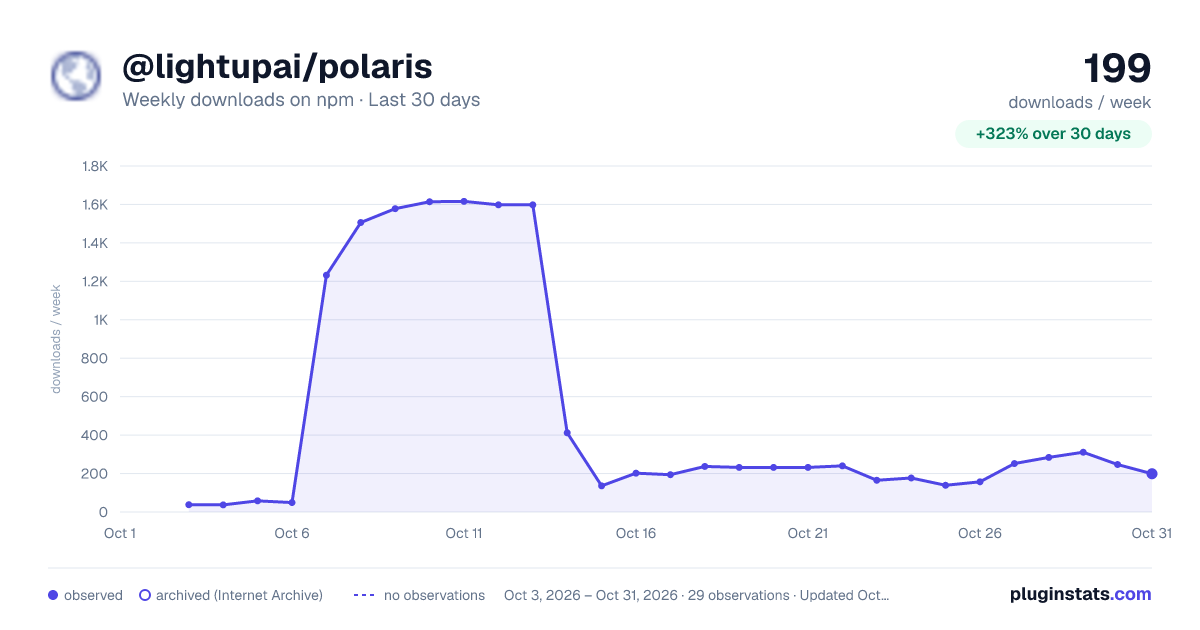
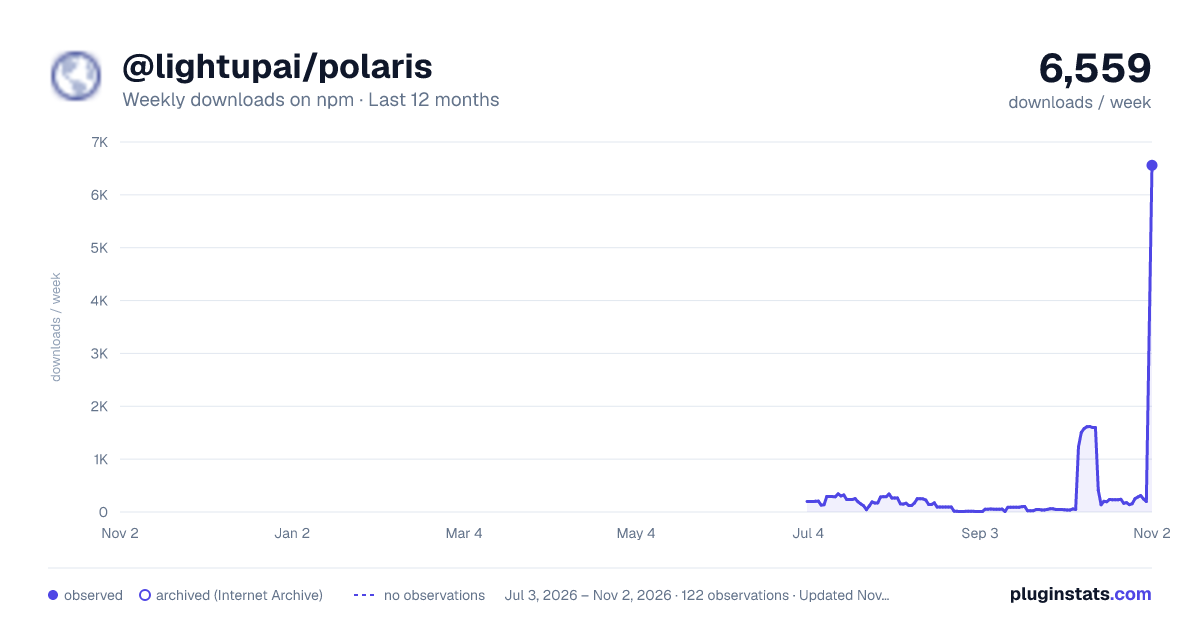
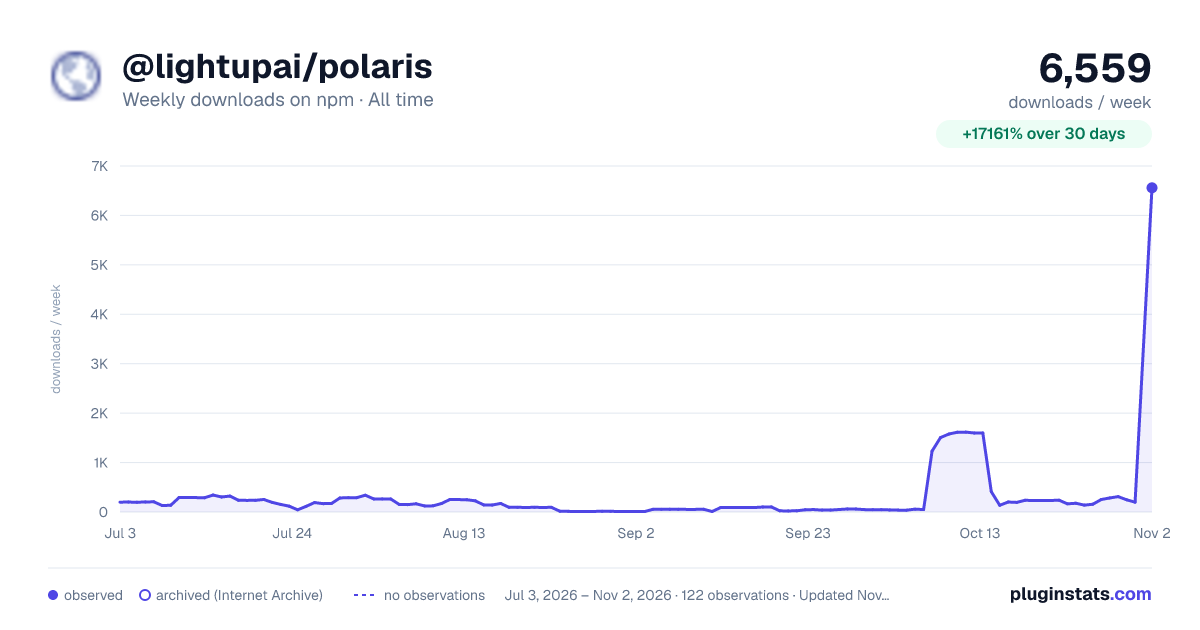

Adoption over time
7/30/90-day growth
Ranking history
Listing placement
Listing placement
Filled points are observed values; hollow points come from Internet Archive snapshots of the listing page. Dashed segments span periods with no observations — values between points are not interpolated.
Each band is one page of 20. Weekly downloads on a linear scale. Placement is projected from weekly downloads, so it can differ from the marketplace's own sort order. Hover a dot to see the listing.
Recent observations
Full history (1)Similar npm Claude Code plugins
All 20 @lightupai/polaris alternativesData source
Weekly downloads (trailing 7 complete days) come from the official npm downloads API. Downloads include CI and mirrors and are not equivalent to installs or users. npm publishes no ratings.
Listing: https://www.npmjs.com/package/@lightupai/polaris. First seen Oct 28, 2026; last successful collection Oct 28, 2026. See the methodology.