 PluginStats
@felores/airtable-mcp-server weekly downloads statistics
By felores · npm · MCP servers
An Airtable Model Context Protocol Server
@felores/airtable-mcp-server has 46,033 recorded weekly downloads on npm.
About @felores/airtable-mcp-server
Airtable MCP Server
A Model Context Protocol server that provides tools for interacting with Airtable's API. This server enables programmatic management of Airtable bases, tables, fields, and records through Claude Desktop or other MCP clients.
This MCP server features a specialized implementation that allows it to build tables in stages, leveraging Claude's agentic capabilities and minimizing the failure rate typically seen in other MCP servers for Airtable when building complex tables. It also includes system prompts that provide additional guidance for the LLM when leveraging projects in Claude Desktop.
Installation
⚠️ Important: Before running, make sure to:
- Set up your Airtable API key (see API Key Setup)
- Configure Claude Desktop (see Configuration)
Method 1: Using npx (Recommended)
The easiest way to run the server is with npx:
# Run directly (will install latest version)
npx airtable-server

# Or specify a version
npx airtable-server@0.2.0
Method 2: Using mcp-installer:
After you have mcp-installer installed, you can install the Airtable MCP server by prompting Claude Desktop:
Install the MCP server: airtable-server. Set the environment variable AIRTABLE_API_KEY to 'your_airtable_api_key_here'
Claude will install the server, modify the configuration file and set the environment variable AIRTABLE_API_KEY to your Airtable API key.
Method 3: Local Development Installation
If you want to contribute or modify the code:
# Clone the repository
git clone https://github.com/felores/airtable-mcp.git
cd airtable-mcp

# Install dependencies
npm install

# Build the server
npm run build

# Run locally
node build/index.js
Obtaining Airtable API Key
- Log in to your Airtable account at airtable.com
- Create a personal access token at Airtable's Builder Hub
- In the Personal access token section select these scopes:
- data.records:read
- data.records:write
- schema.bases:read
- schema.bases:write
- Select the workspace or bases you want to give access to the personal access token
- Keep this key secure - you'll need it for configuration
Configuring Claude Desktop
-
Navigate to the Claude configuration directory:
- Windows:
C:\Users\NAME\AppData\Roaming\Claude - macOS:
~/Library/Application Support/Claude/
(You can also find these directories in Claude Desktop > Settings > Developer > Edit Config)
- Windows:
-
Create or edit
claude_desktop_config.json:
For npx installation:
{
  "mcpServers": {
    "airtable": {
      "command": "npx",
      "args": ["airtable-server"],
      "env": {
        "AIRTABLE_API_KEY": "your_api_key_here"
      }
    }
  }
}
For local installation:
{
  "mcpServers": {
    "airtable": {
      "command": "node",
      "args": ["path/to/airtable-mcp/build/index.js"],
      "env": {
        "AIRTABLE_API_KEY": "your_api_key_here"
      }
    }
  }
}
Note: For Windows paths, use double backslashes (\) or forward slashes (/).
Verifying Installation
- Start Claude Desktop
- The Airtable MCP server should be listed in the "Connected MCP Servers" section
- Test with a simple command:
List all bases
Features
Available Operations
Base Management
list_bases: List all accessible Airtable baseslist_tables: List all tables in a basecreate_table: Create a new table with fieldsupdate_table: Update a table's name or description
Field Management
create_field: Add a new field to a tableupdate_field: Modify an existing field
Record Operations
list_records: Retrieve records from a tablecreate_record: Add a new recordupdate_record: Modify an existing recorddelete_record: Remove a recordsearch_records: Find records matching criteriaget_record: Get a single record by its ID
Field Types
singleLineText: Single line text fieldmultilineText: Multi-line text areaemail: Email address fieldphoneNumber: Phone number fieldnumber: Numeric field with optional precisioncurrency: Money field with currency symboldate: Date field with format optionssingleSelect: Single choice from optionsmultiSelect: Multiple choices from options
Field Colors
Available colors for select fields:
blueBright,redBright,greenBrightyellowBright,purpleBright,pinkBrightgrayBright,cyanBright,orangeBrightblueDark1,greenDark1
Contributing
We welcome contributions to improve the Airtable MCP server! Here's how you can contribute:
-
Fork the Repository
- Visit https://github.com/felores/airtable-mcp
- Click the "Fork" button in the top right
- Clone your fork locally:
git clone https://github.com/your-username/airtable-mcp.git
-
Create a Feature Branch
git checkout -b feature/your-feature-name -
Make Your Changes
- Follow the existing code style
- Add tests if applicable
- Update documentation as needed
-
Commit Your Changes
git add . git commit -m "feat: add your feature description" -
Push to Your Fork
git push origin feature/your-feature-name -
Create a Pull Request
- Go to your fork on GitHub
- Click "New Pull Request"
- Select your feature branch
- Describe your changes in detail
Development Guidelines
- Use TypeScript for new code
- Follow semantic commit messages
- Update documentation for new features
- Add examples for new functionality
- Test your changes thoroughly
Getting Help
- Open an issue for bugs or feature requests
- Join discussions in existing issues
- Ask questions in pull requests…
Description from the npm listing.
- airtable
- mcp
- model-context-protocol
- claude
- api
README badge
Show your rank in a README or on your website. The badge updates automatically.
Charts
Images: 30d · 1y · all time · 1600×900 dark
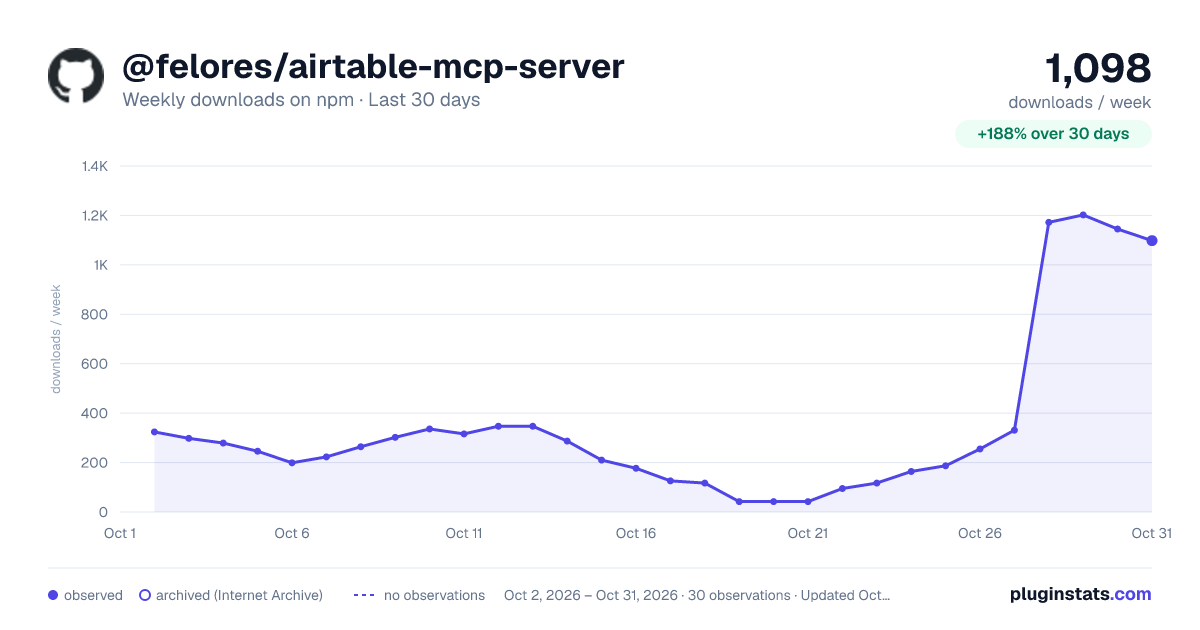
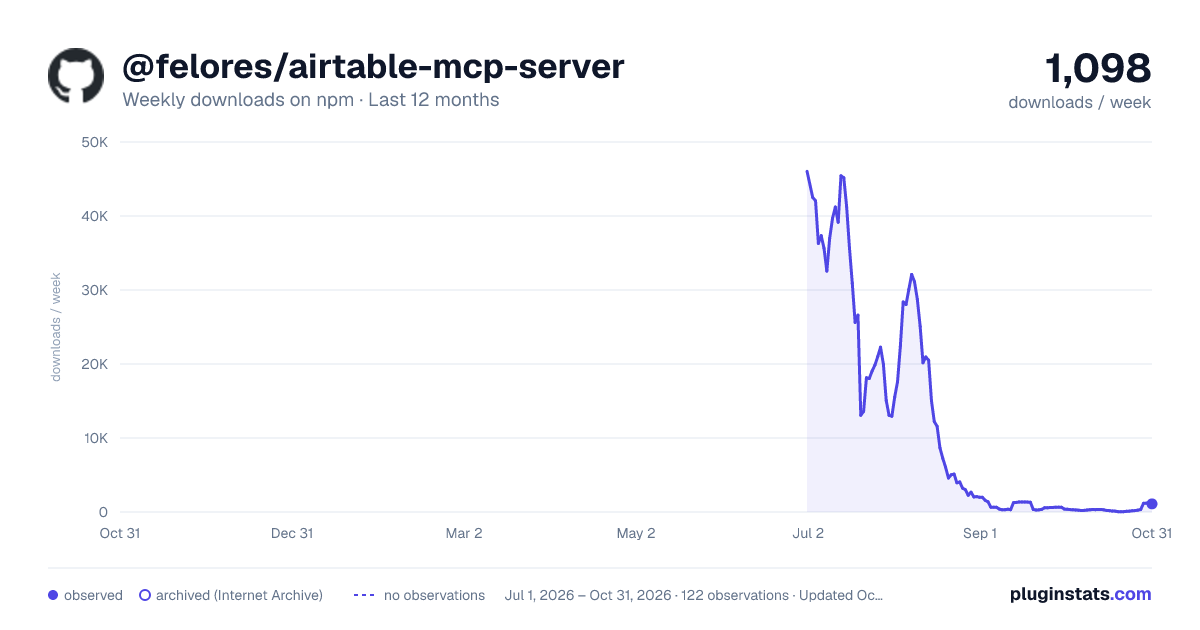
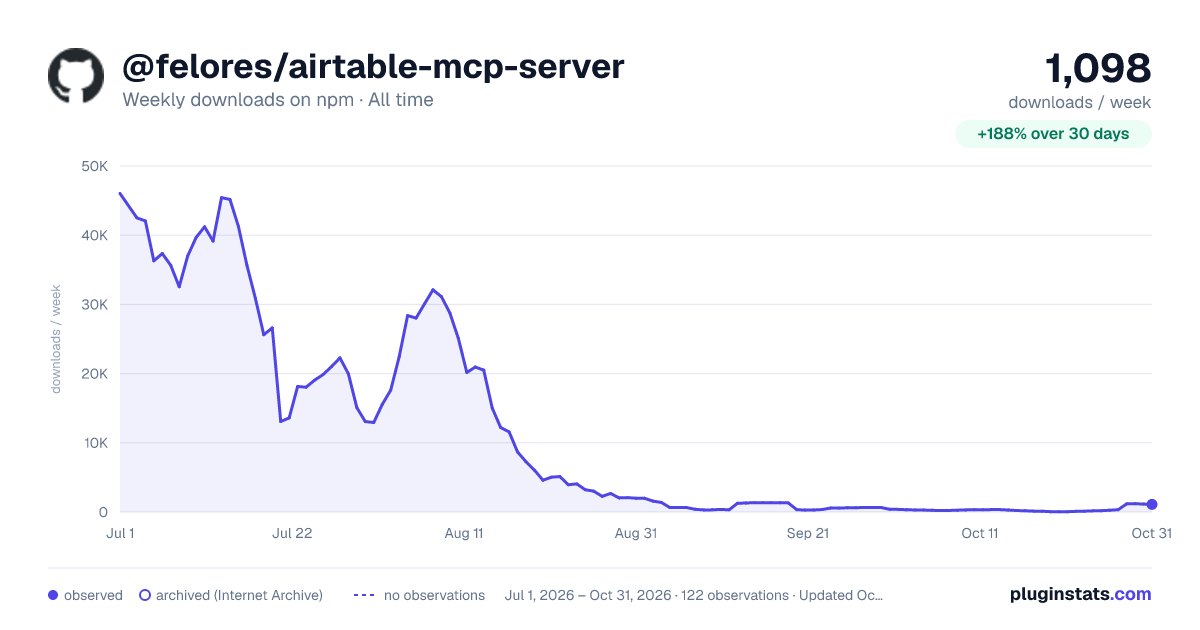

Adoption over time
7/30/90-day growth
Ranking history
Listing placement
Listing placement
Filled points are observed values; hollow points come from Internet Archive snapshots of the listing page. Dashed segments span periods with no observations — values between points are not interpolated.
Each band is one page of 20. Weekly downloads on a linear scale. Placement is projected from weekly downloads, so it can differ from the marketplace's own sort order. Hover a dot to see the listing.
Recent observations
Full history (1)Similar npm MCP servers plugins
All 20 @felores/airtable-mcp-server alternativesData source
Weekly downloads (trailing 7 complete days) come from the official npm downloads API. Downloads include CI and mirrors and are not equivalent to installs or users. npm publishes no ratings.
Listing: https://www.npmjs.com/package/@felores/airtable-mcp-server. First seen Oct 27, 2026; last successful collection Oct 27, 2026. See the methodology.