 PluginStats
semantic-release-claude-changelog weekly downloads statistics
By cahaseler · npm · Claude Code
Semantic Release plugin that uses the Claude Agent SDK to generate high quality release notes
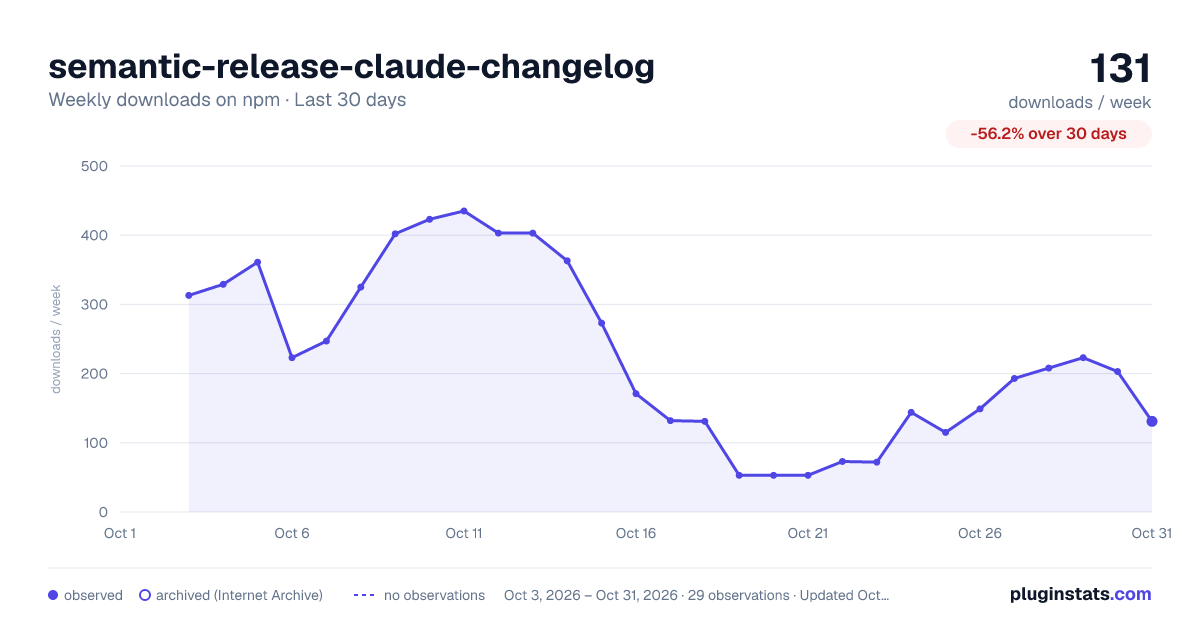
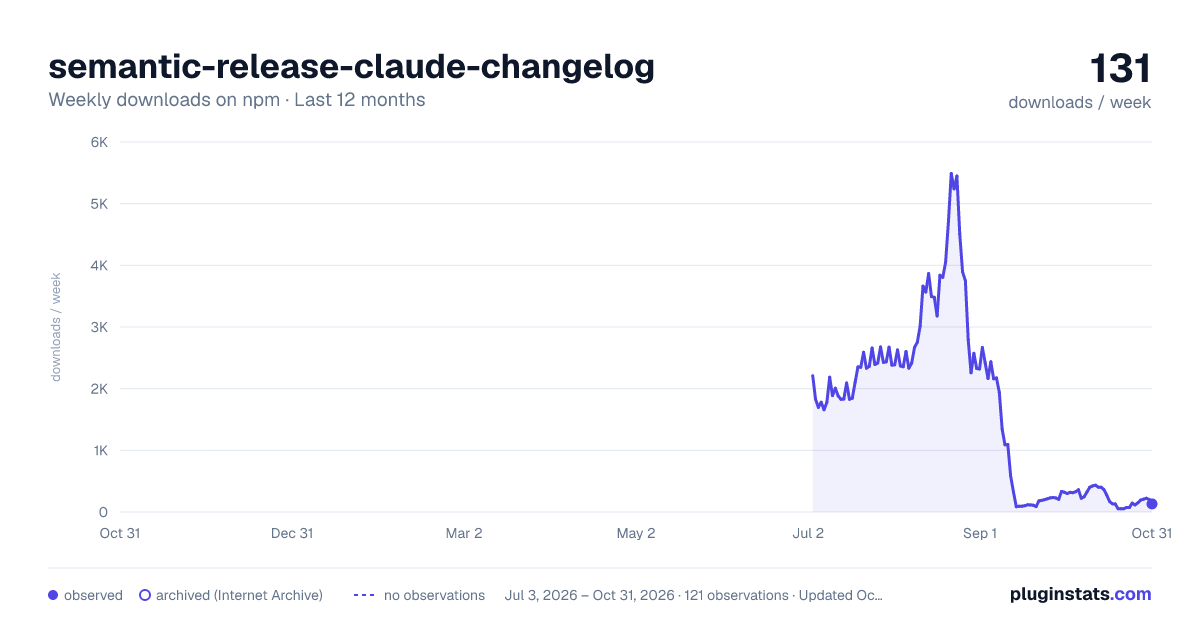
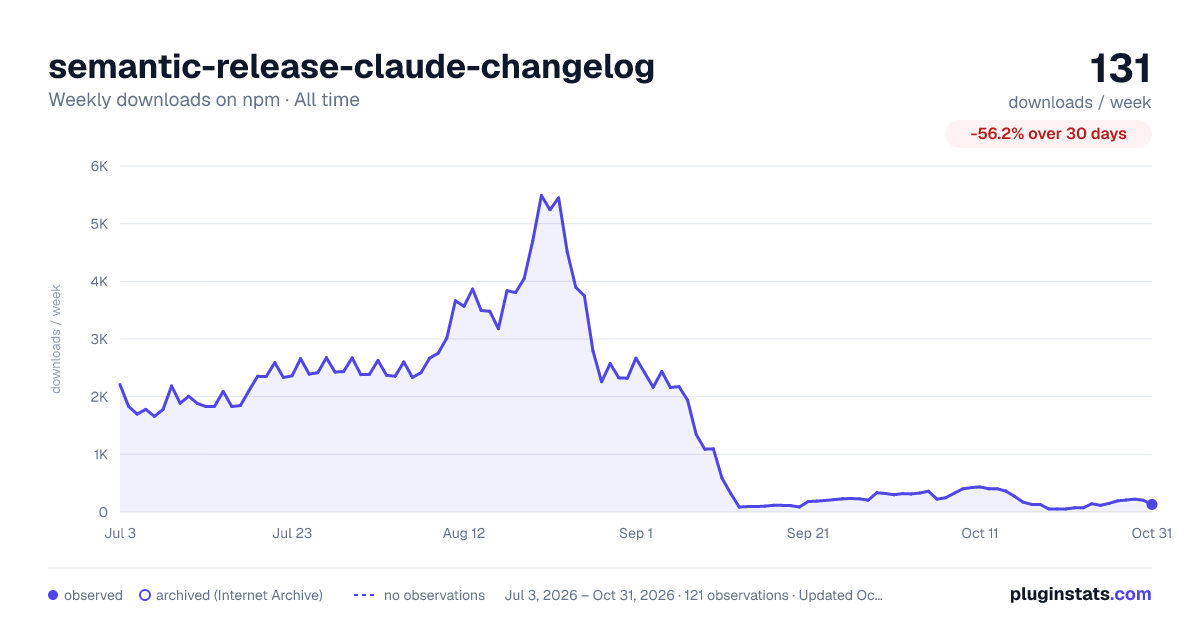
semantic-release-claude-changelog has 149 recorded weekly downloads on npm, ranking #1655 of 2,644 tracked listings.
About semantic-release-claude-changelog
semantic-release-claude-changelog
A semantic-release plugin that uses the Claude Agent SDK to generate high-quality release notes suitable for end users based on commit information.
Installation
npm install --save-dev semantic-release-claude-changelog
Requirements
- Node.js 18.x or higher
- semantic-release 18.x or higher
- ANTHROPIC_API_KEY environment variable set
Usage
The plugin can be configured in the semantic-release configuration file:
{
  "plugins": [
    "@semantic-release/commit-analyzer",
    "semantic-release-claude-changelog",
    "@semantic-release/npm",
    "@semantic-release/github"
  ]
}
Configuration
Options
| Option | Description | Default |
|---|---|---|
promptTemplate | Template for the prompt sent to Claude | See Default Prompt Template |
maxCommits | Maximum number of commits to include in the prompt | 100 |
maxTurns | Maximum number of turns (interactions) Claude can make | 10 |
additionalContext | Additional context information (PRs, issues, etc.) | undefined |
cleanOutput | Whether to automatically extract only the release notes section | true |
escaping | How to escape the output: 'shell' (escapes quotes and special chars) or 'none' | 'shell' |
Default Prompt Template
The default prompt template used can be customized according to your needs:
Generate release notes for version {{version}} (released on {{date}}) of the {{repoName}} project.

Here are the commits that were included in this release:

\`\`\`json
{{commits}}
\`\`\`

{{#additionalContext}}
Additional context information:

\`\`\`json
{{additionalContext}}
\`\`\`
{{/additionalContext}}

IMPORTANT: Your response must contain ONLY the release notes in Markdown format, with no additional text, commentary, or explanations about your process. DO NOT include any phrases like "Based on my analysis" or "Here are the release notes".

The release notes should:

1. Group changes by type (features, improvements, bug fixes, etc.)
2. Translate technical commit messages into user-friendly descriptions
3. Highlight important changes that users should be aware of
4. Be concise but informative
5. Use Markdown formatting with bold titles using ** for emphasis

Focus on explaining what's new or changed from an end-user perspective, rather than implementation details. Omit commits that are purely technical (e.g., "fix typo", "merge branch", etc.) unless they fix important user-facing issues.

Your response must ONLY contain the release notes in Markdown format - nothing else. Start directly with the version header.
You can customize this template to match your project's needs.
Custom Prompt Template Requirements
When creating a custom prompt template, make sure to include these placeholders:
Required placeholders:
{{commits}}- The commit data in JSON format (⚠️ Without this, no commit data will be included!)
Recommended placeholders:
{{version}}- The version number being released{{date}}- The release date{{repoName}}- The repository name{{#additionalContext}}...{{/additionalContext}}- Conditional block for additional context (PRs, issues, etc.)
Example custom template:
{
  "plugins": [
    ["semantic-release-claude-changelog", {
      "promptTemplate": "Generate user-friendly release notes for {{repoName}} version {{version}}.\n\nCommits:\n```json\n{{commits}}\n```\n\n{{#additionalContext}}Context:\n```json\n{{additionalContext}}\n```\n{{/additionalContext}}\n\nFocus on security updates and breaking changes."
    }]
  ]
}
Important: The plugin will warn you if your custom template is missing required placeholders. Always test your custom templates to ensure they generate appropriate release notes.
Output Cleaning
By default, the plugin will attempt to clean Claude's response to extract only the actual release notes section. This is done by:
- Looking for a markdown header containing the version number (e.g.,
## 1.2.0) - Extracting everything from that header to the end of the text
- Removing any preamble text that Claude might add (like "Now I'll analyze these commits...")
This ensures the final release notes are clean and ready to use without manual editing.
You can disable this behavior by setting cleanOutput: false in your configuration:
{
  "plugins": [
    "@semantic-release/commit-analyzer",
    ["semantic-release-claude-changelog", {
      "cleanOutput": false
    }],
    "@semantic-release/npm",
    "@semantic-release/github"
  ]
}
If you're using a custom prompt that doesn't follow the standard markdown header format, you might want to disable automatic cleaning.
Shell Escaping
By default, the plugin escapes special characters in the generated release notes to ensure they work safely in shell commands. This prevents issues when semantic-release plugins use ${nextRelease.notes} in shell contexts.
The following characters are escaped:
- Single quotes (
') →'\'' - Double quotes (
") →\" - Backslashes (
\) →\\ - Dollar signs (
$) →\$ - Backticks (
`) →\`
This ensures that release notes containing words like "weren't" or "can't" won't break shell commands in downstream plugins.
If you need the raw, unescaped output (for example, if you're not using the notes in shell commands), you can disable escaping:
{
  "plugins": [
    "@semantic-release/commit-analyzer",
    ["semantic-release-claude-changelog", {
      "escaping": "none"
    }],
    "@semantic-release/npm",
    "@semantic-release/github"
  ]
}
Using Additional Context…
Description from the npm listing.
- semantic-release
- semantic-release-plugin
- changelog
- release-notes
- claude
- anthropic
- claude-code
README badge
Show your rank in a README or on your website. The badge updates automatically.
Charts
Images: 30d · 1y · all time · 1600×900 dark

Adoption over time
7/30/90-day growth
Ranking history
Listing placement
Listing placement
Filled points are observed values; hollow points come from Internet Archive snapshots of the listing page. Dashed segments span periods with no observations — values between points are not interpolated.
Each band is one page of 20. Weekly downloads on a linear scale. Placement is projected from weekly downloads, so it can differ from the marketplace's own sort order. Hover a dot to see the listing.
Recent observations
Full history (1)Similar npm Claude Code plugins
All 20 semantic-release-claude-changelog alternatives- 152 weekly downloads-97.6%
- 135 weekly downloads-97.9%
- 135 weekly downloads-95.1%
Data source
Weekly downloads (trailing 7 complete days) come from the official npm downloads API. Downloads include CI and mirrors and are not equivalent to installs or users. npm publishes no ratings.
Listing: https://www.npmjs.com/package/semantic-release-claude-changelog. First seen Oct 28, 2026; last successful collection Oct 28, 2026. See the methodology.