 PluginStats
@larksuiteoapi/lark-mcp weekly downloads statistics
By larksuiteoapi · npm · MCP servers
Feishu/Lark OpenAPI MCP
@larksuiteoapi/lark-mcp has 20,281 recorded weekly downloads on npm, ranking #848 of 2,644 tracked listings.
About @larksuiteoapi/lark-mcp
Feishu/Lark OpenAPI MCP



English | 中文
Developer Documentation Retrieval MCP
⚠️ Beta Version Notice: This tool is currently in Beta stage. Features and APIs may change, so please stay updated with version releases.
This is the Feishu/Lark official OpenAPI MCP (Model Context Protocol) tool designed to help users quickly connect to the Feishu/Lark platform and enable efficient collaboration between AI Agents and Feishu/Lark. The tool encapsulates Feishu/Lark Open Platform API interfaces as MCP tools, allowing AI assistants to directly call these interfaces and implement various automation scenarios such as document processing, conversation management, calendar scheduling, and more.
Features
-
Complete Feishu/Lark API Toolkit: Encapsulates almost all Feishu/Lark API interfaces, including message management, group management, document operations, calendar events, Bitable, and other core functional areas.
-
Dual Authentication Support:
- Supports App Access Token authentication
- Supports User Access Token authentication
-
Flexible Communication Protocols:
- Supports standard input/output stream (stdio) mode, suitable for integration with AI tools like Trae/Cursor/Claude
- Supports StreamableHTTP/SSE mode, providing HTTP-based interfaces
-
Supports multiple configuration methods, adapting to different usage scenarios
Tool List
A complete list of all supported Feishu/Lark tools can be found in tools.md, where tools are categorized by project and version with descriptions.
Preparation
Creating a Feishu/Lark Application
Before using the lark-mcp tool, you need to create a Feishu/Lark application:
- Visit the Feishu Open Platform or Lark Open Platform and log in
- Click "Console" and create a new application
- Obtain the App ID and App Secret, which will be used for API authentication
- Add the necessary permissions for your application based on your usage scenario
- If you need to call APIs as a user, set the OAuth 2.0 redirect URL to http://localhost:3000/callback
For detailed application creation and configuration guidelines, please refer to the Feishu Open Platform Documentation - Creating an Application.
Installing Node.js
Before using the lark-mcp tool, you need to install the Node.js environment.
Using the Official Installer (Recommended):
- Visit the Node.js website
- Download and install the LTS version
- After installation, verify in the terminal:
node -v
npm -v
Usage Guide
Using with Trae/Cursor/Claude
To integrate Feishu/Lark functionality in AI tools like Trae, Cursor or Claude, install using the button below.



or add the following to your configuration file:
{
  "mcpServers": {
    "lark-mcp": {
      "command": "npx",
      "args": [
        "-y",
        "@larksuiteoapi/lark-mcp",
        "mcp",
        "-a",
        "<your_app_id>",
        "-s",
        "<your_app_secret>"
      ]
    }
  }
}
If you need to access APIs with user identity, you need to login first using the login command in the terminal. Note that you need to configure the application's redirect URL in the developer console first, default is http://localhost:3000/callback
# Login and get user access token
npx -y @larksuiteoapi/lark-mcp login -a cli_xxxx -s yyyyy

# Or optionally, login with specific OAuth scope - if not specified, all permissions will be authorized by default
npx -y @larksuiteoapi/lark-mcp login -a cli_xxxx -s yyyyy --scope offline_access docx:document
Then add the following to your configuration file:
{
  "mcpServers": {
    "lark-mcp": {
      "command": "npx",
      "args": [
        "-y",
        "@larksuiteoapi/lark-mcp",
        "mcp",
        "-a",
        "<your_app_id>",
        "-s",
        "<your_app_secret>",
        "--oauth"
      ]
    }
  }
}
You can also directly add a user access token (expires in 2 hours) via -u:
{
  "mcpServers": {
    "lark-mcp": {
      "command": "npx",
      "args": [
        "-y",
        "@larksuiteoapi/lark-mcp",
        "mcp",
        "-a",
        "<your_app_id>",
        "-s",
        "<your_app_secret>",
        "-u",
        "<your_user_token>"
      ]
    }
  }
}
Custom API Configuration…
Description from the npm listing.
- feishu
- lark
- mcp
- open-api
- ai
README badge
Show your rank in a README or on your website. The badge updates automatically.
Charts
Images: 30d · 1y · all time · 1600×900 dark
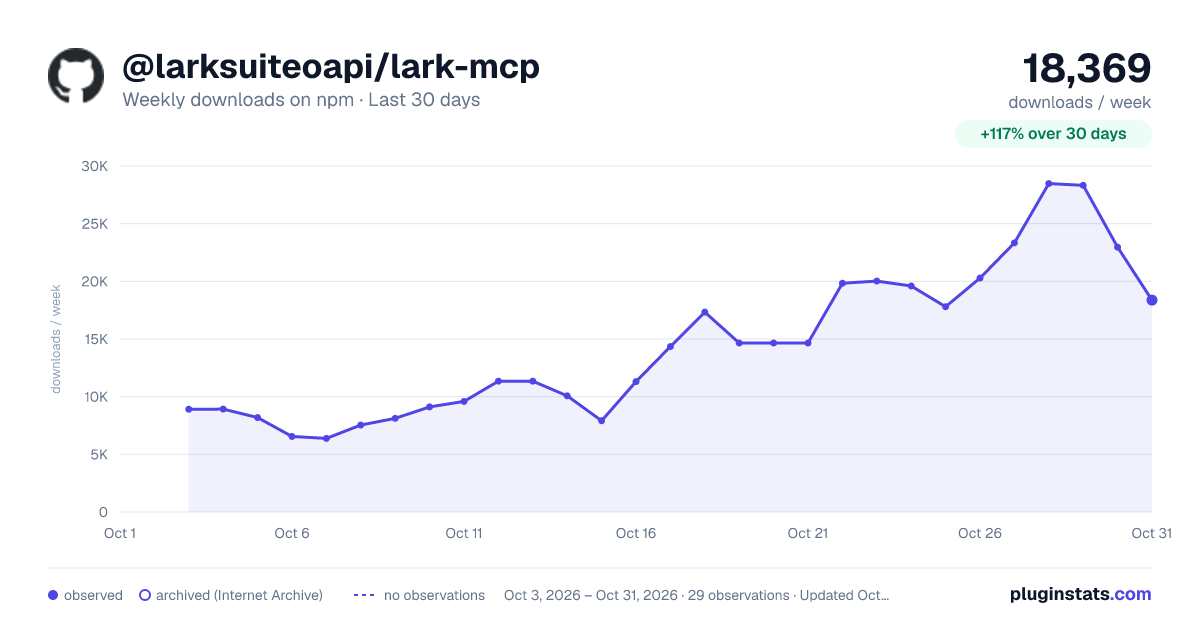
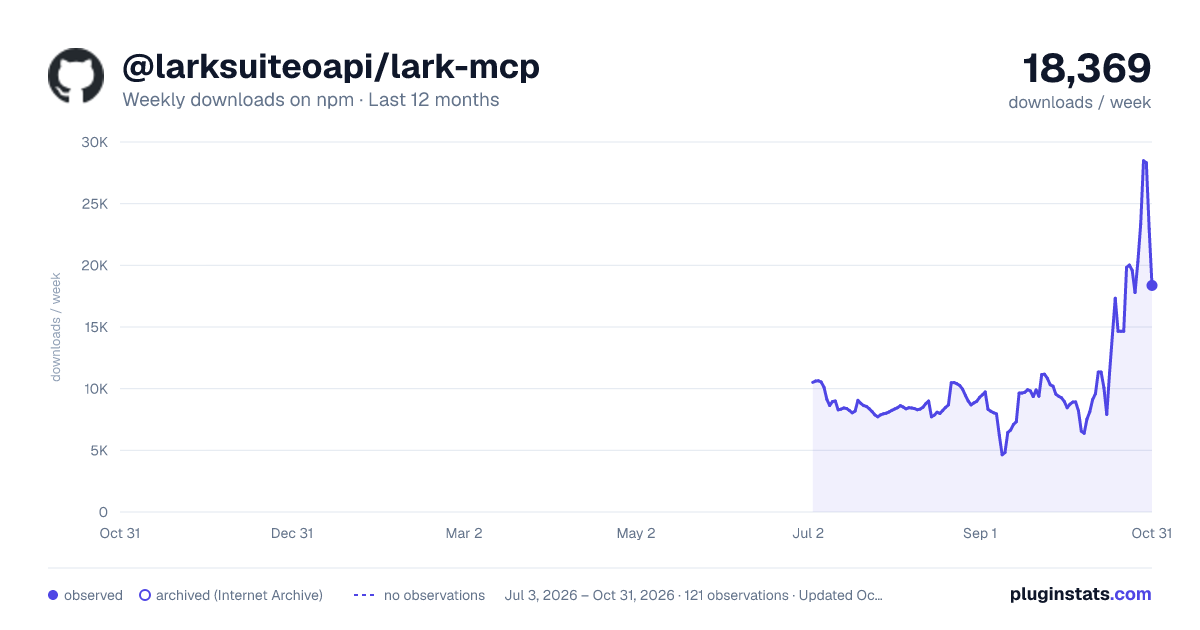
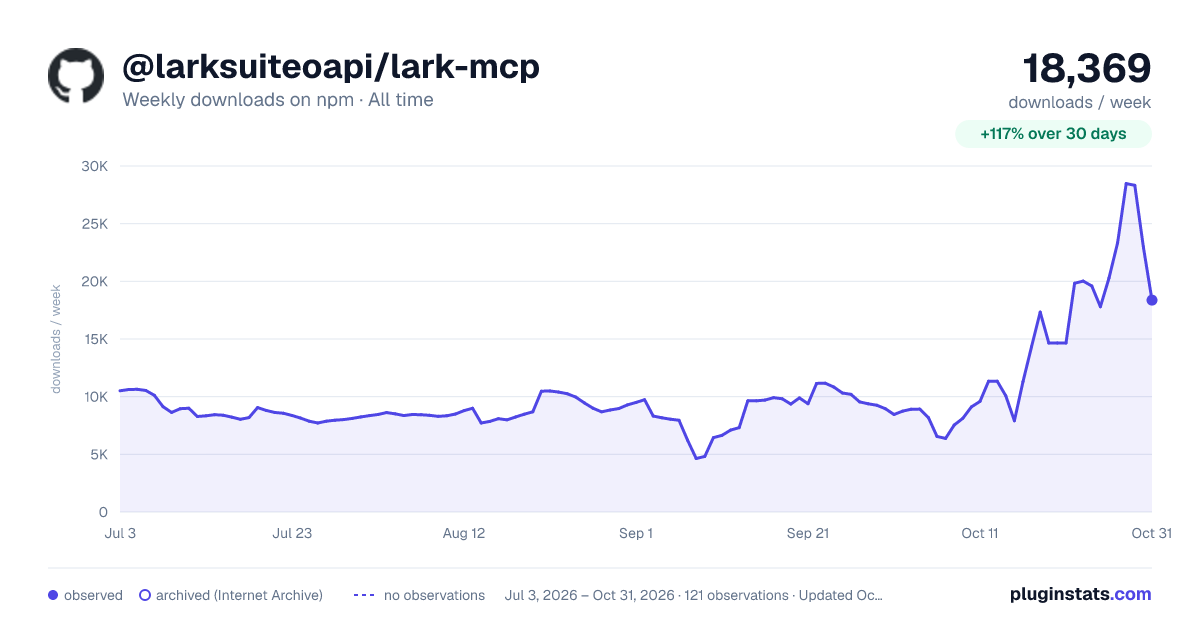

Adoption over time
7/30/90-day growth
Ranking history
Listing placement
Listing placement
Filled points are observed values; hollow points come from Internet Archive snapshots of the listing page. Dashed segments span periods with no observations — values between points are not interpolated.
Each band is one page of 20. Weekly downloads on a linear scale. Placement is projected from weekly downloads, so it can differ from the marketplace's own sort order. Hover a dot to see the listing.
Recent observations
Full history (1)Similar npm MCP servers plugins
All 20 @larksuiteoapi/lark-mcp alternativesData source
Weekly downloads (trailing 7 complete days) come from the official npm downloads API. Downloads include CI and mirrors and are not equivalent to installs or users. npm publishes no ratings.
Listing: https://www.npmjs.com/package/@larksuiteoapi/lark-mcp. First seen Oct 28, 2026; last successful collection Oct 28, 2026. See the methodology.