 PluginStats
@bitbonsai/mcpvault weekly downloads statistics
By bitbonsai · npm · MCP servers
Universal AI bridge for Obsidian vaults - connect any MCP-compatible assistant
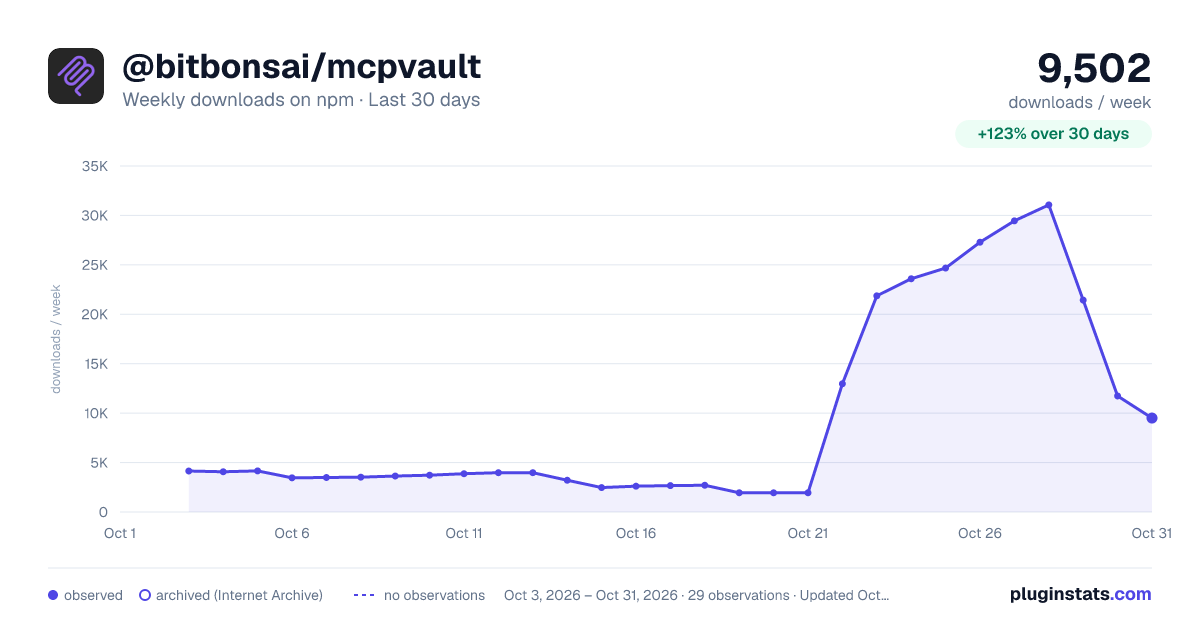
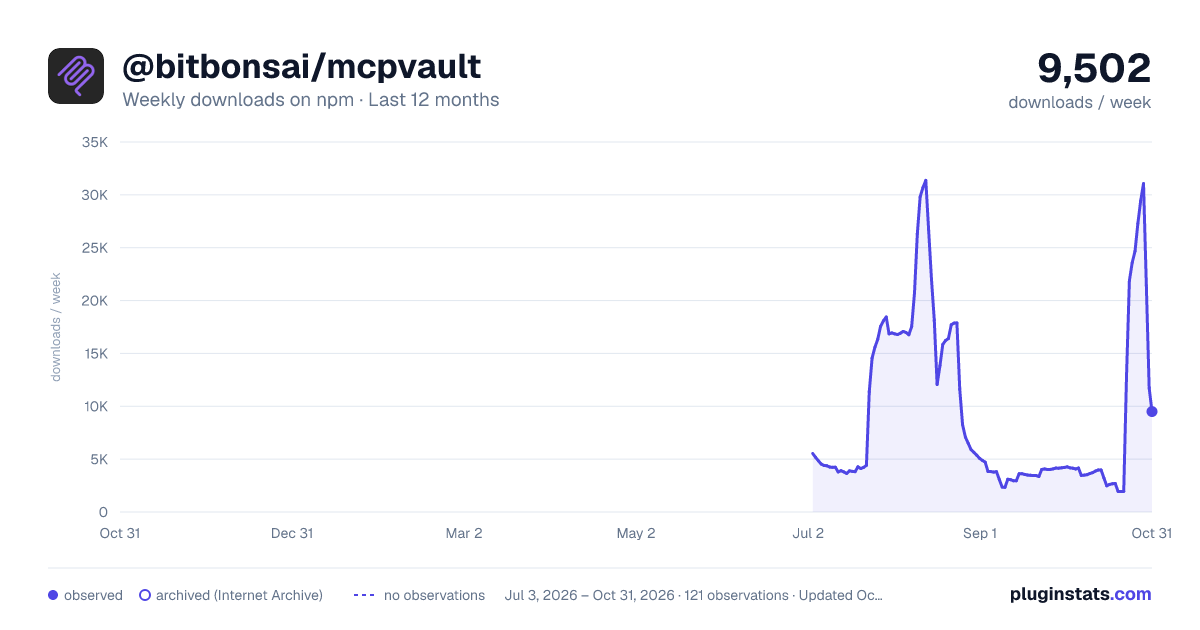
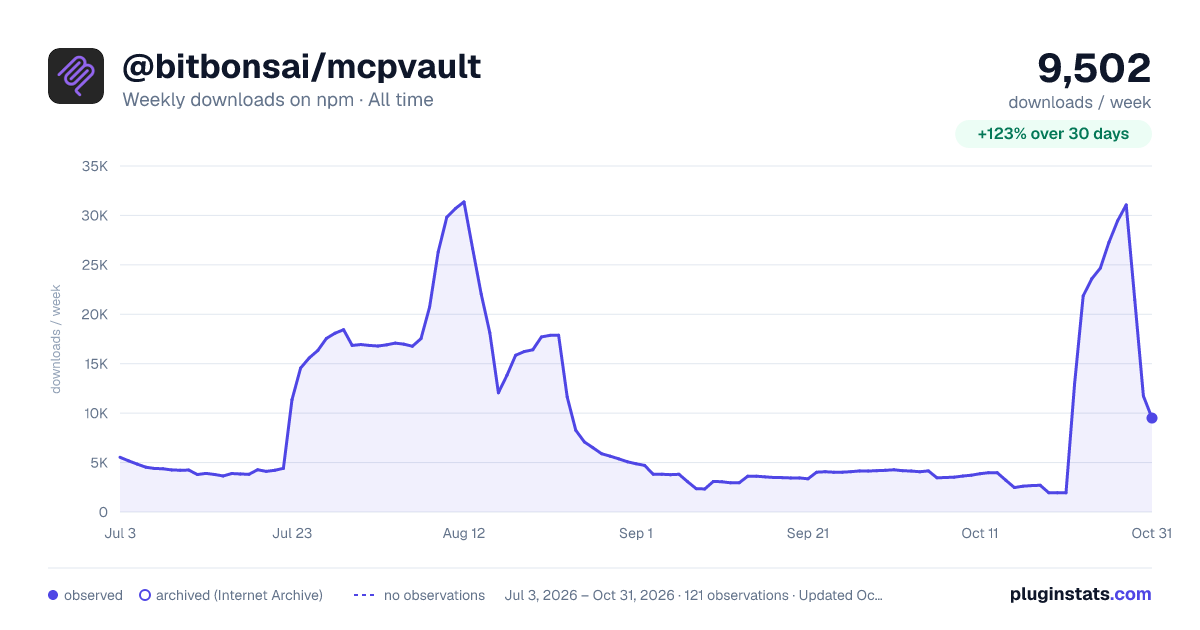
@bitbonsai/mcpvault has 27,289 recorded weekly downloads on npm, ranking #786 of 2,644 tracked listings.
About @bitbonsai/mcpvault
MCPVault

A local MCP server that lets compatible clients read, search, and edit notes in an Obsidian vault. MCPVault works directly with vault files, restricts file operations to the configured vault root, and preserves formatting for unchanged frontmatter fields.
<div align="center"> </div> <div align="center">





Supported clients
Configuration examples are available for Claude Desktop, Claude Code, ChatGPT Desktop (Enterprise+), OpenCode, Gemini CLI, OpenAI Codex, IntelliJ IDEA 2025.1+, Cursor, Windsurf, and Ontheia. Other clients can use MCPVault if they support local stdio MCP servers.
https://github.com/user-attachments/assets/657ac4c6-1cd2-4cc3-829f-fd095a32f71c
Quick start
-
Install Node.js runtime:
# Download from https://nodejs.org (v20.0.0 or later) # or use a package manager like nvm, brew, apt, etc. -
Test the server:
If using the published package:
npx @modelcontextprotocol/inspector npx @bitbonsai/mcpvault@latest /path/to/your/vault -
Configure your AI client:
Claude Desktop - Copy this to
claude_desktop_config.json:{ "mcpServers": { "obsidian": { "command": "npx", "args": ["@bitbonsai/mcpvault@latest", "/path/to/your/vault"] } } }Claude Code - Copy this to
~/.claude.json:{ "mcpServers": { "obsidian": { "command": "npx", "args": ["@bitbonsai/mcpvault@latest", "/path/to/your/vault"], "env": {} } } }OpenCode - Copy this to
~/.config/opencode/opencode.json{ "mcp": { "obsidian": { "type": "local", "command": [ "npx", "@bitbonsai/mcpvault@latest", "/path/to/your/vault/" ], "enabled": true } } }Replace
/path/to/your/vaultwith your actual Obsidian vault path.For other platforms, see detailed configuration guides below.
-
Test with your AI:
- "List files in my Obsidian vault"
- "Read my note called 'project-ideas.md'"
- "Create a new note with today's date"
To verify the connection, ask your client to list MCPVault tools or read a known note.
How it connects
An MCP client starts MCPVault as a local stdio process and passes the vault path. MCPVault exposes the same tools to each supported client, so the server is not tied to one AI provider. Obsidian does not need to be running, and no Obsidian plugin is required.
Features
- AST-aware frontmatter updates preserve formatting for unchanged YAML fields.
- Path checks block traversal, symlink escapes, dotfiles,
.obsidian,.git, andnode_modules. - Eighteen MCP tools cover note and file operations:
- File operations:
read_note,write_note,patch_note,delete_note,move_note,move_file - Partial reads:
get_note_outline,read_note_lines - Directory and batch reads:
list_directory,read_multiple_notes - Search:
search_noteswith multi-word matching and BM25 reranking - Metadata and tags:
get_frontmatter,update_frontmatter,get_notes_info,get_vault_stats,manage_tags,list_all_tags - Wiki links:
wiki_linkresolves names and returns alternative paths when a name is ambiguous
- File operations:
write_notesupports overwrite, append, and prepend modes.delete_noteandmove_filerequire matching confirmation paths.- Path arguments are trimmed before validation.
- Search and batch tools return compact fields by default; set
prettyPrint: truefor expanded output. - The package exports TypeScript declarations and public types.
- MCPVault requires no Obsidian plugin.
Prerequisites
- Node.js runtime (v20.0.0 or later)
- An Obsidian vault (local directory with
.md,.markdown,.txt,.base, or.canvasfiles) - MCP-compatible AI client (Claude Desktop, ChatGPT Desktop, Claude Code, etc.)
Installation
For end users
npx downloads and runs the package:
npx @bitbonsai/mcpvault@latest /path/to/your/obsidian/vault
If you omit the vault path, the server uses your current working directory as the vault root.
For developers
- Clone this repository
- Use the correct Node.js version:
nvm use # Uses Node 24 from .nvmrc
- Install dependencies with npm:
npm install  # Corepack automatically uses npm 10.9.0
```…
Description from the npm listing.
- mcp
- obsidian
- model-context-protocol
- universal
- ai-bridge
- mcp-server
- claude
- chatgpt
- ai
- knowledge-management
- pkm
- vault
- notes
- markdown
- future-proof
- open-standard
README badge
Show your rank in a README or on your website. The badge updates automatically.
Charts
Images: 30d · 1y · all time · 1600×900 dark

Adoption over time
7/30/90-day growth
Ranking history
Listing placement
Listing placement
Filled points are observed values; hollow points come from Internet Archive snapshots of the listing page. Dashed segments span periods with no observations — values between points are not interpolated.
Each band is one page of 20. Weekly downloads on a linear scale. Placement is projected from weekly downloads, so it can differ from the marketplace's own sort order. Hover a dot to see the listing.
Recent observations
Full history (1)Similar npm MCP servers plugins
All 20 @bitbonsai/mcpvault alternativesData source
Weekly downloads (trailing 7 complete days) come from the official npm downloads API. Downloads include CI and mirrors and are not equivalent to installs or users. npm publishes no ratings.
Listing: https://www.npmjs.com/package/@bitbonsai/mcpvault. First seen Oct 28, 2026; last successful collection Oct 28, 2026. See the methodology.