 PluginStats
use-webmcp-tool weekly downloads statistics
By GoogleChromeLabs (38 listings) · npm · MCP servers
React hook for registering WebMCP tools (document.modelContext) with lifecycle-managed registration and MCP result normalization.
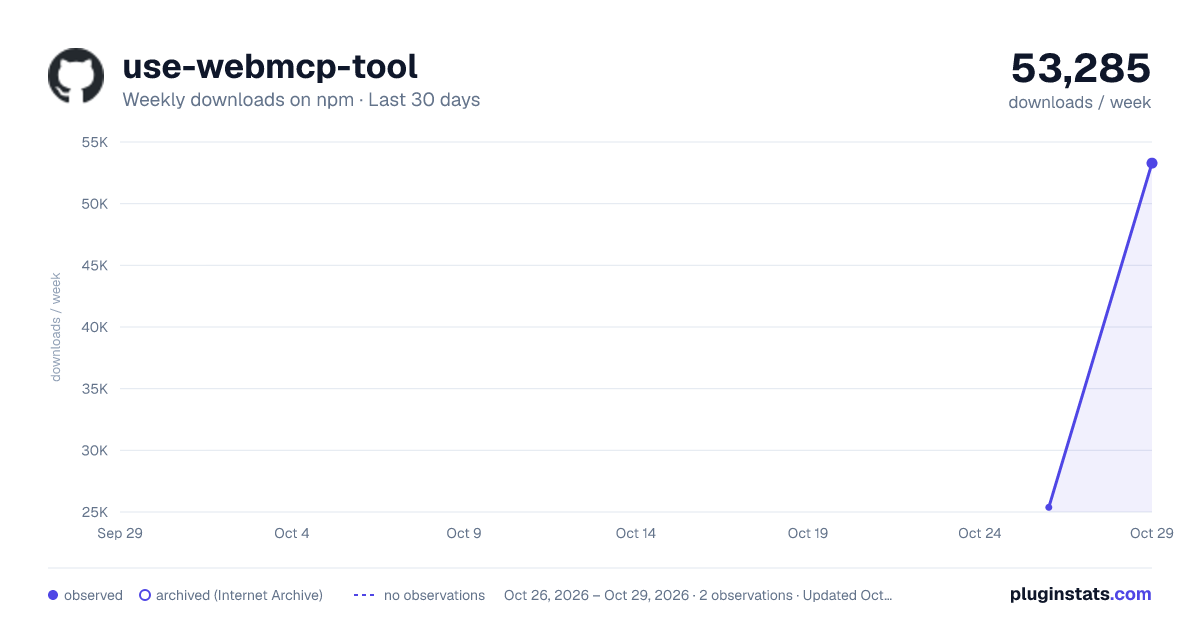
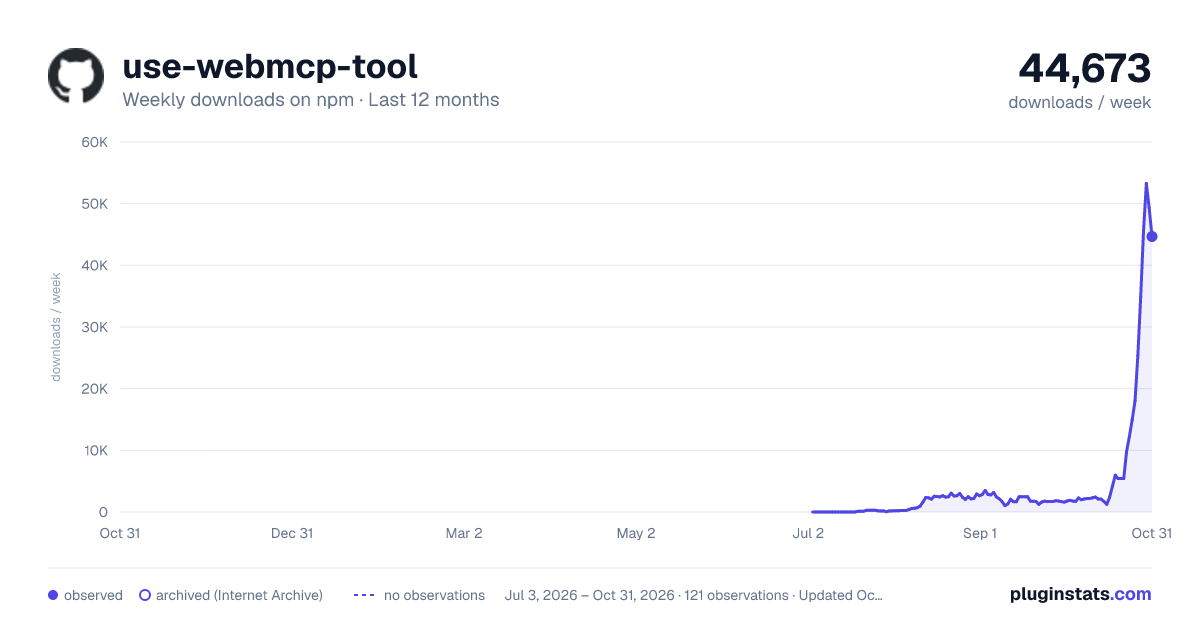
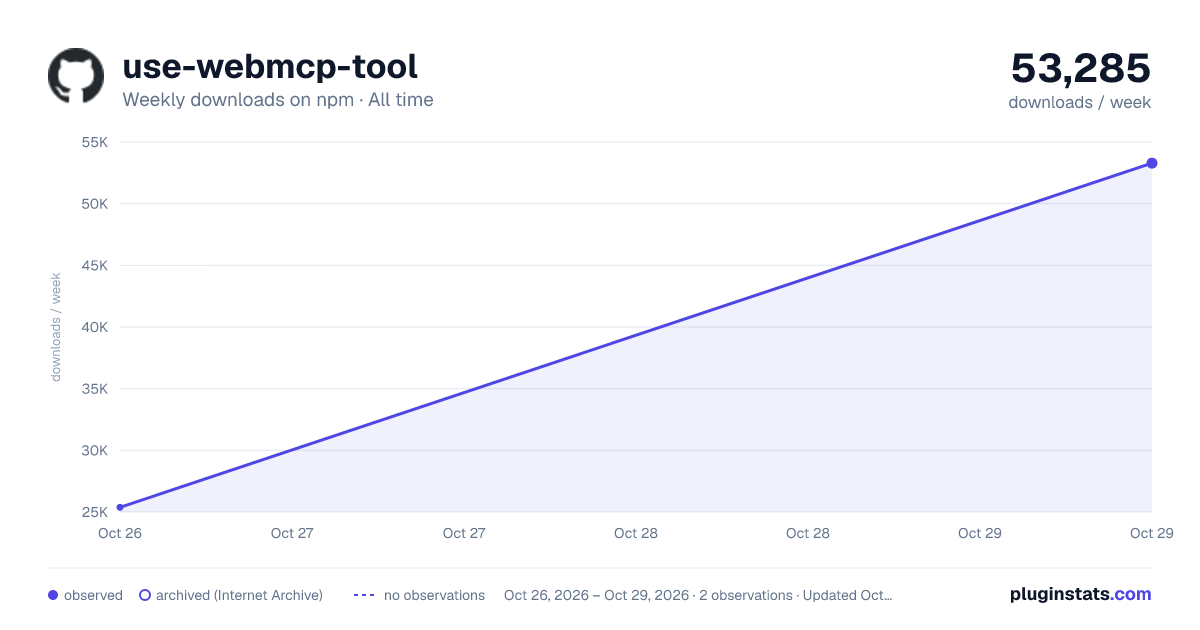
use-webmcp-tool has 25,378 recorded weekly downloads on npm, ranking #800 of 2,644 tracked listings.
About use-webmcp-tool
Use-Webmcp-Tool
A hook that registers a WebMCP tool with the browser and ties its lifecycle to a React component.
This is maintained by Chrome, and will be updated with any spec changes. The spec is
🧪experimental, so the hook feature-detects and degrades to a no-op everywhere the API is absent.
Status / accuracy note (2026-06-05): Built against the current WebMCP spec, which exposes the imperative API on document.modelContext (registerTool + an AbortSignal for unregistration).
Install
npm install use-webmcp-tool
Requires React 18+ as a peer dependency. Ships as ESM with TypeScript types included — no runtime dependencies.
What it does
WebMCP lets a page expose JavaScript functions as "tools" that an AI agent (browser-built-in, iframe-hosted, or extension) can discover and call. The site author can expose functionality, and the agent uses this instead of scraping the DOM, a11y tree, or using screenshots.
The raw imperative API looks like this:
const controller = new AbortController();

document.modelContext.registerTool({
  name: "add-todo",
  description: "Add a new item to the user's active todo list",
  inputSchema: {
    type: "object",
    properties: {
      text: { type: "string", description: "The text content of the todo item" },
    },
    required: ["text"],
  },
  async execute({ text }) {
    await addTodoItemToCollection(text);
    return { content: [{ type: "text", text: `Added todo item: "${text}" successfully.` }] };
  },
}, { signal: controller.signal });

// Unregister later:
controller.abort();
useWebMCP wraps that imperative, lifecycle-bound API in the declarative, lifecycle-managed model React developers already use for everything else:
import { useWebMCP } from "use-webmcp-tool";

function TodoTools({ addTodo }) {
  const { supported, registered } = useWebMCP({
    name: "add-todo",
    description: "Add a new item to the user's active todo list",
    inputSchema: {
      type: "object",
      properties: {
        text: { type: "string", description: "The text content of the todo item" },
      },
      required: ["text"],
    },
    async execute({ text }) {
      addTodo(text);
      return `Added todo item: "${text}" successfully.`;
    },
  });

  if (!supported) return null;
  return <p>{registered ? "🤖 Agent tools ready" : "…"}</p>;
}
The tool is registered when the component mounts and unregistered automatically when it unmounts. This is designed so that the set of tools an agent sees stays in lockstep with what is actually on screen.
API
const { supported, registered, error } = useWebMCP({
  name,           // string — tool identifier (required)
  description,    // string — natural-language description for the agent (required)
  inputSchema,    // JSON Schema object describing args (optional)
  annotations,    // WebMCP.ToolAnnotations object with readOnlyHint/untrustedContentHint/consequentialHint (optional)
  execute,        // (args, { signal }) => result | Promise<result> (required)
  enabled = true, // boolean — register only while true
  formatOutput,   // (result, args) => any — optional shaper before MCP normalization
  onError,        // (error) => void — optional side-effect when execute throws
});
Returns
| field | type | meaning |
|---|---|---|
supported | boolean | document.modelContext exists in this environment. |
registered | boolean | The tool is currently registered with the browser. |
error | Error | null | Registration error, e.g. NotAllowedError from a tools permissions policy. |
execute parameters & return values:
execute receives (args, { signal }), where signal is an AbortSignal provided by the browser/agent to handle cancellation if the call is aborted or timed out.
Return values are normalized:
- a string →
{ content: [{ type: "text", text }] } undefined/null(no return) →{ content: [] }(success, no payload)- a value that is already
{ content: [...] }→ passed through untouched - a thrown value — Error or not (
throw "not signed in",throw { code: 403 }both count) →{ content: [{ type: "text", text }], isError: true }, afteronError. A failure must never read as success to the agent. - a returned
Error→ treated exactly like a throw:onErrorfires, then anisErrorresult - anything else (object/array/number) → JSON-serialized into a text block
Tests
useWebMCP.test.jsx (vitest + jsdom + @testing-library/react, 29 tests) covers the registration lifecycle (mount/unmount, StrictMode, enabled, late injection, registration errors), re-registration identity (execute changes don't churn, content-equal schemas don't churn, name changes do), options and cancellation signals (execute(args, { signal })), and the full result/error normalization matrix including thrown non-Errors and returned Errors.
Run with npm install && npm test.
Description from the npm listing.
- webmcp
- mcp
- react
- react-hook
- hooks
- model-context
- modelcontext
- ai
- agent
README badge
Show your rank in a README or on your website. The badge updates automatically.
Charts
Images: 30d · 1y · all time · 1600×900 dark

Adoption over time
7/30/90-day growth
Ranking history
Listing placement
Listing placement
Filled points are observed values; hollow points come from Internet Archive snapshots of the listing page. Dashed segments span periods with no observations — values between points are not interpolated.
Each band is one page of 20. Weekly downloads on a linear scale. Placement is projected from weekly downloads, so it can differ from the marketplace's own sort order. Hover a dot to see the listing.
Recent observations
Full history (1)Similar npm MCP servers plugins
All 20 use-webmcp-tool alternativesData source
Weekly downloads (trailing 7 complete days) come from the official npm downloads API. Downloads include CI and mirrors and are not equivalent to installs or users. npm publishes no ratings.
Listing: https://www.npmjs.com/package/use-webmcp-tool. First seen Oct 28, 2026; last successful collection Oct 28, 2026. See the methodology.