 PluginStats
OpenCode GUI installs statistics
By Tanishq Kancharla · VS Code Marketplace · AI
OpenCode AI coding agent for VSCode GUI extension
OpenCode GUI has 123,864 recorded installs on VS Code Marketplace, ranking #2094 of 2,502 tracked listings.
Rating: 2.33 / 5 from 3 ratings
About OpenCode GUI
OpenCode VSCode Extension
A VSCode sidebar extension for OpenCode - the AI coding agent. Simple chat interface to interact with OpenCode directly from your sidebar.

Note: This is an independent community project and is not officially affiliated with or maintained by the OpenCode team.
Prerequisites
-
OpenCode CLI must be installed:
curl -fsSL https://opencode.ai/install | bash -
OpenCode must be configured with API credentials:
opencode auth loginSelect your provider (OpenCode Zen, Anthropic, OpenAI, etc.) and add your API key.
Development Setup
Install Dependencies
pnpm install
Build the Extension
pnpm build
This builds both:
- Extension code →
dist/extension.js - Webview UI →
out/main.jsandout/main.css
Development Workflow
-
Start watch mode (in a terminal):
pnpm watch -
Launch Extension Development Host:
- Press
F5in VSCode/Cursor - Or open Run and Debug panel (
Cmd+Shift+D) and click "Run Extension"
- Press
-
Use the extension:
- Look for the OpenCode icon in the Activity Bar (left side)
- Click it to open the sidebar
- Type a message and hit Send or press Enter
Making Changes
-
Extension code (src/extension.ts, src/OpenCodeService.ts, src/OpenCodeViewProvider.ts):
- Save your changes
- Reload the Extension Development Host window:
Cmd+R(Mac) orCtrl+R(Windows/Linux)
-
Webview UI (src/webview/App.tsx, src/webview/App.css, src/webview/hooks/):
- Changes hot-reload automatically
- Just save and see updates instantly
How It Works
Architecture
┌─────────────────────────────────────┐
│  SolidJS Webview (Chat UI)         │
│  - Input box                        │
│  - Message history                  │
│  - Thinking indicator               │
└──────────┬──────────────────────────┘
           │ postMessage
           ▼
┌─────────────────────────────────────┐
│  Extension Host (Node.js)           │
│  - OpenCodeService                  │
│    ├─ Manages OpenCode client      │
│    ├─ Creates sessions              │
│    └─ Sends prompts                 │
└──────────┬──────────────────────────┘
           │ @opencode-ai/sdk
           ▼
┌─────────────────────────────────────┐
│  OpenCode Server (Bun process)      │
│  - Spawned by extension backend     │
│  - Uses workspace opencode.json     │
│  - Handles AI interactions          │
└─────────────────────────────────────┘
Key Components
Extension Side (TypeScript/ESM):
src/extension.ts: Entry point, initializes OpenCodeServicesrc/OpenCodeService.ts: Manages OpenCode client/server, sessions, and promptssrc/OpenCodeViewProvider.ts: Webview provider, handles message passing
Webview Side (SolidJS):
src/webview/App.tsx: Chat UI with input, message history, thinking indicatorsrc/webview/App.css: Styles using VSCode theme variables
Build System:
vite.config.extension.ts: Bundles extension (ESM → CJS for VSCode)vite.config.ts: Bundles webview (SolidJS)
Configuration
The extension automatically uses:
- Workspace
opencode.json(if present in project root) - Global OpenCode config at
~/.config/opencode/opencode.json
Example workspace config:
{
  "model": "anthropic/claude-3-5-sonnet-20241022",
  "mcp": {
    // MCP server configurations
  }
}
Project Structure
opencode-gui/
├── src/
│   ├── extension.ts              # Extension entry point
│   ├── OpenCodeService.ts        # OpenCode client/server manager
│   ├── OpenCodeViewProvider.ts   # Webview provider
│   └── webview/                  # SolidJS UI
│       ├── App.tsx               # Chat component
│       ├── App.css               # Styles
│       ├── hooks/                # SolidJS hooks
│       ├── main.tsx              # SolidJS entry point
│       └── vscode.d.ts           # VSCode API types
├── media/
│   └── icon.svg                  # Activity bar icon
├── dist/                         # Compiled extension (Vite output)
├── out/                          # Compiled webview (Vite output)
├── vite.config.extension.ts      # Extension build config
├── vite.config.ts                # Webview build config
├── tsconfig.json                 # TypeScript config
└── package.json
Tech Stack
- Extension: TypeScript (ESM), VSCode Extension API, OpenCode SDK
- Webview: SolidJS, TypeScript
- Build: Vite for both extension and webview
- Styling: CSS with VSCode theme variables
- Server: Bun (spawned process running OpenCode server)
Features
✅ Simple chat interface ✅ Send prompts and get AI responses ✅ Thinking indicator during processing ✅ Message history (user and assistant) ✅ Workspace configuration support ✅ Full TypeScript type safety ✅ VSCode theme integration
Future Enhancements
- Real-time streaming responses
- File attachments from workspace
- Markdown rendering in responses
- Code syntax highlighting
- Multi-session support
- Session persistence
- Undo/redo functionality
Publishing
To publish a new version:
- Bump the version in
package.json - Set environment variable:
export OVSX_PAT=your_open_vsx_token - Login to VS Code Marketplace:
npx vsce login <publisher> - Run:
pnpm publish
This publishes to both VS Code Marketplace and Open VSX Registry.
Note: You'll need:
- A VS Code Marketplace Personal Access Token (PAT) from Azure DevOps with "Marketplace (Manage)" scope
- An Open VSX token set as
OVSX_PATenvironment variable
Troubleshooting…
Description from the VS Code Marketplace listing.
README badge
Show your rank in a README or on your website. The badge updates automatically.
Charts
Images: 30d · 1y · all time · 1600×900 dark
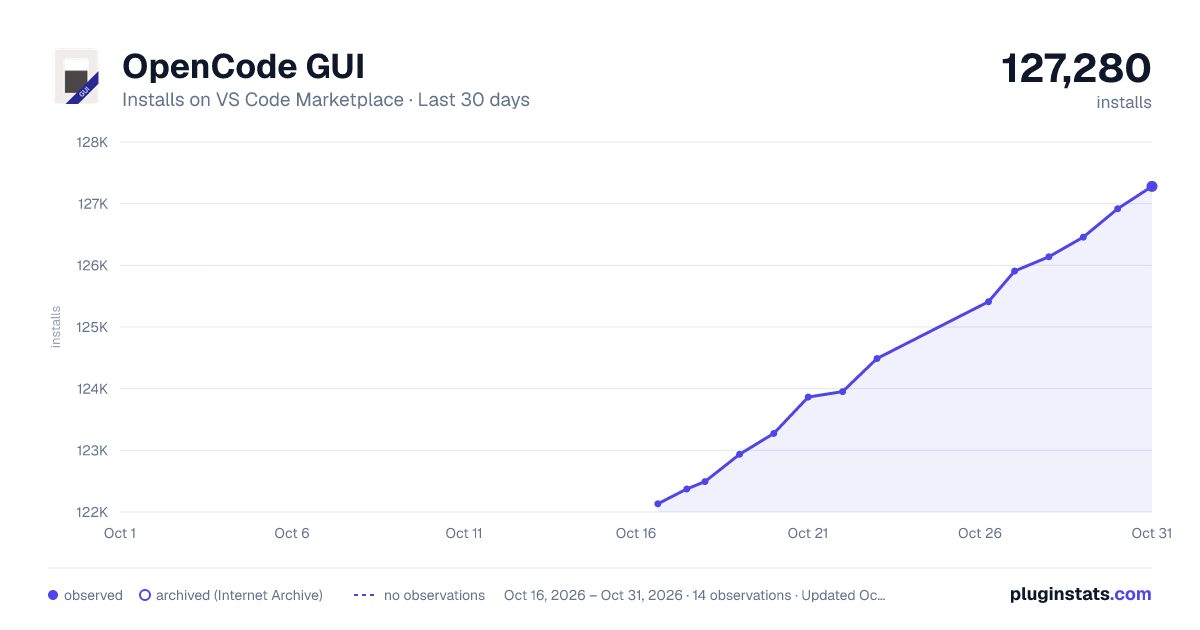
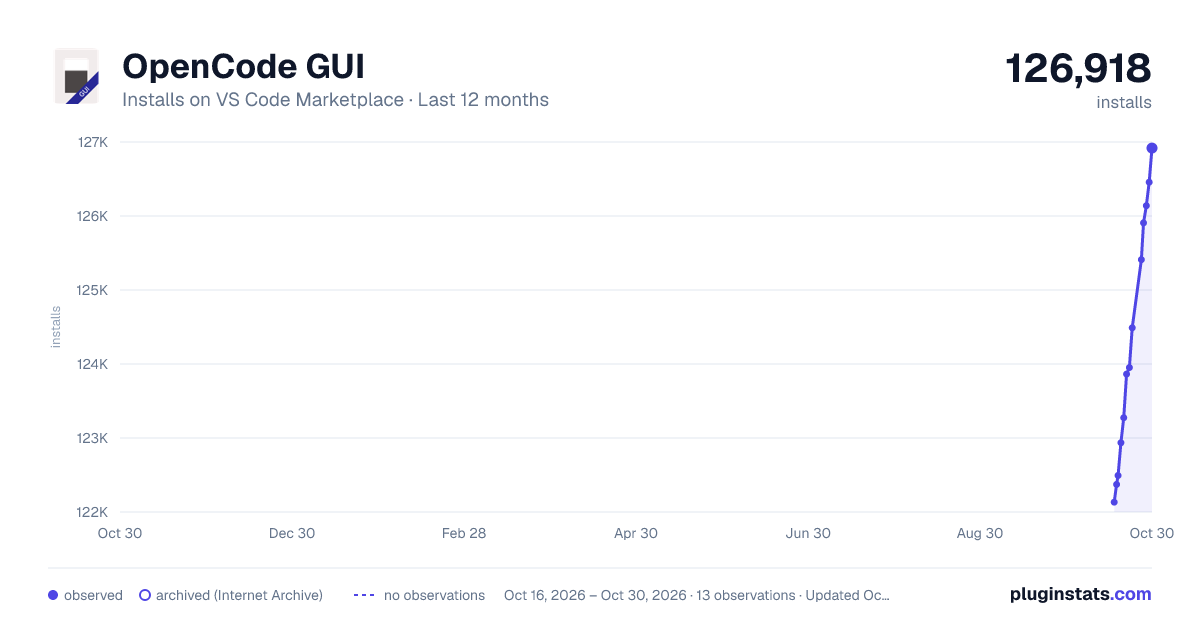
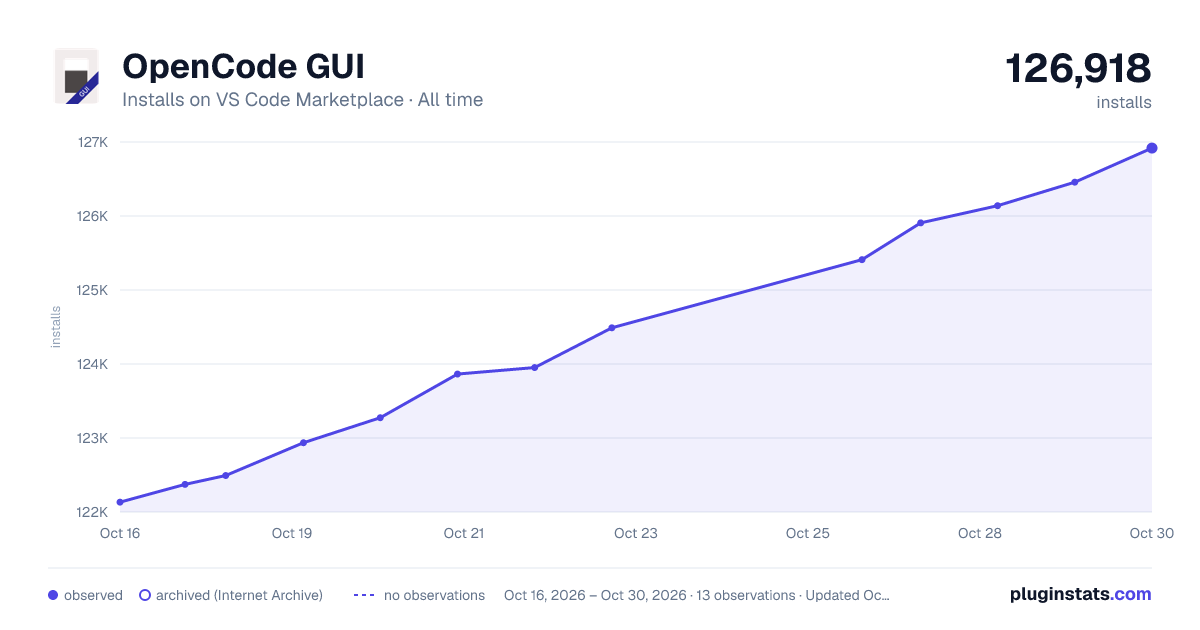

Adoption over time
7/30/90-day growth
Ranking history
Ratings over time
Listing placement
Listing placement
Filled points are observed values; hollow points come from Internet Archive snapshots of the listing page. Dashed segments span periods with no observations — values between points are not interpolated.
Each band is one page of 20. Installs on a linear scale. Placement is projected from installs, so it can differ from the marketplace's own sort order. Hover a dot to see the listing.
Recent observations
Full history (6)Similar VS Code Marketplace AI plugins
All 20 OpenCode GUI alternativesData source
Install counts, average rating, and rating counts come from the public Visual Studio Marketplace gallery API. Installs are cumulative and exclude updates.
Listing: https://marketplace.visualstudio.com/items?itemName=TanishqKancharla.opencode-vscode. First seen Oct 16, 2026; last successful collection Oct 21, 2026. See the methodology.