 PluginStats
Text Marker (Highlighter) installs statistics
By Ryuichi Inagaki (2 listings) · VS Code Marketplace · Other
Select text in your code and mark all matches. The highlight colour is configurable
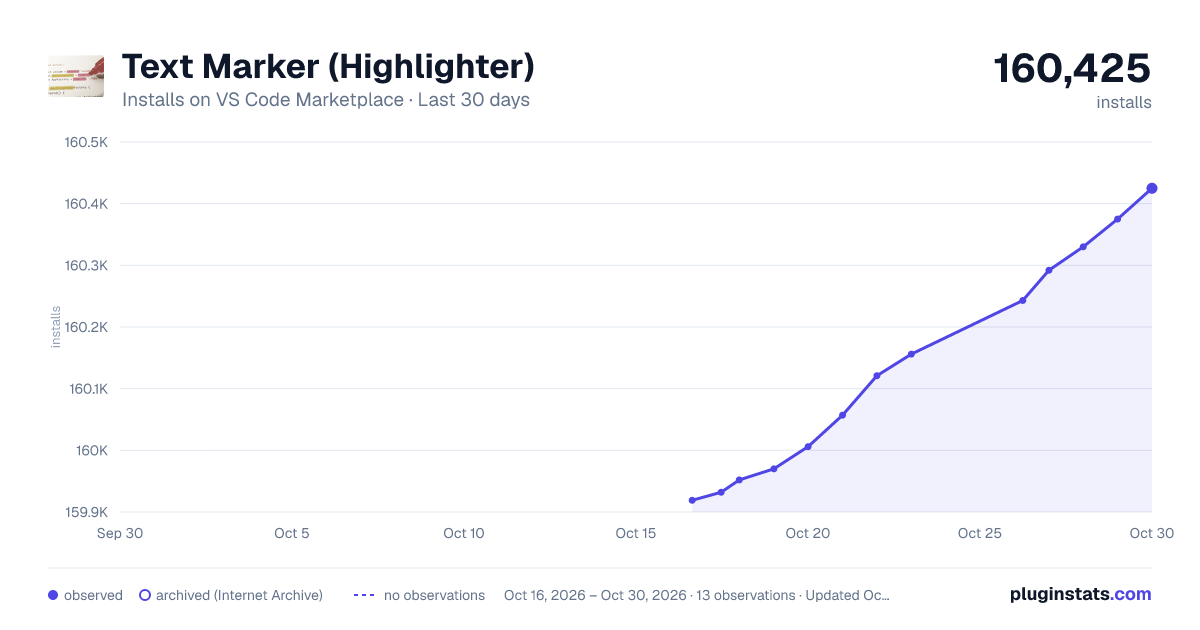
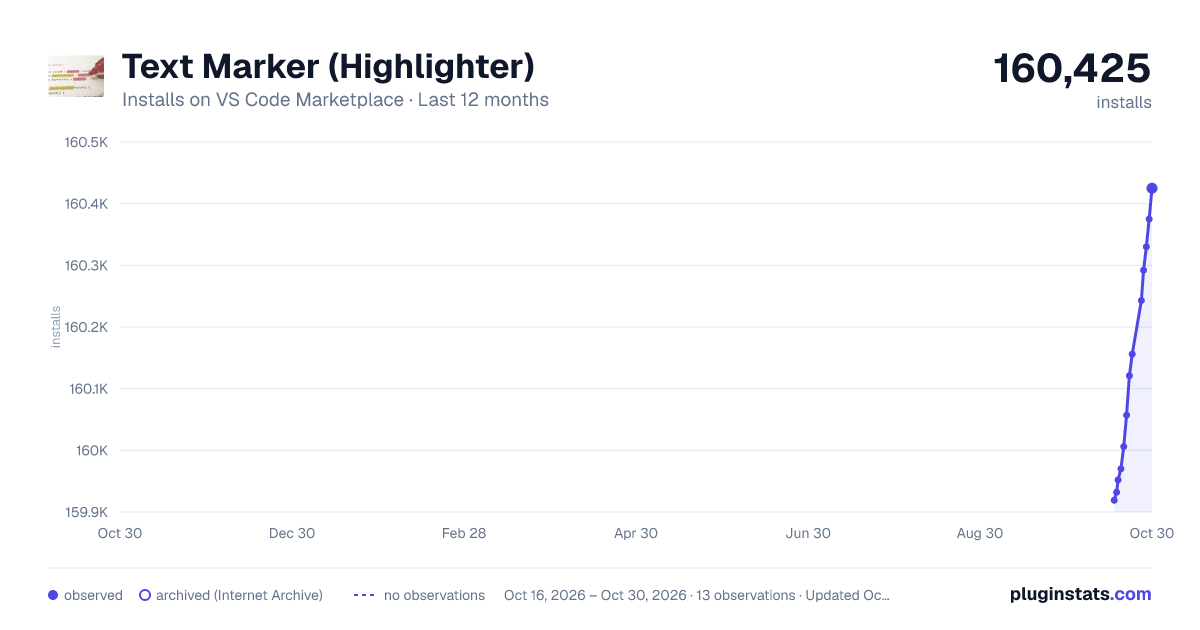
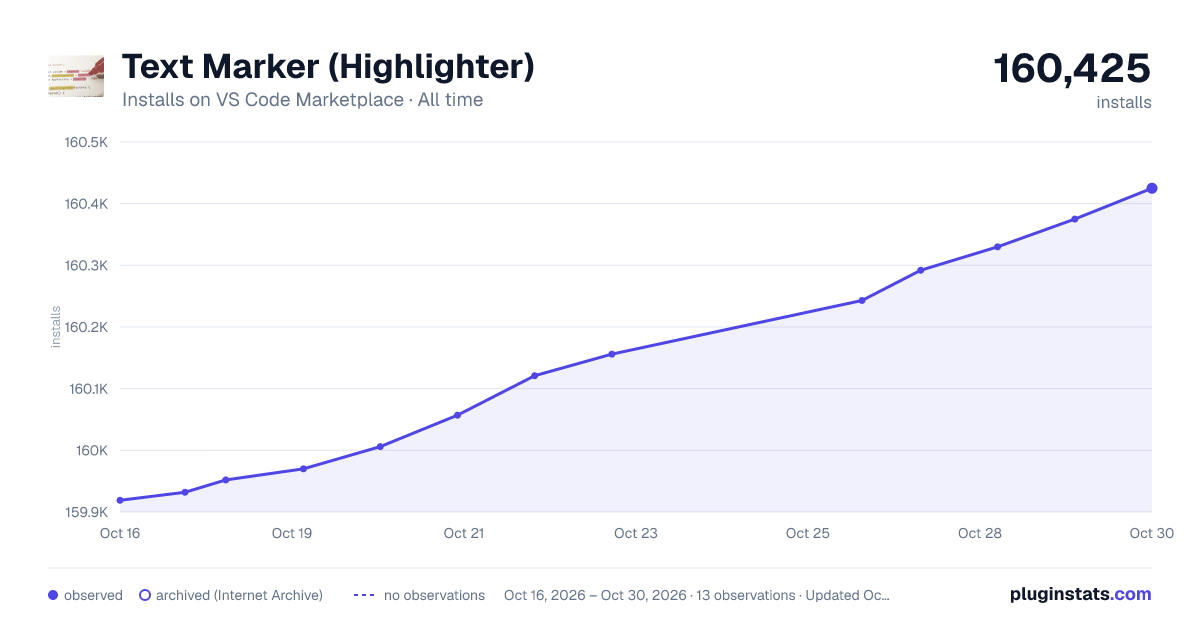
Text Marker (Highlighter) has 159,970 recorded installs on VS Code Marketplace.
It ranks #1784 of 2,501 tracked VS Code Marketplace listings by installs.
It is rated 4.7 out of 5 from 46 ratings.
PluginStats has 4 daily observations since Oct 16, 2026; the latest is from Oct 19, 2026.
Rating: 4.72 / 5 from 46 ratings
About Text Marker (Highlighter)
Text Marker (Highlighter)
Features
• Highlight/Unhighlight text from both command palette or right-click menu • Update existing highlight rules from the right-click menu • Jump to the next/previous location of the same highlighted pattern • Highlight text using a regular expression • Case sensitive/insensitive text matching • Matching is done depending on the current mode for case sensitivity. You can toggle the mode from the status bar. • Whole/Partial text matching • Matching is done depending on the current mode for whole match. You can toggle the mode from the status bar. • Highlighting colour is configurable • Save highlights that will be restored next time you open the editor
Highlight/Unhighlight text. Regular expression can also be used. It highlights your text as you type.
Switch matching mode. Case sensitive match, Whole match are available. From command palette, you can even change the matching mode after you specified a highlight.
You can update a highlight rule after you set it.
Request Features or Report Bugs
Feature requests and bug reports are very welcome: https://github.com/ryu1kn/vscode-text-marker/issues
A couple of requests from me when you raise an github issue.
• Requesting a feature: Please try to provide the context of why you want the feature. Such as, in what situation the feature could help you and how, or how the lack of the feature is causing an inconvenience to you. I can't think of introducing it until I understand how it helps you 🙂 • Reporting a bug: Please include environment information (OS name/version, the editor version). Also consider providing screenshots (or even videos) where appropriate. They are often very very helpful!
Commands
• Toggle Highlight (Command ID: textmarker.toggleHighlight)
Highlight selected text, if no text is selected, the word under cursor will be highlighted. Issueing this command on a highlight without selecting any text will remove the highlight. Available on right-click menu.
• Update Highlight (Command ID: textmarker.updateHighlight)
Update the existing highlight (Toggle case sensitivity, whole/partial match, pattern text). Available on right-click menu.
• Go to Next Same Highlight (Command ID: textmarker.goToNextHighlight)
Move the cursor to the next location of the same highlight. Highlight selection or the word under cursor first if the cursor is not on a highlight. Available on right-click menu.
• Go to Previous Same Highlight (Command ID: textmarker.goToPreviousHighlight)
Move the cursor to the previous location of the same highlight. Highlight selection or the word under cursor first if the cursor is not on a highlight. Available on right-click menu.
• Highlight Text Using Regex (Command ID: textmarker.highlightUsingRegex)
Highlight text that matches a given regular expression.
• Unhighlight Text (Command ID: textmarker.unhighlight)
Remove a highlight from the list of highlights.
• Clear All Highlights (Command ID: textmarker.clearAllHighlight)
Clear all highlights with one shot.
• Save All Highlights (Command ID: textmarker.saveAllHighlights)
Save all highlights that will be restored when opening an editor.
• Toggle Case Sensitivity (Command ID: textmarker.toggleCaseSensitivity)
Toggle the case sensitivity of a highlight.
• Toggle Mode for Case Sensitivity (Command ID: textmarker.toggleModeForCaseSensitivity)
Toggle mode for case sensitivity. Available on Status bar.
• Toggle Whole/Partial Match (Command ID: textmarker.toggleWholeMatch)
Toggle whole match and partial match.
• Toggle Mode for Whole/Partial Match (Command ID: textmarker.toggleModeForWholeMatch)
Toggle mode for whole match and partial match. Available on Status bar.
Extension Settings
• textmarker.highlightColors
List of colours to be used to highlight the selected text. The colours are used with respect to the order in the list. If it runs out of the colours, it uses the colour specified at textmarker.defaultHighlightColor.
• textmarker.defaultHighlightColor (default: "gray")
Once all the colours given in textmarker.highlightColors is used, texts are highlighted with this colour.
• textmarker.defaultHighlightOpacity (default: 0.7)
Opacity to be used when one is not given in the highlight colour. Opacity is also applied to the colours on the overview ruler. The value must be in the range 0.0 to 1.0, inclusive.
• textmarker.enableIgnoreCase (default: false)
Enable ignore case mode on startup
• textmarker.enableWholeMatch (default: false)
Enable whole match mode on startup
• textmarker.useHighlightColorOnRuler (default: true)
Use the same colour for both highlighting a text and showing the location on the ruler. If you have multiple highlights on the same line and their colours have opacity 1, you would only see one of those colours. You can specify a smaller opacity value so that the colours can be blended.
• textmarker.autoSelectDistinctiveTextColor (default: false)
Text colour will be chosen to be distinctive from the background highlight colour. This will hide the text colour given by syntax highlighting; if this is not desirable, set it false. • textmarker.hideStatusBarItems (default: false)
Hide status bar items. When set it true, the buttons to switch the modes of partial/whole match and case sensitive/insensitive match will not be displayed.
• textmarker.delayForRefreshingHighlight (default: 300)
Number of milliseconds to wait before refreshing the highlights on editor contents change. null for no refresh.
• textmarker.commandsOnContextMenu (default: 4 commands are visible. See them here)
Commands appear on the context menu. For historical reason, 4 commands are visible by default.
For example, if you:
• Do NOT want to see Update Highlight command (Command ID: textmarker.updateHighlight), which is on the menu by default • Want to see Clear All Highlights (Command ID: textmarker.clearAllHighlight), which is NOT on the menu by default
You can set this setting like this:…
Description from the VS Code Marketplace listing.
- highlight
- mark
- marker
- match
- search
Where Text Marker (Highlighter) sits in the listing
Each band is one page of 20. Installs on a log scale. Placement is projected from installs, so it can differ from the marketplace's own sort order. Hover a dot to see the listing.


Charts
Images: 30d · 1y · all time · 1600×900 dark

Adoption over time


7/30/90-day growth


Ranking history


Filled points are observed values; hollow points come from Internet Archive snapshots of the listing page. Dashed segments span periods with no observations — values between points are not interpolated.
Recent observations
Full history (4)Similar VS Code Marketplace Other plugins
Data source
Install counts, average rating, and rating counts come from the public Visual Studio Marketplace gallery API. Installs are cumulative and exclude updates.
Listing: https://marketplace.visualstudio.com/items?itemName=ryu1kn.text-marker. First seen Oct 16, 2026; last successful collection Oct 19, 2026. See the methodology.