 PluginStats
C# Dev Kit installs statistics
By Microsoft (224 listings) · VS Code Marketplace · Programming Languages
Official C# extension from Microsoft
C# Dev Kit has 18,343,590 recorded installs on VS Code Marketplace.
It ranks #59 of 2,501 tracked VS Code Marketplace listings by installs.
It is rated 2.3 out of 5 from 307 ratings.
PluginStats has 4 daily observations since Oct 16, 2026; the latest is from Oct 19, 2026.
Rating: 2.32 / 5 from 307 ratings
About C# Dev Kit
C# Dev Kit for Visual Studio Code
C# Dev Kit is designed for modern .NET projects that use a currently supported .NET SDK, including C# projects in polyglot repositories. It is not intended for active development of .NET Framework, WPF, or Windows Forms projects. These projects are not blocked from being present in an open repository, but C# Dev Kit does not provide project support, code IntelliSense, or error assistance for them. For those scenarios, we recommend using Visual Studio.
C# Dev Kit helps you manage your code with C# Project Details and test your code with integrated unit test discovery and execution, elevating your C# development experience wherever you like to develop (Windows, macOS, Linux, and even in a Codespace).
This extension builds on top of the great C# language capabilities provided by the [C# extension][CSharpExtension] and enhances your C# environment by adding a set of powerful tools and utilities that integrate natively with VS Code to help C# developers write, debug, and maintain their code faster and with fewer errors. Some of this new tooling includes but is not limited to:
• C# project and solution management via integrated C# Project Details • Native testing environment to run and debug tests using the Test Explorer • Roslyn-powered language service for best in-class C# language features such as code navigation, refactoring, semantic awareness, and more
Quick Start
1. Install C# Dev Kit (The [C# extension][CSharpExtension] and the .NET Install Tool will automatically be installed). 2. Open a folder/workspace that contains a C# project (.csproj) and the extension will activate, or use the ".NET: New Project..." command to create a new C# project. 3. Check out the C# Getting Started documentation to learn more!
Feature List & Walkthrough
• Project System / C# Project Details • Solution Node Actions • Add Project • Build/Run Project • Code Editing (Uses the [C# extension][CSharpExtension]) • Refactoring • Code Navigation (Go To Definition/References) • Code Completions • Roslyn-powered semantic awareness • Package Management • Automatic NuGet Restore • Debugging • Testing • Discover, Run, and Debug Tests
Requirements
• .NET 10 SDK
Features
Manage your projects with a new solution view
C# Dev Kit extension enhances VS Code's existing Workspaces with a new C# Project Details view, providing a curated and structured view of your application for effortless, central project management. This lets you quickly add new projects or files to your solutions and easily build all or part of your solution.
Test your projects with expanded Test Explorer capabilities
With C# Dev Kit, your tests in XUnit, NUnit, MSTest and bUnit will be discovered and organized for you more easily for fast execution and results navigation. The extension also makes VS Code's Command Palette testing commands easily available for debugging and running your tests.
Installed Extensions
C# Dev Kit will automatically install the [C# extension][CSharpExtension] and .NET Install Tool to give you the best experience when working with C#.
If the installed C# extension is too old, C# Dev Kit displays an upgrade dialog before its project features can be used. Select Upgrade to install the required channel's latest version and reload the window; the dialog tells you when this requires a pre-release version. Select Not Now to continue using VS Code without C# Dev Kit project features.
Write your C# code faster with AI-powered assistance
GitHub Copilot is an AI-powered coding assistant integrated into VS Code. It provides code suggestions, explanations, and automated implementations based on natural language prompts and existing code context. Copilot has been trained on public code repositories and can assist with your C# development. To get set up, follow the instructions here: GitHub Copilot for Visual Studio Code.
Collect diagnostic information
Use the Collect C# Dev Kit Logs command from the Command Palette to gather diagnostic data whenever you need to investigate an issue or file a bug report. The command offers two modes:
• Collect existing logs — packages the current log files for C# Dev Kit, the .NET Install Tool, C#, and Razor into a ZIP archive along with a settings snapshot, environment information, and a README that explains what was collected. • Record a new trace — runs a live dotnet-trace session against active C# Dev Kit processes. Reproduce the issue, click Stop Recording in the status bar, and the .nettrace files are saved to a folder of your choice.
Working with MAUI or Unity
C# Dev Kit family of extensions is great for all cloud native development. Working with mobile (MAUI) or Unity does require the addition of other extensions that provide functionality specific to their unique components.
For MAUI development, install the [.NET MAUI Extension][MAUIExtension]. For Unity development, install the Unity Extension.
When working with Unity, if you see this error: "The project file 'Assembly-CSharp.csproj' is in unsupported format", please update the "Visual Studio Editor" version to 2.0.20 from the Unity Package Manager.
Learn more
Explore all the features the C# extension has to offer by looking for .NET in the Command Palette. For more information on these features, refer to the documentation pages.
For learning materials on C# and .NET, check out the following resources:
• Learn to program using C# • Learn to build front-end web applications • Learn to build back-end web applications
Found a bug?
To file a new issue, go to VS Code Help > Report Issue. In the popup UI, make sure to select "An extension" from the dropdown for "File on" and select "C# Dev Kit" for the extension dropdown. Submitting this form will automatically generate a new issue on the .NET Tools GitHub.
Alternatively, you file an issue directly on the .NET Tools GitHub Repo.
Feedback
Provide feedback File questions, issues, or feature requests for the extension.…
Description from the VS Code Marketplace listing.
- asp.net
- c#
- csharp
- devkit
- dotnet
- json
- keybindings
- msbuild
Charts
Images: 30d · 1y · all time · 1600×900 dark
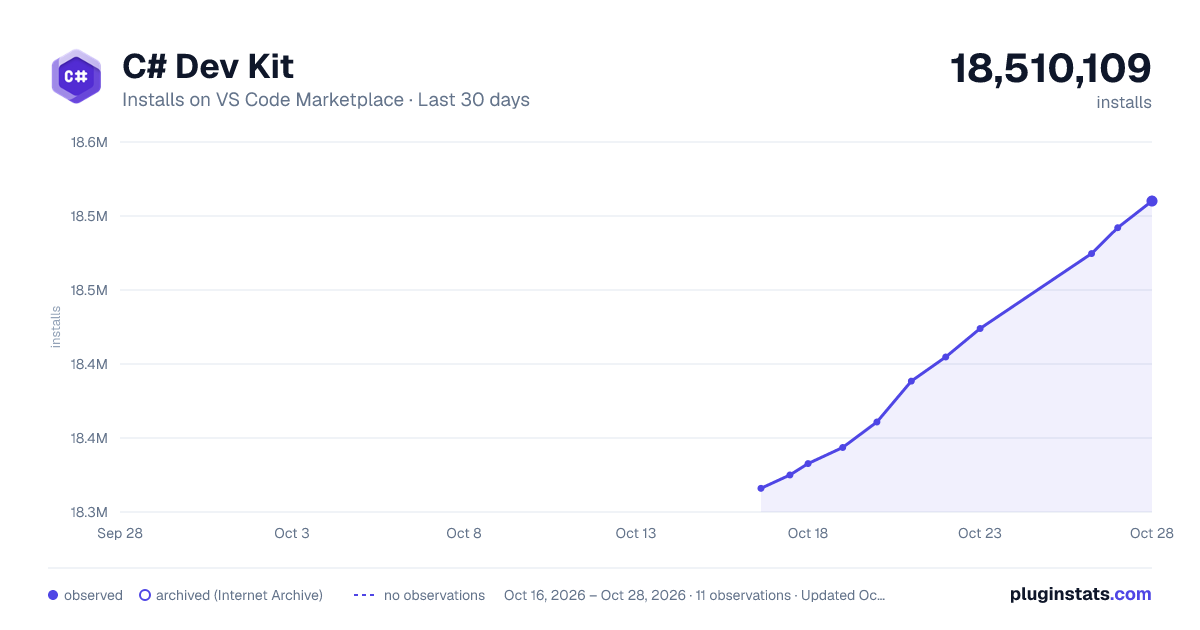
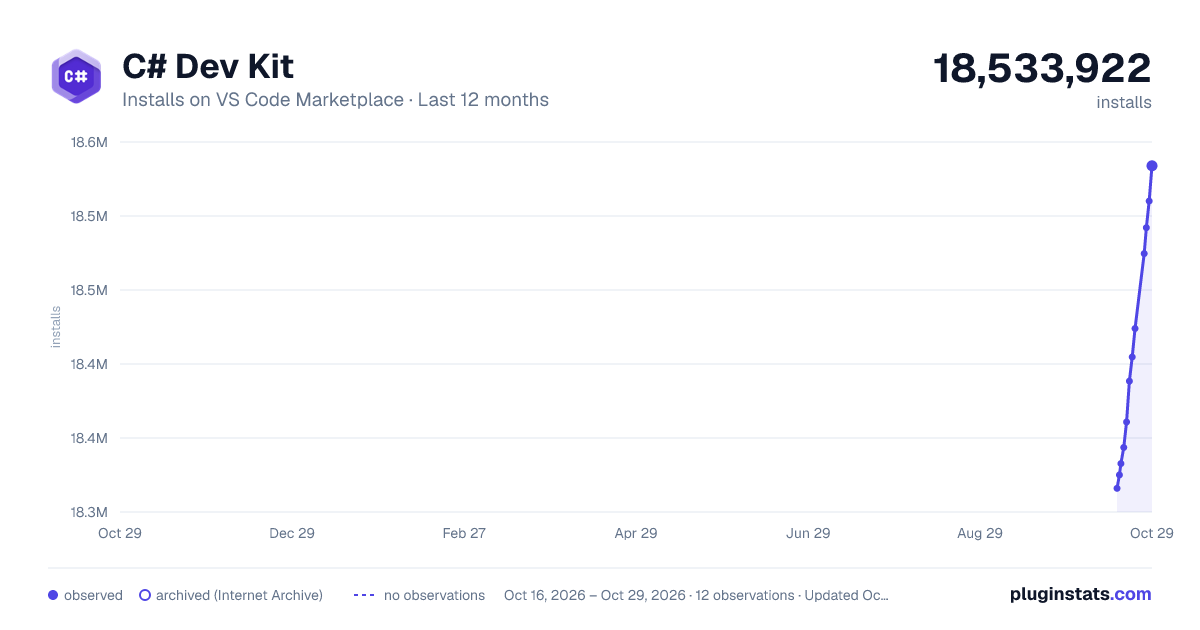
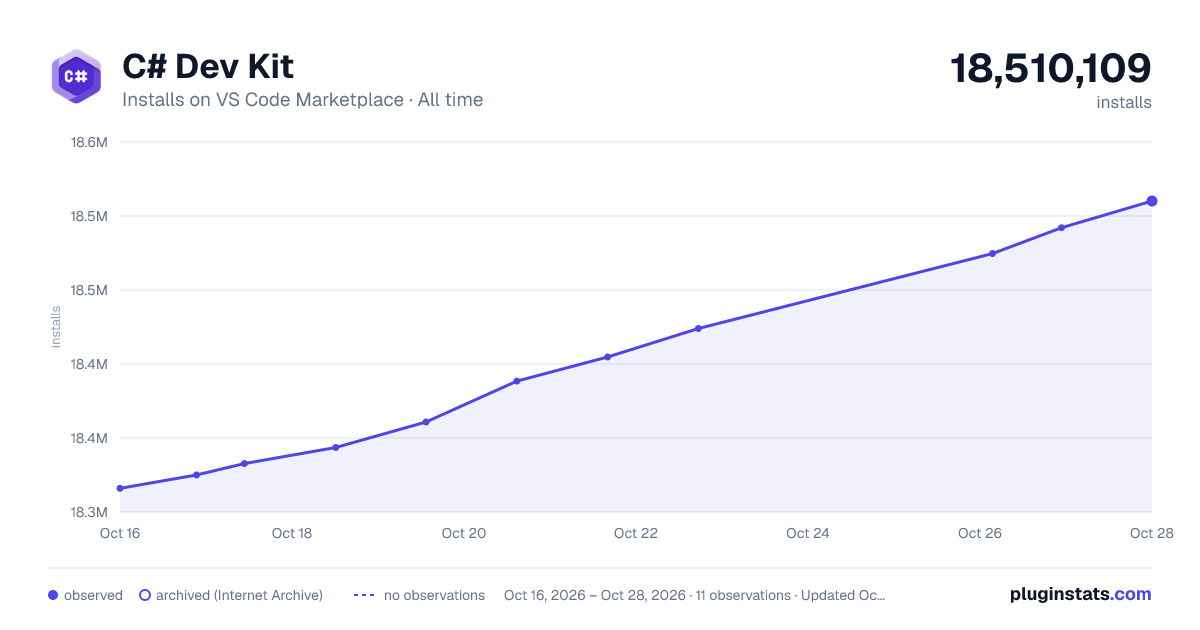

Adoption over time


7/30/90-day growth


Ratings over time


Listing placement


Listing placement


Listing placement


Filled points are observed values; hollow points come from Internet Archive snapshots of the listing page. Dashed segments span periods with no observations — values between points are not interpolated.
Each band is one page of 20. Installs on a log scale. Placement is projected from installs, so it can differ from the marketplace's own sort order. Hover a dot to see the listing.
Recent observations
Full history (4)Similar VS Code Marketplace Programming Languages plugins
All 20 C# Dev Kit alternativesData source
Install counts, average rating, and rating counts come from the public Visual Studio Marketplace gallery API. Installs are cumulative and exclude updates.
Listing: https://marketplace.visualstudio.com/items?itemName=ms-dotnettools.csdevkit. First seen Oct 16, 2026; last successful collection Oct 19, 2026. See the methodology.