 PluginStats
XVBA - Live Server VBA installs statistics
By Local Smart · VS Code Marketplace · Programming Languages
Edit VBA files from Excel/Access In VSCode with Intellisense,Live Server, and Create Ribbons. You can use Snippets, Autocomplete (Language Server), run Macros from VSCode, add namespace to your vba files etc..
XVBA - Live Server VBA has 235,914 recorded installs on VS Code Marketplace, ranking #1354 of 2,501 tracked listings.
Rating: 3.63 / 5 from 57 ratings
About XVBA - Live Server VBA
XVBA — Live Server VBA for Excel & Access
Edit VBA code in Visual Studio Code with IntelliSense, a smart Live Server, snippets, auto-complete, ribbon designer, and macro runner — all tightly integrated with Excel and Access.
What's New in 4.0.34
| Feature | Description |
| Stable production package | All fixes from 4.0.32 and 4.0.33 verified working in the packaged .vsix. The any-promise bundling fix, synchronous temp-file creation, and full activation logging are confirmed working after install. | | CHANGELOG updated | Versions 4.0.32 – 4.0.34 fully documented in CHANGELOG.md. |
What's New in 4.0.33
| Feature | Description |
| Temp files created on every activation (build fix) | VBScript and XML communication files are now reliably created at activation in both development and production builds. Root cause: any-promise was listed as a webpack external, causing a Cannot find module 'any-promise' crash that silently prevented the entire extension from loading when installed from the .vsix. Removed from externals so it is bundled correctly. | | Synchronous file creation | Folders and files are created with mkdirSync / writeFileSync (same pattern used by the logger) so there is no race condition between activation and the first command. | | Full per-file logging | Every folder and file operation logs [XVBA] dir OK/FAIL and [XVBA] file OK/FAIL with the exact path — makes diagnosing permission or path problems instant. |
What's New in 4.0.32
| Feature | Description |
| VBScript from memory | The extension no longer ships or reads .vbs files from its install folder. All VBScript communication files are generated from TypeScript resource strings and written to the OS temp folder on every activation. This means the VSIX is smaller, the scripts are always up-to-date, and there is no dependency on external files that a user or AV tool could accidentally delete or modify. | | Reliable temp-folder creation | createFolderIfNotExist now uses { recursive: true } so intermediate folders are always created in one call, even on a clean user profile. | | Errors surfaced, not swallowed | fileWrite, writeFileIfNotExist, and createConcatenatedScriptFile previously caught errors and returned false or called console.log, hiding the real failure. They now throw so the caller can log the exact problem. | | Per-step activation logging | Each VBScript file creation step logs its target path on success ([XVBA] VBScript Run Macro ready: …) and the full error on failure, making it easy to diagnose permission or path problems in the XVBA log. |
What's New in 4.0.31
| Feature | Description |
| Export Changed VBA | Sends only modified files to Excel. First run captures a baseline snapshot; every subsequent run compares file modification times and pushes only what actually changed. | | Smart Live Server | On every file save the watcher detects which single file changed and sends only that module (RUN_CHANGED). Duplicate OS events for the same save are silently discarded by an mtime guard. | | No freeze on import | ScreenUpdating, Calculation, and EnableEvents are disabled during VBA import. book.Save is no longer called automatically — saving inside VBScript was the primary cause of Excel freezing mid-import. | | Import → sync | After Import VBA pulls files from Excel into VSCode the change-tracker snapshot is refreshed, so the Live Server will not immediately send those files back. | | Sheet / class fix | .cls files that map to existing workbook components (sheets, ThisWorkbook, class modules) are updated in-place instead of removed and re-imported, preventing duplicate sheet tabs. | | Dev (With Line Number) | Line numbering is now accurate — every non-blank VBA line is prefixed with its 1-based source index. Erl() in Excel returns the exact VS Code line number where the error occurred. | | No-folder stability | Fixed a crash where opening VSCode without a workspace folder caused the LSP server to throw an unhandled exception and break the extension. | | Fast startup | Extension no longer blocks the activation sequence on disk I/O. VBScript communication files are written in the background, eliminating the "extension host did not start in 10 seconds" timeout. |
Key Features
• Edit VBA in VSCode — navigate, search, refactor, and version-control your VBA code with the full power of VS Code. • Live Server — save a .bas, .cls, or .frm file and it appears in Excel automatically. Only the changed file is sent. • Export Changed VBA — manually push only modified files at any time without reloading the whole project. • Import VBA — pull the current state of all VBA modules from Excel or Access into your workspace. • Run Macros from TreeView — click any macro in the XVBA panel to run it in Excel with a full error log. • Namespace / folder organisation — map VBA files to sub-folders using the 'namespace= tag. • Auto-complete (LSP) — language server provides context-aware completions, hover docs, and go-to-definition. • Syntax highlighting — full VBA/VBScript grammar including .cls, .bas, .frm, .vbs, .catscript. • Code formatter — auto-indent and format with Alt+Shift+F (set formatter to local-smart.excel-live-server). • Snippets — all XVBA snippets start with x- (block comment, Dim declarations, Sub/Function, etc.). • Custom Ribbon Menus — build Excel ribbon XML with custom images directly from VSCode. • Immediate Window (Xdebug) — simulate VBA's Immediate Window inside the VSCode output channel. • Production / Dev modes — files in xvba_unit_test are exported only in Production mode. • Third-party packages — install VBA packages via @localsmart/xvba-cli and the xvba.dev registry. • Type definition files — .d.vb files for Excel object model auto-complete.
Installation
Save your work and make a backup before setting up the server for the first time.
1 — Allow Excel to run macros on open
2 — Bootstrap XVBA
Click the Bootstrap icon in the XVBA tree view. This creates config.json in your workspace root:…
Description from the VS Code Marketplace listing.
- Access
- CATScript
- excel
- live Server
- macro
- vb
- vba
- vbs
- Visual Basic Application
- Xvba
README badge
Show your rank in a README or on your website. The badge updates automatically.
Charts
Images: 30d · 1y · all time · 1600×900 dark
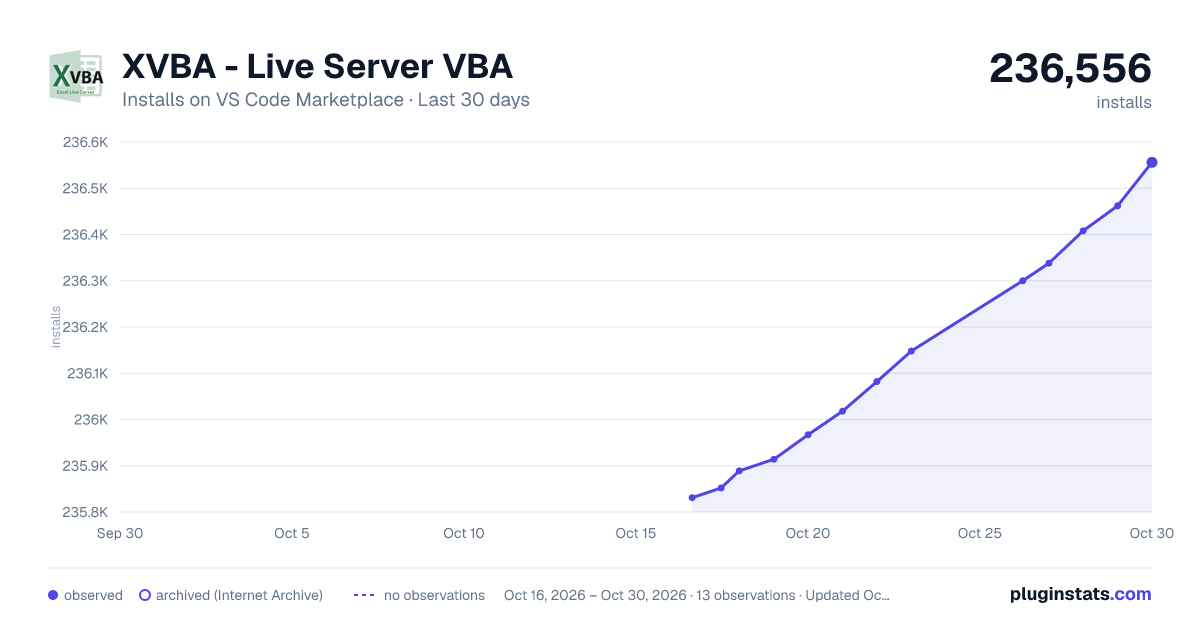
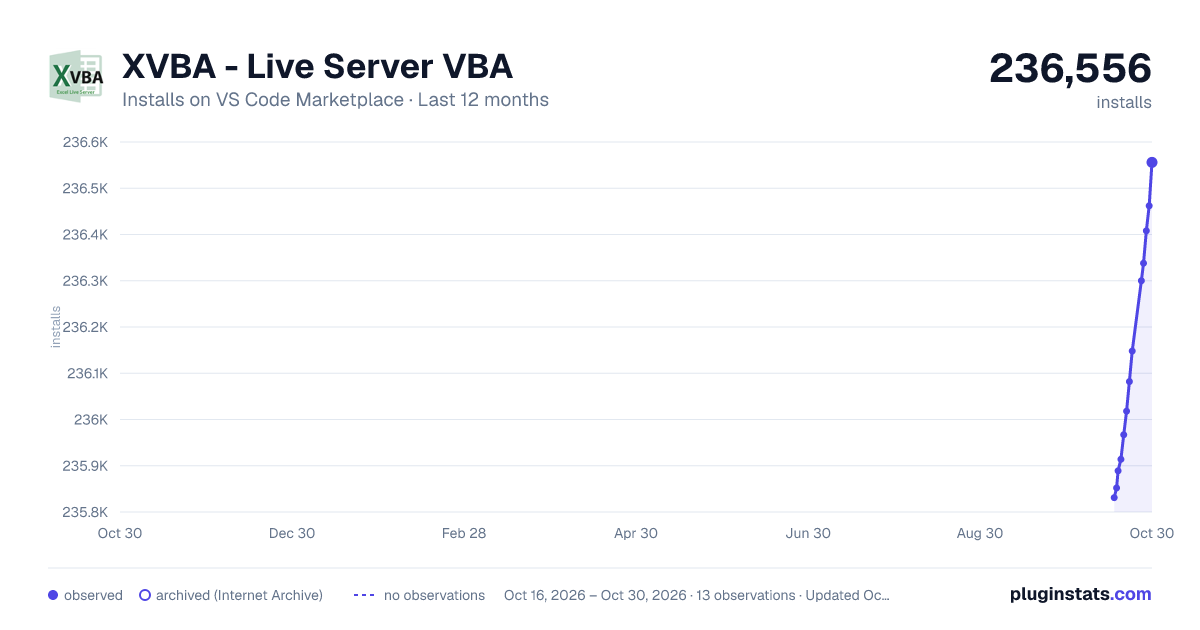
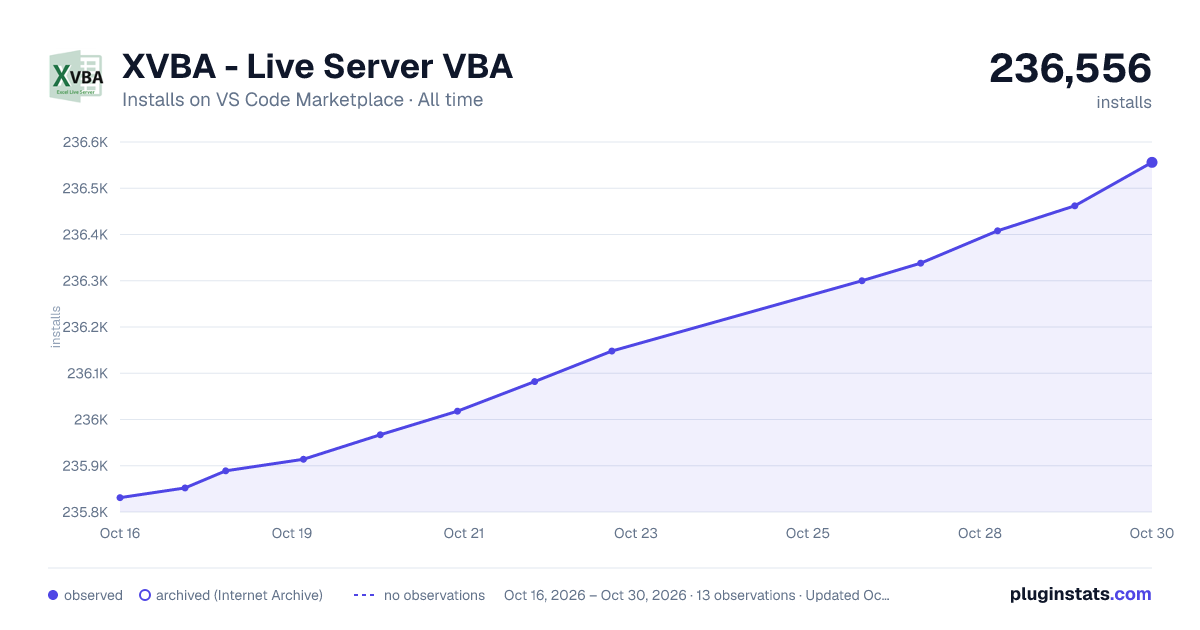

Adoption over time
7/30/90-day growth
Ranking history
Ratings over time
Listing placement
Listing placement
Listing placement
Listing placement
Filled points are observed values; hollow points come from Internet Archive snapshots of the listing page. Dashed segments span periods with no observations — values between points are not interpolated.
Each band is one page of 20. Installs on a linear scale. Placement is projected from installs, so it can differ from the marketplace's own sort order. Hover a dot to see the listing.
Recent observations
Full history (4)Similar VS Code Marketplace Programming Languages plugins
All 20 XVBA - Live Server VBA alternativesData source
Install counts, average rating, and rating counts come from the public Visual Studio Marketplace gallery API. Installs are cumulative and exclude updates.
Listing: https://marketplace.visualstudio.com/items?itemName=local-smart.excel-live-server. First seen Oct 16, 2026; last successful collection Oct 19, 2026. See the methodology.